Drawing objects interactively🔗
HDevelopEVO offers a code action to adapt the shape of an object as shown in the figure below.
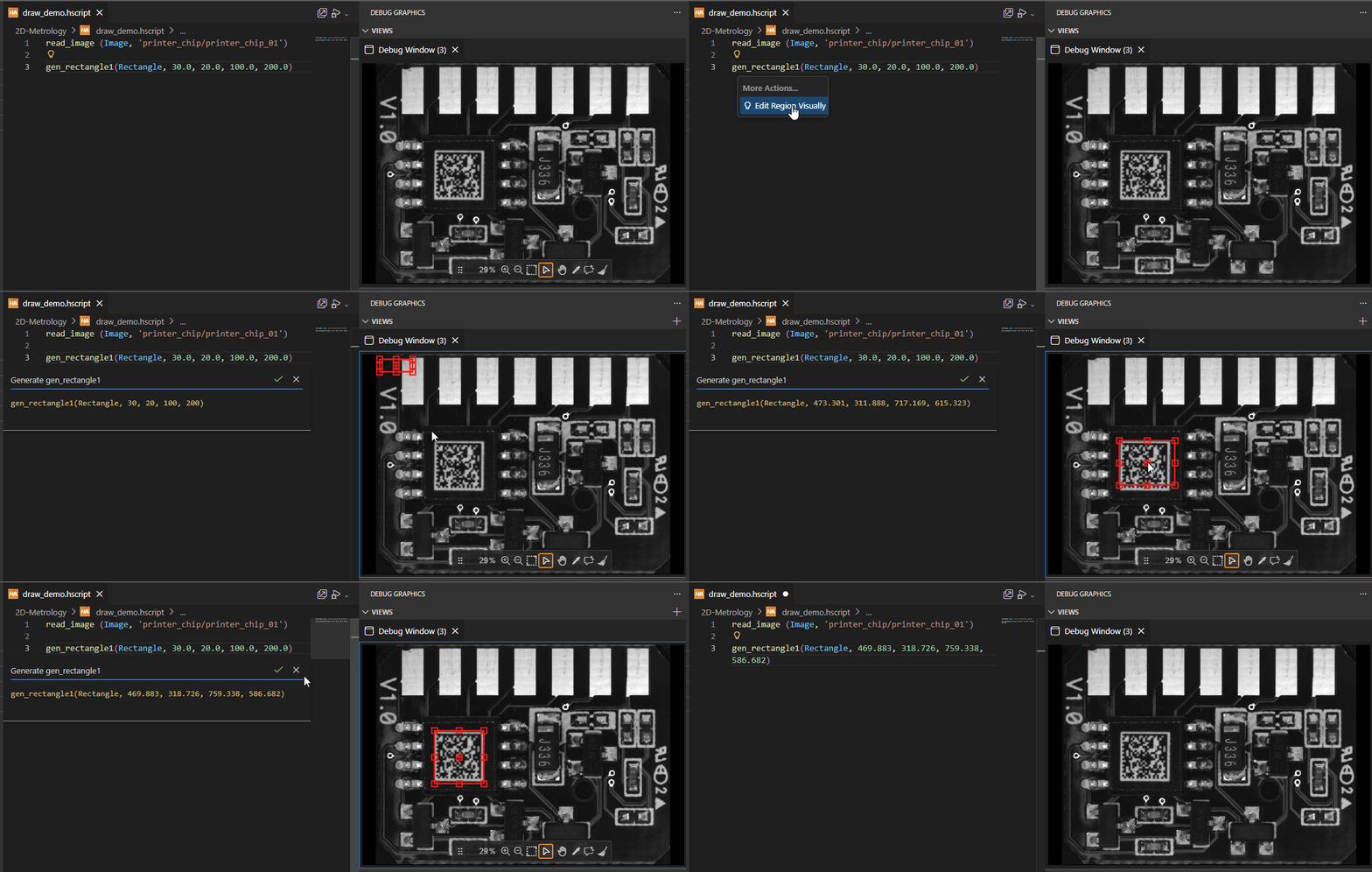
Figure 1. Creating a rectangle interactively
To draw an object interactively, do the following:
- Enter the name of a supported operator in the code editor.
- Hover over the operator and click on the light bulb icon that appears.
- Click Show Code Actions > Edit Region Visually.
- In the debug window, edit the shape of the object by dragging the handles of the shape.
- When finished, click the check mark icon to apply the changes. To cancel the changes, click the cross icon .
Supported operators
The code action is available for the following operators:
- Region generators
gen_circle,gen_ellipse,gen_rectangle1,gen_rectangle2,gen_region_line,gen_region_polygon,gen_region_polygon_filled- XLD contour generators
gen_circle_contour_xld,gen_rectangle2_contour_xld,gen_ellipse_contour_xld- Metrology geometry objects
add_metrology_object_circle_measure,add_metrology_object_line_measure,add_metrology_object_ellipse_measure,add_metrology_object_rectangle2_measure,add_metrology_object_generic