Caching in HALCON🔗
In computer science, caching typically involves storing frequently accessed data for future use. However, HALCON’s caches operate differently by retaining unused memory. This is advantageous because allocating new memory from the operating system is time-consuming. By caching memory that has been freed instead of returning it to the OS, HALCON optimizes performance and accelerates application speed.
We generally do not recommend modifying HALCON’s own cache settings unless necessary.
More Info
For practical advice regarding when and how to modify HALCON’s caching behavior, and how to deal with memory-related issues, see How to analyze memory usage.
HALCON uses three memory caches: image cache, global memory cache, and temporary memory cache.
About the image cache🔗
Images typically require a lot of memory and allocating large memory blocks is slow. Therefore, HALCON does not release image memory back to the operating system if an image is freed. Instead, the image is cached for it to be used later.
The upper limit for the image cache can be set via set_system('image_cache_capacity',<limit>).
Choosing a higher limit will tend to speed up an application, but at the same time usually increases total memory consumption.
To switch off the image cache, set <limit> to 0.
About the global memory cache🔗
Global memory refers to memory which is visible beyond a HALCON operator, and is typically used for output values of operators, such as tuples or regions. For more information on global memory, see Global data.
The global memory cache is in 'exclusive' mode by default.
In this mode, each thread has its own global memory cache.
If a memory block of 1024 bytes or less is requested by the thread, it will first look in its cache for a suitable block.
If no block is found in the cache, the memory is requested from the runtime’s memory allocator.
Larger blocks are requested from the runtime’s memory allocator directly.
If a memory block of 1024 bytes or less is freed by the same thread that allocated it, it will be cached in the global memory cache of the thread.
Larger blocks or blocks that were allocated by a different thread than the one freeing it are returned to the runtime’s memory allocator directly.
This mechanism avoids thread synchronization during memory allocation, improving performance.
When setting the global cache mode to 'idle', any global memory that gets freed is released to the system immediately instead, and any global memory allocated is taken directly from the system.
Any memory blocks already held in the cache are not freed.
To do that, you need to explicitly call set_system('global_mem_cache', 'cleanup').
About the temporary memory cache🔗
Temporary memory is only in use during the execution of an operator.
As soon as the operator is finished, the used temporary memory will be freed.
An example for this are intermediate images, which are created during the execution of an operator, but are not available as an output parameter.
For more information on temporary memory, see Temporary data.
If the temporary memory cache is switched on, this memory will be cached so that it can be reused during the next operator call.
The main conceptional difference to the global memory cache is that the temporary memory cache works by allocating so-called superblocks, which are managed in a stack.
This makes the temporary memory particularly fast.
The basic idea of a superblock is to allocate more memory than is actually needed for the current memory request.
This provides a good chance that no new memory needs to be allocated for the next memory request.
As a result of this, and because temporary memory is allocated and de-allocated much more frequently than global memory, the temporary memory cache usually has a much higher impact on performance, but also on HALCON’s memory consumption than the global memory cache.
Note
Some of the available settings provide thread-specific variants, indicated by the 'tsp_' prefix.
See set_system for general information on setting parameters with and without 'tsp_'.
Available cache modes🔗
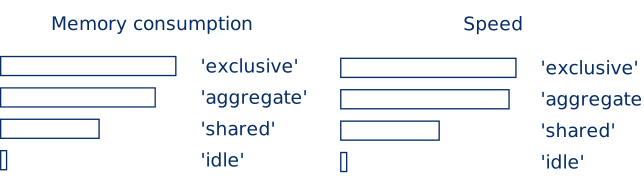
Figure 1 shows the approximate performance of the different temporary memory cache modes with respect to speed and memory consumption. The exact behavior will depend on several factors such as the chosen parameters, the used hardware, the operating system, and the memory usage pattern of the application.
'exclusive' mode🔗
In 'exclusive' mode, each thread has an exclusive memory cache that can be used without needing to synchronize with any other threads, which saves time.
The threads used for AOP also have their own caches.
AOP threads are assigned to tasks when they are ready, which means that work can be shared differently between them in each operator run.
Over time, the cache of each AOP thread will therefore grow to the maximum size required by any one AOP thread.
This can lead to high memory consumption in rare cases.
Figure 2 illustrates how the superblocks work in 'exclusive' mode.
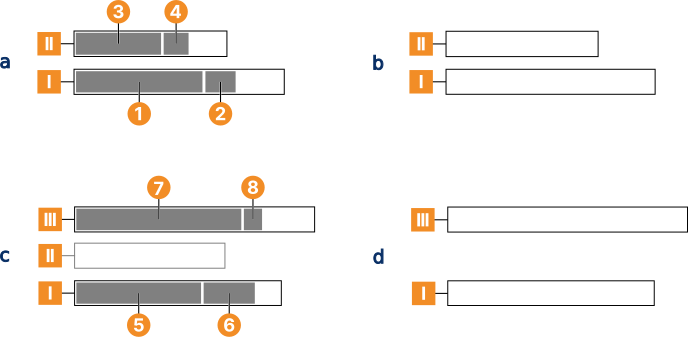
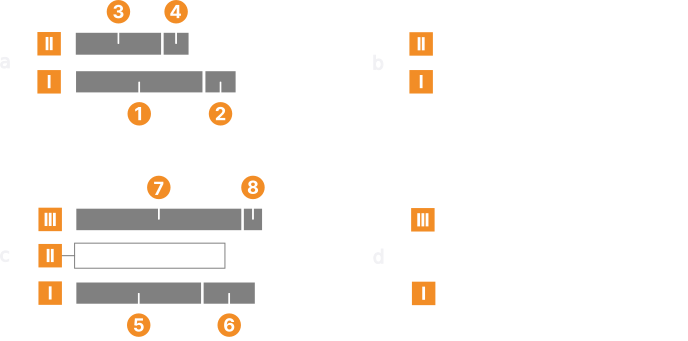
'exclusive' mode For the first memory request of the first HALCON operator executed by a thread, a superblock is allocated, which is larger than the current request (Figure 2 a). Per default, HALCON uses a heuristic based on the current image size to determine an appropriate block size.
Note
You can also set the minimum and maximum sizes of a superblock explicitly via set_system with the parameters 'alloctmp_min_blocksize' and 'alloctmp_max_blocksize'.
However, it is not necessary to set either of these two parameters for most applications.
For the second memory request
, HALCON first checks whether there is enough free memory left in the current superblock and if there is, no new memory needs to be allocated.
If a new memory request
cannot be fulfilled with the remaining space of the first superblock, a second superblock
is allocated in the same way as the first one.
For subsequent memory requests, for example
, HALCON will start checking the highest superblock that is already in use
.
Therefore, the unused memory at the end of the lower superblock
is wasted.
This wastage is not a memory leak as it can be reused later if the memory usage pattern allows it.
This procedure will continue until the operator has finished.
At the end of the operator, all the temporary memory is freed and the superblocks are cached (Figure 2 b). Since temporary memory is managed in a stack, it can only be freed in reverse order.
When the next operator is executed and memory is needed
and
, HALCON starts by checking the lowest superblock
first and will use it if enough memory is available (Figure 2 c).
If a new memory request
cannot be fulfilled with the remaining space of the first superblock, HALCON will check the next higher block
.
If this block cannot fulfill the memory request either, HALCON will check the next higher block.
If no higher block is available, HALCON will create one
, and release all lower blocks
that are unused back to the operating system.
This release avoids wasting more and more memory in situations where individual memory requests keep growing larger.
This could happen, for example, if image sizes grow over time.
Again, for subsequent memory requests
, HALCON will start checking the highest superblock already in use.
At the end of the operator, memory will be freed and cached (Figure 2 d).
'shared' mode🔗
All temporary memory is cached globally in the temporary memory reservoir.
This global reservoir is not to be confused with the global memory cache.
A size limit for the reservoir can be set with the parameter 'temporary_mem_reservoir_size'.
As with the 'exclusive' mode, when a HALCON operator needs temporary memory, it will first check the (local) superblock(s) belonging to the thread from which the operator is called.
In contrast to the 'exclusive' mode, if the current memory request cannot be fulfilled this way, HALCON will check the reservoir for a suitable superblock.
The superblocks in the reservoir are sorted by size and HALCON will choose the smallest one which is large enough according to the heuristic mentioned in the 'exclusive' section.
If HALCON cannot find such a superblock in the reservoir, it will create a new one.
This new superblock will belong to the current thread until the operator finishes.
When the operator has finished, the temporary memory belonging to its thread will be freed and the superblocks will be cached in the reservoir.
If the reservoir is switched off via the parameter 'temporary_mem_reservoir', the superblocks will be returned to the operating system instead.
If there is more than one thread, including AOP threads, HALCON must ensure that only one thread can access the reservoir at a time.
This leads to a synchronization overhead, which usually makes the 'shared' mode slower than the 'exclusive' mode.
However, the total memory consumption is usually lower.
'aggregate' mode🔗
The 'aggregate' mode uses both caching options: local and reservoir.
As with the 'shared' mode, when an operator needs memory, it will first check the local superblock(s) and then the superblocks in the reservoir.
In contrast to the 'shared' mode, when the operator finishes, HALCON will not cache all the used superblocks in the reservoir.
Instead, temporary memory blocks that are larger than the threshold set with the 'alloctmp_max_blocksize' parameter are cached in the global memory reservoir, while all smaller blocks are aggregated into a single block that is cached locally for each thread.
If the global memory reservoir is disabled, the large blocks are freed instead.
The aggregated block will be sized according to the temporary memory usage the thread has seen so far, but if set it will not be larger than 'alloctmp_max_blocksize' (if set) or smaller than 'alloctmp_min_blocksize'.
Due to the aggregation of superblocks, this mode can avoid some of the memory wastage generated by the 'exclusive' mode.
At the same time, it can reach a similar speed because the aggregated superblocks in each thread can grow to a size that is big enough to fulfill most or all future temporary memory requests.
Therefore, this mode presents a good balance between memory usage and speed.
Explicitly setting 'alloctmp_max_blocksize' can be advantageous in this mode, as it can prevent the local caches from growing too large while still allowing occasional large memory requests to be satisfied from the reservoir.
'idle' mode🔗
With significant impact on performance, the temporary memory cache can be switched off by setting it to 'idle'.
When the cache is switched off, HALCON will request new memory from the operating system every time an operator needs memory.
Important
Keep in mind that turning the cache off does not reduce the amount of temporary memory HALCON needs to process an operator. It only reduces the amount of temporary memory HALCON will cache.
Switching between cache modes🔗
Setting the cache mode via the thread-specific variant set_system('tsp_temporary_mem_cache', <mode>) will only change the cache mode of the thread from which it is called.
Calling the global variant without 'tsp_' prefix has the following effect on the active threads of a multithreaded program:
- The cache mode of the current user thread (the one from where
set_systemwas called) is changed. - The new setting is applied to all user threads that are started afterwards.
- The new setting is applied to all AOP threads once they process the next operator in the current thread.
This has several important consequences:
- It is not possible to immediately change the cache mode of all threads with a single call of
set_system. - If the mode is changed in the middle of a multithreaded program from any one of the user threads, including the main thread, it will at least temporarily lead to a mixture of cache modes.
- To ensure that the entire program runs with the same cache setting, set the cache mode at the very beginning of your program.
Example
Switching off the temporary memory cache leads to the following:
- The cache of the current user thread, from where
set_systemwas called, is deleted. - User threads that are started afterwards will not cache temporary memory.
- AOP threads will delete their cache, and stop caching once they process the next operator in the current thread.
This implies that it is usually not possible to release the complete temporary memory cache back to the operating system immediately. It is also not possible to achieve this with a single operator call in a multithreaded program.
Procedure handles🔗
A thread-specific, local, temporary memory cache is not directly associated with a particular thread, but with a procedure handle.
Each thread, including AOP threads, has its own procedure handle.
If a thread is deleted, the procedure handle is not deleted, but cached, so that it can be re-used by another thread.
This ensures that the temporary memory cache associated with the terminated thread is not lost but kept with the procedure handle and can thus be re-used which improves performance.
This mechanism is particularly important for understanding the caching behavior when threads are created and deleted repeatedly.
If a global cache setting is changed, for example, the mode via the variant without 'tsp_', it will be applied to the local caches associated with currently cached procedure handles, and to procedure handles that are cached afterwards.
When the mode is globally changed to 'idle' from one thread and another thread is deleted afterwards, this thread’s procedure handle will be cached and the 'idle' setting will be applied to this cache, which means the superblocks belonging to this thread will be released.
If a new thread is created, it will receive one of the cached procedure handles and will therefore start with a temporary memory cache set to 'idle'.
It is not possible to switch off the procedure handle cache or to release procedure handles.