calibrate_sheet_of_light🔗
Short description🔗
calibrate_sheet_of_light — Calibrate a sheet-of-light setup with a 3D calibration object.
Signature🔗
calibrate_sheet_of_light( sheet_of_light_model SheetOfLightModelID, out number Error )
Description🔗
calibrate_sheet_of_light calibrates the sheet-of-light setup
SheetOfLightModelID from one disparity image of a 3D
calibration object and returns the back projection error of the
optimization in Error.
Overview
The calibration of a sheet-of-light setup with
calibrate_sheet_of_light is simpler than the calibration of a
sheet-of-light setup with standard HALCON calibration plates, which
is shown in the HDevelop example
calibrate_sheet_of_light_calplate.hdev. It is only necessary to
obtain one uncalibrated reconstruction, i.e., a disparity image, of a
special 3D calibration object to calibrate the sheet-of-light model.
In the following, the steps that are necessary for the calibration are described.
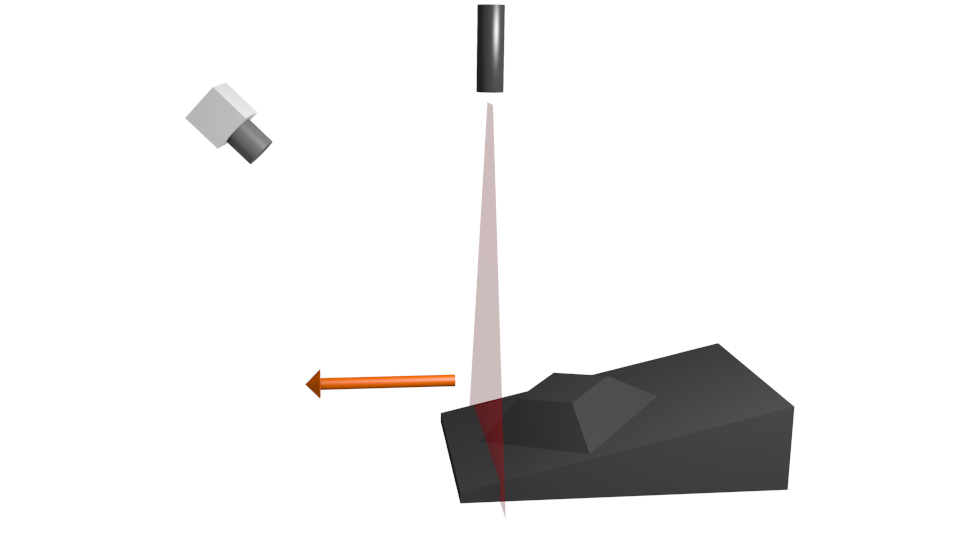
Calibration of a sheet-of-light setup
Supply of a 3D calibration object
A special 3D calibration object must be provided. This calibration
object must correspond to the CAD model created with
create_sheet_of_light_calib_object. The 3D calibration object
has an inclined plane on which a truncated pyramid is located. It has
a thinner side, which is hereinafter referred to as front side. The
thicker side is referred to as back side of the calibration object.
The dimensions of the calibration object should be chosen such that
the calibration object covers the complete measuring volume. Be aware,
that only parts on the 3D calibration object above HeightMin
(see create_sheet_of_light_calib_object) are taken into
account.
The CAD model, which is written as a DXF file, also serves as description file of the calibration object.
Preparation of the sheet-of-light model
To prepare a sheet-of-light model for the calibration, the following steps must be performed.
-
Create a sheet-of-light model with
create_sheet_of_light_modeland adapt the default parameters to your specific measurement task. -
Set the initial parameters of the camera with
set_sheet_of_light_param. So far, only pinhole cameras with the division model are supported, i.e., only cameras of type 'area_scan_division'. -
Set the description file of the calibration object (created with
create_sheet_of_light_calib_object) withset_sheet_of_light_param.
Uncalibrated reconstruction of the 3D calibration object
The 3D calibration object must be reconstructed with the (uncalibrated) sheet-of-light model prepared above, i.e., a disparity image of the 3D calibration object must be created.
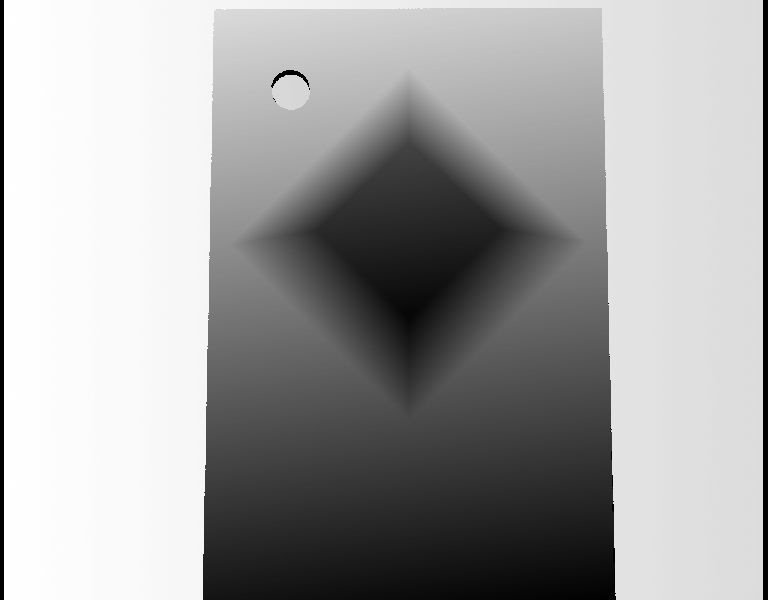
Disparity image of a calibration object
For this, the calibration object must be oriented such that either its
front side or its back side intersect the light plane first (i.e., the
movement vector should be parallel to the Y axis of the calibration
object, see create_sheet_of_light_calib_object).
As far as possible, the domain of the disparity image of the calibration
object should be restricted to the calibration object.
Besides, the domain of the disparity image should have no holes on the
truncated pyramid. All four sides of the truncated pyramid must be clearly
visible.
Calibration of the sheet-of-light setup
The calibration is then performed with
calibrate_sheet_of_light. The returned Error is the
RMS of the distance of the reconstructed points to the calibration
object in meters.
For sheet-of-light models calibrated with calibrate_sheet_of_light,
in rare cases the parameters might yield an unrealistic setup. However,
the quality of measurements performed with the calibrated parameters is
not affected.
Execution information🔗
Execution information
-
Multithreading type: reentrant (runs in parallel with non-exclusive operators).
-
Multithreading scope: global (may be called from any thread).
-
Automatically parallelized on internal data level.
This operator modifies the state of the following input parameter:
During execution of this operator, access to the value of this parameter must be synchronized if it is used across multiple threads.
Parameters🔗
SheetOfLightModelID (input_control, state is modified) sheet_of_light_model → (handle)
Handle of the sheet-of-light model.
Error (output_control) number → (real)
Average back projection error of the optimization.
Example🔗
(HDevelop)
* Calibrate a sheet-of-light model with a 3D calibration object
gen_rectangle1 (Rectangle, 300, 0, 800, 1023)
CameraParam := ['area_scan_division', 0.016, 0, 4.65e-6, 4.65e-6, \
                640.0, 512.0, 1280, 1024]
create_sheet_of_light_model (Rectangle, 'min_gray', 50, SheetOfLightModelID)
set_sheet_of_light_param (SheetOfLightModelID, 'camera_parameter', \
                          CameraParam)
set_sheet_of_light_param (SheetOfLightModelID, 'calibration_object', \
                         'calib_object.dxf')
* Uncalibrated reconstruction of the calibration object
for ProfileIndex := 1 to 1000 by 1
    grab_image_async (Image, AcqHandle, -1)
    measure_profile_sheet_of_light (Image, SheetOfLightModelID, [])
endfor
* Calibration of the sheet-of-light-model
calibrate_sheet_of_light (SheetOfLightModelID, Error)
* Now get a calibrated reconstruction of the calibration object
get_sheet_of_light_result_object_model_3d (SheetOfLightModelID, \
                                           ObjectModel3D)
Result🔗
The operator calibrate_sheet_of_light returns the
value 2 (H_MSG_TRUE) if the calibration was successful.
Otherwise, an exception will be raised.
Combinations with other operators🔗
Combinations
Possible predecessors
create_sheet_of_light_model, set_sheet_of_light_param, set_profile_sheet_of_light, measure_profile_sheet_of_light
Possible successors
set_profile_sheet_of_light, apply_sheet_of_light_calibration
Module🔗
3D Metrology