scene_flow_uncalib🔗
Short description🔗
scene_flow_uncalib — Compute the uncalibrated scene flow between two stereo image pairs.
Signature🔗
scene_flow_uncalib( image ImageRect1T1, image ImageRect2T1, image ImageRect1T2, image ImageRect2T2, image Disparity, out image OpticalFlow, out image DisparityChange, number SmoothingFlow, number SmoothingDisparity, attribute.name GenParamName, attribute.value GenParamValue )
Description🔗
scene_flow_uncalib computes the uncalibrated scene flow
between two consecutive rectified stereo image pairs. The scene
flow is the three-dimensional position and motion of surface points
in a dynamic scene. The movement in the images can be caused by
objects that move in the world or by a movement of the camera (or
both) between the acquisition of the two image pairs. To calculate
the calibrated scene flow, scene_flow_calib can be used.
The two consecutive stereo image pairs of the image sequence are
passed in ImageRect1T1, ImageRect2T1,
ImageRect1T2, and ImageRect2T2. Each stereo image
pair must be rectified. Note that the images can be rectified by
using the operators calibrate_cameras,
gen_binocular_rectification_map, and map_image.
Furthermore, a single-channel Disparity image is required,
which specifies for each pixel \((r,c1)\) of the image
ImageRect1T1 a matching pixel \((r,c2)\) of
ImageRect2T1 according to the equation \(c2=c1+d(r,c1)\),
where \(d(r,c)\) is the Disparity at pixel \((r,c)\). The
disparity image can be computed using binocular_disparity or
binocular_disparity_mg.
The computed uncalibrated scene flow is returned in
OpticalFlow and DisparityChange. The vectors in
the vector field OpticalFlow represent the movement in the
image plane between ImageRect1T1 and ImageRect1T2.
The single-channel image DisparityChange describes the
change in disparity between ImageRect2T1 and
ImageRect2T2. A world point is projected into
ImageRect1T1 at position \((r,c)\). The same point is
projected into
-
ImageRect2T1at position \((r,c+d(r,c))\), -
ImageRect1T2at position \((r+u(r,c),c+v(r,c))\), -
ImageRect2T2at position \((r+u(r,c),c+v(r,c)+d(r,c)+dc(r,c))\),
where \(u(r,c)\) and \(v(r,c)\) denote the values of the row and column
components of the vector field image OpticalFlow, \(d(r,c)\)
denotes the Disparity, and \(dc(r,c)\) the
DisparityChange at the pixel \((r,c)\).
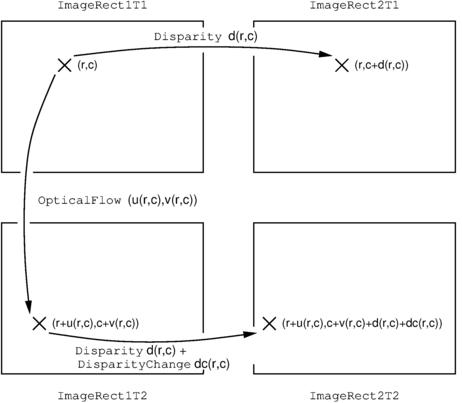
Relations between the four images and the optical flow as well as the disparities in the disparity images.
Parameter Description🔗
The rectified input images are passed in ImageRect1T1,
ImageRect2T1, ImageRect1T2, and
ImageRect2T2. The computation of the scene flow is
performed on the domain of ImageRect1T1, which is
also the domain of the scene flow in OpticalFlow and
DisparityChange. Disparity describes the
disparity between the rectified images ImageRect1T1 and
ImageRect2T1.
SmoothingFlow and SmoothingDisparity specify the
regularization weights \(\lambda\) and \(\gamma\)
with respect to the data term. The larger the value of these
parameters, the smoother the computed scene flow is. For byte
images with a gray value range of \([0,255]\), values
around 40 typically yield good results.
The parameters of the iteration scheme and for the coarse-to-fine
warping strategy can be specified with the generic parameters
GenParamName and GenParamValue.
Usually, it is sufficient to use one of the default parameter sets
for the parameters by using GenParamName =
'default_parameters' and GenParamValue =
'very_accurate', 'accurate', 'fast', or
'very_fast'. If necessary, individual parameters can be
modified after the default parameter set has been chosen by
specifying a subset of the parameters and corresponding values after
'default_parameters' in GenParamName and
GenParamValue (e.g., GenParamName =
['default_parameters', 'warp_zoom_factor'] and
GenParamValue = ['accurate', 0.6]). The meaning of
the individual parameters is described in detail below. The default
parameter sets are given by:
| 'default_parameters' | 'very_accurate' | 'accurate' | 'fast' | 'very_fast' |
|---|---|---|---|---|
| 'warp_zoom_factor' | 0.75 | 0.5 | 0.5 | 0.5 |
| 'warp_levels' | 0 | 0 | 0 | 0 |
| 'warp_last_level' | 1 | 1 | 1 | 2 |
| 'outer_iter' | 10 | 7 | 5 | 4 |
| 'inner_iter' | 2 | 2 | 2 | 2 |
| 'sor_iter' | 3 | 3 | 3 | 3 |
| 'omega' | 1.9 | 1.9 | 1.9 | 1.9 |
If the parameters should be specified individually,
GenParamName and GenParamValue must be set to
tuples of the same length. The values corresponding to the
parameters specified in GenParamName must be specified at
the corresponding position in GenParamValue. For a deeper
understanding of the following parameters, please refer to the
section Algorithm below.
-
GenParamName= 'warp_zoom_factor' can be used to specify the resolution ratio between two consecutive warping levels in the coarse-to-fine warping hierarchy. 'warp_zoom_factor' must be selected from the open interval \((0,1)\). For performance reasons, 'warp_zoom_factor' is typically set to 0.5, i.e., the number of pixels is halved in each direction for each coarser warping level. Values for 'warp_zoom_factor' close to 1 can lead to slightly better results. However, they require a disproportionately larger computation time. -
GenParamName= 'warp_levels' can be used to restrict the warping hierarchy to a maximum number of levels. For 'warp_levels' = 0, the largest possible number of levels is used. If the image size does not allow to use the specified number of levels (taking the resolution ratio 'warp_zoom_factor' into account), the largest possible number of levels is used. Usually, 'warp_levels' should be set to 0. -
GenParamName= 'warp_last_level' can be used to specify the number of warping levels for which the flow increment should no longer be computed. Usually, 'warp_last_level' is set to 1 or 2, i.e., a flow increment is computed for each warping level, or the finest warping level is skipped in the computation. In the latter case, the computation is performed on an image of half the resolution of the original image and then interpolated to the full resolution. -
GenParamName= 'outer_iter' can be used to specify the number of outer iterations in the minimization scheme. Typically, the larger 'outer_iter', the more accurate the numerical results are. Higher values for this parameter lead to an increase in the computation time. Typically, 'outer_iter' is set to values between 5 and 10. -
GenParamName= 'inner_iter' can be used to specify the number of inner iterations in the minimization scheme. Typically, the larger 'inner_iter', the more accurate the numerical results are. Higher values for this parameter lead to an increase in the computation time. Usually, two inner iterations are sufficient. -
GenParamName= 'sor_iter' can be used to specify the number of SOR iterations for solving the linear system of equations. Typically, the larger 'sor_iter', the more accurate the numerical results are. Higher values for this parameter lead to an increase in the computation time. Usually, three SOR iterations are sufficient. -
GenParamName= 'omega' can be used to specify the relaxation factor \(\omega\) of the SOR method. 'omega' must be selected from the open interval \((1,2)\). Typically, 'omega' is set to 1.9.
Algorithm🔗
The scene flow is estimated by minimizing a suitable energy functional:
where \(f=(u,v,dc)\) is the optical flow field and the disparity change. \(E_{D}(f)\) denotes the data term and \(E_{S}(f)\) the smoothness (regularization) term. The algorithm is based on the following assumptions, which lead to the data and smoothness terms:
-
Brightness Constancy It is assumed that the gray value of a point remains constant in all four input images, resulting in the following four constraints:
\[\begin{eqnarray*} C_{D1} & = & I_{1,t1}(r,c) - I_{2,t1}(r,c+d(r,c)) = 0 \\ C_{F1} & = & I_{1,t2}(r+u(r,c),c+v(r,c)) - I_{1,t1}(r,c) = 0 \\ C_{F2} & = & I_{2,t2}(r+u(r,c),c+v(r,c)+d(r,c)+dc(r,c)) - I_{2,t1}(r,c+d(r,c)) = 0 \\ C_{D2} & = & I_{2,t2}(r+u(r,c),c+v(r,c)+d(r,c)+dc(r,c)) - I_{1,t2}(r+u(r,c),c+v(r,c)) = 0 \end{eqnarray*}\]Here, \(I_{1,t1}\), \(I_{2,t1}\), \(I_{1,t2}\), and \(I_{2,t2}\) denote
ImageRect1T1,ImageRect2T1,ImageRect1T2, andImageRect2T2, respectively. -
Piecewise smoothness of the scene flow The solution is assumed to be piecewise smooth. This smoothness is achieved by penalizing the first derivatives of the flow \(\nabla(u)^2, \nabla(v)^2, \nabla(dc)^2\). The use of a statistically robust (linear) penalty function \(\Psi(s) = \sqrt{s^2+\varepsilon}\) with \(\varepsilon = 0.001\) provides the desired preservation of edges in the movement in the scene flow to be determined.
Because the disparity image \(d\) is given, the first constraint \(C_{D1}\) can be omitted. Taking into account all of the above assumptions, the energy functional can be written as
where \(\lambda\) and \(\gamma\) are the
regularization parameters passed in SmoothingFlow and
SmoothingDisparity.
To calculate large displacements, coarse-to-fine warping strategies use two concepts that are closely interlocked: The successive refinement of the problem (coarse-to-fine) and the successive compensation of the current image pair by already computed displacements (warping). Algorithmically, such coarse-to-fine warping strategies can be described as follows:
-
First, all images are zoomed down to a very coarse resolution level.
-
Then, the scene flow is computed on this coarse resolution.
-
The scene flow is required on the next resolution level: It is applied there to the second image pair of the image sequence, i.e., the problem on the finer resolution level is compensated by the already computed scene flow. This step is also known as warping.
-
The modified problem (difference problem) is now solved on the finer resolution level, i.e., the scene scene flow is computed there.
-
The steps 3-4 are repeated until the finest resolution level is reached.
-
The final result is computed by adding up the scene flow from all resolution levels.
This incremental computation of the scene flow has the following advantage: While the coarse-to-fine strategy ensures that the displacements on the finest resolution level are very small, the warping strategy ensures that the displacements remain small for the incremental displacements (scene flow of the difference problems). Since small displacements can be computed much more accurately than larger displacements, the accuracy of the results typically increases significantly by using such a coarse-to-fine warping strategy. However, instead of having to solve a single correspondence problem, an entire hierarchy of these problems must be solved.
The minimization of functionals is mathematically very closely related to the minimization of functions: Like the fact that the zero crossing of the first derivative is a necessary condition for the minimum of a function, the fulfillment of the so called Euler-Lagrange equations is a necessary condition for the minimizing function of a functional (the minimizing function corresponds to the desired scene flow in this case). The Euler-Lagrange equations are partial differential equations. By discretizing these Euler-Lagrange equations using finite differences, large sparse nonlinear equation systems have to be solved in this algorithm.
For each warping level a single equation system must be solved. The algorithm uses an iteration scheme consisting of two nested iterations (called the outer and inner iteration) and the SOR (Successive Over-Relaxation) method. The outer loop contains the linearization of the nonlinear terms resulting from the data constraints. The nonlinearity of \(\Psi'\) is removed by the inner fixed point iteration scheme. The resulting linear system of equations can be solved efficiently by the SOR method.
Execution information🔗
Execution information
-
Multithreading type: reentrant (runs in parallel with non-exclusive operators).
-
Multithreading scope: global (may be called from any thread).
-
Automatically parallelized on internal data level.
Parameters🔗
ImageRect1T1 (input_object) singlechannelimage(-array) → object (byte / uint2 / real)
Input image 1 at time \(t_{1}\).
ImageRect2T1 (input_object) singlechannelimage(-array) → object (byte / uint2 / real)
Input image 2 at time \(t_{1}\).
ImageRect1T2 (input_object) singlechannelimage(-array) → object (byte / uint2 / real)
Input image 1 at time \(t_{2}\).
ImageRect2T2 (input_object) singlechannelimage(-array) → object (byte / uint2 / real)
Input image 2 at time \(t_{2}\).
Disparity (input_object) singlechannelimage(-array) → object (real)
Disparity between input images 1 and 2 at time \(t_{1}\).
OpticalFlow (output_object) singlechannelimage(-array) → object (vector_field)
Estimated optical flow.
DisparityChange (output_object) singlechannelimage(-array) → object (real)
Estimated change in disparity.
SmoothingFlow (input_control) number → (real / integer)
Weight of the regularization term relative to the data term (derivatives of the optical flow).
Default: 40.0
Suggested values: 10.0, 20.0, 30.0, 40.0, 50.0, 60.0, 70.0, 80.0, 90.0, 100.0
Restriction: SmoothingFlow > 0.0
SmoothingDisparity (input_control) number → (real / integer)
Weight of the regularization term relative to the data term (derivatives of the disparity change).
Default: 40.0
Suggested values: 10.0, 20.0, 30.0, 40.0, 50.0, 60.0, 70.0, 80.0, 90.0, 100.0
Restriction: SmoothingDisparity > 0.0
GenParamName (input_control) attribute.name(-array) → (string)
Parameter name(s) for the algorithm.
Default: 'default_parameters'
Suggested values: 'default_parameters', 'warp_levels', 'warp_zoom_factor', 'warp_last_level', 'outer_iter', 'inner_iter', 'sor_iter', 'omega'
GenParamValue (input_control) attribute.value(-array) → (string / integer / real)
Parameter value(s) for the algorithm.
Default: 'accurate'
Suggested values: 'very_accurate', 'accurate', 'fast', 'very_fast', 0, 1, 2, 3, 4, 5, 6, 0.5, 0.6, 0.7, 0.75, 3, 5, 7, 2, 3, 1.9
Result🔗
If the parameter values are correct, the operator
scene_flow_uncalib returns the value 2 (H_MSG_TRUE). If the input is
empty (no input images are available) the behavior can be set via
set_system('no_object_result',<Result>). If necessary, an
exception is raised.
Combinations with other operators🔗
Combinations
Possible predecessors
binocular_disparity, binocular_disparity_mg
Possible successors
threshold, vector_field_length
Alternatives
References🔗
A. Wedel, C. Rabe, T. Vaudrey, T. Brox, U. Franke and D. Cremers: “Efficient dense scene flow from sparse or dense stereo data”; In: Proceedings of the 10th European Conference on Computer Vision: Part I, pages 739-751. Springer-Verlag, 2008.
Module🔗
Foundation