About the example program🔗
The following example shows how to create an application that uses HALCON Script Engine to load and execute a HSCRIPT document.
You can find the corresponding files of this example in the %HALCONEXAMPLES%\hscriptengine\hscript directory.
More Info
For information about building the example using CMake , see the %HALCONEXAMPLES%\hscriptengine\cpp\README.md file.
The example loads images from the HALCON images directory (fin1.png to fin3.png; Figure 1).
It detects the fins and then displays the images with the fin region highlighted in red (see Figure 2).
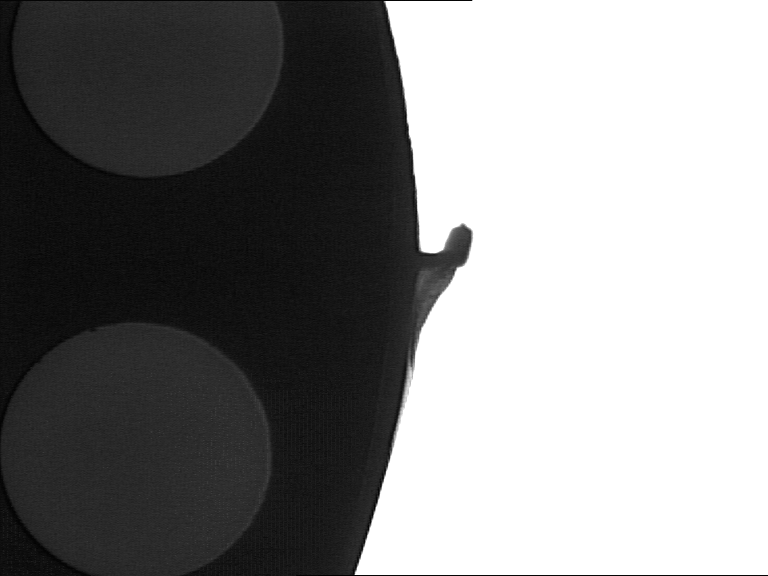
The procedures in this HALCON Script file (detect_fin.hscript) do the following:
initloads the images.detect_findetects the fins in an image.display_zoomed_regionopens a window showing the respective result.cleanupcloses the window again.
HSCRIPT file
// HALCON Script procedures for fin detection used by HScriptEngine examples

public proc init(out tuple AcqHandle)
  open_framegrabber ('File', 1, 1, 0, 0, 0, 0, 'default', -1, 'default',
                     -1, 'default', 'fin.seq', 'default', -1, -1, AcqHandle)
  grab_image (Image, AcqHandle)
  get_image_pointer1 (Image, Pointer, Type, Width, Height)
  dev_open_window(0, 0, Width, Height, 'black', MainWindow)
endproc

public proc cleanup()
  dev_close_window()
endproc

public proc detect_fin(object Image, out object FinRegion, out tuple FinArea)
  binary_threshold (Image, Dark, 'max_separability', 'dark', UsedThreshold)
  difference (Image, Dark, Background)
  dev_set_color ('blue')
  dev_display (Background)
  closing_circle (Background, ClosedBackground, 250)
  dev_set_color ('green')
  dev_display (ClosedBackground)
  difference (ClosedBackground, Background, RegionDifference)
  opening_rectangle1 (RegionDifference, FinRegion, 5, 5)
  area_center (FinRegion, FinArea, Row, Column)
endproc

public proc display_zoomed_region(object Image, object Region, tuple ZoomScale, tuple Margin)
  area_center (Region, Area, CenterRow, CenterCol)
  smallest_rectangle1 (Region, Row1, Col1, Row2, Col2)
  RegionHeight := Row2 - Row1
  RegionWidth := Col2 - Col1
  Width := (RegionWidth + 2 * Margin) * ZoomScale
  Height := (RegionHeight + 2 * Margin) * ZoomScale
  dev_open_window (CenterRow / 2, CenterCol / 2 + 30, Width, Height, 'black', ZoomWinID)
  dev_set_part (Row1 - Margin, Col1 - Margin, Row2 + Margin, Col2 + Margin)
  dev_display (Image)
  dev_set_color ('red')
  dev_display (Region)
  wait_seconds (3)
  dev_close_window ()
endproc
Important
If you want to use dev_display or similar operators, include dev_open_window first (currently, there is no default window).
This C++ program calls the procedures in detect_fin.hscript using HALCON Script Engine.
It also prints the corresponding fin area as numeric result.
C++ file
// HDScriptEngine/C++ example for executing an *.hscript procedure

#include "hscriptenginecpp/HScriptEngine.h"   // (1)!

using namespace HalconCpp;
using namespace HScriptEngineCpp;

static HFramegrabber
InitAcquisitionAndVisualization(const HScriptDocument& doc)
{
  HScriptProcedure     proc = doc.GetProcedure("init");
  HScriptProcedureCall call = proc.CreateCall();

  call.Execute();

  HTuple t_acq_handle = call["AcqHandle"];
  return t_acq_handle.H();
}

static void CleanupScript(const HScriptDocument& doc)
{
  HScriptProcedure     proc = doc.GetProcedure("cleanup");
  HScriptProcedureCall call = proc.CreateCall();

  call.Execute();
}

static HRegion DetectFin(const HScriptDocument& doc, const HImage& image, HTuple& fin_area)
{
  HScriptProcedure     proc = doc.GetProcedure("detect_fin");
  HScriptProcedureCall call = proc.CreateCall();

  call["Image"] = image;

  call.Execute();

  HObject fin_region = call["FinRegion"];
  fin_area           = call["FinArea"];
  return fin_region;
}

static void VisualizeDetails(const HScriptDocument& doc, const HObject& image, const HObject& region)
{
  HScriptProcedure     proc = doc.GetProcedure("display_zoomed_region");
  HScriptProcedureCall call = proc.CreateCall();

  call["Image"]     = image;
  call["Region"]    = region;
  call["ZoomScale"] = 2;
  call["Margin"]    = 5;
  call.Execute();
}

static void Run(void)
{
  try
  {
    // Setup: Locate and load source *.hscript file
    std::string halcon_examples =
        (std::string)HSystem::GetSystem("example_dir")[0].S();

    std::string hscript_file =
        halcon_examples + "/hscriptengine/hscript/detect_fin.hscript";

    HScriptEngine   engine;
    HScriptDocument doc = engine.LoadDocument(hscript_file.c_str());

    // Initialize acquisiton and open main visualization window
    HFramegrabber acq_handle = InitAcquisitionAndVisualization(doc);

    // Main loop: Grab and process 3 images
    for (int i = 0; i < 3; i++)
    {
      HImage  image = acq_handle.GrabImage();
      HTuple  fin_area;
      HRegion fin_region = DetectFin(doc, image, fin_area);

      printf("Iteration %d: Fin Area: %lf\n", i, fin_area.D());

      // Show zoomed defect in separate window
      VisualizeDetails(doc, image, fin_region);
    }

    // Close main window
    CleanupScript(doc);
  }
  catch (const HScriptEngineException& ex)
  {
    printf("HScriptEngine Error: %s\n", ex.GetErrorMessage());
  }
  catch (const HException& ex)
  {
    printf("HALCON Error: %s\n", ex.ErrorMessage().Text());
  }
}

int main(void)
{

  Run();
  return 0;
}
- No need to include
HalconCpp.hexplicitly, as it is included inHScriptEngine.h.