Image Source Plugin for Intel RealSense Devices
The RealSense Image Source Plugin is based on the Intel RealSense SDK 2.0 and provides access to all Intel RealSense 3D vision sensors.
The SDK version used is 2.54.2.
For a RealSense device to be usable with this plugin it must provide at least a depth stream in the RealSense Z16 format.
Compatibility has been tested with a device of the D400 and of the L500 family of devices.
The plugin is available via the MVTec Software Manager (SOM) as an optional component of a HALCON installation.
| Plugin Name | mvtec_realsense |
|---|---|
| Version | |
| Date | 2026-04-20 |
| Available Architectures | x64-win64 x64-linux aarch64-linux |
Features
- Delivers depth, color overlay and confidence planes.
- Support of GenICam feature persistence.
Limitations
- No external triggering.
- No support of software trigger.
- Only AcquisitionMode
Continuousis available. - No support for RealSense infrared streams.
- No access to RealSense 'advanced mode' parameters.
- The following SFNC features are read-only:
Height,Width, andAcquisitionFrameRate.
Installation
You can install the mvtec_realsense plugin via the SOM:
- For an already installed HALCON version choose the Manage packages functionality in the context menu.
- When installing a HALCON version from scratch, go to the Available products tab, and click install. You may need to choose the Advanced installation to select individual packages.
-
In both cases the Image Source Plugins can be found in the package group Image Acquisition Interfaces (1).
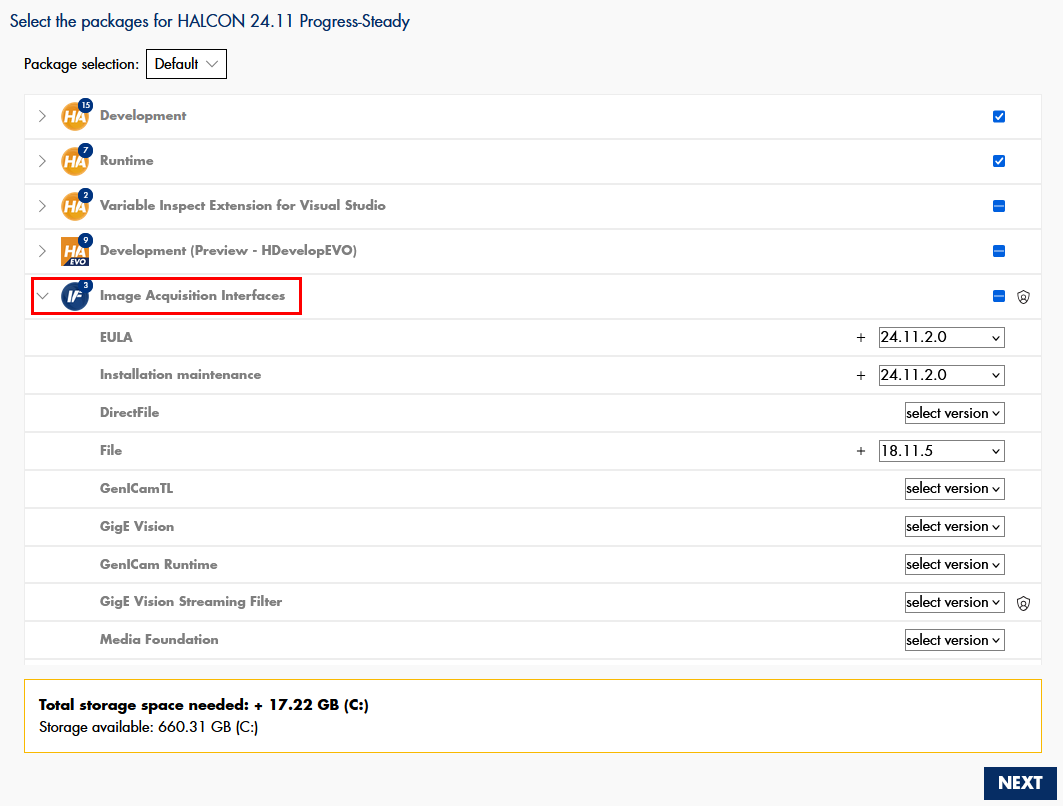
The SOM will place all necessary components at the correct location, such that the plugin is ready to use from within HALCON.
System requirements
- The
mvtec_realsenseplugin is usable on all systems that fulfill the HALCON 24.11 system requirements. - The realsense2 shared library (realsense2.dll) must be present and found in the system in version 2.54.2. Please download and install the RealSense SDK package for Windows. Make sure that the realsense2.dll is found in the windows PATH variable, or copy it to bin%HALCONARCH% within the HALCON base directory %HALCONROOT% you have chosen during the installation of HALCON.
- The computer has to be equipped with a USB 3.0 interface to connect the RealSense Device.
- The
mvtec_realsenseplugin is usable on all systems that fulfill the HALCON 24.11 system requirements. - The realsense2 shared library (librealsense2.so) must be present and found in the system in version 2.54.2.
- Please follow the RealSense instructions for installation on Linux.
Specific versions of the packages can be installed via
sudo apt-get install <package>=<version>. If no dpkg packages are available for your platform, follow the build from source instructions. - The computer has to be equipped with a USB 3.0 interface to connect the RealSense Device.
Usage and concepts
Identifying/Connecting devices
The mvtec_realsense plugin implements a single GenTL interface module.
HALCON image sources provide shortcuts to discover all reachable devices with just one operator call.
Device identifier
The mvtec_realsense plugin provides two different ways to identify RealSense devices.
These are:
- The unique ID of the device, as seen by the plugin
- The serial number of the device, which should not change
HDevelop: Using the unique ID to specify your RealSense device
HDevelop: Using the serial number to specify your RealSense device
Device discovery
By using the HALCON operator query_image_sources, the device discovery is automatically triggered.
For each discovered device, an image source handle in unconnected state is returned.
These handles can be used for connecting directly.
HDevelop: Discover devices and connect to one of them
Interface
By default, the HALCON operator connect_image_source automatically
searches and connects the interface module.
Although it is technically possible to open a connection to the interface module without connecting to a device, this option has no practical use for this plugin.
 The
The interface_id is always RzwoaTL_ITF_GenTLRealSenseDefaultInterface.
Configuring the sensor hardware
RealSense devices typically consist of multiple modules, where each module provides one type of data stream. For example, the depth module provides the depth data, the color module provides the color data which can be overlaid to generate colored point clouds. Each module might consist of multiple sub-components as well (i.e. the depth module of a D400 device consists of two infrared sensors and an infrared laser projector).
Configuration options are managed on a per-module basis. This means some options might be only available for one of the modules, some options might be available for both.
As an example, the ExposureTime parameter can be configured for the depth and the color module, the LaserPower parameter can only be configured for the depth module.
To cover this use case while keeping parameters like ExposureTime singular, the SFNC specifies the SourceSelector.
It allows to switch the target of the configuration option.
Even if a specific parameter exists only for one of the modules, it will not be configurable while the SourceSelector is pointing to the wrong module.
HDevelop: Configure the ExposureTime for each module differently
The names of the parameters reflect the names of the RealSense SDK sensor options, except where the SFNC dictates a specific different name.
For each parameter that maps to a RealSense SDK option, the parameters documentation states the option explicitly (for example RS_OPTION_BACKLIGHT_COMPENSATION and so on).
Those identifiers are contained in the RealSense SDK header file librealsense2/h/rs_option.h.
Acquiring depth and image data
Warning
The HALCON operators snap_from_image_source and fetch_from_image_source are not yet feature-complete.
They are simply discarding any non-traditional image data.
This also hinders the delivery of the XYZ planes and confidence maps, output by RealSense 3D vision sensors.
This limitation will be removed in a future version of HALCON.
Configuration parameters
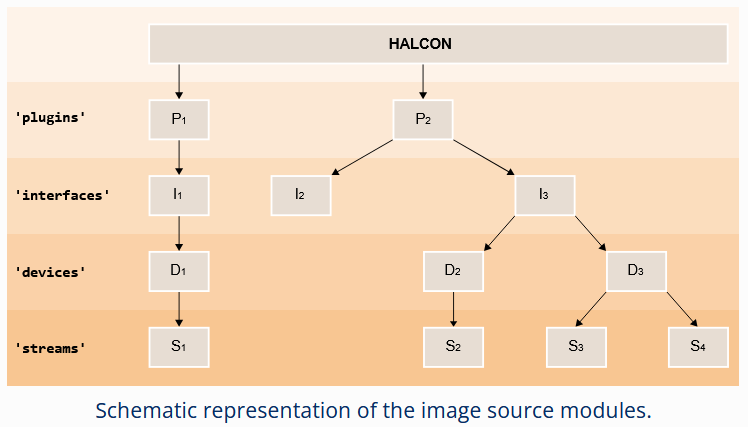
The mvtec_realsense plugin implements the GenICam GenTL standard, which specifies a set of five configurable modules.
These are the plugin (in GenTL referred to as System), interface, local_device, device, and stream modules (1).
Refer to the HALCON Operator Reference for more information about these modules.
In the following section all configuration parameters of the different modules are listed.
Plugin
Only one instance of the plugin module exists per plugin.
This module serves mostly informational purposes.
Its parameters can be grouped broadly in two different categories:
-
Generic information about the plugin itself (such as
TLType,TLModelName, andTLVendorName). -
Generic information about the available interfaces on the given system (e.g.
InterfaceID)
HDevelop: How to access parameters for the plugin module
| Parameter | Description type read-only values default |
|---|---|
GenTLSFNCVersionMajor |
Major version number of the GenTL Standard Features Naming Convention used to create this GenTL Producer's XML.integer read-only |
GenTLSFNCVersionMinor |
Minor version number of the GenTL Standard Features Naming Convention used to create this GenTL Producer's XML.integer read-only |
GenTLVersionMajor |
Major version number of the GenTL specification this GenTL Producer complies with.integer read-only |
GenTLVersionMinor |
Minor version number of the GenTL specification this GenTL Producer complies with.integer read-only |
InterfaceID |
GenTL Producer wide unique identifier of the selected interface. This interface list only changes on execution of InterfaceUpdateList.string read-only |
InterfaceSelector |
Selector for the different GenTL Producer interfaces. This interface list only changes on execution of InterfaceUpdateList.integer 0 |
InterfaceUpdateList |
Updates the internal interface list.command |
InterfaceUpdateTimeout |
Specifies timeout for the InterfaceUpdateList Command.integer 0 ms |
RSExpectedVersion |
Version of the RealSense library this producer was compiled against.string read-only |
RSFoundVersion |
Version of the RealSense library that was loaded at runtime.string read-only |
TLFileName |
File name including extension of the library.string read-only |
TLID |
Unique identifier of this GenTL Producer.string read-only |
TLModelName |
Name of this GenTL Producer to distinguish different kinds of GenTL Producer implementations from one vendor.string read-only |
TLPath |
Full path to this GenTL Producer including name and extension.string read-only |
TLType |
Transport layer type of this GenTL Producer.Custom: RealSense GenTL Producerenumeration read-only Custom |
TLVendorName |
Name of the GenTL Producer vendor.string read-only |
TLVersion |
Vendor specific version string.string read-only |
Interface
The mvtec_realsense plugin provides unified access to all devices through a single interface module.
The parameters of the interface module can be grouped broadly in two different categories:
-
Generic information about the interface itself (such as
InterfaceIDandInterfaceTLVersionMajor). -
Generic information about the discovered devices on the interface (such as
DeviceModelName,DeviceSerialNumber, andDeviceVendorName).The discovery of these devices can be triggered via the command
DeviceUpdateList. All the parameters mentioned in this second group are selected by theDeviceSelector. To discover information about all reachable devices, increment the value of theDeviceSelectorone-by-one and query the corresponding device parameters in each iteration.
HDevelop: How to access parameters for the interface module
| Parameter | Description type read-only values default |
|---|---|
DeviceAccessStatus |
Access status of the selected device at the moment of the last execution of DeviceUpdateList.This value only changes on execution of DeviceUpdateList.Unknown: Unknown statusReadWrite: Full accessReadOnly: Read-only accessNoAccess: The device is seen but unreachableBusy: The device is open by another entityOpenReadWrite: The device is open by this GenTL Producer with RW accessOpenReadOnly: The device is open by this GenTL Producer with RO accessenumeration read-only Unknown, ReadWrite, ReadOnly, NoAccess, Busy, OpenReadWrite, OpenReadOnly |
DeviceID |
Interface wide unique identifier of the selected device. This value only changes on execution of DeviceUpdateList.string read-only |
DeviceModelName |
Name of the device model of the selected device. This value only changes on execution of DeviceUpdateList.string read-only |
DeviceSelector |
Selector for the different devices on this interface. This value only changes on execution of DeviceUpdateList.integer 0 |
DeviceSerialNumber |
Serial number of the selected device. This value only changes on execution of DeviceUpdateList.string read-only |
DeviceTLVersionMajor |
Major version number of the transport layer specification of the selected device.integer read-only |
DeviceTLVersionMinor |
Minor version number of the transport layer specification of the selected device.integer read-only |
DeviceUpdateList |
Updates the internal device list.command |
DeviceUpdateTimeout |
Specifies timeout for the DeviceUpdateList Command.integer 0 ms |
DeviceUserID |
User-programmable device identifier of the selected device. This value only changes on execution of DeviceUpdateList.string read-only |
DeviceVendorName |
Name of the device vendor of the selected device. This value only changes on execution of DeviceUpdateList.string read-only |
InterfaceID |
GenTL Producer wide unique identifier of the selected interface.string read-only |
InterfaceTLVersionMajor |
Major version number of the transport layer specification this GenTL Producer interface complies with. The TL version of the Interface can be compared with the TL version of the device to assure compatibility. integer read-only |
InterfaceTLVersionMinor |
Minor version number of the transport layer specification this GenTL Producer interface complies with. The TL version of the Interface can be compared with the TL version of the device to assure compatibility. integer read-only |
InterfaceType |
Transport layer type of the interface.Custom: RealSense GenTL Producerenumeration read-only Custom |
Local Device
As mandated by the GenTL standard, for each detected physical device, the mvtec_realsense
plugin also instantiates a so called 'local device' module. This provides information and configuration parameters
for the device as it is seen by the RealSense image source plugin. The list of available parameters
therefore is independent of the actual device.
This is contrary to the device module. Its parameters are fully defined by the connected device and its on-board GenICam feature description file.
The parameters of the local device module can be grouped broadly in two different categories:
-
Information about the real device as seen by the
mvtec_realsenseplugin (such asDeviceAccessStatusandDeviceModelName). -
Information about the discovered streams on this device (
StreamSelectorandStreamID). However, as most RealSense cameras only provide one stream, themvtec_realsenseplugin only supports streaming images from the first stream.
HDevelop: How to access parameters for the local_device module
| Parameter | Description type read-only values default |
|---|---|
DeviceAccessStatus |
Gets the access status the GenTL Producer has on the device.Unknown: Unknown statusOpenReadWrite: The device is open by this GenTL Producer with RW accessOpenReadOnly: The device is open by this GenTL Producer with RO accessenumeration read-only Unknown, OpenReadWrite, OpenReadOnly |
DeviceEventsThreadApplyPriority |
Applies desired thread priority parameter(s) to the internal event handling thread. Also triggers a re-read of the actual values. The values must be configured with the DeviceEventsThreadPriority and DeviceEventsThreadSchedulingPolicy parameters beforehand. Executing this command and changing the thread priority parameter(s) might require administrative privileges.Only available if the device supports device events. Use with care. command |
DeviceEventsThreadPriority |
OS-specific thread priority value used for the internal event handling thread. The value can be applied with the DeviceEventsThreadApplyPriority command. Afterwards the value in effect can be read back. The value must fall within the range of values expected by the operating system, i.e. as expected in the struct sched_param under Linux or in the call to SetThreadPriority under Windows. Even per default the implementation tries to apply a higher-than-normal priority to this thread.Only available if the device supports device events. Use with care. integer |
DeviceEventsThreadSchedulingPolicy |
OS-specific scheduling policy value used for the internal event handling thread. The value can be applied with the DeviceEventsThreadApplyPriority command. Afterwards the value in effect can be read back. The value must be one of the values of the priority identifiers of the operating system, e.g. SCHED_FIFO, SCHED_RR and so on.Only available on Linux systems. Only available if the device supports device events. Use with care. integer |
DeviceID |
Interface-wide unique identifier of this device.string read-only |
DeviceManufacturerInfo |
Manufacturer information about the remote device.string read-only |
DeviceModelName |
Name of the remote device model.string read-only |
DeviceSerialNumber |
Serial number of the remote device.string read-only |
DeviceType |
Transport layer type of the device.Custom: RealSense GenTL Producerenumeration read-only Custom |
DeviceUserID |
User-programmable device identifier of the remote device.string read-only |
DeviceVendorName |
Name of the remote device vendor.string read-only |
DeviceVersion |
Name of the version of the remote device model.string read-only |
StreamID |
Device unique ID for the stream. For example a GUID. string read-only |
StreamSelector |
Selector for the different stream channels.integer 0 |
Device
In plugins such as mvtec_gigevision and mvtec_usb3vision, the available parameters in the device module are defined by the
GenICam feature description file provided by the connected device and automatically retrieved by the plugin.
However, the mvtec_realsense plugin interfaces with devices that do not expose such a file.
Instead, it dynamically queries the device's settings at runtime and exposes a custom GenICam-compliant feature description file.
HDevelop: How to access parameters for the device module
The parameters of the device module are selected per default.
Therefore specifying the generic parameter group==device can be omitted.
Note
Not all listed parameters are guaranteed to be available, this depends on the device's supported features.
| Parameter | Description type read-only values default |
|---|---|
AcquisitionFrameRate |
The framerate at which the device is capturing frames.float read-only |
AcquisitionMode |
Sets the acquisition mode of the device.Continuous: Frames are captured continuously until stopped with the AcquisitionStop command.enumeration read-only Continuous |
AlternateIR |
Enables/disables the alternate IR feature. Corresponds to the RS2_OPTION_ALTERNATE_IR. Availability depending on the connected device and the current setting of the SourceSelector.Off: Disable the alternate IR feature.On: Enable the alternate IR feature.enumeration Off, On |
BacklightCompensation |
Controls the back light compensation. Corresponds to the RS_OPTION_BACKLIGHT_COMPENSATION. Availability depending on the connected device and the current setting of the SourceSelector.float |
BalanceRatio |
Controls the white balance of the color image.BalanceWhiteAuto will be set to Off automatically when writing a value to BalanceRatio. Corresponds to the RS2_OPTION_ENABLE_WHITE_BALANCE.Availability depending on the connected device and the current setting of the SourceSelector.float |
BalanceWhiteAuto |
Controls the mode for automatic white balancing between the color channels. Corresponds to the RS2_OPTION_ENABLE_AUTO_WHITE_BALANCE. Availability depending on the connected device and the current setting of the SourceSelector.Off: White balancing is user controlled using BalanceRatio.Continuous: White balancing is constantly adjusted by the device.enumeration Off, Continuous |
Brightness |
Controls the brightness. Corresponds to RS_OPTION_BRIGHTNESS. Availability depending on the connected device and the current setting of the SourceSelector.float |
ChunkComponentIDValue |
Returns a unique Identifier value that corresponds to the selected chunk Component.integer read-only |
ChunkComponentSelector |
Selects the Component from which to retrieve data from.Intensity: The image data is the intensity component (visible).Range: The image data is the range component (distance or depth).Confidence: The image data is the confidence map component.enumeration Intensity, Range, Confidence |
ChunkModeActive |
Activates the inclusion of chunk data in the payload of the image. It cannot be disabled in this implementation. boolean read-only |
ChunkScan3dCoordinateOffset |
Returns the offset for the selected coordinate axis of the image included in the payload.float read-only |
ChunkScan3dCoordinateReferenceSelector |
Selector to read a coordinate system reference value defining the transform of a point from one system to the other.RotationX: Rotation around X axis.RotationY: Rotation around Y axis.RotationZ: Rotation around Z axis.TranslationX: X axis translation.TranslationY: Y axis translation.TranslationZ: Z axis translation.enumeration RotationX, RotationY, RotationZ, TranslationX, TranslationY, TranslationZ |
ChunkScan3dCoordinateReferenceValue |
Reads the value of a position or pose coordinate for the anchor or transformed coordinate systems relative to the reference point.float read-only |
ChunkScan3dCoordinateScale |
Returns the scale for the selected coordinate axis of the image included in the payload.float read-only |
ChunkScan3dCoordinateSelector |
Selects which coordinate to retrieve data from.CoordinateA: The first (X or Theta) coordinateCoordinateB: The second (Y or Phi) coordinateCoordinateC: The third (Z or Rho) coordinate.enumeration CoordinateA, CoordinateB, CoordinateC |
ChunkScan3dCoordinateSystem |
Returns the coordinate system of the image included in the payload.Cartesian: Default value. 3-axis orthogonal, right-hand X-Y-Z.enumeration read-only Cartesian |
ChunkScan3dCoordinateSystemReference |
Returns the coordinate system position of the image included in the payload.Anchor: The coordinate system fixed relative to the cameras reference point marker is used.enumeration read-only Anchor |
ChunkScan3dDistanceUnit |
Returns the distance unit of the payload image.Millimeter: Default value. Distance values are in millimeter units.enumeration read-only Millimeter |
ChunkScan3dInvalidDataFlag |
Returns the presence of a non-valid value in the image-data in the payload.boolean read-only |
ChunkScan3dInvalidDataValue |
Returns the invalid data value used for the image included in the payload.float read-only |
ChunkScan3dOutputMode |
Returns the calibrated mode of the payload image.CalibratedABC_Grid: Only range data (2.5d)enumeration read-only CalibratedABC_Grid |
ColorResolution |
Configures the resolution of the color input data stream. The values are in the form 'WidthxHeight', for example '1024x768'. The resolution of the images delivered to the application might be influenced by the parameter ComponentMappingMode.Res_Col_Default_0: Enumeration values are dynamically generated based on the current device.enumeration Res_Col_Default_0 |
ComponentEnable |
Controls if streaming of the selected component is active. The depth stream cannot be switched off. boolean true |
ComponentMappingMode |
How to map depth and color planes. In order to map the components, image planes will be cropped and scaled internally. ColorOntoDepth: The depth plane is delivered unaltered, but the color is adapted. In this process pixels in the color image will be set to black in regions where the depth value cannot be determined.DepthOntoColor: The color plane is delivered unaltered, but the depth is adapted.None: Do not map depth and color. Can be used to receive the full field-of-view of each sensor. Automatic mapping of color onto depth in later processing stages might not be possible in this mode.enumeration ColorOntoDepth, DepthOntoColor, None ColorOntoDepth |
ComponentSelector |
Selects a component to activate/deactivate its data streaming.Range: Control the acquisition and delivery of the 3D (range) data. Range is the SFNC terminology for the RealSense depth data.Intensity: Control the acquisition and delivery of the color overlay. Intensity is the SFNC terminology for the RealSense color overlay.Confidence: Control the acquisition and delivery of the confidence map.enumeration Range, Intensity, Confidence Range |
Contrast |
Controls the contrast. Corresponds to the RS_OPTION_CONTRAST. Availability depending on the connected device and the current setting of the SourceSelector.float |
DepthResolution |
Configures the resolution of the depth input data stream. The values are in the form 'WidthxHeight', for example '1024x768'. The resolution of the images delivered to the application might be influenced by the parameter ComponentMappingMode.Res_Dep_Default_0: Enumeration values are dynamically generated based on the current device.enumeration Res_Dep_Default_0 |
DeviceFamilyName |
Name of the device family. For RealSense devices the output will be for example 'D400'. string read-only |
DeviceModelName |
Model name of the device. For RealSense devices the output will be for example 'Intel RealSense L515'. string read-only |
DeviceReset |
Resets the device and puts it into its power up statecommand |
DeviceSFNCVersionMajor |
Major version of the Standard Features Naming Convention that was used to create the device's GenICam XML.integer read-only |
DeviceSFNCVersionMinor |
Minor version of the Standard Features Naming Convention that was used to create the device's GenICam XML.integer read-only |
DeviceSFNCVersionSubMinor |
Sub minor version of Standard Features Naming Convention that was used to create the device's GenICam XML.integer read-only |
DeviceScanType |
Returns the scan type of the device's sensor (area or line scan).Areascan3D: The device has an area scan 3D sensor.enumeration read-only Areascan3D |
DeviceSerialNumber |
Serial number of the actual hardware device.string read-only |
DeviceVendorName |
Name of the device's vendor. For RealSense devices the output will be 'Intel'. string read-only |
DeviceVersion |
Version of the device. For RealSense devices the output will be for example 'Intel RealSense L515'. string read-only |
EmitterAlwaysOn |
Allows to switch the emitter to always on. Corresponds to the RS2_OPTION_EMITTER_ALWAYS_ON. Availability depending on the connected device and the current setting of the SourceSelector.Off: OffOn: Onenumeration Off, On |
ExposureAuto |
Sets the automatic exposure mode. Corresponds to the RS_OPTION_ENABLE_AUTO_EXPOSURE. Availability depending on the connected device and the current setting of the SourceSelector.Off: Exposure duration is user controlled using ExposureTime.Continuous: Exposure duration is constantly adapted by the device to maximize the dynamic range.enumeration Off, Continuous |
ExposureMode |
Sets the operation mode of the Exposure.Timed: Timed exposure. The exposure duration time is set using the ExposureTime or ExposureAuto features.enumeration read-only Timed |
ExposureTime |
Controls the Exposure time. It is the duration of exposing the photosensitive cells to light. ExposureAuto will be set to Off automatically when writing a value to ExposureTime. Corresponds to the RS2_OPTION_EXPOSURE.Availability depending on the connected device and the current setting of the SourceSelector.float |
Gain |
Controls the selected gain as an absolute physical value. This is an amplification factor applied to the video signal. Corresponds to the RS2_OPTION_GAIN. Availability depending on the connected device and the current setting of the SourceSelector.float |
Gamma |
Controls the gamma. Corresponds to the RS_OPTION_GAMMA. Availability depending on the connected device and the current setting of the SourceSelector.float |
HDREnabled |
Enables/disables the HDR feature. Corresponds to the RS_OPTION_HDR_ENABLED. Availability depending on the connected device and the current setting of the SourceSelector.Off: Disable the HDR feature.On: Enable the HDR feature.enumeration Off, On |
Height |
Height of the image provided by the device (in pixels).The value is influenced by the parameters SourceSelector and ComponentMappingMode. The value cannot be changed directly in this implementation (ROI not supported).integer read-only |
Hue |
Controls the hue. Corresponds to the RS_OPTION_HUE. Availability depending on the connected device and the current setting of the SourceSelector.float |
LaserPower |
Controls the power (intensity) of the infrared projector. Corresponds to the RS2_OPTION_LASER_POWER. Availability depending on the connected device and the current setting of the SourceSelector.float |
MinDistance |
Controls the minimum distance to the target. Corresponds to the RS2_OPTION_MIN_DISTANCE. Availability depending on the connected device and the current setting of the SourceSelector.float |
NoiseFiltering |
Controls edges and background noise. Corresponds to the RS2_OPTION_NOISE_FILTERING. Availability depending on the connected device and the current setting of the SourceSelector.float |
PayloadSize |
Provides the number of bytes transferred for each image or chunk on the stream channel.integer read-only |
PixelFormat |
Format of the pixels provided by the device. It cannot be changed in this implementation. RGB8a32: Red-Green-Blue 8-bit aligned to 32-bitConfidence8: Conficence Monochrom 8-bitCoord3D_ABC32f_Planar: 3D coordinate ABC 32-bit float planarenumeration read-only RGB8a32, Confidence8, Coord3D_ABC32f_Planar |
PostProcessingSharpening |
Controls the amount of sharpening in the post processed image. Corresponds to the RS2_OPTION_POST_PROCESSING_SHARPENING. Availability depending on the connected device and the current setting of the SourceSelector.float |
PreProcessingSharpening |
Controls the amount of sharpening in the pre processed image. Corresponds to the RS2_OPTION_PRE_PROCESSING_SHARPENING. Availability depending on the connected device and the current setting of the SourceSelector.float |
ReceiverGain |
Controls the exposure time of the avalanche photo diode in the receiver. Corresponds to the RS_OPTION_AVALANCHE_PHOTO_DIODE. Availability depending on the connected device and the current setting of the SourceSelector.float |
Saturation |
Controls the saturation. Corresponds to the RS_OPTION_SATURATION. Availability depending on the connected device and the current setting of the SourceSelector.float |
Sharpness |
Controls the sharpness. Corresponds to the RS_OPTION_SHARPNESS. Availability depending on the connected device and the current setting of the SourceSelector.float |
SourceSelector |
Selects the hardware component that should be configured.Depth: Configure the depth sensor.Color: Configure the color sensor.enumeration Depth, Color Depth |
VisualPreset |
Allows to load sets of predefined configuration options. This optimizes the sensor for certain application profiles. Corresponds to the RS_OPTION_VISUAL_PRESET. Only available for the depth module. VP_Default_0: Enumeration values are dynamically generated based on the current device.enumeration VP_Default_0 |
WhiteBalance |
Controls the white balance of the color image. Provided as an alias for the BalanceRatio parameter.float |
Width |
Width of the image provided by the device (in pixels).The value is influenced by the parameters SourceSelector and ComponentMappingMode. The value cannot be changed directly in this implementation (ROI not supported).integer read-only |
Stream
The mvtec_realsense plugin automatically instantiates one stream module per connected device.
The purpose of the stream module is to configure parameters related to the transmission and receiving of image data.
HDevelop: How to access parameters for the stream module
| Parameter | Description type read-only values default |
|---|---|
PayloadSize |
Size of the expected data in bytes. Note that this feature "overwrites" the PayloadSize of the remote device, see corresponding sections of the GenICam GenTL standard.integer read-only |
StreamAnnounceBufferMinimum |
Minimal number of buffers to announce to enable selected buffer handling mode.integer read-only 0 |
StreamAnnouncedBufferCount |
Number of announced (known) buffers on this stream. This value is volatile. It may change if additional buffers are announced and/or buffers are revoked by the GenTL Consumer. integer read-only |
StreamAuxiliaryBufferCount |
Number of auxiliary buffers the acquisition engine will allocate to keep the stream going when not enough user buffers are available.integer |
StreamBufferHandlingMode |
Selects the buffer handling mode in use for this Data Stream. This influences how the streaming engine handles new complete transmissions, especially when they arrive faster than the application is processing them. Not writeable while streaming is active. OldestFirst: The acquired buffers are delivered to the application in a FIFO manner. New data will be discarded if no free buffers are available. Typically used when each image must be processed, even when short load-spikes slow down processing momentarily.OldestFirstOverwrite: The acquired buffers are delivered to the application in a FIFO manner. New data will overwrite the oldest buffer if no free buffers are available. Typically used when each image must be processed, even when short load-spikes slow down processing momentarily.NewestOnly: The application always receives the newest acquired buffer. New data will replace any other one already received and not yet given to the application. Typically used for displaying or when having the latest results is more important than having all results.enumeration OldestFirst, OldestFirstOverwrite, NewestOnly OldestFirst |
StreamID |
Device unique ID for the data stream. For example a GUID. string read-only |
StreamThreadApplyPriority |
Applies desired thread priority parameter(s) to the internal stream processing thread. Also triggers a re-read of the actual values. The values must be configured with the StreamThreadPriority and StreamThreadSchedulingPolicy parameters beforehand. Executing this command and changing the thread priority parameter(s) might require administrative privileges.Use with care. command |
StreamThreadPriority |
OS-specific thread priority value used for the internal stream processing thread. The value can be applied with the StreamThreadApplyPriority command. Afterwards the value in effect can be read back. The value must fall within the range of values expected by the operating system, i.e. as expected in the struct sched_param under Linux or in the call to SetThreadPriority under Windows. Even per default the implementation tries to apply a higher-than-normal priority to this thread.Use with care. integer |
StreamThreadSchedulingPolicy |
OS-specific scheduling policy value used for the internal stream processing thread. The value can be applied with the StreamThreadApplyPriority command. Afterwards the value in effect can be read back. The value must be one of the values of the priority identifiers of the operating system, e.g. SCHED_FIFO, SCHED_RR and so on.Only available on Linux systems. Use with care. integer |
StreamType |
Transport layer type of the Data Stream.Custom: RealSense GenTL Producerenumeration read-only Custom |
Examples
At the moment there exist no HDevelop examples specific to the mvtec_realsense plugin.
Refer to the examples using the classic HALCON acquisition interface hAcqRealSense.
Troubleshooting
In case of image acquisition problems with the mvtec_realsense plugin, the following hints might help to solve them.
- Check if the latest revision of the
mvtec_realsenseplugin is used. - Check the System Requirements.
- Check if the device has the latest firmware.
- Check the extended error messages for detailed error descriptions. These are automatically displayed in HDevelop, but might need to be queried explicitly when programming in HALCON/C++ or HALCON/C# for example.
-
If the plugin cannot be loaded (1), it might not be properly installed.
Check if it is installed via the SOM (see installation).
Verify manually that the file 'mvtec_realsense.cti' is present in the folder%HALCONROOT%\bin\%HALCONARCH%() or$HALCONROOT/lib/$HALCONARCH().- Error
"Image source module not found (HALCON error code: 5809)"
or extended error message containing
"Cannot identify producer to open"
while usingquery_image_sourceorconnect_image_source.
- Error
Requesting help
If you experience problems not solvable with the tips of the previous section, MVTec and its worldwide partner network are ready to help. Please refer to www.mvtec.com/support for directions.
Include the following in your support request for maximum efficiency
- Used HALCON and image source plugin version.
- Used HALCON architecture (e.g. x64-win64, x64-linux, aarch64-linux or armv7a-linux).
- Camera manufacturer, model and firmware version.
- Details about the host machine, like operating system, RAM and CPU.
- Description of the observed and expected behavior.
- Minimal sample code (if possible HDevelop script) to reproduce the issue.
- If applicable, any error codes and error messages observed.
FOSS libraries
The mvtec_realsense plugin depends on free and open-source software (FOSS) libraries.
See the file third_party_mvtec_realsense.txt in the HALCON base directory for copyright and license information.
Libraries are used without modifications unless explicitly stated in the file.
You can request the source for those third-party libraries licensed under LGPL via email to info@mvtec.com with the subject "Request source code of third-party libraries".
Release notes
-
Version 1.1.0 (2026-04-20)
- The PixelFormat used for the color plane has been adapted to improve compatibility with new versions of HALCON.
-
Version 1.0.0 (2025-04-16)
- First official version of the MVTec RealSense implementation as a standalone GenTL compatible plugin.