Parallel execution🔗
The HALCON Script language supports the parallel execution of procedure and operator calls as subthreads of the main thread. The execution of subthreads is independent of the thread they have been started from. Therefore, the exact point in time when a specific thread finishes cannot be predicted. If you want to access data returned from a group of threads, ensure to wait for the corresponding threads to finish.
Thread limits🔗
HDevelopEVO has no limit of the number of threads. However, inadvertently generating a huge number of threads poses a serious risk: System load and memory consumption may grow so high that HDevelopEVO becomes unresponsive.
Starting a subthread🔗
To start a new thread, create a thread handle with thread_create.
After that you can actually start the new thread with thread_start:
thread_create(ThreadID)
thread_start(ThreadID, gather_data())
This call starts the hypothetical procedure gather_data() as a new subthread in the background and continues to execute the subsequent program lines.
Restriction
At the moment, thread_start only supports calls to procedures.
If you really have to call a single operator in a subthread, write a little helper procedure that wraps the operator call.
Waiting for subthreads to finish🔗
Use the statement thread_join to wait for the completion of a single thread or a group of threads.
As an example why this is necessary suppose we want to call a procedure that performs some magic calculation in the background and returns a count number as a result. In the subsequent program lines, we want to use that number for further calculations.
thread_create(ThreadID)
thread_start(ThreadID, count_objects(num))
...
for i := 1 to num by 1     // BEWARE: num might be uninitialized
  ...
endfor
Relying on the subthread to be fast enough is most likely going to fail.
Therefore, an explicit call to thread_join is required beforehand.
thread_create(ThreadID)
thread_start(ThreadID, count_objects(num))
...
thread_join(ThreadID)
for i := 1 to num by 1
  ...
endfor
Note
In HDevelopEVO, it is not strictly required to use thread_join because the main thread will always outlive the subthreads.
However, when executing in HALCON Script Engine (see Working with HALCON Script Engine), subthread execution may get cancelled unexpectedly when the execution of the main HScriptProcedureCall entry point procedure ends.
If the subthread is expected to run longer, it has to be detached or the thread handle returned as an output parameter.
In the HALCON Script language, any output parameters of the called procedure are written back to the caller during thread_join only.
Given the example from the previous section, waiting for all threads that were started in a loop to finish is accomplished using the following lines.
Threads := []
for Index := 1 to 5 by 1
  Threads := [Threads, ThreadIDs.[Index - 1]]
endfor
thread_join(Threads)
Note
The thread IDs are collected in a dictionary variable.
Thus, the conversion to a tuple is necessary for thread_join to work properly.
The statement thread_join blocks the further execution of the procedure it has been called from until all specified threads have finished.
In the subsequent program lines, results from the corresponding threads can then be accessed reliably.
Handling multiple threads🔗
You can start multiple threads in a loop. In this case, the thread IDs need to be collected so that all threads can be referenced later:
ThreadIDs := []
for Index := 1 to 5 by 1
  thread_create(ThreadID)
  thread_start(ThreadID, gather_data())
  ThreadIDs := [ThreadIDs, ThreadID]
endfor
Note
It is also possible to collect the thread IDs in a dictionary, but you have to transfer them into a tuple if you want to use thread_join to join all threads afterwards.
for Index := 1 to 5 by 1
  thread_create(ThreadIDs.[Index - 1])
  thread_start(ThreadIDs.[Index - 1], gather_data())
endfor
For more information about dictionaries, see Dictionaries.
For more information about messages, see the operator create_message and the tutorial about parallelization concepts.
Subthreads that return data in an output variable require special care. In particular, output variables must not be accessed in other threads while the subthread is still running. Otherwise, the data is not guaranteed to be valid.
Likewise, ensure that multiple threads do not interfere with their results. To avoid this problem, collect the returned data in a dictionary variable as shown previously with the thread IDs:
for Index := 1 to 5 by 1
  thread_create(ThreadIDs.[Index - 1])
  thread_start(ThreadIDs.[Index - 1], gather_data(Result.[Index - 1]))
endfor
Here, each invocation of gather_data returns its result in a unique slot of the dictionary variable Result.
Things to consider when returning thread results
Suppose the procedure gather_data is started as multiple threads like above but returns data in an output control variable:
for Index := 1 to 5 by 1
  thread_create(ThreadIDs.[Index - 1])
  thread_start(ThreadIDs.[Index - 1], gather_data(Result))  // BEWARE!!!
endfor
In the example, all the threads would return their result in the same variable, which is certainly not what was intended.
The final value of Result would be the unpredictable return value of the thread that finishes last, and all other results would be lost.
In HDevelopEVO/HALCON Script Engine (other than with HDevEngine), all the writebacks happen in a synchronized way. So, while not great style, the following code would work:
thread_start(T1, gather_data_1(Result))
thread_start(T2, gather_data_2(Result))
thread_join(T1)
GatherResult_1 := Result
thread_join(T2)
GatherResult_2 := Result
However, don’t use thread_join([T1,T2]) – in this case, the result may be indeterministic!
Execution of threads in HDevelopEVO🔗
In general, threads in HDevelopEVO are only executed in parallel when the program runs continuously after pressing F5.
In all other execution modes, only the selected thread is started and all other threads remain stopped unless an explicit user interaction advances their execution.
Active breakpoints, instructions, runtime errors, or uncaught exceptions also cause all threads to stop so their current state can be evaluated.
This convention enables a clearly defined debugging process because it eliminates uncontrollable side-effects from other threads.
Any editing action in the program window will also cause a concurrently running program to stop.
Selected thread🔗
Exactly one of the threads is the so-called selected thread. By default, this corresponds to the main thread of the program. The position of the PC, the status of the call stack, and the state of the variables in the variable window are linked to the selected thread. The selected thread can change automatically to a thread that stops, for example, by a breakpoint, stop instruction, an uncaught exception, or a draw operator.
For more information about how to select a specific thread, see Inspecting threads. All run modes other then continuous execution apply only to the selected thread.
Thread lifetime🔗
Usually, a thread exists as long as it is still being referenced by a variable, even if its execution has finished.
This is necessary to reference the thread in a thread_join instruction, or to set back the PC of the corresponding thread for debugging.
However, the lifetime of a thread ends when thread_join has been successfully called with its thread handle.
Additionally, the lifetime of all subthreads ends when the program is reset.
During its lifetime, a thread is listed in the Threads and Call Stack window, from where it can be selected and managed.
Subthreads can be “killed” externally by clearing all references to the thread handle.
For example, when you single step through the following program you can observe that the subthread disappears from the Call Stack window immediately after its handle ThreadID is cleared in the third line:
thread_create(ThreadID)
thread_start(ThreadID, do_something())
ThreadID := []
thread_join(ThreadID)
If necessary, the lifetime behavior of a subthread can be changed by setting the thread parameter detached to true.
In this case, a subthread will continue to run even after all references to the thread handle are lost until either one of the following events occur:
- The end of execution is reached.
- An exception is encountered.
- The environment forces termination:
- IDE: or is pressed.
- HALCON Script Engine: The instance in which the thread is running is destroyed.
Note
The thread will survive the destruction of the originating HScriptProcedureCall instance.
The latter is true even for a non-detached thread when the thread handle is returned via a procedure output parameter (thus keeping a handle reference alive via the host application).
thread_create(ThreadID)
thread_start(ThreadID, do_something())
thread_set_param(ThreadID,'detached','true')
ThreadID := []
thread_join(ThreadID)
A detached thread dies automatically when it reaches the end of its code.
Error handling🔗
Each thread can specify its own error handling, for example, using ('~give_error').
New subthreads inherit the error handling mode from their parent thread.
Exception handling using try .. catch works only within a thread.
In the main thread, it is not possible to catch an exception that is thrown in a subthread.
Inspecting threads🔗
The current execution status of the program and its threads is displayed in the Threads and Call Stack windows. The thread window lists all existing threads while call stack window displays the call stack of the selected thread.
To illustrate the interaction with these windows, consider the following (silly) example.
proc p_wait_seconds(tuple num_seconds)
  for I := 0 to num_seconds*10 by 1
  wait_seconds(0.1)
  endfor
endproc

for Index:= 0 to 4 by 1
  thread_create(ThreadID[Index])
  thread_start(ThreadID[Index], p_wait_seconds(Index))
endfor
wait_seconds(2)
stop()
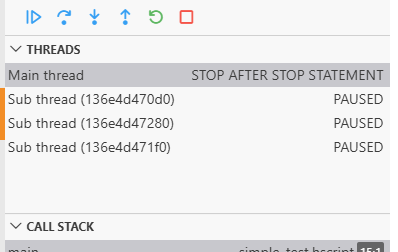
After pressing F5, the program will start five subthreads, and eventually reach the instruction, leaving some subthreads still running while others will already have finished. The corresponding thread view is displayed in Figure 1.
Note
The unfinished threads are in a paused state because of another thread (in this case caused by the stop instruction in the main thread).
The thread view lists the properties of all threads in a table.
The line of the currently selected thread is highlighted.
The other five threads are the subthreads started from the main thread.
To select another thread, click it in the Threads view.
This will also update the PC, the call stack, and the variables according to the selected thread.
The active procedure of the selected thread is displayed in the program window.
The meaning of the columns of the thread view is as follows:
| Column | Description |
|---|---|
| Thread ID | Unique number assigned to the thread when it is started |
| State | Current execution state of the thread |
Single-stepping over a program line containing a thread_start starts and immediately pauses the corresponding thread.
To debug a specific thread, select the desired thread from the Threads view.
Suspending and resuming threads🔗
Currently, you can pause (suspend) or resume only all threads of a running application at once, whereas single-stepping takes place only in the currently selected thread.
Threads are paused by either clicking or pressing F6, or by hitting a breakpoint or stop statement in any of the currently running threads.