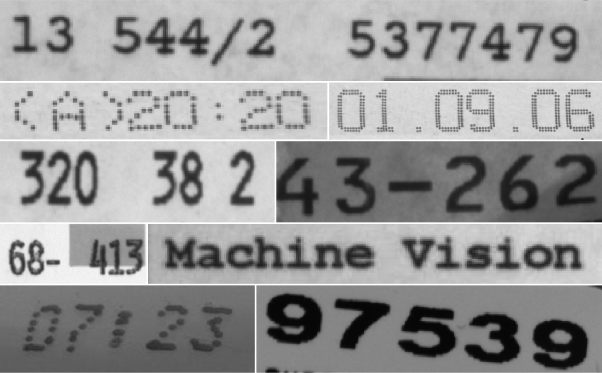
Advanced topics🔗
Tips and tricks🔗
Composed symbols🔗
Some characters and symbols are composed of multiple sub-symbols, like an “i”, “%“, or “!”.
For the OCR, these sub-symbols must be combined into a single region.
If you use the operators segment_characters and select_characters for the segmentation of the characters, sub-symbols are automatically combined.
Otherwise, you can combine them by calling closing_rectangle1 after thresholding, typically using a small width but a larger height.
After calling connection to separate the characters, you use the operator intersection to get the original segmentation (input parameter 2), while preserving the correct connected components from connection (input parameter 1).
Line scan cameras🔗
In general, line scan cameras are treated like normal area sensors.
But in some cases, not single images but an “infinite” sequence of images showing objects, e.g., on a conveyor belt, must be processed.
In this case, the end of one image is the beginning of the next one.
This means that text or numbers, which partially lie in both images, must be combined into one object.
For this purpose, HALCON provides the operator merge_regions_line_scan.
This operator is called after the segmentation of one image, and combines the current objects with those of previous images.
Circular prints🔗
In some cases the symbols are not printed as straight lines but along arcs, e.g., on a CD.
To read these, the (virtual) center and radius of the corresponding circle are extracted.
Using the operator polar_trans_image_ext, the image is then unwrapped.
To project a region obtained in the unwrapped image back into the original image, you can use the operator polar_trans_region_inv.
OCR features🔗
HALCON offers many different features for the OCR.
Most of these are for advanced use only.
In most cases it is recommended to use the feature combination 'default'.
This combination is based on the gray values within the surrounding rectangle of the character.
In case that the background of the characters cannot be used, e.g., if it varies because of texture, the features 'pixel_binary', 'ratio', and 'anisometry' are good combinations.
Here, only the region is used, the underlying gray values are ignored.
Pretrained OCR fonts🔗
The following sections shortly introduce you to the pretrained OCR fonts provided by HALCON.
You can access them in the subdirectory dirName{ocr} of the directory where you installed HALCON.
Note that the pretrained fonts were trained with symbols that are printed dark on light.
If you want to read light on dark symbols with one of the provided fonts, you can either invert the image with the operator invert_image, or, if this does not lead to a satisfying result, preprocess the image by applying first the operator gen_image_proto with a light gray value and then overpaint_region with the gray value set to 0.
Note that the pretrained fonts were trained with the character encoding Windows-1252. Therefore, the appearance of character symbols with an ASCII code above 127 (these are “€”, “£”, “¥”) may differ from the expected appearance depending on the character encoding of your system. In such cases, the classified characters should be checked based on their ASCII code, i.e. 128 for “€”, 163 for “£”, and 165 for “¥”.
The pretrained fonts are based on an MLP classifier, except for the 'Universal' font, which is based on CNN.
Pretrained fonts with regularized weights and rejection class🔗
All pretrained OCR fonts are available in two versions.
Font names ending with _NoRej have regularization weights but no rejection class, font names ending with _Rej have regularization weights as well as a rejection class.
Because of the regularization, the pretrained OCR fonts provide more meaningful confidences.
With fonts that provide a rejection class, it is possible to distinguish characters from background clutter.
Fonts with a rejection class return the ASCII Code 26, which is SUB (substitute) if no letter was found.
Nomenclature for ready-to-use OCR fonts🔗
There are several groups of OCR fonts available. The members of each group differ as they contain different symbol sets. The content of an OCR font is described by its name. For the names of the pretrained OCR fonts the following nomenclature is applied:
The name starts with the group name, e.g., Document or DotPrint, followed by indicators for the set of symbols contained in the OCR font.
The meaning of the indicators is the following:
-
0-9: The OCR font contains the digits0to9. -
A-Z: The OCR font contains the uppercase charactersAtoZ. -
+: The OCR font contains special characters. The list of special characters varies slightly over the individual OCR fonts. It is given below for each OCR font separately. -
_NoRej: The OCR font has no rejection class. -
_Rej: The OCR font has a rejection class.
If the name of the OCR font does not contain any of the above indicators or is only followed by the indicators _NoRej or _Rej, typically, the OCR font contains the digits 0 to 9, the uppercase characters A to Z, the lowercase characters a to z, and special characters.
Some of the OCR fonts do not contain lowercase characters (e.g., DotPrint).
This is explicitly mentioned in the description of the respective OCR fonts.
Ready-to-use OCR fonts🔗
The following OCR fonts with different symbol sets are available:
| Symbol set | OCR font with rejection class | OCR font without rejection class |
|---|---|---|
| 0-9, A-Z, a-z, special characters | Document_Rej |
Document_NoRej |
| A-Z, special characters | Document_A-Z+_Rej |
Document_A-Z+_NoRej |
| 0-9 | Document_0-9_Rej |
Document_0-9_NoRej |
| 0-9, A-Z | Document_0-9A-Z_Rej |
Document_0-9A-Z_NoRej |
- Special characters:
- : - = + < > . # $ % & ( ) @ * e £ ¥
- Usage:
- Printed characters in fonts like Arial, Courier, or Times New Roman (typical for printed documents or letters).
- Note:
- Characters
Iandlcannot be distinguished for the font Arial, thus they can be mistaken for each other.
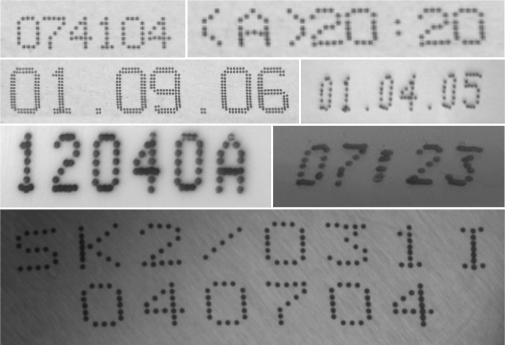
The following OCR fonts with different symbol sets are available:
| Symbol set | OCR font with rejection class | OCR font without rejection class |
|---|---|---|
| 0-9, A-Z, special characters | DotPrint_Rej |
DotPrint_NoRej |
| A-Z, special characters | DotPrint_A-Z+_Rej |
DotPrint_A-Z+_NoRej |
| 0-9 | DotPrint_0-9_Rej |
DotPrint_0-9_NoRej |
| 0-9, A-Z | DotPrint_0-9A-Z_Rej |
DotPrint_0-9A-Z_NoRej |
| 0-9, special characters | DotPrint_0-9+_Rej |
DotPrint_0-9+_NoRej |
- Special characters:
-
- / . * :
- Usage:
- Characters printed with dot printers.
- Note:
- Contains no lowercase letters.
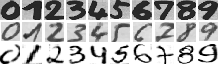
The following OCR fonts with different symbol sets are available:
| Symbol set | OCR font with rejection class | OCR font without rejection class |
|---|---|---|
| 0-9 | HandWritten_0-9_Rej |
HandWritten_0-9_NoRej |
- Special characters:
- none
- Usage:
- Handwritten numbers.
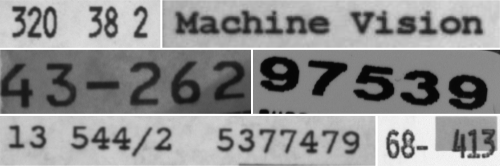
The following OCR fonts with different symbol sets are available:
| Symbol set | OCR font with rejection class | OCR font without rejection class |
|---|---|---|
| 0-9, A-Z, a-z, special characters | Industrial_Rej |
Industrial_NoRej |
| A-Z, special characters | Industrial_A-Z+_Rej |
Industrial_A-Z+_NoRej |
| 0-9 | Industrial_0-9_Rej |
Industrial_0-9_NoRej |
| 0-9, A-Z | Industrial_0-9A-Z_Rej |
Industrial_0-9A-Z_NoRej |
| 0-9, special characters | Industrial_0-9+_Rej |
Industrial_0-9+_NoRej |
- Special characters:
-
- / + . $ % * e £ ¥
- Usage:
- Characters printed in fonts like Arial, OCR-B, or other sans-serif fonts, that are typically used to print labels, for instance.
The following OCR fonts with different symbol sets are available:
| Symbol set | OCR font with rejection class | OCR font without rejection class |
|---|---|---|
| 0-9, A-Z, a-z, special characters | OCRA_Rej |
OCRA_NoRej |
| A-Z, special characters | OCRA_A-Z+_Rej |
OCRA_A-Z+_NoRej |
| 0-9 | OCRA_0-9_Rej |
OCRA_0-9_NoRej |
| 0-9, A-Z | OCRA_0-9A-Z_Rej |
OCRA_0-9A-Z_NoRej |
- Special characters:
- : - ? ! / {} = + < > . # $ % & ( ) @ * e £ ¥
- Usage:
- Characters printed in the font OCR-A.
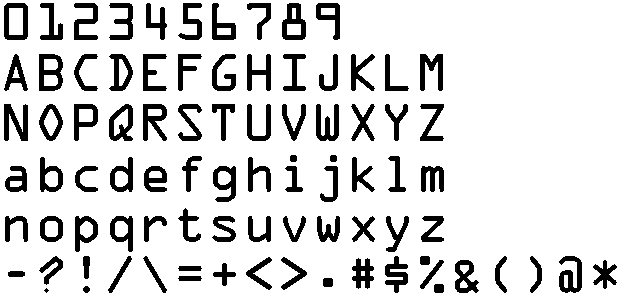
The following OCR fonts with different symbol sets are available:
| Symbol set | OCR font with rejection class | OCR font without rejection class |
|---|---|---|
| 0-9, A-Z, a-z, special characters | OCRB_Rej |
OCRB_NoRej |
| A-Z, special characters | OCRB_A-Z+_Rej |
OCRB_A-Z+_NoRej |
| 0-9 | OCRB_0-9_Rej |
OCRB_0-9_NoRej |
| 0-9, A-Z | OCRB_0-9A-Z_Rej |
OCRB_0-9A-Z_NoRej |
| 0-9, A-Z, + and < | OCRB_passport_Rej |
OCRB_passport_NoRej |
- Special characters:
- : - ? ! / {} = + < > . # $ % & ( ) @ * e £ ¥
- Usage:
- Characters printed in the font OCR-B.
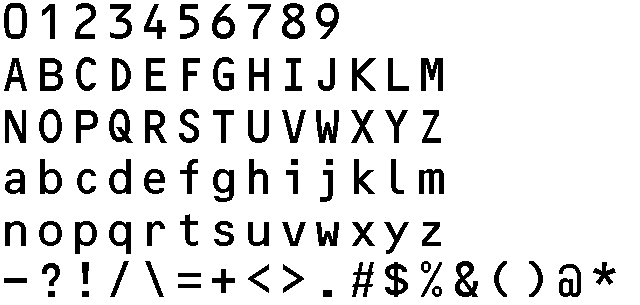
The following OCR fonts with different symbol sets are available:
| Symbol set | OCR font with rejection class | OCR font without rejection class |
|---|---|---|
| 0-9, A-Z, special characters | Pharma_Rej |
Pharma_NoRej |
| 0-9 | Pharma_0-9_Rej |
Pharma_0-9_NoRej |
| 0-9, special characters | Pharma_0-9+_Rej |
Pharma_0-9+_NoRej |
| 0-9, A-Z | Pharma_0-9A-Z_Rej |
Pharma_0-9A-Z_NoRej |
- Special characters:
-
- / . ( ) :
- Usage:
- Characters printed in fonts like Arial, OCR-B or other fonts that are typically used in the pharmaceutical industry.
- Note:
- Contains no lowercase letters.
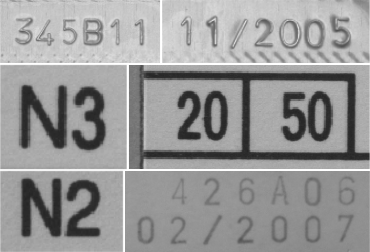
The following OCR fonts with different symbol sets are available:
| Symbol set | OCR font with rejection class | OCR font without rejection class |
|---|---|---|
| 0-9, A-Z, special characters | SEMI_Rej |
SEMI_NoRej |
- Special characters:
-
- .
- Usage:
- Characters printed in the font SEMI, which consists of characters which are designed to be easily distinguished from each other
- Note:
- Character set is limited and contains no lowercase letters.
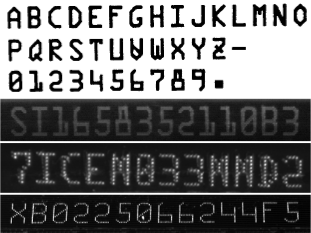
The following OCR fonts with different symbol sets are available:
| Symbol set | OCR font with rejection class | OCR font without rejection class |
|---|---|---|
| 0-9, A-Z, a-z, special characters | Universal_Rej |
Universal_NoRej |
| A-Z, special characters | Universal_A-Z+_Rej |
Universal_A-Z+_NoRej |
| 0-9 | Universal_0-9_Rej |
Universal_0-9_NoRej |
| 0-9, special characters | Universal_0-9+_Rej |
Universal_0-9+_NoRej |
| 0-9, A-Z | Universal_0-9A-Z_Rej |
Universal_0-9A-Z_NoRej |
| 0-9, A-Z, special characters | Universal_0-9A-Z+_Rej |
Universal_0-9A-Z+_NoRej |
- Special characters:
- : - / = + : < > . # $ % & ( ) @ * e £ ¥
- Usage:
- The OCR font Universal can be used to read a wide range of different characters.
The training of this CNN-based font is based on the characters used for
Document,DotPrint,SEMI, andIndustrial.