About HALCON operators and extension packages🔗
HALCON can be extended by up to 99 additional operator packages.
During the initialization of the system, all packages indicated by the environment variable HALCONEXTENSIONS are automatically loaded.
A package typically contains libraries with the new operators, their prototypes, the operator information needed by HDevelop, and the HTML online documentation.
For the programming of such a package, the HALCON Extension Package Interface is used, for example, to manipulate parameters of HALCON operators and to read or write iconic data (images, regions, XLDs) from the HALCON database of iconic objects.
Furthermore, the operators provided by HALCON itself are also based on the functionality of the Extension Package Interface. Thus, the Extension Package Interface is both the interface between application programs and the operator layer of the HALCON system and the interface between the operator layer and the iconic object database.
A reason why to extend the capabilities of HALCON by using the Extension Package Interface might be one of the following:
- Extension of the pool of image processing operators,
- Integration of special image processing hardware,
- Integration of a special graphics software package.
The new extension package example program is an Easy Extension Interface example for .NET, and shows how to easily integrate a .NET function, based on the HALCON/.NET interface, to HALCON’s operator set.
It can be used within HDevEngine and HDevelop.
For more information, see the README.md in the Easy Extension Interface for .NET example under %HALCONEXAMPLES%\extension_package\easy_extensions\dotnet.
Once the users have extended HALCON by a package containing their own operators, these can be used within all supported host languages and the interactive tool HDevelop.
This chapter gives a short introduction to HALCON packages and operators, including an example describing the integration of a simple operator.
The following chapters present detailed information that will allow you to write your own packages.
As a common example, a package called halconuser will be used (see %HALCONEXAMPLES%\extension_package\halconuser).
Except for Linux-specific sections, file paths and environment variables are printed in the Windows convention in this manual, for example, %HALCONEXAMPLES%\extension_package\halconuser to denote the subdirectory halconuser containing an example package within the HALCON base directory referenced by the environment variable HALCONEXAMPLES.
The same expression in Linux convention would look like $HALCONEXAMPLES/extension_package/halconuser.
HALCON operators🔗
This section describes the external interface of HALCON operators, i.e., how to use them in a programming language, and their internal structure.
Using HALCON operators in C, C++, and .NET languages🔗
There are two different modes of calling operators from HALCON/C: One way is to call operators for simple applications with only one value per control parameter (simple mode).
This is the easiest way and sufficient for many applications.
When using complex procedures that need more than one value per parameter, data is transferred within tuples (Htuple).
Iconic objects are represented with the type Hobject, so that one object can contain several images, regions, or XLDs.
In contrast, the HALCON/C++ and the HALCON/.NET interface support a flexible management of several types.
However, the defined class hierarchy has a fixed mapping between the HALCON operators and the provided classes.
This mapping follows predefined rules and is therefore partly generic.
A user-defined HALCON operator cannot be linked to an arbitrary position inside the class hierarchy.
Thus, these operators are integrated using the generic data type Hobject in order to pass arguments to and from the operator.
This kind of integration is also used, for example, if you export your HDevelop program as C++ or C# code.
For further information on using HALCON in programming languages please refer to the Integrating HALCON in applications.
Internal structure of HALCON operators🔗
HALCON operators (like the new operators in halconuser) typically consist of two procedures: One procedure – the supply procedure – receives the input data, tests its consistency, passes it to the processing action procedure and returns the output data after the processing.
If the input data contains any composed iconic objects, for example, image tuples, the supply procedure has to extract the single parts.
An iconic object key can represent an unlimited number of iconic objects and every image object may consist of several components (one region and an unlimited number of gray value channels; see also figure 1).
Generally, a user may assume that a HALCON operator is able to handle single iconic objects as well as composed objects (i.e., multivalue is set to optional; see multivalue) and that it can work on multi-channel images (i.e., multichannel is set to optional; see multichannel).
So, the author of a new HALCON operator should implement appropriate mechanisms for extracting the needed data from composed iconic objects (or multi-channel images) within the supply procedure.
The name of this procedure designates the internal C-procedure name specified in the DEF file (see Short operator description and Extended operator description).
After preprocessing the input data, the action procedure is called within the supply procedure.
This procedure performs the specific image processing.
In most cases the action procedure receives only the already extracted single components (for example, regions of type Hrlregion, channels of type Himage, or pointers to the raw image data) and parameter values.
The results are returned to the supply procedure where they are passed to the generated interface that returns them to the calling system.
Every supply procedure returns an error code of type Herror.
Thus, it is necessary to return an error code, which is H_MSG_TRUE if no error occurred.
Only one parameter (a so called procedure handle) is passed to a supply procedure. All other input data (iconic objects and control values) is read and written with the help of this identifier. Moreover, it allows the unique identification of a HALCON operator call while running HALCON on parallel hardware. Instead of further parameters, all in- and output to and from the supply procedure is done with the help of several (internal) buffers, as illustrated in figure 1.
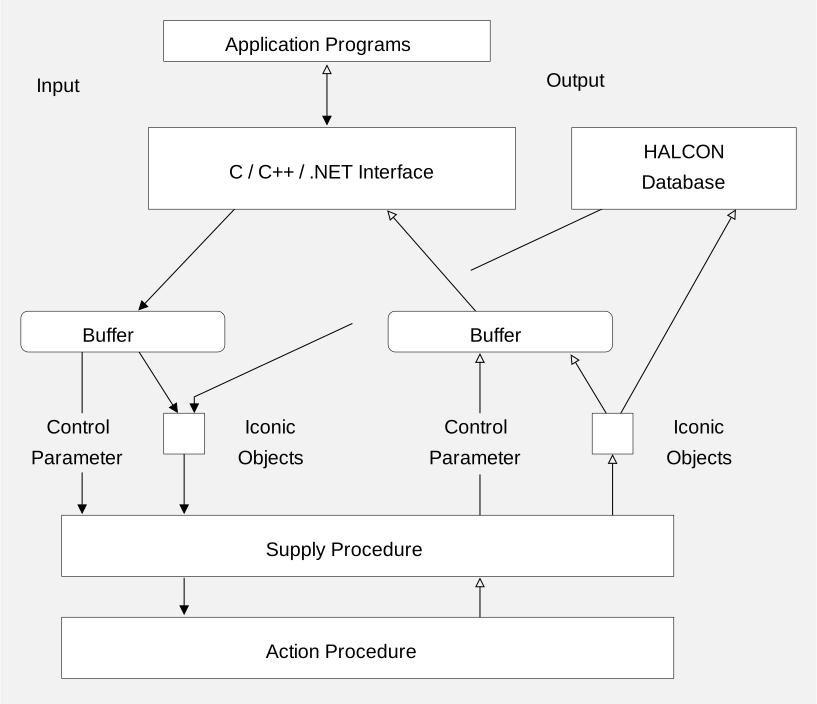
Figure 1. Data flow within HALCON
The buffer contains input data as well as output data. Control parameters (containing all kind of control values like integers, floating-point values, strings or handles) are stored directly in the buffers, whereas all iconic data (including images, regions and XLDs) are stored in the database and represented by an iconic object key. Iconic data can be accessed with the help of database procedures by using these keys. The Extension Package Interface provides special procedures and macros for reading and writing elements of the parameter buffer within the supply procedure. Every parameter belongs to one of the four classes
- input iconic object
- output iconic object
- input control parameter
- output control parameter
that determines the name of the suitable procedures/macros (for example: HGetCPar is used to get an input control value).
To identify a specific parameter within a class, its number is passed to the procedure/macro.
This is the number of the parameter within the parameter-list of a HALCON operator counted for every parameter class (for example: to get the value of the second input control parameter, the number 2 must be passed to HGetCPar).
The read-/write access on the buffer is done automatically by the generated interface.
The code of this interface is generated by the HALCON compiler hcomp from a so-called definition file (DEF file).
For more information, see About the example package and HALCON compiler hcomp.
Any programmer of a new HALCON operator must provide such a definition file, which contains all relevant information, for example, concerning in- and output parameters: information about the parameter class (input-/output, iconic object/control), about the parameter type, etc.
The syntax and semantics of the definition file is explained in Describing operators (DEF files).
HALCON packages🔗
Similar to the standard HALCON system a programmer has to provide (at least) two libraries (DLLs in Windows, shared libraries in Linux environments) in order to extend HALCON by a new operator package (see Creating a new HALCON package).
- A library containing the new operators (written in C).
Most of this manual is about how to write such operators based on internal data structures / procedures of the HALCON system.
This library has the same name as the package itself, in our example
halconuser. - Libraries encapsulating the generated interface code (for C, C++, .NET).
These libraries (i.e., the operator library and one of the interface libraries) have to be used in new applications in order to provide the interface of the new operators to the host language of your choice.
Most of the work concerning these libraries is done by the HALCON compiler
hcomp, see The HALCON compilerhcompfor details. In the example package these libraries are calledhalconuserc,halconusercpp, andhalconuserdotnet.
The names of all these libraries are derived from the name of the package itself:
A package package contains the libraries package, packagec, packagecpp, and packagedotnet.
The names of all these libraries are derived from the name of the package itself:
A package package contains the libraries libpackage, libpackagec, and libpackagecpp.
Packages and HALCON XL🔗
Extension packages can also be used in HALCON XL.
Similar to the HALCON libraries, which exist in two versions (for example, halcon.dll and halconxl.dll), you must provide separate versions of your package libraries to be used together with HALCON XL.
The names of these libraries must have the suffix xl; for example, the HALCON XL version of the example package halconuser consists of the libraries halconuserxl.dll, halconusercxl.dll, halconusercppxl.dll, and halconuserxxl.dll (Windows), libhalconuserxl.so, libhalconusercxl.so, and libhalconusercppxl.so (Linux), and halconuserdotnetxl.dll (.NET).
The HALCON XL version of the libraries is created analogously to the standard HALCON version with only small differences. For more information, see Generating HALCON packages.
Version compatibility🔗
HALCON packages are version-specific. Packages built for one major version of HALCON are unlikely to work with another major version of HALCON. Packages should be binary-compatible across maintenance releases of HALCON.
Since extension packages must use internal HALCON interfaces, which may change between major HALCON versions, the source code of a package developed for one major version of HALCON may need to be modified to be able to compile the package for a different major version of HALCON.