Basic access to iconic input objects🔗
Names
Synopsis
#include "Halcon.h"

HGetObj(   Hproc_handle  proc_handle,
           int           par_num,
           INT4_8        obj_num
           Hkey          *obj_key)

HGetComp(  Hproc_handle  proc_handle,
           Hkey          obj_key,
           int           comp
           Hkey          *comp_key)

HGetRL(    Hproc_handle  proc_handle,
           Hkey          region_key,
           Hrlregion     *region)

HGetImage( Hproc_handle  proc_handle,
           Hkey          image_key,
           Himage        *image)

HGetXLD(   Hproc_handle  proc_handle,
           Hkey          obj_key,
           int          xld_type,
           Hpoly|Hcont   **xld)
This section introduces some basic routines for accessing iconic objects (regions, gray value channels, XLDs), see Basic routines for accessing iconic input objects. They form a basic interface to the HALCON database of iconic objects. Figure 1 illustrates how they are used to read image and region data from input iconic parameters.
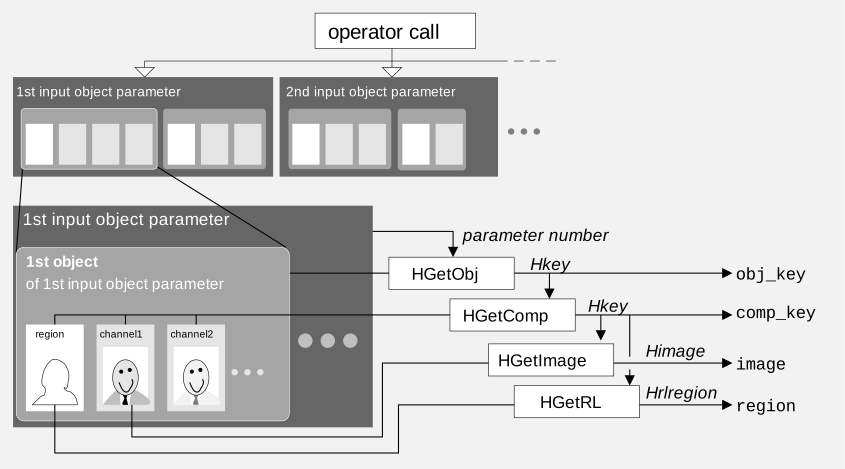
Figure 1. Direct access to input image objects.
HGetObj🔗
HGetObj (see Basic routines for accessing iconic input objects) returns the database key (type: Hkey) of an iconic object corresponding to the input object parameter with the index par_num of the HALCON operator.
Note that HGetObj automatically checks the result state of the underlying procedure with the macro HCkP (see HCkP).
Thus, you must not use HCkP on HGetObj yourself.
int8_t   inp_pars;
int32_t  num_objs;
int      p,o;
Hkey     key;
...
/* get number of input iconic parameters:                     */
/* note: This number is known in general - it is specified by */
/* the operator header in the corresponding DEF file of the   */
/* operator                                                   */
HReadGV(proc_handle,HGinp_obj,&inp_pars);
for (p=1; p<=inp_pars; p++) {
   /* get number of input iconic objects per input obj. parameter: */
   HReadGVA(proc_handle,HGnum_obj,&num_objs,p);
   for (o=1; o<=num_objs; o++) {
      HGetObj(proc_handle,p,o,&key); /* get key of iconic object   */
      /* further processing ... */
   }
}
The iconic object can either be a region (iconic object that contains only a region component), an image (iconic object that contains a region component and one or more image channels), or an XLD (iconic object that contains a contour or a polygon).
The parameters of a HALCON operator are numbered consecutively from 1 to n (not from 0 to n − 1) for each parameter class (input/output iconic object/control).
The parameter par_num of HGetObj refers to this index, thus specifying the desired input iconic parameter.
All objects passed within a single input iconic parameter are numbered from 1 to m, with the first iconic object in the list having the index 1.
The parameter obj_num of HGetObj denotes the index of a desired iconic object within this list (1 ≤ obj_num ≤ m).
The total number of input iconic parameters for an operator is specified in the corresponding DEF file1, but the number of objects within an input iconic parameter is dynamic.
This value is accessible via the Extension Package Interface routine HReadGVA:
where p denotes the parameter index and num_objs is the desired number of iconic objects.
As an alternative for reading the number of iconic objects of an input iconic parameter without the routine HReadGVA, you can use the macro HGetObjNum (see HGetObjNum).
Note that a loop over all iconic objects passed to an operator within an input iconic object parameter is a very common task.
Therefore, HALCON provides a macro for this problem: See HAllObj in HAllObj.
HGetComp🔗
HGetComp (see Basic routines for accessing iconic input objects) returns the database key of an image component (image matrix, i.e., channel: image_key or domain, i.e., area of definition: region_key) of an image object that is stored under the key obj_key in the HALCON database of iconic objects.
Note that HGetComp automatically checks the result state of the underlying procedure with the macro HCkP (see HCkP).
Thus, you must not use HCkP on HGetComp yourself.
int obj_channels;
Hkey obj_key;
Hkey region_key;
Hkey image_key;
...
/* get key of object: */
HGetObj(proc_handle,p,o,&obj_key);
/* get key of region: */
HGetComp(proc_handle,obj_key,REGION,®ion_key);
/* get number of channels: */
HCkP(HPNumOfChannels(proc_handle,p,o,&obj_channels));
for (i=1; i<=obj_channels; i++) {
/* get image matrix key: */
HGetComp(proc_handle,obj_key,i,&image_key);
/* ...further processing */
}
All components of an iconic object are consecutively numbered from 0 to n, with 0 denoting the region (domain) and 1… n denoting the channels (image matrices).
To get a better legibility of program code, the constants REGION (= 0), IMAGE_INDEX (= 1), IMAGE1 (= 1), IMAGE2 (= 2), etc. have been defined globally and may be used as parameter values.
Names
Synopsis
#include "Halcon.h"

Herror HPNumOfChannels( Hproc_handle proc_handle,
                        int          par_num,
                        INT4_8       obj_num,
                        int          *chn_num)
The number of channels per image object obj_num of parameter par_num is accessible via HPNumOfChannels, see Example for HGetComp: Database keys of all regions and channels within an input image object and Auxiliary routine HPNumOfChannels:
See also HNumOfChannels in HNumOfChannels for a convenience version of this routine when dealing with the first input iconic parameter.
More examples of how to use HGetComp can be found in Example for HGetRL: Calculate the area of a region and Example for HGetImage: Average gray value of first channel.
HGetRL🔗
HGetRL (see Basic routines for accessing iconic input objects) reads the runlength encoding of a region (type: Hrlregion, see Region data (Hrlregion)) denoted by the database key region_key (type Hkey) from the HALCON database.
Note that HGetRL automatically checks the result state of the underlying procedure with the macro HCkP (see HCkP).
Thus, you must not use HCkP on HGetRL yourself.
Hrlregion *region;
Hkey obj_key;
Hkey region_key;
...
HCkP(HAllocRLTmp(proc_handle,®ion));
HGetObj(proc_handle,p,o,&obj_key);
HGetComp(proc_handle,obj_key,REGION,®ion_key);
HGetRL(proc_handle,region_key,region);
/* processing (in general this should be done calling an action proc.) */
area = 0;
for (i=0; i<region->num; i++)
area += region->rl[i].ce - region->rl[i].cb + 1;
HCkP(HFreeRLTmp(proc_handle,region));
Since the region data is copied to region, it might be overwritten with new values (in contrast to HGetImage and HGetFDRL, see HGetImage and HGetFDRL).
However, this means that enough memory for region must be allocated before calling HGetRL, see Temporary data.
Example for HGetRL: Calculate the area of a region and Example for HGetImage: Average gray value of first channel show example applications of HGetRL.
HGetImage🔗
HGetImage (see Basic routines for accessing iconic input objects) reads the image data (type: Himage, see Pixel data (Himage)) of a specific gray value component (i.e., channel) of an image object referenced by its database key (type Hkey) in the HALCON database.
Note that HGetImage automatically checks the result state of the underlying procedure with the macro HCkP (see HCkP).
Thus, you must not use HCkP on HGetImage yourself.
Hkey obj_key;
Hkey image_key;
Hkey region_key;
Himage image;
Hrlregion *region;
...
HGetComp(proc_handle,obj_key,IMAGE_INDEX,&image_key);
HGetComp(proc_handle,obj_key,REGION,®ion_key);
HGetImage(proc_handle,image_key,&image);
HGetRL(proc_handle,region_key,region);
switch (image.kind) {
case BYTE_IMAGE:
/* processing (in general this should */
/* be done calling an action procedure) */
area = sum = 0;
for (c=0; c<region->num; c++) {
for (i=CB(region->rl,c,image.width);
i<=CE(region->rl,c,image.width); i++, area++)
sum += image.pixel.b[i];
}
average = sum / area;
break;
default: return(H_ERR_WIT); /* wrong image type */
}
The data structure Himage contains the gray values, the gray value type, and the size of the image matrix.
Instead of copying the image matrix, HGetImage only returns a pointer to the raw data in image.pixel.
This is much more efficient, but means that only read access to the image matrix is recommended (otherwise you will encounter unpredictable side effects).
Example for HGetImage: Average gray value of first channel shows an application of HGetImage.
HGetXLD🔗
HGetXLD (see Basic routines for accessing iconic input objects) is used to access XLD objects in the HALCON database of iconic objects.
The object of interest is specified by the database key obj_key.
The parameter xld_type allows to specify the kind of XLD data to be accessed: It has to be set to XLD_CONTOUR_ID in case of a contour and to XLD_POLYGON_ID in case of a polygon.
Corresponding to the selected type, HGetXLD expects a pointer to Hcont or a pointer to Hpoly in the parameter xld.
In both cases not the underlying data within the structures Hcont or Hpoly but only the pointers to the data are copied from the database.
Thus, please avoid any write access to this data.
Otherwise you will encounter unpredictable side effects (changing other iconic objects).
Example for HGetXLD: Return the number of points of the contour with the index obj_num within input iconic parameter par_num shows a simple example for how to use HGetXLD.
Note that HGetXLD automatically checks the result state of the underlying procedure with the macro HCkP (see HCkP).
Thus, you must not use HCkP on HGetXLD yourself.
Hkey         obj_key;
Hcpar        num_points;
Hcont        *cont;

HGetObj(proc_handle,par_num,obj_num,&obj_key);
HGetXLD(proc_handle,obj_key,XLD_CONTOUR_ID,(void*)&cont);

/* processing (in general this should be done calling an action proc.) */
num_points.type  = LONG_PAR;
num_points.par.l = cont->num;
HPutCPar(proc_handle,1,&num_points,1);
-
So this number is actually known by the programmer. However, using
HReadGVit can be read from the operator context as well, see Example for HGetObj: Database keys of all iconic objects of all input object parameters. ↩