set_color🔗
Short description🔗
set_color — Set output color.
Signature🔗
set_color( window WindowHandle, string Color )
Description🔗
set_color defines the colors for region output in the window. The
available colors can be queried with the operator query_color. In
addition, the Color may be specified as hexadecimal RGB triplet
or RGBA quadruplet in the form '#rrggbb' and '#rrggbbaa'.
‘rr’, ‘gg’, ‘bb’, and ‘aa’ are hexadecimal numbers
between ‘00’ and ‘ff’, respectively. ‘aa’ denotes the alpha value of a
color and can be used to display transparent regions.
The parameter Color can contain a single color or a tuple with up
to 256 colors.
If only a single color is passed, all output is in this color.
If a tuple of colors is passed, the output color of regions is modulo
to the number of colors. In the example below, the first circle is
displayed red, the second in transparent green and the third in red again.
HALCON always begins output with the first color passed. Note, that the
number of output colors depends on the number of objects that are displayed
in one operator call. If only single objects are displayed, they always
appear in the first color, even if they consist of more than one connected
component.
The defined colors are used until set_color,
set_rgb, set_rgba, set_hsi or
set_gray is called again.
Colors are defined separately for each window. They can only be changed for the valid window.
Color is used in operators with region output like
disp_region, disp_line,
disp_rectangle1, or disp_arrow.
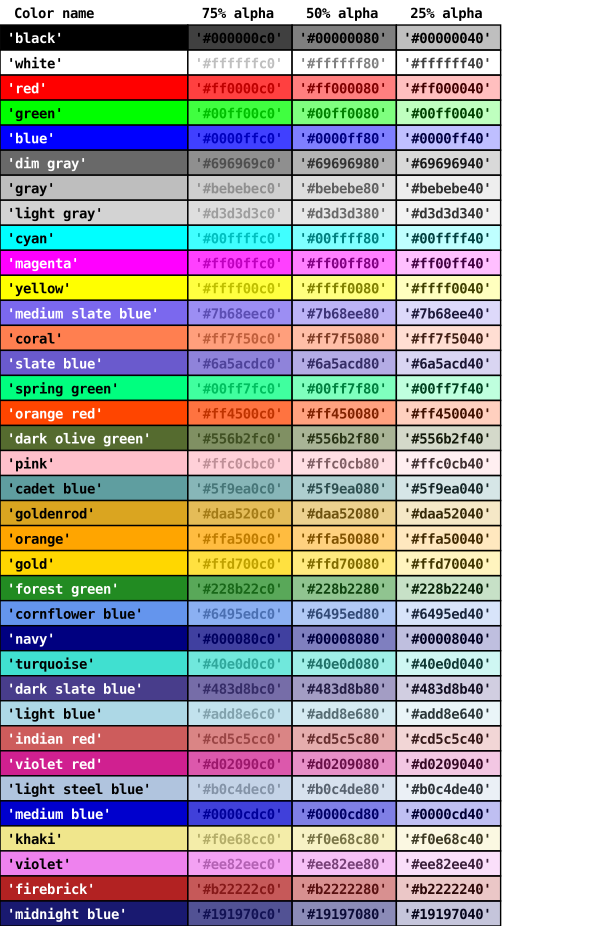
Examples of possible color strings
Execution information🔗
Execution information
-
Multithreading type: reentrant (runs in parallel with non-exclusive operators).
-
Multithreading scope: global (may be called from any thread).
-
Processed without parallelization.
Parameters🔗
WindowHandle (input_control) window → (handle)
Window handle.
Color (input_control) string(-array) → (string)
Output color names.
Default: 'white'
Suggested values: 'black', 'white', 'red', 'green', 'blue', 'cyan', 'magenta', 'yellow', 'dim gray', 'gray', 'light gray', 'medium slate blue', 'coral', 'slate blue', 'spring green', 'orange red', 'orange', 'dark olive green', 'pink', 'cadet blue', '#003075', '#e53019', '#ffb529', '#f28d26bb'
Example🔗
(HDevelop)
set_color(WindowHandle, ['red', '#00ff00a0'])
disp_circle(WindowHandle, [100,200,300], [200,300,100], [100,100,100])
Result🔗
set_color returns 2 (H_MSG_TRUE) if the window is valid and the
passed colors are displayable on the screen. Otherwise an exception
is raised.
Combinations with other operators🔗
Combinations
Possible predecessors
Possible successors
Alternatives
See also
Module🔗
Foundation