set_metrology_model_param🔗
Short description🔗
set_metrology_model_param — Set parameters that are valid for the entire metrology model.
Signature🔗
set_metrology_model_param( metrology_model MetrologyHandle, attribute.name GenParamName, attribute.value GenParamValue )
Description🔗
set_metrology_model_param sets or changes parameters that are
valid for the entire metrology model MetrologyHandle.
For an explanation of the concept of 2D metrology see the introduction of chapter 2D Metrology.
The following values for GenParamName and GenParamValue
are possible:
Calibration🔗
If both internal camera parameters and the 3D pose of the measurement plane
are set, apply_metrology_model calculates the results
in metric coordinates.
-
'camera_param': Often the internal camera parameters are the result of calibrating the camera with the operator
calibrate_cameras(see Calibration for the sequence of the parameters and the underlying camera model). It is possible to discard the internal camera parameters by setting 'camera_param' to [].Default: []
-
'plane_pose': The 3D pose of the measurement plane in camera coordinates. It is possible to discard the pose by setting 'plane_pose' to [].
Default: []
Definition of a new reference system🔗
When adding the metrology objects to the metrology model using e.g.,
add_metrology_object_generic,
add_metrology_object_circle_measure etc. the positions and
orientations are given with respect to the image coordinate system which
has its origin in the upper left corner of the image.
In some cases it may be necessary to change the reference system with respect
to which the metrology objects are given. This is for instance the case
when using a shape model to align the metrology model in a new image.
The results from find_generic_shape_model can only be directly used in
align_metrology_model if the reference system of the metrology model
is the same as the system in which the shape model is given (see
align_metrology_model for more details).
-
'reference_system': The tuple given in
GenParamValueshould contain [row, column, angle]. By default the reference system is the image coordinate system which has its origin in the top left corner. A new reference system is defined with respect to the image coordinate system by its translation (row,colum) and its rotation angle (angle). All components of the metrology model are converted into the new reference coordinate system. In the following figure, the reference system of the metrology model is set to the center of the image.set_metrology_model_param(MetrologyHandle, 'reference_system', [Height/2, Width/2, 0])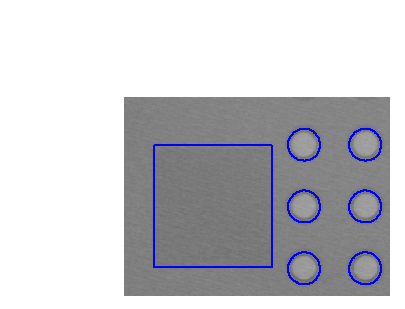
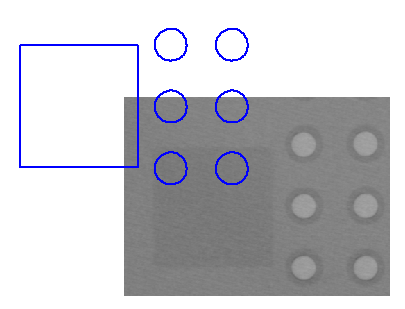
(1) (2) (1) Several metrology objects and their contours are shown in blue. (2) The new reference system for the metrology model is placed in the center of the image. As a consequence, the positions and orientations of the metrology objects are moved into the reverse direction. The resulting contours of the metrology objects are shown in blue.
Default: [0, 0, 0]
Scaling the results🔗
The results of the measurement queried by
get_metrology_object_result can be scaled by setting a scaling
factor.
-
'scale': The parameter 'scale' must be specified as the ratio of the desired unit to the original unit. If no camera parameters are given, the default unit is pixel.
If 'camera_param' and 'plane_pose' are set, the original unit is determined by the coordinates of the calibration object. Standard HALCON calibration plates are defined in metric coordinates. If it was used for the calibration, the desired unit can be set directly. The relation of units to scaling factors is given in the following table:
Unit Scaling factor m 1 dm 10 cm 100 mm 1000 um, microns 1e6 Suggested values: 1.0, 0.1, 'm', 'cm', 'mm', 'microns', 'um'
Default: 1.0
Execution information🔗
Execution information
-
Multithreading type: reentrant (runs in parallel with non-exclusive operators).
-
Multithreading scope: global (may be called from any thread).
-
Processed without parallelization.
This operator modifies the state of the following input parameter:
During execution of this operator, access to the value of this parameter must be synchronized if it is used across multiple threads.
Parameters🔗
MetrologyHandle (input_control, state is modified) metrology_model → (handle)
Handle of the metrology model.
GenParamName (input_control) attribute.name → (string)
Name of the generic parameter.
Default: 'camera_param'
List of values: 'camera_param', 'plane_pose', 'reference_system', 'scale'
GenParamValue (input_control) attribute.value(-array) → (string / real / integer)
Value of the generic parameter.
Default: []
Suggested values: 1.0, 0.1, 'm', 'cm', 'mm', 'microns', 'um'
Result🔗
If the parameters are valid, the operator
set_metrology_model_param returns the value 2 (H_MSG_TRUE). If
necessary, an exception is raised.
Combinations with other operators🔗
Combinations
Possible predecessors
create_metrology_model, set_metrology_model_image_size
Possible successors
add_metrology_object_generic, get_metrology_object_model_contour
See also
set_metrology_object_param, align_metrology_model, get_metrology_model_param
Module🔗
2D Metrology