set_shape_model_clutter🔗
Short description🔗
set_shape_model_clutter — Set the clutter parameters of a shape model.
Signature🔗
set_shape_model_clutter( region ClutterRegion, shape_model ModelID, hom_mat2d HomMat2D, number ClutterContrast, attribute.name GenParamName, attribute.value GenParamValue )
Description🔗
set_shape_model_clutter sets the clutter parameters of the shape
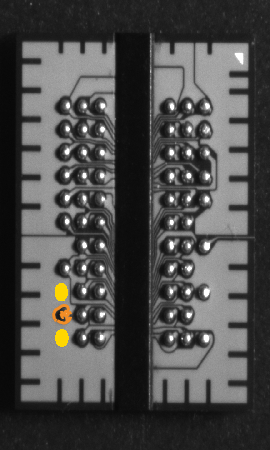
model ModelID. In particular, a region is defined relative to the
model contours, in which no (or too faint) clutter edges should occur in the
search image.
This is helpful, e.g., if it is a special characteristic of the model
that, in specific parts near to the model, structures are missing.
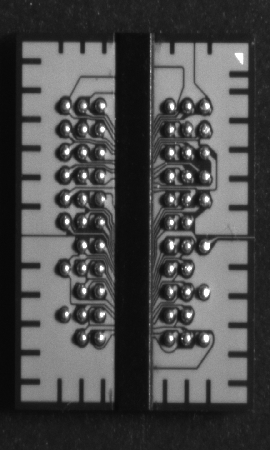
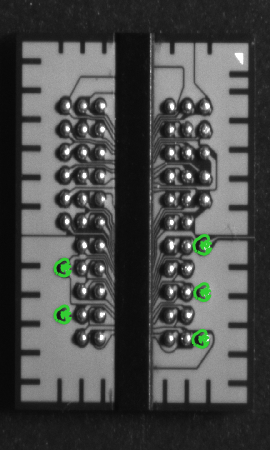
For example, within the HDevelop example program
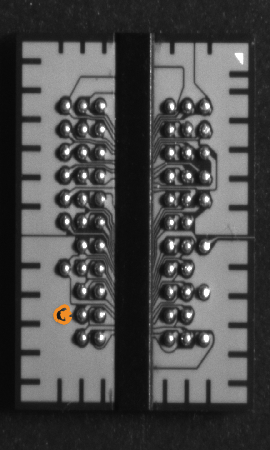
find_shape_model_clutter.hdev, the model corresponds to a ball in a
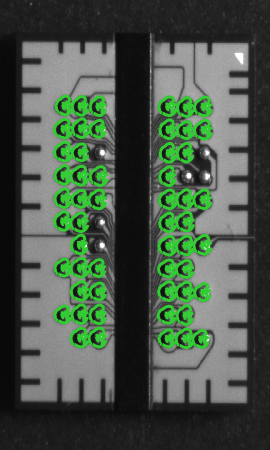
ball grid array (BGA). As the ball grid array represents a repeating pattern,
many matches are returned when matching is applied without considering the
neighborhood of the model. By defining a clutter region, the search can be
restricted to specific instances of the model.
 |
 |
 |
 |
 |
| (1) | (2) | (3) | (4) | (5) |
(1) Image of ball grid array, (2) shape model of a single ball of the array (orange), (3) matching result without using clutter parameters (green), (4) defining the clutter region (yellow) relative to the model (orange), (5) matching result using clutter parameters (green).
For matches found in a search image, edges within the clutter region
increase the resulting clutter scores. These are returned by
find_shape_model, find_scaled_shape_model,
find_aniso_shape_model, find_shape_models,
find_scaled_shape_models, and find_aniso_shape_models
in the parameter Score, following the common values measuring
how much of the model is visible in the image.
Note that the input parameter MinScore of those operators
additionally expects information specifying the maximum
clutter score up to which matches should be returned.
For more information regarding the setting of MinScore,
please refer to the respective operator reference.
To define the clutter region relative to the model contours, you need the
region ClutterRegion and the transformation matrix HomMat2D
that maps the model contours to the respective position where the object
appears in an image. Typically, you obtain them by searching for a model
instance in an image, e.g., with the operator find_shape_model. Then,
the transformation matrix can be determined with the procedure
get_hom_mat2d_from_matching_result using the respective output
parameters of the search. The region ClutterRegion is specified
within the same image. Note that ClutterRegion should contain the
regions around the superfluous edges that are typical for all expected
manifestations of the matches. We recommend that the clutter region is
chosen larger than necessary when large scale ranges are
searched. Furthermore, choosing the clutter region not too near to the
expected model contours can increase the robustness.
The parameter ClutterContrast determines the contrast the edges
in the clutter region must have in order to be counted as clutter. In
many applications, the parameter Contrast, which has been used to
create the shape model, is also a reasonable choice for
ClutterContrast.
ClutterContrast may not be smaller than the parameter
MinContrast of the shape model, otherwise an error is raised at
runtime.
The polarity of the found clutter edges is ignored, i.e., bright objects on a
dark background will yield the same clutter score as dark objects on a
bright background, independent of the parameter Metric of the
shape model.
Please note that of all shape-based matching results, clutter scores are
affected the most when a variation of illumination occurs.
With GenParamName set to 'clutter_border_mode', the
behavior of the clutter score can be influenced in cases where the clutter
region of a found match is not entirely contained in the image domain. The
corresponding values for 'clutter_border_mode'
(GenParamValue) can be 'clutter_border_average' or
'clutter_border_empty'.
-
'clutter_border_average':
When
GenParamValueis set to 'clutter_border_average' (default), the hidden part of the clutter region is assumed to be filled on average as is its visible part. If the clutter region is not visible at all, the clutter score of the found match is set to 0.0. -
'clutter_border_empty':
When
GenParamValueis set to 'clutter_border_empty', the clutter region is assumed to be empty where it is not visible.
Note that GenParamValue set to 'clutter_border_average'
results in higher clutter scores even if the match is not located at the
border of the image domain.
The use of clutter parameters can be disabled and enabled by calling
set_shape_model_param. For newly created shape models, the use of
clutter parameters is disabled. After calling
set_shape_model_clutter, the use of clutter parameters is enabled.
Depending on the activation status for the use of clutter parameters, the find
operators, e.g., find_shape_model, expect a different number of
entries in the input parameter MinScore. The set clutter parameters
and the value of 'use_clutter' can be queried using the operator
get_shape_model_clutter.
Execution information🔗
Execution information
-
Multithreading type: reentrant (runs in parallel with non-exclusive operators).
-
Multithreading scope: global (may be called from any thread).
-
Processed without parallelization.
This operator modifies the state of the following input parameter:
During execution of this operator, access to the value of this parameter must be synchronized if it is used across multiple threads.
Parameters🔗
ClutterRegion (input_object) region → object
Region where no clutter should occur.
ModelID (input_control, state is modified) shape_model → (handle)
Handle of the model.
HomMat2D (input_control) hom_mat2d → (real)
Transformation matrix.
ClutterContrast (input_control) number → (integer)
Minimum contrast of clutter in the search images.
Default: 128
GenParamName (input_control) attribute.name(-array) → (string)
Parameter names.
List of values: 'clutter_border_mode'
GenParamValue (input_control) attribute.value(-array) → (real / integer / string)
Parameter values.
List of values: 'clutter_border_average', 'clutter_border_empty'
Example🔗
(HDevelop)
*
* Create a shape model.
read_image (ImageModel, '/bga_gap/bga_gap_01.png')
gen_circle (ROI, 753.869, 551.624, 28.4027)
reduce_domain (ImageModel, ROI, ImageReduced)
create_aniso_shape_model (ImageReduced, 'auto', rad(0), rad(0), 'auto', \
                          0.95, 1.05, 'auto', 0.95, 1.05, 'auto', 'auto', \
                          'use_polarity', 'auto', 'auto', ModelID)
*
* Specify the clutter parameters.
find_aniso_shape_model (ImageModel, ModelID, rad(0), rad(0), 0.95, 1.05, \
                        0.95, 1.05, 0.83, 0, 0.0, 'least_squares', 0, 0.0, \
                        Row, Column, Angle, ScaleR, ScaleC, Score)
get_hom_mat2d_from_matching_result (Row[0], Column[0], Angle[0], ScaleR[0], \
                                    ScaleC[0], HomMat2D)
*
gen_circle (ROI_0, 700.655, 548.666, 21.6273)
gen_circle (ROI_1_0, 810.655, 550.611, 21.6273)
union2 (ROI_0, ROI_1_0, ClutterRegion)
*
ClutterContrast := 12
*
* Set the clutter parameters into shape model.
set_shape_model_clutter (ClutterRegion, ModelID, HomMat2D, ClutterContrast, \
                         [], [])
*
* Use the shape model to detect objects with a small amount of clutter
read_image (Image,'/bga_gap/bga_gap_02.png')
MaxClutter := 0.09
find_aniso_shape_model (Image, ModelID, rad(0), rad(0), 0.95, 1.05, 0.95, \
                        1.05, [0.83, MaxClutter], 0, 0.0, 'least_squares', \
                        [4, 3],  0.0,  Row, Column, Angle, ScaleR, ScaleC, \
                        Score)
*
* Visualize the matches
dev_display_shape_matching_results (ModelID, ['green', 'red'], Row, Column, \
                                    Angle, ScaleR, ScaleC, 0)
Clutter := Score[|Score|/2:|Score|-1]
Score := Score[0:|Score|/2-1]
dev_inspect_ctrl ([Score, Clutter])
Result🔗
If the parameters are valid, the operator set_shape_model_clutter
returns the value 2 (H_MSG_TRUE). If necessary an exception is raised.
Combinations with other operators🔗
Combinations
Possible predecessors
create_shape_model, create_scaled_shape_model, create_aniso_shape_model, create_shape_model_xld, create_scaled_shape_model_xld, create_aniso_shape_model_xld
Possible successors
find_shape_model, find_scaled_shape_model, find_aniso_shape_model, find_shape_models, find_scaled_shape_models, find_aniso_shape_models, get_shape_model_clutter
Alternatives
set_generic_shape_model_param, set_generic_shape_model_object
See also
Module🔗
Matching