Concept – 1D Measuring🔗
This chapter contains operators for 1D measuring.
Concept of 1D measuring🔗
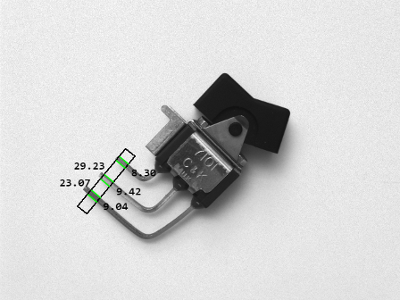
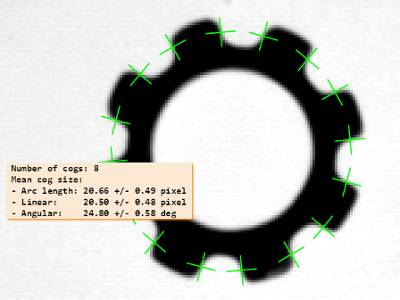
With 1D measuring, edges, i.e., transitions from light to dark or from dark to light, can be located along a predefined line or arc. This allows you to measure the dimension of parts fast and easily with high accuracy. Note that if you want to measure the dimensions of geometric primitives like circles, ellipses, rectangles, or lines, and approximate values for the positions, orientations, and geometric shapes are known, 2D Metrology may be a suitable alternative.
 |
 |
| (1) | (2) |
Measure edges and the distances between them along a line (1) or along an arc (2). These images are from the example programs fuzzy_measure_pin.hdev and measure_ring.hdev.
In the following, the steps that are required to use 1D measuring are described briefly.
-
Generate measure object: First, a measure object must be generated that describes the region of interest for the measurement. If the measurement should be performed along a line, the measure object is defined by a rectangle. If it should be performed along an arc, the measure object is defined as an annular arc. The measure objects are generated by the operators
Note that you can use shape-based matching (see chapter Matching / Shape Based) to automatically align the measure objects.
-
Perform the measurement: Then, the actual measurement is performed. For this, typically one of the following operators is used:
-
measure_posextracts straight edges perpendicular to the main axis of the measure object and returns the positions of the edge centers, the edge amplitudes, and the distances between consecutive edges. -
measure_pairsextracts straight edge pairs perpendicular to the main axis of the measure object and returns the positions of the edge centers of the edge pairs, the edge amplitudes for the edge pairs, the distances between the edges of an edge pair, and the distances between consecutive edge pairs. -
measure_threshextracts points with a particular gray value along the main axis of the measure object and returns their positions and the distances between consecutive points.
Alternatively, if there are extra edges that do not belong to the measurement, fuzzy measuring can be applied. Here, so-called fuzzy rules, which describe the features of good edges, must be defined. Possible features are, e.g., the position, the distance, the gray values, or the amplitude of edges. These functions are created with
create_funct_1d_pairsand passed to the tool withset_fuzzy_measureorset_fuzzy_measure_norm_pair. Then, based on these rules, one of the following operators will extract the most appropriate edges:-
fuzzy_measure_posextracts straight edges perpendicular to the main axis of the measure object and returns the positions of the edge centers, the edge amplitudes, the fuzzy scores, and the distances between consecutive edges. -
fuzzy_measure_pairsextracts straight edge pairs perpendicular to the main axis of the measure object and returns the positions of the first and second edges of the edge pairs, the edge amplitudes for the edge pairs, the positions of the centers of the edge pairs, the fuzzy scores, the distances between the edges of an edge pair, and the distances between consecutive edge pairs. -
fuzzy_measure_pairingis similar tofuzzy_measure_pairswith the exception that it is also possible to extract interleaving and included pairs using the parameter Pairing.
Alternatively to the automatic extraction of edges or points within the measure object, you can also extract a one-dimensional gray value profile perpendicular to the rectangle or annular arc and evaluate this gray value information according to your needs. The gray value profile within the measure object can be extracted with the operator
-
-
Destroy measure object handle: When you no longer need the measure object, you destroy it by passing the handle to
Further operators🔗
In addition to the operators mentioned above, you can use
reset_fuzzy_measure to discard a fuzzy function of a fuzzy set that
was set via set_fuzzy_measure or set_fuzzy_measure_norm_pair
before, translate_measure to translate the reference point of the
measure object to a specified position, write_measure and
read_measure to write the measure object to file and read it from
file again, and serialize_measure and deserialize_measure to
serialize and deserialize the measure object.
Glossary🔗
In the following, the most important terms that are used in the context of 1D Measuring are described.
-
measure object A data structure that contains a specific region of interest that is prepared for the extraction of straight edges which lie perpendicular to the major axis of a rectangle or an annular arc.
-
annular arc A circular arc with an associated width.
Further Information🔗
See also the “Solution Guide Basics” and
“Solution Guide on 1D Measuring” for further details about
1D Measuring.
Learn about 1D Measuring and many other topics in interactive online courses at our MVTec Academy.