Concept – Model🔗
This chapter explains the general concept of the deep learning (DL) model in HALCON and the data handling.
By concept, a deep learning model in HALCON is an internal representation of a deep neural network. Each deep neural network has an architecture defining its function, i.e., the tasks it can be used for. There can be several possible network architectures for one functionality. Currently, networks for the following functionalities are implemented in HALCON as model:
-
3D Gripping Point Detection, see 3D Matching / 3D Gripping Point Detection.
-
Advanced object detection see Deep Learning / Object Detection.
-
Anomaly detection and Global Context Anomaly Detection, see Deep Learning / Anomaly Detection.
-
Classification, see Deep Learning / Classification.
-
Deep 3D Matching, see 3D Matching / Deep 3D Matching.
-
Deep OCR, see OCR / Deep OCR.
-
Instance segmentation and object detection see Deep Learning / Instance Segmentation.
-
Multi-Label Classification, see Deep Learning / Multi Label Classification.
-
Semantic segmentation and edge extraction, see Deep Learning / Semantic Segmentation.
Each functionality is identified by its unique model type. For the implemented methods you can find further information about the specific workflow, data requirements, and validation measures in the corresponding chapters. Information to deep learning in general are given in the chapter Deep Learning.
In this chapter you find the information, which data a DL model needs and returns as well as how this data is transferred.
Data🔗
Deep Learning applications have different types of data to be distinguished. Roughly spoken these are: The raw images with possible annotations, data preprocessed in a way suitable for the model, and output data.
Before the different types of data and the entries of the specific dictionaries are explained, we will have a look how the data is connected. Thereby, symbols and colors refer to the schematic overviews given below.
In brief, the data structure for training or evaluation starts with the raw
images and their ground truth annotations (gray frames).
With the read data the following dictionaries are created:
A dictionary DLDataset (red), which serves as database and
refers to a specific dictionary (yellow) for every input image.
The dictionary DLSample (orange) contains the data for a sample
in the way the network can process it.
A batch of DLSample is handed to the model in
DLSampleBatch.
For evaluation, DLResultBatch is returned, a tuple of
dictionaries DLResult (dark blue), one for every sample.
They are needed to obtain the evaluation results EvaluationResult.
For training, the training results (e.g., loss values) are returned in the
dictionary DLTrainResult (light blue).
The most important steps concerning modifying or creating a dictionary:
-
reading the raw data (symbol: paper with arrow)
-
preprocessing the data (symbol: cogs)
-
training (symbol: transparent brain in an arc)
-
evaluation of the model (symbol: graph)
-
evaluation of a sample (symbol: magnifying glass)
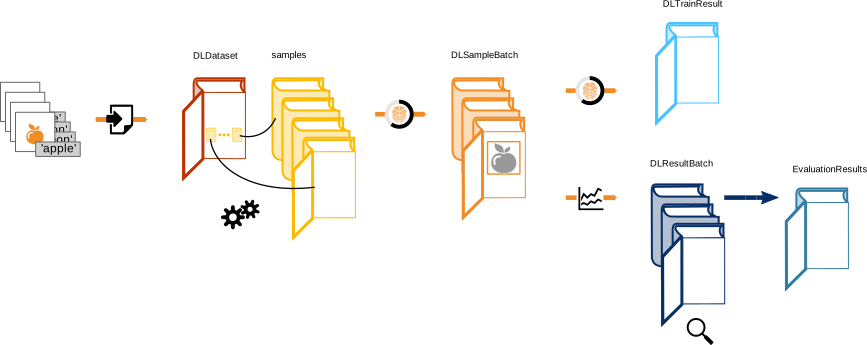
Schematic overview of the data structure during training and evaluation.
For inference no annotations are needed.
Thus, the data structure starts with the raw images (gray frames).
The dictionary DLSample (orange) contains the data for a sample
in the way the network can process it.
The results for a sample are returned in a dictionary DLResult
(dark blue).
The most important steps concerning modifying or creating a dictionary:
-
reading the raw data (symbol: paper with arrow)
-
preprocessing the data (symbol: cogs)
-
inference (symbol: brain in a circle)
-
evaluation of a sample (symbol: magnifying glass)

Schematic overview of the data connection during inference.
In order for the model to process the data, the data needs to follow certain conventions about what is needed and how it is given to the model. As visible from the figures above, in HALCON the data is transferred using dictionaries.
In the following we explain the involved dictionaries, how they can be created, and their entries. Thereby, we group them according to the main step of a deep learning application they are created in and whether they serve as input or output data. The following abbreviations mark for which methods the entry applies:
-
'Any': any method
-
'3D-GPD': 3D Gripping Point Detection
-
'3D-PE': Deep 3D Matching pose estimation component
-
'AD': anomaly detection
-
'CL': classification
-
'MLC': multi-label classification
-
'OCR-D': Deep OCR detection component
-
'OCR-R': Deep OCR recognition component
-
'GC-AD': Global Context Anomaly Detection
-
'OD': object detection
In case the entry is only applicable for a certain 'instance_type', the specification 'r1': 'rectangle1', 'r2': 'rectangle2' is added.
For entries only applicable for instance segmentation the specification 'is' is added.
-
'SE': semantic segmentation
The entries only applicable for certain methods are described more extensively in the corresponding chapter.
-
Training and evaluation input data The dataset consists of images and corresponding information. They have to be provided in a way the model can process them. Concerning the image requirements, find more information in the section “Images” below.
The information about the images and the dataset is represented in a dictionary
DLDataset, which serves as a database. More precisely, it stores the general information about the dataset and the dictionaries of the individual samples collected under the keysamples. When the actual image data is needed, a dictionaryDLSampleis created (or read if it already exists) for each image required. The relation of these dictionaries is illustrated in the figure below.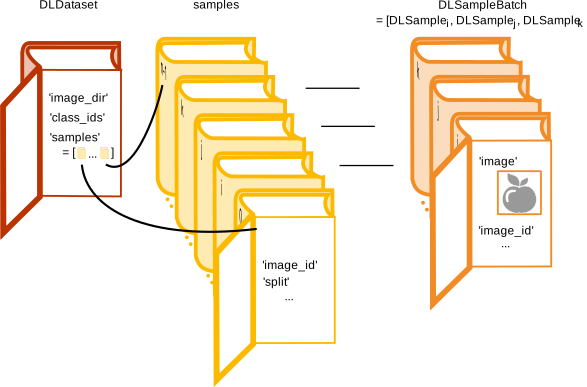
Schematic illustration of the different dataset dictionaries used for training and evaluation. For visibility purpose only few entries are registered and
BatchSizeis set to three. In this example we have \(n\) samples. Thereof three samples are chosen randomly: i,j, and k. The corresponding dictionariesDLSampleare created and joined in the tupleDLSampleBatch.In the following we look at these dictionaries.
-
DLDatasetThe dictionary
DLDatasetserves as a database. It stores general information about the dataset and collects the dictionaries of the individual samples. Thereby iconic data is not included inDLDatasetbut the paths to the respective images. The dictionaryDLDatasetis used by the training and evaluation procedures. It is not necessary for the model, but we highly recommend to create it. Its necessary entries are described below. This dictionary is either created directly when labeling your data using the MVTec Deep Learning Tool or it is created by one of the following method-specific procedures:-
read_dl_dataset_3d_gripping_point_detection(3D Gripping Point Detection) -
read_dl_dataset_anomaly(anomaly detection, Global Context Anomaly Detection) -
read_dl_dataset_classification(classification) -
read_dl_dataset_ocr_detection(Deep OCR - detection component) -
read_dl_dataset_ocr_recognition(Deep OCR - recognition component) -
read_dl_dataset_from_coco(object detection with 'instance_type' = 'rectangle1') -
read_dl_dataset_segmentation(semantic segmentation).
Please see the respective procedure documentation for the requirements on the data in order to use these procedures. In case you create
DLDatasetin an other way, it has to contain at least the entries not marked with a number in the description below. During the preprocessing of your dataset the respective procedures include the further entries of the dictionaryDLDataset.Depending on the model type, this dictionary can have the following entries:
-
image_dir: Any Common base path to all images.format: string
-
dlsample_dir: Any [1] Common base path of all sample files (if present).format: string
-
class_names: Any except OCR-R Names of all classes that are to be distinguished.format: tuple of strings
-
class_ids: Any except OCR-R IDs of all classes that are to be distinguished (range: 0-65534).format: tuple of integers
-
preprocess_param: Any [1] All parameter values used during preprocessing.format: dictionary
-
samples: Any Collection of sample descriptions.format: tuple of dictionaries
-
normals_dir: 3D-GPD Optional. Common base path of all normals images.format: string
-
xyz_dir: 3D-GPD Common base path of all XYZ-images.format: string
-
orig_3d_model: 3D-PE 3D CAD object model.format: string
-
anomaly_dir: AD, GC-AD Common base path of all anomaly regions (regions indicating anomalies in the image).format: string
-
class_weights: CL, SE [1] Weights of the different classes.format: tuple of reals
-
segmentation_dir: SE, 3D-GPD Common base path of all segmentation images.format: string
This dictionary is directly created when labeling your data using the MVTec Deep Learning Tool. It is also created by the procedures mentioned above for reading in your data. The entries marked with [1] are added by the preprocessing procedures.
-
-
samplesThe
DLDatasetkeysamplesgets a tuple of dictionaries as value, one for each sample in the dataset. These dictionaries contain the information concerning an individual sample of the dataset. Depending on the model type, this dictionary can have the following entries:-
image_file_name: Any File name of the image and its path relative toimage_dir.format: string
-
image_id: Any Unique image ID (encoding format: UINT8).format: integer
-
split: Any [2] Specifies the assigned split subset ('train','validation','test').format: string
-
dlsample_file_name: Any [3] File name of the corresponding dictionaryDLSampleand its path relative todlsample_dir.format: string
-
normals_file_name: 3D-GPD Optional. File name of the normals image and its path relative tonormals_dir.format: string
-
segmentation_file_name: 3D-GPD, SE File name of the ground truth segmentation image and its path relative tosegmentation_dir.format: string
-
xyz_file_name: 3D-GPD File name of the XYZ-image and its path relative toxyz_dir.format: string
-
anomaly_file_name: AD, GC-AD Optional. Path to region files with ground truth annotations (relative toanomaly_dir).format: string
-
anomaly_label: AD, GC-AD Ground truth anomaly label on image level (in the form ofclass_names).format: string
-
image_label_id: CL Ground truth label for the image (in the form ofclass_ids).format: tuple of integers
-
image_label_ids: MLC Ground truth labels for the image (in the form ofclass_ids).format: tuple of integers
-
image_id_origin: OCR-R ID of the original image the sample was extracted from.format: integer
-
word: OCR-D, OCR-R Ground truth word.format: string
-
bbox_label_id: OD, OCR-D Ground truth labels for the bounding boxes (in the form ofclass_ids).format: tuple of integers
-
bbox_row1: OD:r1 [4] Ground truth bounding boxes: upper left corner, row coordinate.format: tuple of reals
-
bbox_col1: OD:r1 [4] Ground truth bounding boxes: upper left corner, column coordinate.format: tuple of reals
-
bbox_row2: OD:r1 [4] Ground truth bounding boxes: lower right corner, row coordinate.format: tuple of reals
-
bbox_col2: OD:r1 [4] Ground truth bounding boxes: lower right corner, column coordinate.format: tuple of reals
-
coco_raw_annotations: OD:r1 Optional. It contains for everybbox_label_idwithin this image a dictionary with all raw COCO annotation information.format: tuple of dictionaries
-
bbox_row: OCR-D, OCR-R, OD:r2 [4] Ground truth bounding boxes: center point, row coordinate.format: tuple of reals
-
bbox_col: OCR-D, OCR-R, OD:r2 [4] Ground truth bounding boxes: center point, column coordinate.format: tuple of reals
-
bbox_phi: OCR-D, OCR-R, OD:r2 [4] Ground truth bounding boxes: angle phi.format: tuple of reals
-
bbox_length1: OCR-D, OCR-R, OD:r2 [4] Ground truth bounding boxes: half length of edge 1.format: tuple of reals
-
bbox_length2: OCR-D, OCR-R, OD:r2 [4] Ground truth bounding boxes: half length of edge 2.format: tuple of reals
-
visibility: OD Fractional visibility of bounding boxes.format: tuple of reals
-
mask: 3D-PE, OD:is Ground truth mask marking the instance regions.format: tuple of regions
-
camera_parameter: 3D-PE Camera parameter for the image.format: tuple of HALCON camera parameter
-
pose: 3D-PE Poses of the objects in each bounding box.format: tuple of HALCON poses
These dictionaries are part of
DLDatasetand thus they are created concurrently. An exception are the entries with a mark in the table, [2]: the proceduresplit_dl_datasetaddssplit, [3]: the procedurepreprocess_dl_samplesaddsdlsample_file_name. [4]: Used coordinates: Pixel centered, subpixel accurate coordinates. -
-
DLSampleThe dictionary
DLSampleserves as input for the model. For a batch, they are handed over as the entries of the tupleDLSampleBatchforapply_dl_modelortrain_dl_model_batch. They are created out ofDLDatasetfor every sample by the proceduregen_dl_samplesfollowed bypreprocess_dl_samples. Note,preprocess_dl_sampleswill update the correspondingDLSampledictionary. If preprocessing is done using the standard procedurepreprocess_dl_dataset, the preprocessed samples are stored on the file system. Afterwards they need to be retrieved with the procedureread_dl_samples.DLSamplecontains the preprocessed image and, in case of training and evaluation, all ground truth annotations. Depending on the model type, it can have the following entries:-
anomaly_ground_truth: AD, GC-AD Anomaly image or region, read fromanomaly_file_name.format: image or region
-
anomaly_label: AD, GC-AD Ground truth anomaly label on image level (in the form ofclass_names).format: string
-
anomaly_label_id: AD, GC-AD Ground truth anomaly label ID on image level (in the form ofclass_ids).format: integer
-
bbox_label_id: OD Ground truth labels for the image part within the bounding box (in the form ofclass_ids).format: tuple of integers
-
bbox_row1: OD:r1 [4] Ground truth bounding boxes: upper left corner, row coordinate.format: tuple of reals
-
bbox_col1: OD:r1 [4] Ground truth bounding boxes: upper left corner, column coordinate.format: tuple of reals
-
bbox_row2: OD:r1 [4] Ground truth bounding boxes: lower right corner, row coordinate.format: tuple of reals
-
bbox_col2: OD:r1 [4] Ground truth bounding boxes: lower right corner, column coordinate.format: tuple of reals
-
bbox_row: OCR-D, OD:r2 [4] Ground truth bounding boxes: center point, row coordinate.format: tuple of reals
-
bbox_col: OCR-D, OD:r2 [4] Ground truth bounding boxes: center point, column coordinate.format: tuple of reals
-
bbox_phi: OCR-D, OD:r2 [4] Ground truth bounding boxes: angle phi.format: tuple of reals
-
bbox_length1: OCR-D, OD:r2 [4] Ground truth bounding boxes: half length of edge 1.format: tuple of reals
-
bbox_length2: OCR-D, OD:r2 [4] Ground truth bounding boxes: half length of edge 2.format: tuple of reals
-
image: Any Input image.format: image
-
image_label_id: CL Ground truth label for the image (in the form ofclass_ids).format: integer
-
image_label_ids: MLC Ground truth labels for the image (in the form ofclass_ids).format: tuple of integers
-
mask: 3D-PE, OD:is Ground truth mask marking the instance regions.format: tuple of regions
-
normals: 3D-GPD 2D mappings (3-channel image)format: image
-
segmentation_image: SE, 3D-GPD Image with the ground truth segmentations, read fromsegmentation_file_name.format: image
-
weight_image: SE [5] Image with the pixel weights.format: image
-
target_orientation: OCR-D Orientation target image for the word orientation.format: image
-
target_text: OCR-D Text target image for the character detection.format: image
-
target_link: OCR-D Link target image for the connection of detected character centers to a connected word.format: image
-
target_weight_orientation: OCR-D Weight with respect totarget_orientation.format: image
-
target_weight_link: OCR-D Weight with respect totarget_link.format: image
-
target_weight_text: OCR-D Weight with respect totarget_text.format: image
-
word: OCR-D, OCR-R Ground truth word.format: string
-
x: 3D-GPD X-image (values need to increase from left to right).format: image
-
y: 3D-GPD Y-image (values need to increase from top to bottom).format: image
-
z: 3D-GPD Z-image (values need to increase from points close to the sensor to far points; this is for example the case if the data is given in the camera coordinate system).format: image
-
camera_parameter: 3D-PE Camera parameter for the image.format: tuple of HALCON camera parameter
-
pose: 3D-PE Poses of the objects in each bounding box.format: tuple of HALCON poses
-
width_orig: 3D-PE Original width of the bounding boxes.format: tuple of reals
-
height_orig: 3D-PE Original height of the bounding boxes.format: tuple of reals
These dictionaries are created by the procedure
gen_dl_samplesfollowed bypreprocess_dl_samples. An exception is the entry marked in the table above, [5]: created by the proceduregen_dl_segmentation_weights. [4]: Used coordinates: Pixel centered, subpixel accurate coordinates. -
-
-
Inference input data The inference input data consists of a single
DLSampledictionary or a tuple of such. In contrast to training and evaluation, only the following keys are used:-
image: Any Input imageformat: image
-
normals: 3D-GPD 2D mappings (3-channel image).format: image
-
x: 3D-GPD X-image (values need to increase from left to right).format: image
-
y: 3D-GPD Y-image (values need to increase from top to bottom).format: image
-
z: 3D-GPD Z-image (values need to increase from points close to the sensor to far points; this is for example the case if the data is given in the camera coordinate system).format: image
Concerning the image requirements, find more information in the subsection “Images” below.
For the inference, such a dictionary containing only the image data can be created using the procedure
gen_dl_samples_from_imagesorgen_dl_samples_3d_gripping_point_detection(only for 3D Gripping Point Detection). These dictionaries can be passed one at a time or within a tupleDLSampleBatch. -
-
Training output data
The training output data is given in the dictionary
DLTrainResult. Its entries depend on the model and thus on the operator used (for further information see the documentation of the corresponding operator):-
3D-GPD, 3D-PE, CL, MLC, OCR-D, OCR-R, GC-AD, OD, SE: The operator
train_dl_model_batchreturns-
total_loss -
possible further losses included in your model
-
-
AD: The operator
train_dl_model_anomaly_datasetreturns-
final_error -
final_epoch
-
-
-
Inference and evaluation output data
As output from the operator
apply_dl_model, the model will return a dictionaryDLResultfor each sample. An illustration is given in the figure below. The evaluation is based on these results and the annotations. Evaluation results are stored in the dictionaryEvaluationResult.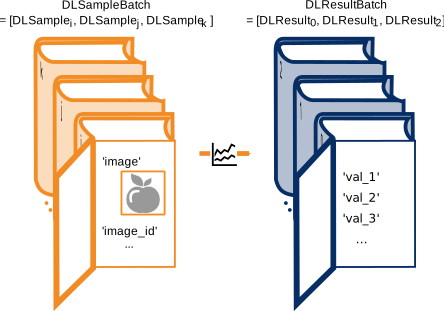
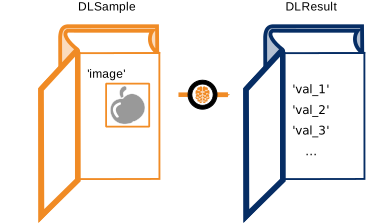
(1) (2) Schematic illustration of the dictionaries serving as model input: (1) Evaluation:
DLSampleincludes the image as well as information about the image and its content. This data serves as basis for the evaluation. For visibility purposeBatchSizeis set to three (containing the randomly chosen samples i,j,and k, see above) and only few entries are registered. (2) Inference:DLSamplecontains only the image. These dictionaries can be passed one at a time or within a tuple.Note that for model of type 3D-PE, inference and evaluation are not performed as described above. Please refer to 3D Matching / Deep 3D Matching on how to use Deep 3D Matching inference.
Depending on the model type, the dictionary
DLResultcan have the following entries:-
gripping_confidence: 3D-GPD Image, containing raw, uncalibrated confidence values for every point in the scene.format: image
-
gripping_map: 3D-GPD Binary image, indicating for each pixel of the scene whether the model predicted a gripping point (pixel value = 1.0) or not (0.0).format: image
-
anomaly_image: AD, GC-AD Single channel image whose gray values are scores, indicating how likely the corresponding pixel in the input image belongs to an anomaly.format: image
-
anomaly_image_combined: GC-AD Single channel image whose gray values are scores, indicating how likely the corresponding pixel in the input image belongs to an anomaly. Calculated by combining the 'local' and 'global' subnetworks of the model.Format: image
-
anomaly_image_global: GC-AD Single channel image whose gray values are scores, indicating how likely the corresponding pixel in the input image belongs to an anomaly. Calculated by the 'global' subnetwork of the model.format: image
-
anomaly_image_local: GC-AD Single channel image whose gray values are scores, indicating how likely the corresponding pixel in the input image belongs to an anomaly. Calculated by the 'local' subnetwork of the model.format: image
-
anomaly_score: AD, GC-AD Anomaly score on image level calculated fromanomaly_image.format: real
-
anomaly_score_local: GC-AD Anomaly score on image level calculated fromanomaly_image_local.format: real
-
anomaly_score_global: GC-AD Anomaly score on image level calculated fromanomaly_image_global.format: real
-
classification_class_ids: CL Inferred class ids for the image sorted by confidence values.format: tuple of integers
-
classification_class_names: CL Inferred class names for the image sorted by confidence values.format: tuple of strings
-
classification_confidences: CL Confidence values of the image inference for each class.format: tuple of reals
-
class_ids: MLC Inferred class ids for the image sorted by confidence values.format: tuple of integers
-
class_names: MLC Inferred class names for the image sorted by confidence values.format: tuple of strings
-
confidences: MLC Confidence values of the image inference for each class.format: tuple of reals
-
selected_class_ids: MLC Class ids for the image selected by the confidence threshold(min_confidence).format: tuple of integers
-
selected_class_names: MLC Class names for the image selected by the confidence threshold (min_confidence).format: tuple of strings
-
selected_confidences: MLC Confidence values of the image selected by the confidence threshold for each class.format: tuple of reals
-
char_candidates: OCR-R Candidates for each character of the word and their confidences.format: tuple of dictionaries
-
word: OCR-R Recognized word.format: string
-
score_maps: OCR-D Scores given as image with four channels:-
Character score: Score for the character detection.
-
Link score: Score for the connection of detected character centers to a connected word.
-
Orientation 1: Sine component of the predicted word orientation.
-
Orientation 2: Cosine component of the predicted word orientation.
format: image
-
-
words: OCR-D Dictionary containing the following entries. Thereby, the entries are tuples with a value for every found word.-
row: Localized word: Center point, row coordinate. -
col: Localized word: Center point, column coordinate. -
phi: Localized word: Angle phi. -
length1: Localized word: Half length of edge 1. -
length2: Localized word: Half length of edge 2. -
line_index: Line index of localized word if 'detection_sort_by_line' set to 'true'.
format: dictionary with tuples of reals and strings
-
-
word_boxes_on_image: OCR-D Dictionary with the word localization on the coordinate system of the preprocessed images placed inimage. The entries are tuples with a value for every found word.-
row: Localized word: Center point, row coordinate. -
col: Localized word: Center point, column coordinate. -
phi: Localized word: Angle phi. -
length1: Localized word: Half length of edge 1. -
length2: Localized word: Half length of edge 2.
format: dictionary with tuples of reals
-
-
word_boxes_on_score_maps: OCR-D Dictionary with the word localization on the coordinate system of the score images placed inscore_maps. The entries are the same as forword_boxes_on_imageabove. format: dictionary with tuples of reals -
bbox_class_id: OD Inferred class for the bounding box (in the form ofclass_ids).format: tuple of integers
-
bbox_class_name: OD Name of the inferred class for the bounding box.format: tuple of strings
-
bbox_confidence: OD Confidence value of the inference for the bounding box.format: tuple of reals
-
bbox_row1: OD:r1 [6] Inferred bounding boxes: upper left corner, row coordinate.format: tuple of reals
-
bbox_col1: OD:r1 [6] Inferred bounding boxes: upper left corner, column coordinate.format: tuple of reals
-
bbox_row2: OD:r1 [6] Inferred bounding boxes: lower right corner, row coordinate.format: tuple of reals
-
bbox_col2: OD:r1 [6] Inferred bounding boxes: lower right corner, row coordinate.format: tuple of reals
-
bbox_row: OD:r2 [6] Inferred bounding boxes: center point, row coordinate.format: tuple of reals
-
bbox_col: OD:r2 [6] Inferred bounding boxes: center point, column coordinate.format: tuple of reals
-
bbox_phi: OD:r2 [6] Inferred bounding boxes: angle phi.format: tuple of reals
-
bbox_length1: OD:r2 [6] Inferred bounding boxes: half length of edge 1.format: tuple of reals
-
bbox_length2: OD:r2 [6] Inferred bounding boxes: half length of edge 2.format: tuple of reals
-
mask: OD:is Inferred mask marking the instance regions.format: tuple of regions
-
mask_probs: OD:is Image with the confidence values of the inferred mask.format: image
-
segmentation_image: SE Image with the segmentation result.format: image
-
segmentation_confidence: SE Image with the confidence values of the segmentation result.format: image
[6]: Used coordinates: Pixel centered, subpixel accurate coordinates.
For a further explanation to the output values we refer to the chapters of the respective method, e.g., Deep Learning / Semantic Segmentation.
-
-
Images Regardless of the application, the network poses requirements on the images. The specific values depend on the network itself and can be queried using
get_dl_model_param. In order to fulfill these requirements, you may have to preprocess your images. Standard preprocessing of the entire dataset and therewith also the images is implemented inpreprocess_dl_samples. In case of custom preprocessing this procedure offers guidance on the implementation.