Concept – 2D Code🔗
This chapter contains operators for reading 2D codes.
Concept of reading 2D codes🔗
2D code symbols are a special kind of two-dimensional patterns that encode text and numbers. HALCON is able to read the most popular 2D codes: Data Matrix ECC 200, QR Code, Micro QR Code, Aztec Code, PDF417, and DotCode. Except for DotCodes all these codes contain a finder pattern and a data pattern. The finder pattern is used to locate the pattern of the symbol and get basic information about the geometric properties, e.g., the orientation of the symbol. The data pattern contains the code itself and consists of multiple dots, bars, or small squares, the so-called modules. Because of the special design of the codes, they can be decoded even if some parts are disturbed.
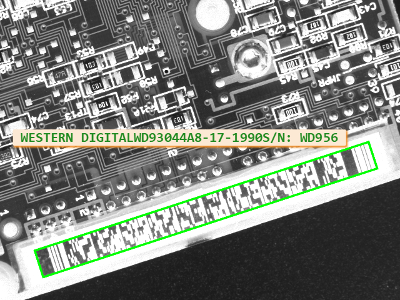
Reading a 2D code of type PDF417. This image is from the example program 2d_data_codes_default_settings.hdev.
In the following, the steps that are required to read 2D codes are described briefly.
-
Create 2D code model:
First, a 2D code model must be created using
This model provides the reader with all necessary information about the structure of the code. For normal printed codes only the name needs to be provided and HALCON will select suitable default parameters. For special cases, you can modify the model parameters either when creating the 2D code model or in a later step to adapt the model to a particular symbol appearance.
-
Modify the model parameters for non-standard codes:
Using the default parameters, the 2D code reader is able to read a wide range of codes. For non-standard codes the parameters can be modified using
Here, you can either select an enhanced set of default parameters using the generic parameter 'default_parameters', e.g., with the value 'enhanced_recognition', or you specify the parameter values separately to adapt the model optimally to the conditions of the used print style. Note that
query_data_code_2d_paramscan be used to query the parameters that are valid for the specific 2D code type. To obtain the currently set values of parameters,get_data_code_2d_paramcan be used.Instead of modifying the model parameters manually, you can also let HALCON train the model using
with the generic parameter 'train'. Then, HALCON will search for the best parameters needed to extract the given code. It is recommended to apply this to multiple example images to ensure that all variations are covered.
-
Read 2D code:
The 2D code is located and its content is decoded using
The operator returns for every successfully decoded symbol the surrounding XLD contour, a handle to a result structure, which contains additional information about the symbol as well as about the search and decoding process, and the string that is encoded in the symbol. With the result handles and the operators
get_data_code_2d_resultsandget_data_code_2d_objects, additional data about the extraction process can be accessed that can be used both for process analysis and for displaying. In particular,get_data_code_2d_resultsallows to access several alphanumerical results that were calculated while searching and reading the symbols andget_data_code_2d_objectsallows to access iconic objects that were created during the last call offind_data_code_2d.
Further operators🔗
In addition to the operators mentioned above,
write_data_code_2d_model allows to write the model into a file that
can be used later to create (e.g., in a different application) an identical
copy of the model. Such a model copy is created directly by
read_data_code_2d_model (without calling
create_data_code_2d_model). Furthermore, you can use
serialize_data_code_2d_model and
deserialize_data_code_2d_model to serialize and deserialize the 2D
2D code model.
Glossary🔗
-
2D code symbol Two-dimensional graphical symbol that encodes characters and numbers. It is constructed by dark and light dots, bars, or small squares that are called modules. There are different types of 2D codes. Two common types are the so-called stacked codes and the so-called matrix codes.
-
stacked code Type of 2D code symbol that contains a stack of 1D bar codes arranged in rows and columns. To ensure that the complete stack of 1D bar codes is processed, the symbol contains a start and a stop pattern. Additionally, the symbol is framed by a quiet zone.
-
matrix code Type of 2D code symbol that uses graphical patterns consisting of dark and light modules arranged in two dimensions. The symbol consists of three components: a finder pattern, a data pattern, and a quiet zone.
-
modules Dark and light dots, bars, or small squares that are used to build a 2D code symbol.
-
quiet zone Homogeneous frame around the symbol’s border that makes the symbol better distinguishable from the background or from other objects in the image.
-
finder pattern Pattern that is used to find the symbol and its orientation in the image. The pattern differs depending on the used 2D code type.
Further Information🔗
See also the “Solution Guide Basics” and the
“Solution Guide on 2D Codes” for further details
about 2D codes.