Concept – Image Source🔗
Introduction🔗
The image source concept enables the HALCON user to configure and handle the usage of machine vision cameras to acquire images for their machine vision task. It replaces the framegrabber operator set (see Image / Acquisition) as HALCON’s recommended way to access cameras.
This chapter gives guidance on the concept and usage of image sources. Refer to the MVTec Interfaces Reference Documentation for the documentation of individual MVTec image source plugins.
Image Source Concept🔗
The machine vision device and all further components that are involved in the process of acquiring image data can be controlled using an image source handle. It is designed to encapsulate the so-called modules of the image source:
-
plugins,
-
interfaces,
-
devices and
-
streams.
These modules are structured in a hierarchical parent-child configuration, with each module acting as a parent to the subsequent one. The module concept of the image sources is modeled after the GenICam GenTL standard.
To acquire images from the image source handle, an image source plugin is used to communicate to the imaging device through an interface. The imaging device provides access to one or multiple image streams. The images transmitted through that stream eventually arrive in multiple buffers in the memory of the host application. All this complexity is hidden from the user in most applications, and per default any image source handle will try to connect to a full chain of image source modules: plugin > interface > device > stream.
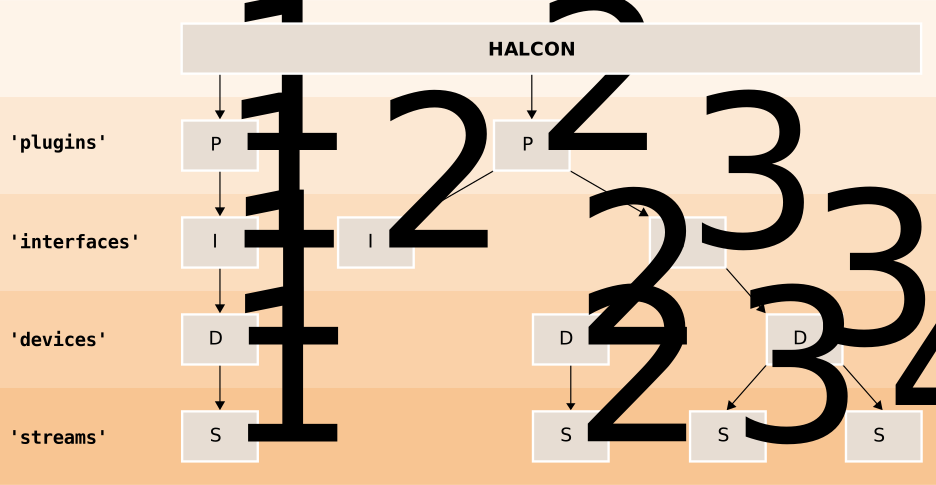
Schematic representation of the image source modules.
However, for certain applications it might be necessary to connect to a specific module. For instance, using the scheme above as a representation of an exemplary system, it might be desired to configure the parameters of a framegrabber before a camera is connected to it. Image source handles can be configured to solely connect to the parent image source plugin \(P_{1}\) and the respective GenTL interface module \(I_{1}\). The interface module then allows to configure the framegrabber without a connection to a child module. Likewise, image source handles can be used to connect to any other available module or to specify a desired module if multiple options are available (e.g., whether to choose stream \(S_{3}\) or \(S_{4}\) of the device \(D_{3}\) in the scheme above).
States of the Image Source Handle🔗
An image source handle can be in different states. In each state a different set of operations is available. The image source operators can be used to trigger such state changes.
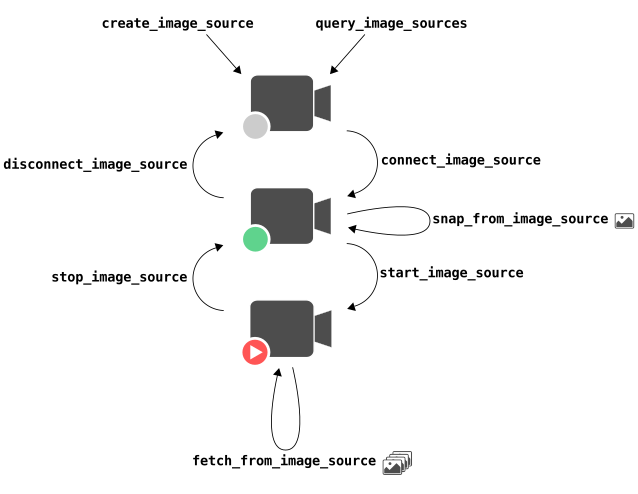
Schematic representation of the possible states of an image source handle. The scheme shows which image source operators cause a change of the image source handle state between initialized (gray), connected (green), and streaming (red) state.
The three possible states are:
-
Initialized The image source handle should contain enough information to specify which device should be connected with
connect_image_source. The operatorsset_image_source_paramandget_image_source_paramprovide access to the parameters of the 'image_source' group. These are always existent, regardless of the connection state. -
Connected The operator
snap_from_image_sourceis only available in this state.snap_from_image_sourcebriefly changes the image source handle to the streaming state, but resets it again when an image has arrived.The operators
set_image_source_paramandget_image_source_paramprovide access to the parameters of all different modules, including the device module. The device module allows to configure the imaging hardware, e.g., a machine vision camera.In this state typical machine vision devices are utilized exclusively, meaning other applications can discover, but not access them.
-
Streaming In this state the imaging device can transmit image data continuously in the background. The images arrive in an internal image buffer queue from which they can be pulled with
fetch_from_image_source.fetch_from_image_sourceis only available in this state.In the streaming state the device might prevent certain parameters from being changed. This is done to ensure a reliable image transmission. As a consequence the operator
set_image_source_parammight not be able to change all device parameters and might deliver an error instead. In that case, return to the connected state first.
Parameter Groups and Their Relation to the Modules🔗
Each module can be configured with get_image_source_param.
To indicate which module of the image source to configure
the parameters are divided into groups. This is how the grouped parameters
are related to the GenTL modules. Plugins that are not provided by MVTec,
might group their parameter documentation according to the GenTL module names.
| Parameter Group | GenTL Module Name | Remarks |
|---|---|---|
| 'image_source' | - | The parameter group 'image_source' configures the module chain plugin > interface > device > stream and as such it sits ‘on-top’ of the GenTL modules. These parameters are implemented by MVTec and exist all the time, regardless of the connection state. They are described in get_image_source_param. |
| 'plugin' | System | Parameters for global configuration in the loaded plugin. Parameters in this group depend on which plugin is loaded and are implemented by the provider of the loaded plugin. Plugins can be provided by MVTec (see MVTec Interfaces Reference Documentation) or other manufacturers. |
| 'interface' | Interface | Parameters for configuring the hardware component that is interfacing to the devices. Parameters in this group depend on which plugin is loaded and are implemented by the provider of the loaded plugin. Plugins can be provided by MVTec (see MVTec Interfaces Reference Documentation) or other manufacturers. |
| 'local_device' | Device | Software abstraction for the hardware device. This group exists for technical reasons of the GenTL standard and can be ignored most of the cases. Parameters in this group depend on which plugin is loaded and are implemented by the provider of the loaded plugin. Plugins can be provided by MVTec (see MVTec Interfaces Reference Documentation) or other manufacturers. |
| 'device' | Remote Device | Parameters for configuring the imaging hardware (e.g. machine vision cameras, sensors, devices). Use this to configure the most important properties of the image generation like exposure time, gain, width, height and trigger mode. Parameters in this group depend on which device is connected and are implemented by the manufacturer of the connected device. |
| 'stream' | Stream | Parameters for configuring the details of the image transmission on the receiving side. Parameters in this group depend on which plugin is loaded and are implemented by the provider of the loaded plugin. Plugins can be provided by MVTec (see MVTec Interfaces Reference Documentation) or other manufacturers. |
Configuration persistence🔗
In many applications it is desirable to preserve the current configuration of the device and the overall image source setup to restore it later. Typical use cases include keeping the optimal settings found during development or deploying the same configuration to multiple machines performing an identical task.
The image source provides two mechanisms for persisting settings, depending on the required scope:
-
Persisting a specific GenICam module If only the configuration of a specific GenICam module is relevant, such as the camera parameters in the group 'device' (for example exposure time or trigger mode), that module can be persisted independently.
To store the settings of a module, call
control_image_sourcewith the action 'write_state_string'. To restore them, call the operator with the action 'read_state_string'.See the documentation of
control_image_sourcefor details and a usage example. -
Persisting the complete image source configuration If the complete configuration of the image source, including all parameter groups ('image_source', 'plugin', 'interface', 'device', and 'stream'), should be stored for later restoration, create a configuration file.
This approach preserves the camera selection defined in the 'image_source' group. This ensures that the restored configuration automatically reconnects to the same device, providing consistent behavior across sessions and machines.
To create such a file, call
control_image_sourcewith the action 'write_config_file'. To restore an image source from this file, create a new handle withcreate_image_sourceand the generic parameter 'read_config_file'.For detailed information and an example, refer to the documentation of
control_image_sourceandcreate_image_source.
Warning Regarding Third-Party GenTL Producers🔗
HALCON supports the use of third-party GenTL producers from other manufacturers. The design, stability, and correctness of these components lie outside MVTec’s responsibility.
If a producer fails to handle standard operations correctly or becomes unresponsive, undefined behavior may be observed in HALCON. Use such producers with appropriate caution, as MVTec cannot guarantee proper functionality or interoperability with all HALCON features.
Migration Guide🔗
Expand here for information on migration from framegrabber to
  image source operators.
The following table provides a comparison between the old framegrabber and the new image source operators. When switching an application to the newer image sources, replace each framegrabber operator with its corresponding image source operator.
| Operator | Remarks concerning migration |
|---|---|
old: info_framegrabber new: query_image_sources |
info_framegrabber per default returns a string for each found device, which can be used for open_framegrabber. query_image_sources per default returns an image source handle for each device, which can be used for connect_image_source. |
old: No direct equivalent new: create_image_source |
create_image_source creates an image source handle in an unconnected state. This is not possible with framegrabber operators. |
old: open_framegrabber new: connect_image_source |
open_framegrabber is creating the framegrabber handle and connecting to the imaging hardware at the same time. Image source handles split this into two operations: create_image_source followed by connect_image_source. This allows to use connect_image_source with handles obtained by create_image_source or by query_image_sources. |
old: close_framegrabber new: disconnect_image_source |
close_framegrabber at the same time destroys the framegrabber handle. It can only be re-created with open_framegrabber. disconnect_image_source leaves the image source handle intact. It can be used with connect_image_source to re-connect. |
old: get_framegrabber_param new: get_image_source_param |
Works similar, but the parameter group is now specified with the GenParam 'group' instead of using the [<GenTL module>] prefix. Example: old: get_framegrabber_param(AcqHandle, '[Stream]StreamBufferHandlingMode', Value) new: get_image_source_param(ImageSourceHandle, 'StreamBufferHandlingMode', 'group', 'stream', Value) |
old: set_framegrabber_param new: set_image_source_param |
Works similar. The relation is analogous to get_framegrabber_param and get_image_source_param (see above). |
old: No direct equivalent new: control_image_source |
Framegrabber handles provide parameters with the prefix ‘do_’. This kind of parameters is replaced by actions available via control_image_source. control_image_source also allows to list all parameters (previously get_framegrabber_param). |
old: grab_image new: snap_from_image_source |
Works similar. |
old: grab_image_start new: start_image_source |
grab_image_start is automatically executed by the first grab_image_async call, if grab_image_start was not previously called. start_image_source is not automatically executed by the first fetch_from_image_source call. |
old: No direct equivalent new: stop_image_source |
Some framegrabber handles provide the special parameter 'do_abort_grab', which serves the same purpose that stop_image_source does. |
old: grab_image_async new: fetch_from_image_source |
Works similar. |
old: grab_data new: snap_from_image_source |
snap_from_image_source combines the use cases covered by grab_image and grab_data. Additionally, meta data like buffer timestamps and frame IDs is returned alongside and does not need to be queried separately. |
old: grab_data_async new: fetch_from_image_source |
fetch_from_image_source combines the use cases covered by grab_image_async and grab_data_async. Additionally, meta data like buffer timestamps and frame IDs is returned alongside and does not need to be queried separately. |
old: get_framegrabber_callback old: set_framegrabber_callback old: get_framegrabber_lut old: set_framegrabber_lut |
No direct equivalent |
The following table shows the relations between MVTec image source plugins (see MVTec Interfaces Reference Documentation for detailed information) and classical image acquisition interfaces:
| Image Source Plugin | Corresponding image acquisition interface | Remarks |
|---|---|---|
| 'mvtec_gigevision' | GigEVision2 | The 'mvtec_gigevision' plugin contains the same GigE Vision standard implementation that is contained in the GigEVision2 image acquisition interface. Despite its name (GigEVision2) the plugin, as well as the image acquisition interface, allow access to all GigE Vision cameras, regardless of which version of the GigE Vision standard the camera implements. |
| 'mvtec_usb3vision' | USB3Vision | The 'mvtec_usb3vision' plugin contains the same implementation of the USB3 Vision standard that is contained in the USB3Vision image acquisition interface. |
| 'mvtec_realsense' | RealSense | The 'mvtec_realsense' plugin interfaces to the Intel RealSense SDK and contains the same low-level implementation that is contained in the RealSense image acquisition interface. |
| 'mvtec_mediafoundation' | MediaFoundation | The 'mvtec_mediafoundation' plugin interfaces to the Microsoft Media Foundation API and contains the same low-level implementation that is contained in the MediaFoundation image acquisition interface. (Only available on Windows platforms) |
| 'mvtec_gstreamer' | GStreamer | The 'mvtec_gstreamer' plugin interfaces to the open source GStreamer multimedia platform and contains the same low-level implementation that is contained in the GStreamer Image Acquisition Interface. (Only available on Linux platforms) |
More image source plugins to interface to even more image transmission technologies will be provided in the future.
Classical image acquisition interfaces not mentioned here (like “File”, “SaperaLT”, “DirectShow”) do not have a corresponding image source plugin. They must be used with the framegrabber operators.
Glossary🔗
In the following, we describe the most important terms used in the context of image sources:
-
Device Device refers to the actual imaging device. This includes different kinds of sensors, ranging from conventional machine vision cameras to 3D sensors and, in special cases controllers or virtual devices.
-
GenICam The GenICam standard allows machine vision devices to expose their configuration properties to the connected application via a feature description XML file. HALCON image sources rely on this standard to provide access to the device configuration (see
set_image_source_paramandget_image_source_param). Usually, HALCON users do not need to deal with these XML files directly.The standard defines a wide range of features, many of which go beyond the scope of this documentation. For more detailed information, consult the official standard documents, particularly the GenICam Standard Features Naming Convention (SFNC) and the GenICam GenTL SFNC. These resources are hosted by the European Machine Vision Association (EMVA).
-
GenTL The GenICam GenTL standard allows machine vision applications and frameworks from different vendors to access machine vision cameras and devices from different other vendors. It specifies a clearly defined software interface that allows to hide different implementation details from the using application. An application like HALCON using different GenTL producers like the plugins might also be referred to as GenTL consumer.
-
Image Source Handle An image source handle provides a generic interface to a wide variety of underlying image acquisition standards and technologies. From the viewpoint of the HALCON library any image source handle provides the same basic operations. The image source handle ties together software and hardware components that are needed in order to acquire images.
-
Interface Interfaces refer to the hardware interfacing with the imaging device, e.g., where the cable coming from the imaging device is plugged into the host machine. Thus, in the image source context, the term “interface” does not refer to what was formerly called the image acquisition interface.
In case framegrabbers are used, each framegrabber card is typically modeled as one interface. Per default, HALCON image sources hide the complexity of multiple interface by automatically using the correct one.
-
Module The individual units of an image source (plugin, interface, device, stream) are called modules. Each module allows access to its parameters. The module names therefore also apply to parameter groups of the same name.
-
Plugin Image source plugins abstract the various technologies used to transfer images from the imaging device to the receiving application. Elsewhere, they might also be referred to as GenTL Producer. Plugins exist in form of
.ctifiles on each target machine. Plugins may be selected and installed with the MVTec Software Manager. Plugins (i.e. GenTL Producers) provided by other manufacturers are automatically available after installing the manufacturer’s proprietary SDK. Consult the manufacturers documentation for more in depth instructions. At runtime plugins not provided by MVTec are found by HALCON through the environment variable GENICAM_GENTL64_PATH (or GENICAM_GENTL32_PATH), which lists all the paths that contain.ctifiles. -
Stream A device can allow access to none, one or multiple streams of images. The typical machine vision camera however just gives access to one stream. Per default HALCON image sources hide the complexity of multiple streams.