About print quality🔗
In some cases, the print quality of a symbol is asked for. There are various standards available that are related to the quality verification of 2D data codes. Their focus differs depending, for example, on the way the symbol is applied to a surface. HALCON supports the quality standards ISO/IEC 15415:2024, ISO/IEC 29158:2025, and SEMI T10-0701. ISO/IEC 29158:2025 is an extension to the ISO/IEC 15415:2024 standard, so the last one will is a good starting point to get a basic understanding of how the quality inspection works. The print quality grading using the ISO/IEC 29158:2025 standard is different in its usage as it requires interactive image acquisition.
Print quality grades are determined with get_data_code_2d_results and returned as a tuple.
For easier usability, the procedure grade_data_code_2d can be used to perform print quality inspection instead.
The grading results are then returned in dictionary format.
Note that the print quality inspection can be performed for all symbol types except DotCode.
About the ISO/IEC 15415:2024 standard🔗
With get_data_code_2d_results and the parameter 'quality_isoiec15415' you can query a set of values that numerically describe the quality grade for different features of a successfully read symbol in a descending order from 4.0 (highest quality) to 0.0 (lowest quality) in steps of 0.1.
As a tuple of values is returned, the print quality has to be queried for each symbol candidate individually.
The calculation of the quality is applied after reading the symbol with find_data_code_2d and does not affect the run time of the actual reading process.
Note
With HALCON you can read many 2D data code symbols even if their quality according to the standard is low.
Symbols of the types Data Matrix ECC 200, QR Code, Micro QR Code, and Aztec Code are graded based on ten different print quality features.
To query the quality grades, you have to apply find_data_code_2d and then call get_data_code_2d_results (with the parameter 'quality_isoiec15415') to get the quality grades for these features:
'Overall symbol grade''Symbol contrast''Modulation''Fixed pattern damage''Decode''Axial nonuniformity''Grid nonuniformity''Unused error correction''Print growth x''Print growth y'
Additionally
'Contrast uniformity''Aperture'
are returned.
For QR Code and Micro QR Code, two additional grades, namely 'Format information' and 'Version information', are assessed.
For symbols of type PDF417, you can query the quality grades for these seven features:
'Overall symbol grade''Start/stop pattern''Codeword yield''Unused error correction''Modulation''Decodability''Defects'
Additionally, the 'Aperture' value is returned.
The quality grades also comply to the standard ISO/IEC 15415:2024 but involve also techniques that are common for 1D bar codes and which are described in detail in the standard ISO/IEC 15416:2016. Basically, a set of scan lines measures the reflectance profiles along the symbol and the individual profiles are evaluated for the quality grades of the different features.
About grades🔗
The individual features that are evaluated for their quality grade are shortly introduced in the following sections.
Additionally, they are demonstrated in the HDevelop example %HALCONEXAMPLES%\hdevelop\Identification\Data-Code\ecc200_print_quality.hdev.
For detailed information, we recommend to read the specifications for the standards ISO/IEC 15415:2024, for symbols of type PDF417 also the standard ISO/IEC 15416:2016, the respective code type specific standards.
Find detailed descriptions about the grading in the symbol-specific sections:
- Aztec Code grades
- Data Matrix ECC 200 grades
- DotCode grades
- Micro QR Code grades
- PDF417 Code grades
- QR Code grades
Acquiring raw data (all codes except DotCode)🔗
When investigating the reason for quality defects, it can be useful to query the data that was used to calculate the values for the print quality elements.
For this, you call the operator get_data_code_2d_results with the parameter value 'quality_isoiec_15415_values'.
The operator then returns a tuple with the following raw values (or N/A if no raw value is available for the respective quality grade):
About the ISO/IEC 29158:2025 standard🔗
Another possibility of evaluating the print quality of Data Matrix ECC 200, QR Codes, Micro QR Codes and Aztec Codes is using HALCON’s data code quality inspection following the ISO/IEC 29158:2025 standard, an extension to ISO/IEC 15415:2024 that specifically addresses print quality grading for direct part marking (DPM) symbols. In general, it returns a tuple representing the twelve print quality elements:
'Overall symbol grade''Cell contrast''Cell modulation''Fixed pattern damage''Decode''Axial nonuniformity''Grid nonuniformity''Unused error correction''Mean light''Contrast uniformity''Aperture'
For QR Code and Micro QR Code, two additional grades, namely 'Format Information' and 'Version information', are assessed.
For Data Matrix ECC 200, the additional value 'Dot connecting algorithm used' is returned.
All grades except 'Mean light' and 'Dot connecting algorithm used' have the same meaning as the ISO/IEC 15415:2024 grades with two exceptions: 'Symbol contrast' and 'Modulation' are renamed 'Cell contrast' and 'Cell modulation', respectively, to reflect differences in the methods specified with both standards for estimating those values.
'Mean light' is not a grade but an estimation for the quality of the processed image computed as the mean grayscale value of the centers of the bright data code modules, a value between 0.0 and 1.0, corresponding to 0% to 100% of the maximum gray-scale value (255 for byte images).
The mean light is estimated to reach reproducible results, which can be achieved because
- the mean light condition guarantees a unified image quality among different systems and
- the calibration compares the
'light'used to evaluate a known calibration object and the'light'used to evaluate a physical data code in the quality inspection process. Codes with a contrast that is too large or too weak are rejected.
Note that the ISO/IEC 29158:2025 standard recommends special lighting environments.
These include diffuse on-axis illumination (90), diffuse off-axis illumination (D), directional illumination (30Q, 30T, 30S), and a tilted coaxial lighting setup (30CS).
For more information about the lighting environments refer to the comments within the example program %HALCONEXAMPLES%\hdevelop\Identification\Data-Code\calibration_isoiec29158.hdev or the more detailed description in the document ISO/IEC 29158:2025 with the title ‘Automatic identification and data capture techniques – Bar code symbol quality test specification – Direct part mark (DPM)’.
Dot connecting algorithm used is not a grade either.
Instead, if this value is true, it indicates that the best grading was achieved by applying the dot connecting algorithm as described in Annex C of ISO/IEC 29158:2025.
The dot connecting algorithm is necessary to enable the assessment of codes (for example, dot-peened) with non-continuous features which are actually defined to be continuous.
An example is the L-pattern of the Data Matrix finder pattern.
For these symbols, the reference decode algorithm would fail without the dot connecting algorithm, as described in the respective code-specific standards.
Note that Halcon’s robust (default) decode algorithm is capable enough to read these kinds of codes without the dot connecting algorithm and, hence, the value will always be false.
This value can only become true, if the reference decode algorithm is explicitly enabled.
This can be accomplished by setting quality_isoiec29158_decode_algorithm to reference.
Another important difference from ISO/IEC 15415:2024 regards the value of the Aperture.
For the ISO/IEC 15415:2024 standard, the relative aperture size can be chosen between 0.0 and 1.0 by the user via set_data_code_2d_param with the parameter value quality_isoiec15415_aperture_size.
By default a value of 0.8 is used.
In contrast, the ISO/IEC 29158:2025 standard does not expect that the user specifies the aperture.
Instead, the print quality inspection is executed twice by re-computing the reference gray scale image with an aperture of 0.5 and 0.8 of the average grid spacing.
If the reference decode algorithm is used, another two executions are added with the dot connecting algorithm, respectively.
The final grades are selected by choosing the best results obtained from the different assessment runs.
Hence, the Aperture and Dot connecting algorithm used status returned by get_data_code_2d_results with the parameters quality_isoiec29158 or quality_isoiec29158_values represent the settings leading to the best grading results.
In case of a tie, the following tie-breaking rules apply:
first, the result without dot connecting is preferred, followed by the 0.8 aperture.
Acquiring raw data (all codes except DotCode)🔗
When investigating the reason for quality defects, it can be useful to query the data that was used to calculate the values for the print quality elements.
For this, you call the operator get_data_code_2d_results with the parameter value 'quality_isoiec29158_values'.
The operator then returns a tuple with the following raw values:
'Cell contrast''Axial nonuniformity''Grid nonuniformity''Unused error correction''Mean light''Contrast uniformity''Aperture'
The parameter 'quality_isoiec29158_values' always returns a tuple with a value for each grade.
It therefore displays 'N/A' if a grade is not on the above list and no raw value is consequently available.
The values for 'Mean light', 'Contrast uniformity' and 'Aperture' are identical to the values returned for the parameter 'quality_isoiec29158'.
The same applies to the Data Matrix ECC 200 exclusive Dot connecting algorithm used value.
How to apply the ISO/IEC 29158:2025 standard🔗
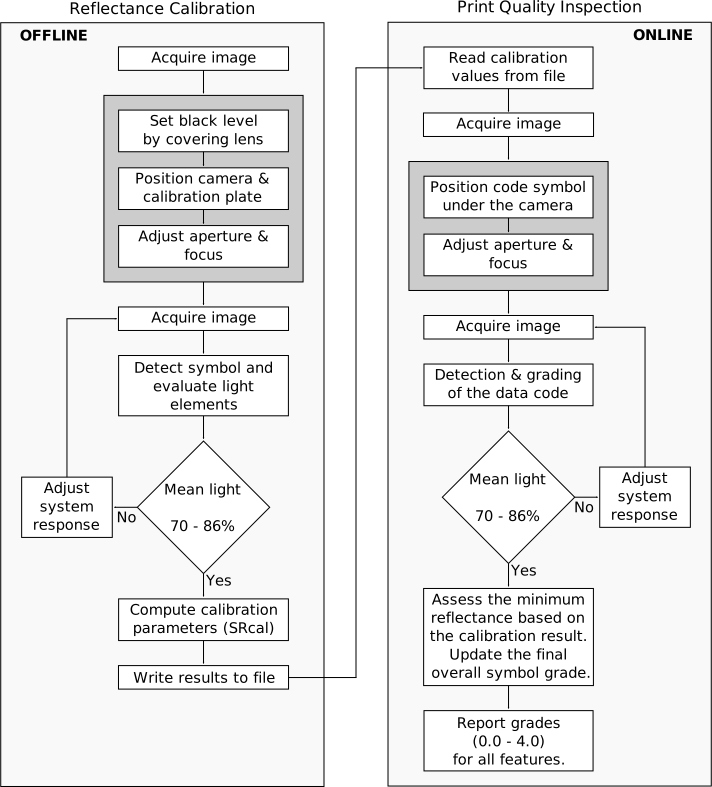
The ISO/IEC 29158:2025 standard requires interactive image acquisition. Much of the functionality cannot be provided within an operator. Instead, HALCON provides two example applications:
%HALCONEXAMPLES%\hdevelop\Identification\Data-Code\calibration_isoiec29158.hdevperforms the so-called reflectance calibration and stores the calibration results.%HALCONEXAMPLES%\hdevelop\Identification\Data-Code\print_quality_isoiec29158.hdevperforms the print quality inspection based on the calibration results.
Reflectance calibration🔗
To calibrate your system, use the example program %HALCONEXAMPLES%\hdevelop\Identification\DataCode\calibration_isoiec29158.hdev.
The step described there is called reflectance calibration.
To perform this calibration you need a calibrated conformance standard test card (for example, a NIST-traceable calibrated conformance test card).
Currently, there are no cards available specifically challenging ISO/IEC 29158:2025.
Hence, we use an image of a Data Matrix ECC 200 test card with symbol contrast grade of 4.0 following ISO/IEC 15415:2024.
At first you have to setup your system.
The example program contains all the code necessary for the reflectance calibration.
However, it is also an example that can be run as it is and for this purpose, it uses a stored image.
Thus, you must first adapt the example to your application.
* Set the value of code type to the code type printed on the
* calibration card.
CodeType := 'Data Matrix ECC 200'
* Set the value of the reference aperture of the laser (see
* calibration card). If no reference aperture is denoted, set
* the X Dimension value to 1.
RefAperture := 1
* Set the value of X Dimension printed on the calibration card.
* If no X Dimension is denoted, set the X Dimension value to 1
XDimension := 1
The program guides you through the necessary steps. First, it asks you to cover the lens for setting the black level. If your image interface does not provide black-level compensation, please ask your distributor.
min_max_gray (Image, Image, 0, Min, Max, Range)
set_framegrabber_param (AcqHandle, 'BlackLevelSelector', 'All')
Then, position the code horizontally in the center of the image and adjust focus and aperture (F-number) so that the code is imaged with a good contrast.
Now, the interactive part of the calibration is finished.
During the calibration, the code symbol on the calibration card is detected, its bright code elements are segmented and, using the gray values in the center of each element, the value of mean light is calculated from the maximum gray value.
If the gray value does not lie in a range between 70% and 86%, the system response is adjusted by calling the procedure adjust_system_response.
If the mean light value lies over 86%, then the symbol is too bright and the system response values are adapted to reduce the brightness.
The contrary happens if the mean light value lies below 70%.
This procedure repeats until the mean light is within the requested range or the system response values cannot be adjusted any more.
Then, the calibration values are returned and written to a file.
write_calib_results (A, MLCal, Rcal, SRexp, SRgain, ResultFileName, ResultValueNames)Inspecting print quality🔗
The program %HALCONEXAMPLES%\hdevelop\Identification\Data-Code\print_quality_isoiec29158.hdev is used to demonstrate the print quality inspection.
It starts by reading the calibration values from file.
read_reflectance_calib_file (ReflectanceCalibFile, ReflectanceCalibResultsValues)In the next step you are asked to position the code symbol parallel to the axis of the image plane and in the center of the field of view under the camera and to adjust the aperture and the focus.
The code is detected in the current image and graded according to the ISO/IEC 29158:2025 grades as listed above.
In addition, the 'Minimum reflectance' is assessed.
This grade is based on the calibration result and must be considered as a subsequent step.
The necessary procedure grade_minimum_reflectance_isoiec29158 can be found in the example.
Furthermore, the program returns raw values for some quality grades to investigate the reason for quality defects.
Again, the mean light value is checked and the system response is adjusted if the value does not lie between 70% and 86%.
elseif (MeanLight < 0.7)
  IncreaseLight := 1
elseif (MeanLight > 0.86)
  IncreaseLight := -1
endif
adjust_system_response (AcqHandle, IncreaseLight, AdjustParams, MAXSTEPS, EXPSTEP, AdjustmentImpossible, AdjustParams)
Once the mean light value lies within the specifications, the system response values of the calibration and of the print quality inspection are compared, resulting in a 'Minimum reflectance' grade.
This grade has also an impact on the overall symbol grade.
The combination of this grade and ISO/IEC 29158:2025 grades returned by grade_data_code_2d form the final quality inspection result.
grade_data_code_2d (DataCodeHandle, ResultHandle, 'isoiec29158', 'numeric', 'all', ISOIEC29158)
* Assess 'Minimum reflectance' following Section 9.2 of ISO/IEC 29158.
grade_minimum_reflectance_isoiec29158 (Rtarget, GradeMR)
*
* Adapt the 'Overall symbol grade':
OverallGrade := ISOIEC29158.Grades.['Overall symbol grade'].Grade
ISOIEC29158.Grades.['Overall symbol grade'].Grade := min2(OverallGrade,GradeMR)
*
dev_disp_text ('The quality grades of the 2d data code symbol:', 'window', 'top', 'left', 'black', [], [])