Optimization🔗
This chapter describes the most important parameters and optimization techniques for k-NN classification.
In general, it is recommended to first optimize the classification quality and only afterwards optimize the runtime.
The most important parameters are provided by
Further information can be found in the Reference Manual entries of the respective operators.
Parameter setting for k-NN🔗
This section describes the most important parameters of the k-NN operators and explains how they influence the classification quality and runtime. The focus is on parameters whose influence on the classification result or runtime is not immediately obvious.
Create the classifier🔗
A k-NN classifier is created with
During classifier creation, the dimension of the feature vectors is defined. The returned classifier handle is required for all subsequent training and classification steps.
NumDim🔗
The parameter NumDim specifies the dimension of the feature vectors used during training and classification.
The feature dimension must be identical for all feature vectors used by the classifier.
Add training samples🔗
Training samples are added using
Representative training samples are essential for obtaining a robust classifier. The same set of features must be used consistently during training and classification.
Features🔗
The parameter Features contains the feature vector of a training sample.
Each feature vector consists of numerical values describing the sample. The dimension of the feature vector must correspond to NumDim.
ClassID🔗
The parameter ClassID specifies the class to which the feature vector belongs.
The class ID is an integer between 0 and Number of Classes - 1. If a tuple containing class names has been created, the class ID corresponds to the index of the corresponding class name in the tuple.
Training🔗
Training is performed with
During training, the internal representation of the training samples is prepared for an efficient search of the nearest neighbors.
The most important parameters are described below.
NumTrees🔗
The parameter 'num_trees' influences the internal representation of the samples and thus the accuracy and runtime of the k-NN classification.
The default value for 'num_trees' is 4.
To speed up the classification, the number of trees can be set to a lower value. To achieve a more accurate classification result, 'num_trees' can be set to a higher value.
Normalization🔗
The parameter 'normalization' specifies whether the feature vectors are normalized during training.
If 'normalization' is set to 'true', the feature vectors are normalized by subtracting the mean of the individual components of the training vectors and dividing the result by the standard deviation of the individual components of the training vectors.
Hence, the normalized feature vectors have a mean of 0 and a standard deviation of 1. The normalization does not change the length of the feature vector.
Note that the training samples stored in the k-NN classifier are modified if train_class_knn is called with 'normalization' set to 'true'. The original data can be restored at any time by calling train_class_knn with 'normalization' set to 'false'.
If normalization is used, {{ opref(‘classify_class_knn’) }} interprets the input data as unnormalized and performs normalization internally as defined in the last call to {{ opref(‘train_class_knn’) }}.
If the relation between the dimensions of the different features is known, it is best to apply the normalization explicitly.
For example, if the first feature is given in millimeters and the second feature is given in meters, scaling the first with 0.001 or the second with 1000.0 will typically produce better classification results than using the built-in normalization of {{ opref(‘train_class_knn’) }}.
Classification🔗
Unknown feature vectors are classified with
The behavior of the classification is controlled by parameters set with
k🔗
The parameter 'k' defines the number of nearest neighbors that are determined during classification.
The selection of a suitable value for 'k' depends heavily on the classification task.
Generally, larger values of 'k' lead to higher robustness against noise, smooth the boundaries between the classes, and lead to longer runtimes during the classification.
In practice, the best way of finding a suitable value for 'k' is to try different values and select the value that yields the best classification results under the constraint of an acceptable runtime.
Method🔗
The parameter 'method' controls the kind of result that is returned by {{ opref(‘classify_class_knn’) }}.
If 'method' is set to 'classes_distance', {{ opref(‘classify_class_knn’) }} returns each class that exists in the set of the k nearest neighbors. For each returned class, its smallest distance to the sample to be classified is returned.
The returned classes are sorted according to this distance, i.e., the first element of the returned classes contains the nearest neighbor. 'classes_distance' is the default value for 'method'.
If 'method' is set to 'classes_frequency', {{ opref(‘classify_class_knn’) }} performs a simple majority vote and returns those classes that occur among the 'k' nearest neighbors, sorted according to their relative frequency.
For example, if 'k' is set to 10 and among the 10 nearest neighbors there are 7 samples that belong to class 9 and 3 samples that belong to class 4, the tuple [9, 4] is returned.
If 'method' is set to 'classes_weighted_frequencies', {{ opref(‘classify_class_knn’) }} performs a weighted majority vote and returns those classes that occur among the 'k' nearest neighbors, sorted according to their relative frequency weighted with the distances of the individual neighbors from the sample to be classified.
Thus, classes are better rated if they provide neighbors very close to the sample to be classified.
If 'method' is set to 'neighbors_distance', {{ opref(‘classify_class_knn’) }} returns the indices of the 'k' nearest neighbors and their distances.
This may be useful if none of the above-described options fits the requirements. In this case, the information about the nearest neighbors and their distances can be used to implement a custom voting scheme.
MaxNumClasses🔗
The parameter 'max_num_classes' controls how many different classes may be returned by {{ opref(‘classify_class_knn’) }}.
The default value of 'max_num_classes' is 1. In this case, only the best-rated class is returned, which is often sufficient.
If information about the reliability of the classification result is required, 'max_num_classes' should be set to a value larger than 1 and the ratings of the returned classes should be analyzed.
For example, the rating of the first returned class can be compared with that of the second one. If the first class is not significantly better rated than the second one, the classification of this specific sample may not be reliable. In this case, application knowledge may help to decide which of the best-rated results is the correct one.
Note that 'max_num_classes' is an upper bound for the number of returned classes because the 'k' nearest neighbors may contain less than 'max_num_classes' classes.
NumChecks🔗
HALCON uses an approximate algorithm for the search for the 'k' nearest neighbors.
The parameter 'num_checks' controls the trade-off between speed and accuracy of this search.
The default value is 32. To speed up the search, use a lower value that is greater than 0.
To perform an exact search, 'num_checks' must be set to 0.
Epsilon🔗
The parameter 'epsilon' sets a stop criterion for the nearest-neighbor search.
The default value is 0.0. To potentially speed up the search, a higher value can be used.
Typically, adjusting 'num_checks' has a greater effect than adjusting 'epsilon'.
Evaluate the classifier🔗
The classification result should be evaluated using representative test data that was not used during training.
Evaluation can be used to compare different parameter settings and to estimate the expected classification performance on previously unseen data.
In particular, the selected value of 'k', the classification method, and the feature preprocessing should be evaluated using independent test data.
Parameter setting for k-NN (Segmentation)🔗
Most considerations for parameter optimization are identical to those for general k-NN classification.
For image segmentation with k-NN, sample regions are added to the classifier using
In contrast to general classification, no feature vectors have to be generated explicitly. The feature vectors are implicitly given by the gray values of each pixel of the respective input region in all channels of the input image.
The dimension of the feature vectors depends on the number of channels of the image containing the sample regions.
The quality of the training samples determines the quality of the classification. The selected sample regions should therefore represent the classes reliably.
Adding samples🔗
Training regions are added with
The operator uses an image containing the sample regions and a tuple of training regions. One region per class is defined.
The number of classes corresponds to the number of regions. The label of an individual class therefore corresponds to the position of the respective training region in the tuple.
The classifier handle is created with {{ opref(‘create_class_knn’) }} and is modified by {{ opref(‘add_samples_image_class_knn’) }}.
Classification🔗
The general parameter settings described above also apply to image segmentation with k-NN.
The classification result therefore depends on the selected k-NN parameters, in particular the number of neighbors and the parameters controlling the nearest-neighbor search.
Parameter setting for k-NN (OCR)🔗
The k-NN classifier can also be used for OCR classification.
The OCR-specific training operator is
Training🔗
trainf_ocr_class_knn trains the OCR classifier with the training characters stored in the OCR training file.
The generic parameters num_trees and normalization can be set for the OCR classifier and have the same meaning as for the training of a k-NN classifier for general classification.
Optimize critical parameters with a test application🔗
The classification performance strongly depends on the selected parameters and the quality of the training data. Therefore, critical parameters should not be optimized using only the training data.
To estimate the generalization ability of the classifier and to avoid overfitting, it is recommended to optimize critical parameters using an independent test application. Cross validation provides an effective method for estimating the expected classification performance for previously unseen data.
Cross validation🔗
Cross validation divides the available training data into several subsets.
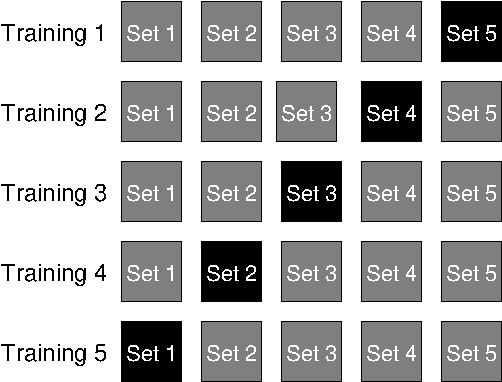
Typically, five subsets are used. During each iteration, one subset is used for testing while the remaining subsets are used for training. The procedure is repeated until every subset has been used once as the test set.
The average classification rate over all iterations provides an estimate of the expected classification performance on previously unseen data.
Cross validation is especially useful
-
if only limited training data is available,
-
when different parameter settings are compared,
-
when overfitting is suspected,
-
when different feature combinations are evaluated.
Parameter optimization🔗
Critical parameters should be optimized one after another while keeping all other parameters unchanged.
Typical parameters for k-NN classification include
-
'k', -
'method', -
'num_trees', -
'num_checks', -
'epsilon', -
the selected features and their scaling.
For each parameter configuration, train the classifier, evaluate the classification result, and compare the obtained performance with previous configurations.
The parameter set providing the best generalization performance should then be selected.
Parameter optimization should always be performed using independent test data.
Representative datasets🔗
The quality of the classifier strongly depends on the representativeness of the training and test data.
The datasets should
-
cover the expected variations,
-
contain sufficient samples for every class,
-
represent the expected application conditions.
Avoid overfitting🔗
A classifier that performs well on the training data does not necessarily generalize well to previously unseen samples.
For k-NN, very small values of 'k' can make the classifier sensitive to individual training samples and noise. Larger values of 'k' generally make the classification more robust, but may smooth the class boundaries excessively.
Cross validation and independent test datasets help to detect such effects.
Runtime optimization🔗
Only after satisfactory classification quality has been achieved should the runtime be optimized.
Typical measures include
-
reducing
'k'if the resulting classification quality remains sufficient, -
reducing
'num_trees', -
reducing
'num_checks', -
increasing
'epsilon'.
Runtime optimization should never be performed at the expense of classification quality.