Optimization🔗
This chapter describes the most important parameters and optimization techniques for multi-layer perceptron (MLP) classification.
In general, it is recommended to first optimize the classification quality and only afterwards optimize the runtime.
The most important parameters are provided by
Further information can be found in the Reference Manual entries of the respective operators.
Parameter setting for MLP🔗
This section describes the most important parameters of the MLP operators and explains how they influence the classification quality and runtime. The focus is on parameters whose influence on the classification result is not immediately obvious.
Create the classifier🔗
An MLP classifier is created with
During classifier creation, the properties of the classifier are defined. The returned classifier handle is required for all subsequent training, evaluation, and classification steps.
NumInput🔗
The parameter NumInput specifies the dimension of the feature vectors used during training and classification.
Unlike GMM classifiers, MLP classifiers can also be applied to high-dimensional feature spaces. Depending on the application, feature vectors with several hundred features can be processed efficiently.
NumHidden🔗
The parameter NumHidden specifies the number of processing units in the hidden layer.
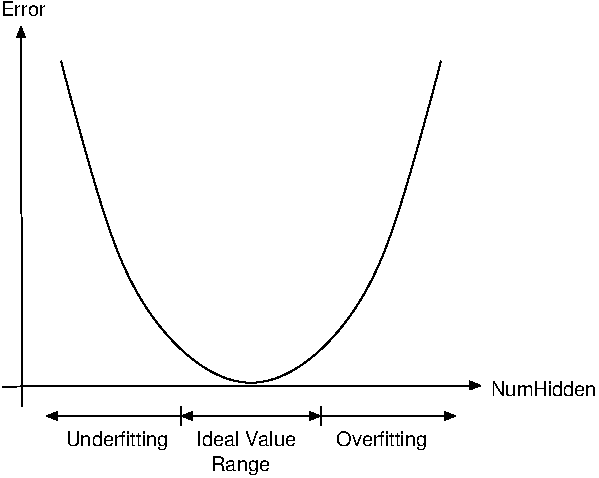
This parameter has a significant influence on the complexity of the learned decision boundaries and therefore on the classification performance.
Small values may lead to underfitting because the classifier cannot model sufficiently complex class boundaries. Conversely, excessively large values may lead to overfitting, where the classifier learns details of the training data that do not generalize well to previously unseen samples.
As a rule of thumb, NumHidden should be chosen in a similar value range as NumInput and NumOutput.
NumOutput🔗
The parameter NumOutput specifies the number of output classes represented by the classifier.
The specified value must correspond to the number of classes represented by the training data.
OutputFunction🔗
The parameter OutputFunction specifies the activation function of the output layer.
The available output functions are softmax, logistic, and linear.
For classification tasks, softmax is recommended because it provides normalized class scores and enables the use of the classification operators.
The output functions logistic and linear are intended for specialized applications such as multi-label classification or regression.
Preprocessing🔗
The parameter Preprocessing specifies whether the feature vectors are preprocessed before training and classification.
Available preprocessing methods are none, normalization, principal_components, and canonical_variates.
In most applications, normalization is recommended. It normalizes each feature by subtracting the mean of the training data and dividing by its standard deviation. As a result, the transformed features have zero mean and unit variance.
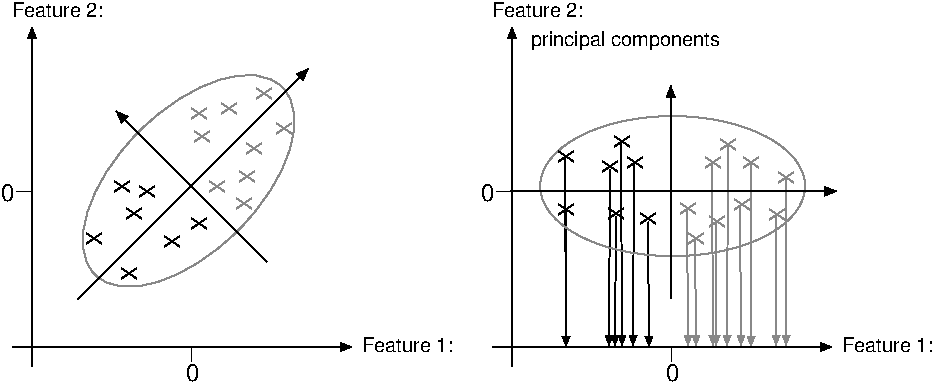
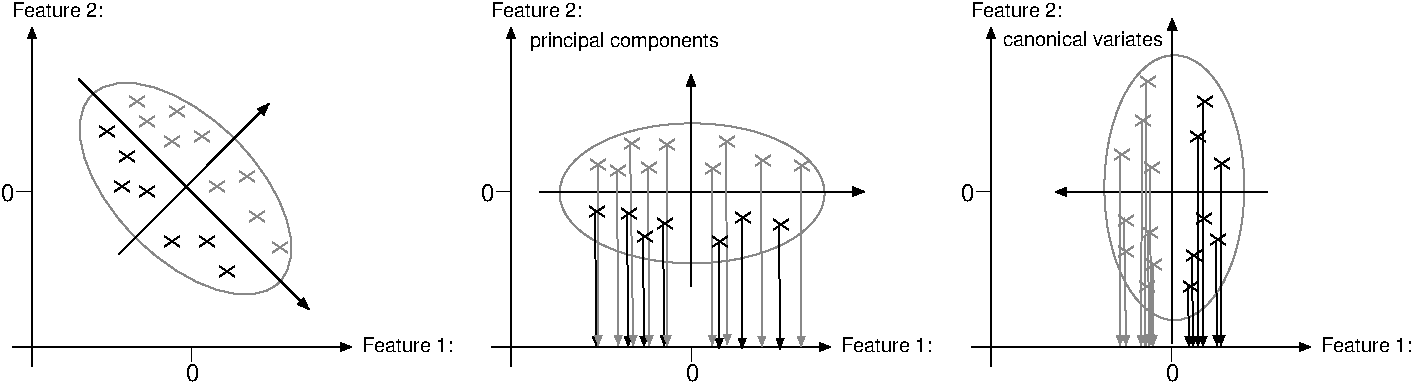
If the feature vectors contain highly correlated features, principal_components can be used to reduce the feature dimension while preserving most of the information.
If the classes are approximately linearly separable, canonical_variates can be used to reduce the feature dimension while maximizing the separation between the class means. This preprocessing method is only supported if OutputFunction is set to softmax.
NumComponents🔗
The parameter NumComponents specifies the number of retained feature components if Preprocessing is set to principal_components or canonical_variates.
The operator get_prep_info_class_mlp can be used to analyze how much information is retained after preprocessing. Based on this information, an appropriate value for NumComponents can be selected.
If preprocessing is not used or Preprocessing is set to normalization, this parameter is ignored.
RandSeed🔗
The parameter RandSeed specifies the seed used to initialize the network weights.
Using the same seed together with identical training data and parameter settings makes the training reproducible.
Add training samples🔗
Training samples are added using
add_sample_class_mlpfor feature vectors,add_samples_image_class_mlpfor labeled images.
Representative training samples are essential for obtaining a robust classifier. The same set of features must be used consistently during training and classification.
Features🔗
The parameter Features contains the feature vector of a training sample.
Each feature vector consists of numerical values describing the properties of an object. The feature vector must contain real-valued features and the same set of features must be used consistently during training and classification.
Depending on the selected workflow, feature vectors can either be provided directly or be extracted automatically from labeled images.
Target🔗
The parameter Target specifies the target class of the training sample.
For classification using the softmax output function, the target can either be specified as the class index or as a one-hot encoded target vector.
The output functions logistic and linear use different target representations that are intended for specialized applications such as multi-label classification or regression.
Training🔗
Training is performed with
During training, the network weights are optimized using the previously added training samples.
The most important parameters are described below.
MaxIterations🔗
The parameter MaxIterations specifies the maximum number of optimization iterations.
Reducing this value decreases the training time, whereas increasing it may improve convergence for more challenging classification problems.
In most applications, values between 100 and 200 are sufficient.
WeightTolerance🔗
The parameter WeightTolerance specifies a stopping criterion based on the change of the network weights between successive optimization iterations.
Training stops when the weight updates become smaller than the specified threshold.
In most applications, the default value should be used.
ErrorTolerance🔗
The parameter ErrorTolerance specifies a stopping criterion based on the change of the training error.
Training terminates if the improvement of the optimization error falls below the specified threshold.
In most applications, the default value provides a good compromise between convergence quality and runtime.
Error🔗
The output parameter Error returns the final training error of the optimized network.
ErrorLog🔗
The output parameter ErrorLog returns the development of the training error during optimization.
It can be used to assess the convergence behavior of the training process and to detect whether the optimization converged to an unfavorable local minimum.
Evaluate the classifier🔗
The output of a trained classifier can be evaluated with
Unlike classify_class_mlp, this operator returns the output values for all classes without assigning the feature vector to the best matching class. It is therefore useful for analyzing the classifier behavior and comparing different parameter settings.
Features🔗
The parameter Features contains the feature vector to be evaluated.
The feature vector must contain the same features in the same order as the feature vectors that were used during training.
Result🔗
The output parameter Result returns the output values of the network for all classes.
For the softmax output function, these values can be interpreted as normalized class scores and can be used to analyze ambiguous classification results or compare different parameter settings.
Classification🔗
Unknown feature vectors are classified with
The classifier assigns each feature vector to the class with the highest network output.
Features🔗
The parameter Features contains the feature vector to be classified.
The feature vector must contain the same features that were used during training.
Num🔗
The parameter Num specifies the number of best matching classes returned by the classifier.
In most applications, Num is set to 1. Larger values can be useful if several candidate classes should be considered.
Class🔗
The output parameter Class returns the predicted class or, if Num is greater than 1, the best matching classes ordered by decreasing confidence.
Confidence🔗
The output parameter Confidence returns the confidence of the predicted classes.
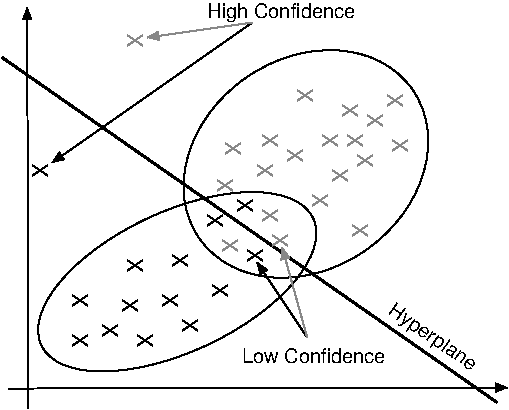
Unlike the probabilities returned by GMM classifiers, the confidence values of an MLP classifier are derived from the learned decision boundaries rather than from an estimated probability distribution. Consequently, feature vectors that are far away from the training samples may still obtain high confidence values if they are clearly located on one side of a decision boundary. Conversely, feature vectors close to the center of a class may obtain lower confidence values if they are located in regions where the decision boundaries of different classes overlap.
Parameter setting for MLP (Segmentation)🔗
Most considerations for parameter optimization are identical to those for general MLP classification.
For image segmentation, feature vectors are implicitly defined by the selected image channels. Therefore, no explicit feature extraction is required. The quality of the selected training regions has a significant influence on the classification result.
Adding samples🔗
Training regions are added using
Representative training regions are essential for obtaining robust segmentation results. The selected regions should
- cover the expected variations within a class,
- avoid ambiguous boundaries,
- contain sufficient samples for each class.
Classification🔗
Segmentation is performed with
Each pixel is assigned to the class with the highest confidence.
The parameter RejectionThreshold specifies the minimum confidence required to assign a pixel to a class. Pixels below this threshold are assigned to the rejection class.
Because MLP confidence values may be influenced by outliers, explicitly training a rejection class is often preferable to relying solely on the rejection threshold.
Practical recommendations🔗
For segmentation applications, it is recommended to
- select homogeneous training regions,
- avoid mixed pixels near class boundaries,
- use representative training images,
- verify the segmentation result visually.
If the confidence values are unreliable in ambiguous regions, consider explicitly training a rejection class.
Optimize critical parameters with a test application🔗
The classification performance strongly depends on the selected parameters and the quality of the training data. Therefore, critical parameters should not be optimized using only the training data.
To estimate the generalization ability of the classifier and to avoid overfitting, it is recommended to optimize critical parameters using an independent test application. Cross validation provides an effective method for estimating the expected classification performance for previously unseen data.
Cross validation🔗
Cross validation divides the available training data into several subsets.
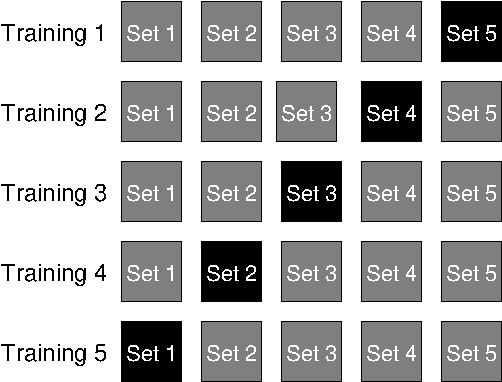
Typically, five subsets are used. During each iteration, one subset is used for testing while the remaining subsets are used for training. The procedure is repeated until every subset has been used once as the test set.
The average classification rate over all iterations provides an estimate of the expected classification performance on previously unseen data.
Cross validation is especially useful
- if only limited training data is available,
- when different parameter settings are compared,
- when overfitting is suspected,
- when different feature combinations are evaluated.
Parameter optimization🔗
Critical parameters should be optimized one after another while keeping all other parameters unchanged.
Typical parameters include
NumHidden,Preprocessing,NumComponents,MaxIterations,- the selected features.
For each parameter configuration, train the classifier, evaluate the classification result, and compare the obtained performance with previous configurations. The parameter set providing the best generalization performance should then be selected.
Parameter optimization should always be performed using independent test data.
Representative datasets🔗
The quality of the classifier strongly depends on the representativeness of the training and test data.
The datasets should
- cover the expected variations,
- contain sufficient samples for every class,
- represent the expected application conditions.
Avoid overfitting🔗
A classifier that performs perfectly on the training data does not necessarily generalize well to previously unseen samples.
Typical indications of overfitting include
- very high training accuracy,
- poor test accuracy,
- strong sensitivity to noise,
- unstable classification results.
Choosing an excessively large value for NumHidden increases the risk of overfitting. Cross validation and independent test datasets help to detect such effects.
Runtime optimization🔗
Only after satisfactory classification quality has been achieved should the runtime be optimized.
Typical measures include
- reducing the feature dimension,
- reducing
NumHidden, - reducing
MaxIterations, - simplifying preprocessing.
Runtime optimization should never be performed at the expense of classification quality.
OCR classification with MLP features🔗
OCR operators can also be used to classify general objects if these objects can be described sufficiently by the available OCR features.
Compared to general feature classification, explicit feature extraction is not required because the OCR operators automatically extract the required features. This simplifies the workflow and may improve the runtime.
Since many OCR features are not rotation invariant, the objects should be aligned before training and classification.
Typical applications include
- classification of printed parts,
- classification of symbols,
- classification of simple geometric objects,
- character recognition.
Advantages of OCR operators🔗
OCR operators provide
- automatic feature extraction,
- optimized classification routines,
- efficient handling of large training sets,
- support for MLP-based classification.
In many applications, OCR classification can replace manually selected feature vectors.
Create an OCR classifier🔗
An OCR classifier is created with
During classifier creation, specify the character size and the class names.
WidthCharacter := 8
HeightCharacter := 10
Classes := ['good','bad']

create_ocr_class_mlp (8, 10, 'constant', 'default', Classes, 80, 'none', 10, 42, OCRHandle)
Define training data🔗
Representative training samples are essential for obtaining robust classification results.
The training objects should
- have similar dimensions,
- be aligned consistently,
- cover the expected variations,
- contain sufficient samples for each class. *
Create a training file🔗
Training samples are stored using
The resulting training file can subsequently be reused for training different OCR classifiers.
write_ocr_trainf (Character, 'good', TrainingFile)
append_ocr_trainf (Character, 'bad', TrainingFile)
Train the classifier🔗
Training is performed with
During training, the OCR features are extracted automatically.
trainf_ocr_class_mlp (TrainingFile, 200, 1, 0.01, OCRHandle, Error, ErrorLog)Classification🔗
Objects are classified using
The operators return
- the predicted class,
- the corresponding confidence,
- additional classification information.
do_ocr_single_class_mlp (Character, OCRHandle, 1, Class, Confidence)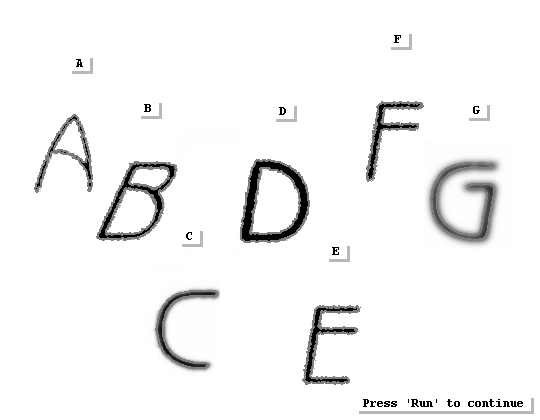
Practical recommendations🔗
For robust OCR classification, it is recommended to
- align the objects before classification,
- use representative training samples,
- avoid large scale variations,
- ensure good image quality,
- validate the classifier using independent test images.
If the objects exhibit large rotations or deformations, general feature classification or specialized OCR approaches may be more suitable.