Optimization🔗
This chapter describes the most important parameters for optimizing an SVM classification.
We recommend to first adjust the parameters so that the classification result is satisfying. If the classification generally works, the parameters can subsequently be adjusted to improve the classification speed.
The most important parameters for the classification result are:
-
Nuofcreate_class_svm, -
KernelParamofcreate_class_svm.
The most important parameters for improving the classification speed are:
-
Preprocessingofcreate_class_svm, -
MaxErrorofreduce_class_svm.
The following sections describe the parameters of the basic SVM operators for which the setting is not immediately obvious or whose influence on the classification is not immediately apparent.
Create the classifier🔗
An SVM classifier is created with
Several properties of the classifier are defined during this step. The returned handle is required and modified in all following classification-specific steps.
NumFeatures🔗
The parameter NumFeatures specifies the dimension of the feature vectors used for training as well as for classification.
Compared to GMM classification, a relatively large number of features can be used with SVM. A number of 500 features is still realistic.
KernelType and KernelParam🔗
The parameter KernelType defines how the feature space is mapped into a higher-dimensional space.
For most applications, the Gaussian radial basis function kernel ('rbf') is recommended.
If KernelType is set to 'rbf', KernelParam specifies the \(\gamma\) of the Gaussian error curve.
The value of \(\gamma\) has a strong influence on the complexity of the separating hypersurface. If \(\gamma\) is very high, the number of support vectors increases. This can lead to overfitting and reduces the generalization ability of the classifier. It also reduces the classification speed.
If \(\gamma\) is too low, underfitting can occur because the number of support vectors is not sufficient to obtain a satisfying classification result.
It is recommended to start with a small value for \(\gamma\) and progressively increase it.
In general, Nu and \(\gamma\) should be optimized simultaneously because they jointly determine the complexity of the separating hypersurface. Cross validation can be used to search for a suitable Nu-\(\gamma\) pair.
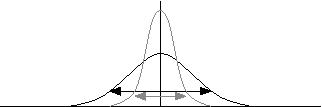
Figure 1. Gamma describes the amount of influence of a support vector upon its surrounding.
Besides 'rbf', a linear or polynomial kernel can also be selected.
The linear kernel (KernelType = 'linear') transforms the feature space using a dot product. It should only be used if the classes are expected to be linearly separable. If a linear kernel is selected, KernelParam has no meaning.
The polynomial kernels ('polynomial_homogeneous' and 'polynomial_inhomogeneous') should only be used in very special cases. If classification with 'rbf' is not successful, a polynomial kernel can be considered, but in most cases 'rbf' leads to a better result.
For a polynomial kernel, KernelParam specifies the degree d of the polynomial. A degree higher than 10 might result in numerical problems.
Nu🔗
For classes that are not linearly separable, samples from different classes may overlap.
The parameter Nu regularizes the separation of the classes. It defines an upper bound for training errors within overlapping areas and, at the same time, a lower bound for the number of support vectors.
Nu should be adjusted carefully. Its value must be a real number between 0 and 1.
As a rule of thumb, Nu can be set to the expected error ratio of the specific dataset. For example, if a maximum training error of 5% is expected, Nu can initially be set to 0.05.
A very large value of Nu results in a large number of support vectors and therefore reduces the classification speed. In addition, training may be aborted if Nu is too large.
On the other hand, a very small value of Nu can lead to unstable numerical behavior and consequently to incorrectly classified feature vectors.
It is recommended to start with a small value for Nu and progressively increase it.
As with \(\gamma\), Nu and \(\gamma\) should generally be optimized together because they jointly determine the complexity of the separating hypersurface.
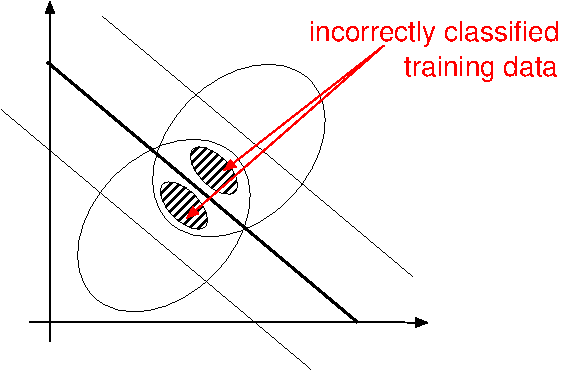
Figure 2. The parameter Nu determines the amount of incorrectly classified training data within the overlap between two classes.
NumClasses🔗
The parameter NumClasses specifies the number of classes.
SVM naturally handles two-class problems. Multi-class problems are handled by combining several binary classifiers.
Mode🔗
The parameter Mode defines whether the application is a binary classification, a multi-class classification, or a novelty-detection problem.
For novelty detection, training data for a single class is used and the classifier determines whether an unknown feature vector belongs to the trained class or to the rejection class.
The 'novelty-detection' mode can only be used if KernelType is set to 'rbf'.
For multi-class classification, two approaches are available.
With 'one-versus-one', a binary classifier is created for every pair of classes. The class that wins the most comparisons is selected.
For n classes, this results in
binary classifiers.
This approach is fast but is suitable mainly for a small number of classes, approximately up to 10.
With 'one-versus-all', each class is compared with the remaining training data. The class with the maximum distance to the separating hypersurface is selected.
The number of required binary classifiers corresponds to the number of classes. This approach is not as fast as 'one-versus-one', but is suitable for a larger number of classes.
Preprocessing and NumComponents🔗
The parameter Preprocessing defines the preprocessing applied to the feature vectors during training and subsequently during classification or evaluation.
Preprocessing can speed up both training and classification and can sometimes improve the recognition rate.
The available values are:
'none''normalization''principal_components''canonical_variates'
In most cases, 'normalization' should be used because it can improve the speed without losing relevant information compared to 'none'.
'principal_components' and, in rare cases, 'canonical_variates' can be used to further reduce the feature dimension and therefore improve the speed.
The parameter NumComponents specifies the number of components to which the feature vector is reduced if a dimensionality-reducing preprocessing method is selected.
NumComponents therefore has to be adjusted only if Preprocessing is set to 'principal_components' or 'canonical_variates'.
If one of these preprocessing methods is selected, get_prep_info_class_svm can be used to determine a suitable number of components.
Add training samples🔗
A single training sample is added to the SVM classifier using
For training, several samples have to be added by successively calling the operator with different samples.
Features🔗
The parameter Features contains the feature vector of the sample to be added to the classifier.
The feature vector is a tuple of values, where each value describes a specific numeric feature.
The feature vector must consist of real numbers. Integer values must therefore be converted to real numbers before they are added to the classifier.
Class🔗
The parameter Class contains the ID of the class to which the feature vector belongs.
The class ID is an integer between 0 and Number of Classes - 1.
If a tuple containing class names has been created, the class ID corresponds to the index of the corresponding class name.
Train the classifier🔗
The SVM classifier is trained with
After training, the classifier contains the information required to separate the classes.
Epsilon🔗
Training gradually optimizes the function that determines the class boundaries.
The optimization stops if the gradient of the function falls below a certain threshold. This threshold is set with Epsilon.
In most cases, the default value of 0.001 should be used.
A value that is too small makes the optimization slower without necessarily improving the recognition rate.
A value that is too large can cause the optimization to stop before the optimum is found. The resulting recognition rate may then be unsatisfactory.
There are two cases in which changing Epsilon can be useful.
If Nu is very small and the training data is small or unbalanced, a smaller value can improve the resulting recognition rate.
When using cross validation to search for a suitable Nu-\(\gamma\) pair, a larger value for Epsilon is recommended. This speeds up the cross validation without significantly changing the parameters of the optimal kernel.
After the optimal Nu-\(\gamma\) pair has been found, the final training should be performed again using the small default value.
TrainMode🔗
The parameter TrainMode determines the mode used for training.
The mode 'default' is recommended in most cases. In this mode, the complete set of available samples is trained in one step.
The mode 'add_sv_to_train_set' allows new samples to be appended to a previously applied training.
However, only the support vectors resulting from the previous training are reused. The samples from the previous training are ignored.
Consequently, the resulting separating hypersurface can differ from the hypersurface obtained by training with all available samples simultaneously.
Therefore, 'default' should generally be preferred if all training samples are available.
Reduce the support vectors🔗
The operator
can be used to reduce the number of support vectors returned by the training.
This is particularly useful for speeding up online classification.
The operator does not modify the original classifier handle. Instead, it creates a copy and reduces the support-vector representation of the copy.
Method, MinRemainingSV, and MaxError🔗
The parameter Method defines the method used to reduce the number of support vectors.
Currently, only 'bottom_up' is available.
With this method, the number of support vectors is reduced by iteratively merging support vectors until either the minimum number of support vectors specified by MinRemainingSV is reached or the accumulated maximum error exceeds MaxError.
Reducing the number of support vectors also reduces the complexity of the separating hypersurface and can therefore lead to a lower classification rate.
A common approach is to start with a small value for MaxError, for example 0.0001, and increase it step by step.
To control the reduction ratio, the number of remaining support vectors can be checked using the HDevelop procedure get_support_vector_num_class.
The classification rate should be checked by classifying separate test data with
Classification🔗
Unknown feature vectors are classified with
Num🔗
The parameter Num specifies the number of best classes to be searched for.
Generally, Num is set to 1 if only the class with the best probability is required.
A value of 2 can be useful if the second-best class is also of interest, for example, if classes overlap.
If Mode was set to 'novelty-detection', Num must be set to 1.
Class🔗
The output parameter Class returns the result of the classification.
If Mode was set to 'one-versus-one', the classes are ordered according to the number of votes received from the binary classifiers.
If Mode was set to 'one-versus-all', the classes are ordered according to the value of the corresponding binary classifier.
If Mode was set to 'novelty-detection', a single value is returned. Num must be set to 1.
The returned value is 1 if the feature vector belongs to the trained class and 0 if it belongs to the rejection class.
Optimize critical parameters with a test application🔗
The classification performance strongly depends on the selected parameters and the quality of the training data. Therefore, critical parameters should not be optimized using only the training data.
To estimate the generalization ability of the classifier and to avoid overfitting, critical parameters should be optimized using independent test data.
For SVM, this is particularly important when optimizing the Nu-\(\gamma\) pair, as these parameters jointly determine the complexity of the separating hypersurface.
Cross validation🔗
Cross validation can be used to search for a suitable Nu-\(\gamma\) pair.
The available training data is divided into several subsets. During each iteration, one subset is used for testing while the remaining subsets are used for training.
The procedure is repeated until every subset has been used once as the test set.
The average classification rate over all iterations provides an estimate of the expected classification performance on previously unseen data.
When performing the cross validation, a larger value for Epsilon can be used to speed up the individual training steps.
After the optimal Nu-\(\gamma\) pair has been found, the final classifier should be trained again with the default value of Epsilon.
Parameter optimization🔗
Critical parameters should be optimized while keeping the remaining parameters unchanged.
For SVM, the most important parameters include
-
KernelType, -
KernelParam, -
Nu, -
Mode, -
Preprocessing, -
NumComponents, -
Epsilon.
The Nu-\(\gamma\) pair should be optimized jointly.
For each parameter configuration, the classifier is trained and evaluated on independent test data.
The parameter set providing the best classification performance should then be selected.
Runtime optimization🔗
Only after satisfactory classification quality has been achieved should the runtime be optimized.
A particularly effective approach is to combine
-
KernelTypeset to'rbf', -
Preprocessingset to'principal_components'.
Reducing the feature dimension also reduces the dimension of the support vectors and can therefore significantly speed up SVM classification.
The number of support vectors can additionally be reduced using reduce_class_svm.
For this purpose, MaxError should initially be set to a small value and then increased step by step while monitoring the classification rate.
Runtime optimization should never be performed at the expense of classification quality.