Anomaly detection and Global Context Anomaly Detection🔗
More Info
Learn about Global Context Anomaly Detection and many other topics in interactive online courses at our MVTec Academy.
These two methods can detect whether or not an image contains anomalies.
Available models🔗
An anomaly detection or Global Context Anomaly Detection model learns common features from images without anomalies.
The trained model will infer how likely an input image contains only learned features or if the image contains something different.
The latter is interpreted as an anomaly.
This inference result is returned as a gray value image.
Its pixel values indicate how likely the corresponding pixels in the input image pixels show an anomaly.
Two model types can be used, anomaly detection or Global Context Anomaly Detection:
Anomaly detection🔗
With anomaly detection (model type 'anomaly_detection'), structural anomalies are targeted, thus any feature that was not learned during training.
This can, for example, include scratches, cracks, or contamination.

Figure 1. Example for anomaly detection:
A value is assigned to each pixel of the input image that indicates how likely the pixel is to be an anomaly.
The worm is not part of the worm-free apples the model has seen during training and therefore, its pixels get a much higher score.
Global Context Anomaly Detection🔗
Global Context Anomaly Detection (model type 'gc_anomaly_detection') comprises two tasks:
-
Detecting structural anomalies
As described for anomaly detection above, structural anomalies primarily include unknown features, like scratches, cracks, or contamination.
-
Detecting logical anomalies
Logical anomalies are detected if constraints regarding the image content are violated. This can, for example, include a wrong number or wrong position of objects in an image.
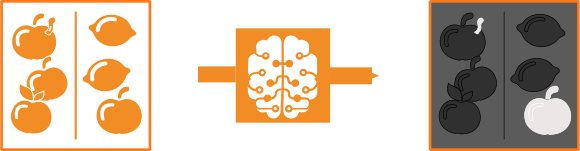
Figure 2. Example for Global Context Anomaly Detection:
A value is assigned to each pixel of the input image that indicates how likely the pixel is to be a structural or logical anomaly:
Structural anomaly: One apple contains a worm, which differs from the apples the model has seen during training.
Logical anomaly: One apple is sorted among lemons.
Although the apple itself is intact, the logical constraint is violated, as the model has only seen images with correctly sorted fruit during training.
The Global Context Anomaly Detection model consists of two subnetworks.
To improve the runtime and memory consumption, the model can be reduced to one of the subnetworks.
This is recommended if a single subnetwork performs well enough.
For more information, see the parameter 'gc_anomaly_networks' in get_dl_model_param.
After setting 'gc_anomaly_networks', the model needs to be evaluated again, as this parameter can change the Global Context Anomaly Detection performance significantly.
-
Local subnetwork
This subnetwork is used to detect anomalies that affect the image on a smaller, local scale. It is designed to detect structural anomalies but can find logical anomalies as well. Thus, if an anomaly can be recognized by analyzing single patches of an image, it is detected by the local component of the model. For information about how to define the local scale of this subnetwork, see the description of the parameter
'patch_size'inget_dl_model_param. -
Global subnetwork
This subnetwork is used to detect anomalies that affect the image on a large or global scale. It is designed to detect logical anomalies but can find structural anomalies as well. Thus, if you need to see most or all of the image to recognize an anomaly, it is detected by the global component of the model.
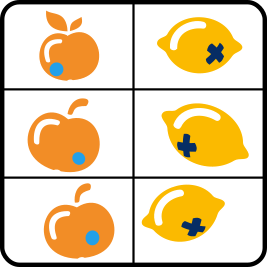
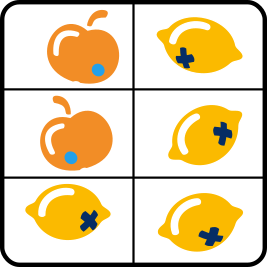
Figure 3. Training image of an exemplary task. Apples and lemons are intact, sorted correctly, and tagged with the correct sticker.
 |
 |
 |
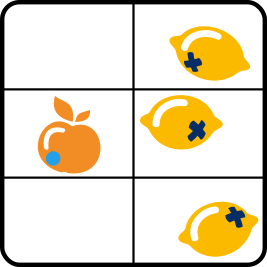 |
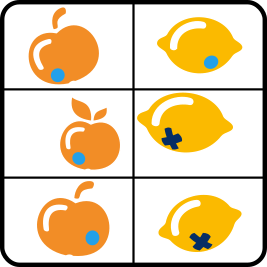
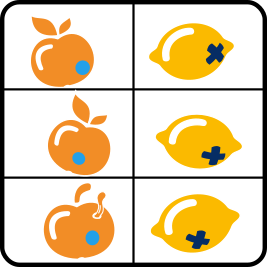
Figure 4. Some anomalies that can be detected with Global Context Anomaly Detection:
Logical anomaly, most likely detected by the local subnetwork (wrong sticker).
Structural anomaly, most likely detected by local subnetwork (wormy apple).
Logical anomaly, most likely detected by global subnetwork (wrong sorting).
Logical anomaly, most likely detected by global subnetwork (missing apples).
About data🔗
We distinguish between data used for training, evaluation, and inference on new images.
As a basic concept, the model handles data by dictionaries, meaning it receives the input data from a dictionary DLSample and returns the dictionaries DLResult and DLTrainResult.
For more information about the data handling, see Deep learning > HALCON DL model.
- Classes
-
In anomaly detection and Global Context Anomaly Detection, there are exactly two classes:
-
'ok', meaning without anomaly, class ID 0. -
'nok', meaning with anomaly, class ID 1 (on pixel values with an ID 0, see Data for evaluation below).
These classes apply to the whole image as well as single pixels.
-
- Data for training
-
This dataset consists only of images without anomalies and the corresponding information. They have to be provided in a way the model can process them. For more information about the image requirements, see Images below.
The training data is used to train a model for your specific task. With the aid of this data, the model can learn which features the images without anomalies have in common.
- Data for evaluation
-
This dataset should include images without anomalies but it can also contain images with anomalies. Every image within this set needs a ground truth label
image_labelspecifying the class of the image (see Classes above). This indicates if the image shows an anomaly ('nok') or not ('ok').Evaluating the model performance on finding anomalies can visually also be done on pixel level if an image
anomaly_file_nameis included in theDLSampledictionary. In thisanomaly_file_nameimage, every pixel indicates the class ID. Hence, if the corresponding pixel in the input image shows an anomaly (pixel value > 0) or not (pixel value equal to 0).
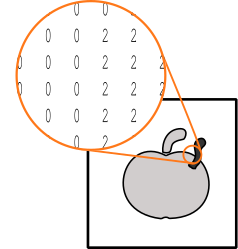
Figure 5. Scheme of
anomaly_file_name. For visibility, gray values are used to represent numbers.
Input image
Correspondinganomaly_file_nameproviding the class annotations; 0:'ok'(white and light gray), 2:'nok'(dark gray) - Images
-
Regardless of the application, the model poses requirements on the images, such as the dimensions, the gray value range, and the type. The specific values depend on the network itself and can be queried with
get_dl_model_param. For more information about specific values of different models, seeread_dl_model.To fulfill these requirements, you may have to preprocess your images. Standard preprocessing is implemented in the procedure
preprocess_dl_datasetand, for a sample, inpreprocess_dl_samples. In case of custom preprocessing, these procedures offer guidance on the implementation. - Model output
-
The training output differs depending on the used model type:
-
Anomaly detection
As training output, the operatortrain_dl_model_anomaly_datasetwill return a dictionaryDLTrainResultwith the best obtained error received during training and the epoch in which this error was achieved. -
Global Context Anomaly Detection
As training output, the operatortrain_dl_model_batchwill return a dictionaryDLTrainResultwith the current value of the total loss as well as values for all other losses included in your model.
As inference and evaluation output, the model will return a dictionary
DLResultfor every sample. For anomaly detection and Global Context Anomaly Detection, this dictionary includes the following extra entries:anomaly_score-
A score indicating how likely the entire image is to contain an anomaly. This score is based on the pixel scores given in
anomaly_image.For Global Context Anomaly Detection, depending on the used subnetworks, the anomaly score can also be calculated by the local (
anomaly_score_local) and the global (anomaly_score_global) subnetwork only.
Theanomaly_scoreis by default equal to the maximum ofanomaly_image. The parameteranomaly_score_tolerancecan be used to ignore a fraction of outliers in theanomaly_imagewhen calculating theanomaly_score. anomaly_image-
An image in which the value of each pixel indicates how likely its corresponding pixel in the input image shows an anomaly (see the illustration below).
For anomaly detection, the values range from 0 to 1.
For Global Context Anomaly Detection, there are no constraints. When using Global Context Anomaly Detection and depending on the used subnetworks, an anomaly image can also be calculated by the local (anomaly_image_local) or the global (anomaly_image_global) subnetwork only.
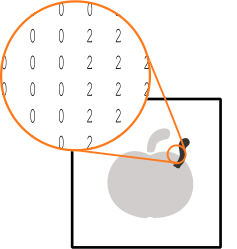
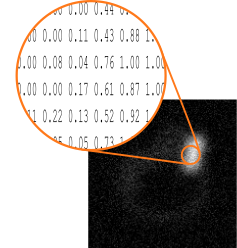
Figure 6. Scheme of
anomaly_image. For visualization purpose, gray values are used to represent numbers.
anomaly_file_nameproviding the class annotations; 0:'ok'(white and light gray), 2:'nok'(dark gray)
Correspondinganomaly_image -
Specific parameters🔗
For an anomaly detection or Global Context Anomaly Detection model, the model parameters as well as the hyperparameters are set using set_dl_model_param.
For more information about the model parameters, see get_dl_model_param.
As training an anomaly detection model utilizes the full dataset at once rather than in batches, certain parameters, such as 'batch_size_multiplier' have no influence.
The model returns scores but classifies neither pixel nor image as showing an anomaly or not.
For this classification, thresholds need to be given, setting the minimum score for a pixel or image to be regarded as anomalous.
You can estimate possible thresholds using the procedure compute_dl_anomaly_thresholds.
Applying these thresholds can be done with the procedure threshold_dl_anomaly_results.
As results, the procedure adds the following (threshold-depending) entries into the dictionary DLResult of a sample:
anomaly_class-
The predicted class of the entire image (for the given threshold).
For Global Context Anomaly Detection, depending on the used subnetworks, the anomaly class can also be calculated by the local (
anomaly_class_local) and the global (anomaly_class_global) subnetwork only. anomaly_class_id-
ID of the predicted class of the entire image (for the given threshold).
For Global Context Anomaly Detection, depending on the used subnetworks, the anomaly class ID can also be calculated by the local (
anomaly_class_id_local) and the global (anomaly_class_id_global) subnetwork only. anomaly_region-
Region consisting of all the pixels that are regarded as showing an anomaly (for the given threshold, see the illustration below).
For Global Context Anomaly Detection, depending on the used subnetworks, the anomaly region can also be calculated by the local (
anomaly_region_local) and the global (anomaly_region_global) subnetwork only.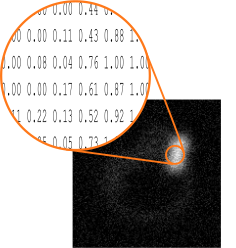
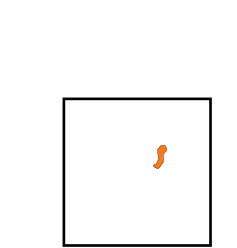
Figure 7. Scheme of
anomaly_region. For visualization purpose, gray values are used to represent numbers.
anomaly_imagewith the obtained pixel scores
Correspondinganomaly_region
Domain handling during inference🔗
You can restrict the search area by reducing the domain of the input images (for example, reduce_domain).
The way preprocess_dl_samples handles the domain is set using the preprocessing parameter 'domain_handling'.
The parameter 'domain_handling' should be used in a way that only essential information is passed on to the network for inference.
For instance, use 'keep_domain' to exclude unwanted anomalies in the background when computing the anomaly score and image.
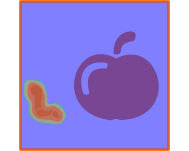
The following, images show how an input image with reduced domain is inferred after the preprocessing step depending on the set 'domain_handling'.

Figure 8. Input image for inference with domain (blue)
 |
 |
Figure 9.
anomaly_image after inference with 'full_domain' (result: 'nok')
anomaly_image after inference with 'keep_domain' (result: 'ok')