bilateral_filter🔗
Short description🔗
bilateral_filter — bilateral filtering of an image.
Signature🔗
bilateral_filter( image Image, image ImageJoint, out image ImageBilateral, real SigmaSpatial, real SigmaRange, attribute.name GenParamName, attribute.value GenParamValue )
Description🔗
bilateral_filter performs a joint bilateral filtering
on the input Image using the guidance image
ImageJoint and returns the result in ImageBilateral.
Image and ImageJoint must be of the same size and type.
SigmaSpatial defines the size of the filter mask and
corresponds to the standard deviation of a conventional Gauss filter.
Bigger values increase the area of influence of the filter and less detail
is preserved.
SigmaRange is used to modify the filter mask depending on the
pixels of ImageJoint around the current pixel.
Only pixels in areas with weak edges that have a contrast lower than
SigmaRange contribute to the smoothing. Please note that the
contrast in uint2 or real images may differ significantly from the
default values of SigmaRange and adjust the parameter accordingly.
GenParamName and GenParamValue currently can be used to
control the trade-off between accuracy and speed (see below).
Influence of the Joint Image🔗
Each pixel of Image is filtered with a filter mask that
depends on ImageJoint. The filter mask combines a Gaussian
closeness function depending on SigmaSpatial
and a Gaussian similarity function that weights gray value differences
depending on SigmaRange.
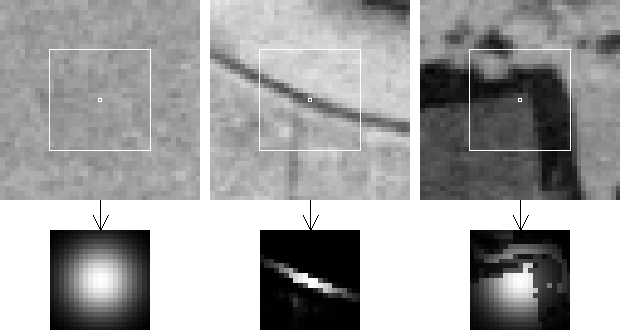
Examples for local filter masks depending on ImageJoint:
Left: In homogeneous areas the filter mask is nearly Gaussian.
Center: The filter mask follows the line. That means, only the dark pixels
are smoothed and the edge is preserved.
Right: The filter mask resembles the corner. Note that the filter mask
extends across the shadow into areas with similar gray values.
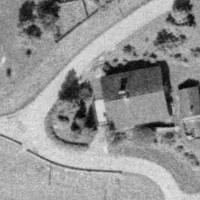
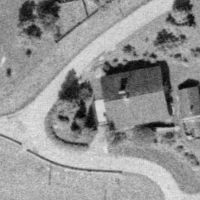
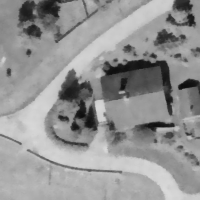
If Image and ImageJoint are identical,
bilateral_filter behaves like an edge-preserving smoothing
where SigmaSpatial defines the size of the filter mask.
Pixels at edges that have a contrast significantly greater than
SigmaRange are preserved, while pixels in homogeneous areas are
smoothed.
 |
 |
 |
| (1) | (2) | (3) |
(1) Image and (2) ImageJoint are identical.
That leads to edge-preserving smoothing in (3) ImageBilateral.
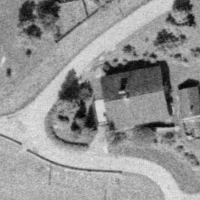
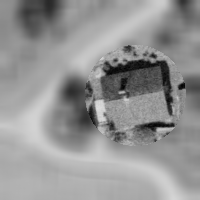
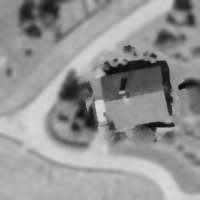
If Image and ImageJoint are different, each pixel of
Image is smoothed with a filter mask that is influenced by
ImageJoint. Pixels at positions where ImageJoint has
strong edges with a contrast significantly greater than
SigmaRange are smoothed less than pixels in homogeneous areas.
 |
 |
 |
| (1) | (2) | (3) |
(1) Image and (2) ImageJoint are different.
(3) ImageBilateral: Only edges are preserved where
ImageJoint has edges.
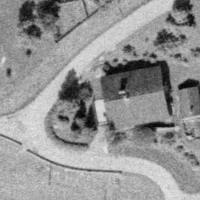
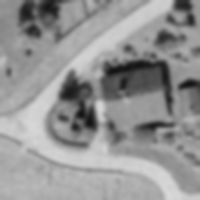
If ImageJoint is constant, bilateral_filter is equivalent
to a Gaussian smoothing with SigmaSpatial (see
gauss_filter or smooth_image).
 |
 |
 |
| (1) | (2) | (3) |
(1) Image. (2) ImageJoint is constant.
(3) ImageBilateral is equal to Image after Gaussian
smoothing.
Influence of the smoothing parameters🔗
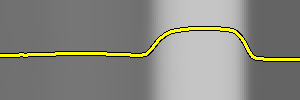
The following examples show the influence of SigmaRange on an
artificial image. In this image, the noise level is 10 gray values,
the left edge has a contrast of 50 gray values, the right edge has a
contrast of 100 gray values.
The yellow line shows a gray-value profile of a horizontal cross section.
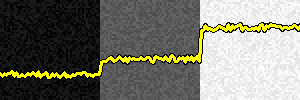
Original image with overlaid gray profile, used as Image and
ImageJoint.
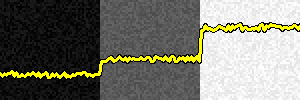
Filter result with SigmaRange = 1:
No effect because SigmaRange is below noise level.
Therefore noise is treated as edge and preserved.
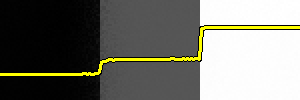
Filter result with SigmaRange = 25:
Noise is smoothed, edges are preserved.
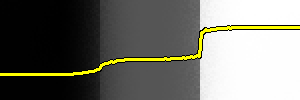
Filter result with SigmaRange = 50:
The weaker edge is smoothed, the stronger edge is preserved.
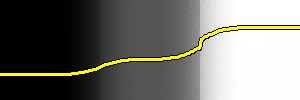
Filter result with SigmaRange = 100: Both edges are smoothed.
Generic Parameters🔗
The following values for GenParamName are supported:
-
'sampling_method' Per default,
bilateral_filteruses an approximation of the bilateral filter that only uses a subset of sampled points for the calculation of the local filter masks.By setting 'sampling_method', the used approximation can be selected. Possible values are:
-
'grid' (default) Uses a regular grid for subsampling the filter masks.
-
'poisson_disk' Uses a Poisson disk sampling. This method is slower than 'grid', but may produce less artifacts.
-
'exact' Uses all available points. This method is slowest, but the most accurate. If 'exact' is used, 'sampling_ratio' is ignored.
-
-
'sampling_ratio' Controls how many points are used for the subsampling of the local filter masks.
By setting 'sampling_ratio' to 1.0, the exact method is used. Using a lower sampling ratio leads to faster filtering, but also to slightly less accurate results.
Suggested values: 0.25, 0.5, 0.75, 1.0
Default: 0.50
Rolling Bilateral Filter🔗
bilateral_filter can be applied iteratively. In this case, the
result of one iteration is used as guidance image for the next iteration.
This can be useful, e.g., to remove small structures from the original
image even if they have a high contrast.
The following example shows the effect of a rolling filter on an artificial
image. In this image, the noise level is 10 gray values, the contrast
between dark and bright areas is 100 gray values, the left bright
bar is 10 pixels wide, the right bar is 40 pixels wide.
The yellow line shows a gray-value profile of a horizontal cross section.
Used parameters: ImageJoint constant,
SigmaSpatial = 25, SigmaRange = 15.
* Apply the rolling bilateral filter |
* (use a constant guide for the first iteration). |
gen_image_proto(Image, ImageJoint, 128) |
for I := 1 to 6 by 1 |
\(\qquad\)bilateral_filter(Image, ImageJoint, ImageJoint, 25, 15, [], []) |
endfor |
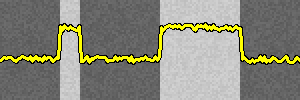 |
 |
| (1) | (2) |
(1) Input Image and (2) ImageJoint for first iteration
of the rolling filter.
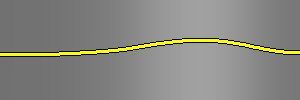
Result after first iteration: The smaller bar is removed.
Result after third iteration: The edges of the right bar are partly restored.

Result after sixth iteration: The edges of the right bar are restored completely.
Mathematical Background🔗
The calculation of the filtered gray values \(I'_{i}\) is done on the basis of the following formula:
where \(c_{ik}\) is a closeness function
\(s_{ik}\) is a similarity function
\(K_{i}\) is a normalization factor
where \(I'_{i}\), \(I_{i}\) and \(J_{i}\) are the
gray values of Image and ImageJoint at the pixel position
\(i\), and \(\omega_{i}\) is the neighborhood around the
pixel \(i\).
For an explanation of the concept of smoothing filters see the introduction of chapter Filters / Smoothing.
Execution information🔗
Execution information
-
Multithreading type: reentrant (runs in parallel with non-exclusive operators).
-
Multithreading scope: global (may be called from any thread).
-
Automatically parallelized on tuple level.
-
Automatically parallelized on channel level.
-
Automatically parallelized on domain level.
Parameters🔗
Image (input_object) (multichannel-)image(-array) → object (byte / uint2 / real)
Image to be filtered.
ImageJoint (input_object) (multichannel-)image(-array) → object (byte / uint2 / real)
Joint image.
ImageBilateral (output_object) (multichannel-)image(-array) → object (byte / uint2 / real)
Filtered output image.
SigmaSpatial (input_control) real → (real)
Size of the Gaussian of the closeness function.
Default: 3.0
Suggested values: 1.0, 2.0, 3.0, 10.0
Restriction: SigmaSpatial > 0.6
SigmaRange (input_control) real → (real)
Size of the Gaussian of the similarity function.
Default: 20.0
Suggested values: 3.0, 10.0, 20.0, 50.0, 100.0
Restriction: SigmaRange > 0.0001
GenParamName (input_control) attribute.name(-array) → (string)
Generic parameter name.
Default: []
List of values: 'sampling_method', 'sampling_ratio'
GenParamValue (input_control) attribute.value(-array) → (real / integer / string)
Generic parameter value.
Default: []
Suggested values: 'grid', 'poisson_disk', 'exact', 0.5, 0.25, 0.75, 1.0
Example🔗
(HDevelop)
read_image (Image, 'mreut')
* Edge-preserving smoothing
bilateral_filter (Image, Image, ImageBilateral, 5, 20, [], [])
* Rolling filter (5 iterations)
gen_image_proto (Image, ImageJoint, 0)
for I := 1 to 5 by 1
  bilateral_filter (Image, ImageJoint, ImageJoint, 5, 20, [], [])
endfor
Combinations with other operators🔗
Combinations
Possible predecessors
Possible successors
threshold, dyn_threshold, var_threshold, regiongrowing
Alternatives
References🔗
C. Tomasi, R. Manduchi: ‘’Bilateral filtering for gray and color images’‘; Sixth International Conference in Computer Vision; S. 839-846; January 1998.
F. Banterle, M. Corsini, P. Cignoni, R. Scopigno: ‘’A Low-Memory, Straightforward and Fast Bilateral Filter Through Subsampling in Spatial Domain’‘; Computer Graphics Forum, no. 1, vol 31; S. 19-23; February 2012.
G. Petschnigg, R. Szeliski, M. Agrawala, M. Cohen, H. Hoppe, K. Toyama: ‘’Digital Photography with Flash and No-flash Image Pairs’‘; ACM Trans., no. 3, vol. 23; S. 9; August 2004.
R. Bridson: ‘’Fast Poisson Disk Sampling in Arbitrary Dimensions’‘; ACM SIGGRAPH 2007 Sketches, no. 22; 2007.
Module🔗
Foundation