Image Source Plugin for GigE Vision compliant cameras
The GigE Vision Image Source Plugin provides access to all GigE Vision cameras, sensors and non-streaming devices. All versions of the GigE Vision standard are supported. The plugin is available via the MVTec Software Manager (SOM) as an optional component of a HALCON installation.
| Plugin Name | mvtec_gigevision |
|---|---|
| Version | |
| Date | 2025-10-09 |
| Available Architectures | x64-win64 x64-linux aarch64-linux armv7a-linux |
Features
- User-space implementation of the GigE Vision protocol.
- For Windows, the MVTec GigE Vision Streaming Filter is available and (if installed) automatically used to improve performance.
- Support of GigE Vision 1.0 up to 2.2 and the latest draft of 3.0.
- Support of RDMA streaming over the RoCEv2 protocol.
- Support of GenDC streaming.
- Support of Multipart streaming.
- Grabbing from multiple cameras.
- Support of Jumbo frames and automatic packet size optimization.
- Software control of transport layer-dependent parameters.
- No administrator or root privileges required, except for the installation of the filter driver.
- Support of Force IP to assign temporary IP addresses to cameras.
- Support for connecting to a camera at a given IP address without triggering a device discovery.
- Support of non-streaming devices. These are devices that communicate via the GigE Vision Control Protocol, but do not stream any image data.
- Support of the pending acknowledge message, which allows automatic adjustment of timeout values, to properly handle slow, asynchronous device commands.
Limitations
- The MVTec GigE Vision Streaming Filter is only available under Windows.
- Multi-stream devices are not supported.
- Acquisition from devices with read-only access (unconditional streaming) is not supported.
- Primary Application Switchover is not supported.
Installation
You can install the mvtec_gigevision plugin via the SOM:
- For an already installed HALCON version choose the Manage packages functionality in the context menu.
- When installing a HALCON version from scratch, go to the Available products tab, and click install. You may need to choose the Advanced installation to select individual packages.
-
In both cases the Image Source Plugins can be found in the package group Image Acquisition Interfaces (1).
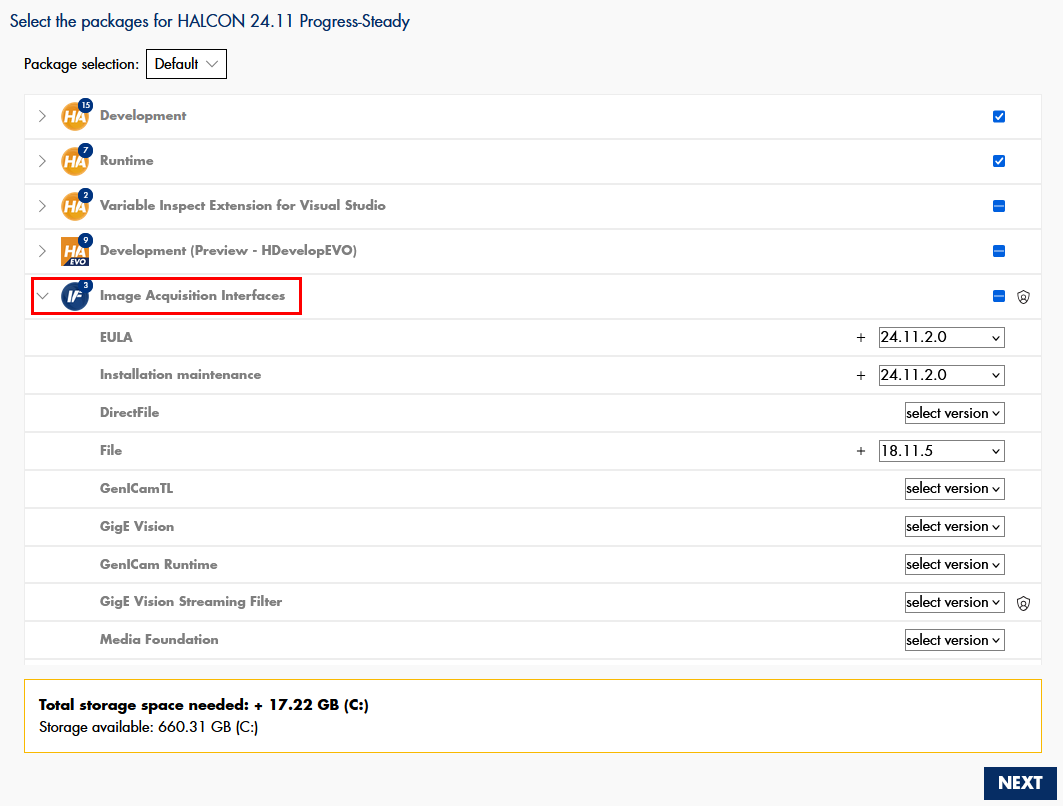
The SOM will place all necessary components at the correct location, such that the plugin is ready to use from within HALCON.
System requirements
- The
mvtec_gigevisionplugin is usable on all systems that fulfill the HALCON 24.11 system requirements. - Gigabit Ethernet network adapter. It is recommended to use a PCIe network adapter which supports Jumbo frames. The adapter should be configured to the maximum MTU value (typically 9000 bytes). The camera should be connected directly to the network adapter to avoid interference with other network traffic. Setups that involve switches and other Ethernet hardware require expert knowledge for a stable image transmission.
- Proper configuration of IP addresses on all devices. Refer to the corresponding section for details.
- GigE Vision network traffic must not be blocked by the firewall on your system. Refer to the troubleshooting section for details on this topic.
- MVTec GigE Vision Streaming Filter:
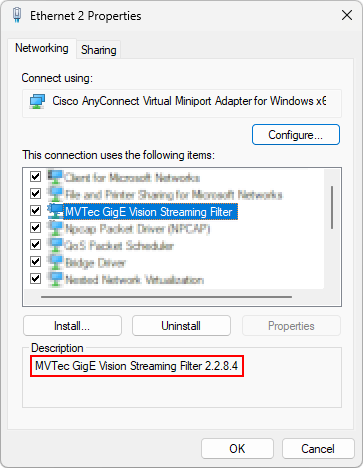
Themvtec_gigevisionplugin automatically uses a filter driver to enhance the performance while streaming images. When installing the GigE Vision acquisition package, the filter driver will be automatically installed if selected. For full functionality use the driver version v2.2.8.4. For details refer to: MVTec GigE Vision Streaming Filter. - GigE Vision 3.0 RDMA streaming:
Network adapter with RDMA/RoCEv2 support under Windows. Up-to-date drivers must be installed including the NDSPI interface (Windows user mode RDMA/RoCEv2 support). Refer to the network adapter manufacturer documentation for details.
- The
mvtec_gigevisionplugin is usable on all systems that fulfill the HALCON 24.11 system requirements. - Gigabit Ethernet network adapter. It is recommended to use a PCIe network adapter which supports Jumbo frames. The adapter should be configured to the maximum MTU value (typically 9000 bytes). The camera should be connected directly to the network adapter to avoid interference with other network traffic. Setups that involve switches and other Ethernet hardware require expert knowledge for a stable image transmission.
- Proper configuration of IP addresses on all devices. Refer to the corresponding section for details.
- GigE Vision network traffic must not be blocked by the firewall on your system. Refer to the troubleshooting section for details on this topic.
- GigE Vision 3.0 RDMA streaming:
Network adapter with RDMA/RoCEv2 support under Linux. Up-to-date drivers/firmware must be installed. Up-to-date versions of the ibverbs and rdmacm libraries must be installed including the corresponding ibverbs provider for the given adapter. Refer to the network adapter manufacturer documentation for details.
Usage and concepts
GigE Vision devices communicate with the image processing hardware via Ethernet connections.
From the view of the operating system, the device is reachable by sending IP packets through one of many available Ethernet ports.
Through a given Ethernet port one or more cameras can be reachable.
To enumerate and connect these cameras without having to know their IP addresses beforehand,
the GigE Vision protocol also includes a device discovery mechanism, which is implemented via IP broadcast packages.
Configuration of IP addresses
All GigE Vision devices should use an IP address that matches the IP configuration of the network interface they are connected to.
Example: Correct and incorrect IP address configuration
 Correct IP address configuration:
| Host | Camera | |
|---|---|---|
| IP Address | 192.168.0.1 | 192.168.0.2 |
| Subnet Mask | 255.255.0.0 | 255.255.0.0 |
 Incorrect IP address configuration:
| Host | Camera | |
|---|---|---|
| IP Address | 192.168.0.1 | 10.10.0.2 |
| Subnet Mask | 255.255.0.0 | 255.255.0.0 |
There are three different strategies for proper IP configuration:
-
Automatically assigned link-local addresses:
Link-local addressing is the simplest method and is supported by most GigE Vision cameras by default.
When a camera is directly connected to a host without any other IP configuration method (e.g. DHCP), both devices will automatically assign themselves IP addresses in the 169.254.0.0/16 range, enabling communication.
On the host, enable this by selecting "Obtain an IP address automatically", "Link-local only", or a similar option in your operating system's IPv4 settings for the relevant network adapter. -
DHCP:
When both the host and camera are connected to a network with a DHCP server, and no other method takes precedence, the server assigns compatible IP addresses to both devices.
Most GigE Vision cameras have DHCP enabled by default. It can be enabled and disabled with the settingGevCurrentIPConfigurationDHCP.
On the host, enable DHCP by selecting "Obtain an IP address automatically", "Automatic (DHCP)", or a similar option in your operating system's IPv4 settings for the relevant network adapter. -
Static IP addresses:
For manual IP configuration, ensure that both the host and camera are on the same subnet and that no IP address conflicts occur.
To configure a static address on the camera, enable the settingGevCurrentIPConfigurationPersistentIPand assign an address withGevPersistentIPAddressandGevPersistentSubnetMask. When enabled, the static address takes precedence over other IP configuration methods.
On the host, select "Use the following IP address", "Manual", or a similar option in your operating system's IPv4 settings for the relevant network adapter.
Warning
If the device's IP configuration does not match the network interface it is connected to,
the device may be discovered but will show a device_access_status of no_access instead of read_write.
In this case, you can however assign a temporary IP address to the device.
Refer to the example mvtec_gigevision_force_ip.hdev.
Identifying/Connecting devices
The mvtec_gigevision plugin models each Ethernet port of the machine as a GenTL interface module.
However, it is usually not needed to query or enumerate these interfaces manually because
HALCON image sources provide shortcuts to discover all reachable devices with just one operator call.
If you need to manually query information about the interfaces or want to specify which interface to use, read here.
Device identifiers
The mvtec_gigevision plugin provides several ways to identify GigE Vision devices.
These are:
- The unique ID of the device, as seen by the plugin
- The serial number of the device, which should not change
-
The GenICam
DeviceUserID, a (changeable) string assigned to the device by the user -
The IP address of the device, which can change based on the device configuration
The first three ways of identifying the device are directly integrated into the HALCON image source handles.
If needed, a device discovery will be triggered in the background when calling connect_image_source.
Using the IP address is specific to the mvtec_gigevision plugin, consequently the mechanism is slightly different.
By skipping the device discovery, this method will speed up the connection process.
Warning
- Only one identifier should be specified at a time.
- If the used identifier is not unique,
connect_image_sourcewill throw an error.
HDevelop: Using the unique ID to specify your GigE Vision camera
HDevelop: Using the serial number to specify your GigE Vision camera
HDevelop: Using the user defined name to specify your GigE Vision camera
HDevelop: Using the IP address to specify your GigE Vision camera
To apply this non-standard identifier, the specified DeviceID contains the IP address instead of the unique ID.
It needs to be prefixed with the string #IP#, such that the mvtec_gigevision plugin can interpret it correctly.
This method also requires to explicitly specify the interface, through which the device is connected, unless
there is only one interface.
Device discovery
By using the HALCON operator query_image_sources, the GigE Vision device discovery is automatically triggered.
For each discovered device, an image source handle in unconnected state is returned.
These handles can be used for connecting directly, but they can also be used to extract the device identifiers mentioned in the previous section
(device_id, device_serial_number, and device_user_name) for later use.
HDevelop: Discover devices globally and connect to one of them
Interface selection
By default, the HALCON operator connect_image_source automatically
searches and connects the interface module (i.e. Ethernet port) through which a requested device is reachable.
However, manually specifying which interface to use, or opening a connection to the interface module without
connecting to a device, can be desirable for the following reasons:
- To query information about the interface, such as its IP address, even when no camera is reachable
- To execute a device discovery just on the given interface
- To mandate that the device connection must happen through a specific interface
The following examples show these use-cases:
HDevelop: Enumerate available interfaces and choose one for connection
HDevelop: Discover devices on a specific interface and connect to one of them
This snippet assumes the interface_id is known a priori, but the InterfaceHandle can also be obtained as shown in the previous example.
create_image_source ('mvtec_gigevision', 'none', ['interface_id'], ['Esen_ITF_c4efbbb32ed10a006c72ffff0000'], InterfaceHandle)
connect_image_source (InterfaceHandle, [], [])

query_image_sources ('ignore', ['interface_handle'], [InterfaceHandle], DetectedCameras)
FirstCam := DetectedCameras[0]
connect_image_source (FirstCam, [], [])
HDevelop: Specify the interface as well as the device ID
This snippet assumes the interface_id and the device_id are known a priori.
create_image_source ('mvtec_gigevision', '001ba22013dc_IDS_GV526xCPM', ['interface_id'], ['Esen_ITF_c4efbbb32ed10a006c72ffff0000'], ImageSourceHandle)
connect_image_source (ImageSourceHandle, [], [])
 In this case, if the device is not reachable through the specified interface,
 connect_image_source will throw an error.
MVTec GigE Vision Streaming Filter
For Windows, a so-called 'filter driver' is available. This kernel mode driver enhances the performance of the image transmission and is strongly recommended.
If installed and activated, it will be used automatically.
For GigE Vision 3.0 RDMA cameras the filter driver has no effect.
If the filter driver cannot be used for any reason, the less performant 'socket driver' will be used as a fallback.
The stream parameter GevStreamActiveEngine can be queried at runtime to check which driver is in use for a given image source handle.
Note
Some stream parameters behave different for the filter driver versus the socket driver. The individual parameter's documentation explains these differences.
- Installation:
When installing the GigE Vision acquisition package the filter driver will be installed automatically, if selected. The filter driver can also be installed separately. The necessary installer can be found in%HALCONROOT%\misc, it requires admin privileges for installation. The name of the installer file also contains the version of the driver. It will install and enable the filter on all your Ethernet interfaces. The driver files will additionally be placed inC:\Program Files\MVTec\GevStreamingFilter. -
Versioning:
The filter driver version number has 4 digits.
The first two digits indicate the maximum GigE Vision standard that is supported.
The third digit indicates the major version, which is used by themvtec_gigevisionplugin to decide if the driver is binary compatible.
The fourth digit is the minor version, indicating that internal changes have been made to the driver.Example
2.2.x.x = Cameras with features according to the GigE Vision Standard 2.2 are fully supported by the driver. Older versions of the standard are always included.
x.x.8.1 = Major version 8, minor version 1. If themvtec_gigevisionplugin expects a major version 8 the driver will be used.Which version is installed:
The filter driver version is displayed in the Windows adapter settings (1).The filter driver version can also be queried from within HALCON at runtime with the
pluginparameterGevTLSubsystemInfo. An exemplary output of this query is the string '2020803/2010802'. The first part indicates which version themvtec_gigevisionplugin expects, the second part indicates which version was found at runtime.Recommended version
MVTec strongly recommends to use the exact version that is expected by the plugin.
-
Updating:
When updating your HALCON installation or the GigE Vision acquisition package and a newer version of the driver is available, it will automatically be installed and replaces the old version. -
Disabling:
If testing, troubleshooting or the usage of very specific devices require to use the socket driver, instead of the filter driver, the latter can be disabled in two ways:-
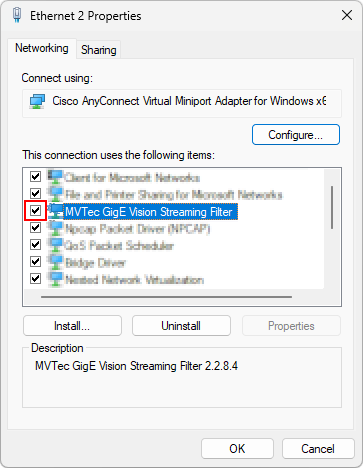
The filter driver can be disabled with the corresponding checkbox in the Windows adapter settings (1). This will disable the use of the driver for all cameras on this port.
-
To disable the driver for a specific image source connection at runtime refer to the documentation of the
local deviceparameterForceSocketDriver.HDevelop: Disable the filter driver for a given device
* Connect to the device without opening the stream.
create_image_source ('mvtec_gigevision', '3cef8c94d023_MachineVision_A5501MG20','stream_id','none', DeviceWithoutStream)
connect_image_source (DeviceWithoutStream, [], [])
set_image_source_param (DeviceWithoutStream,'ForceSocketDriver', 'group', 'local_device', 1)
* Now acquire a reference to the same device again and also open the stream.
create_image_source ('mvtec_gigevision', '3cef8c94d023_MachineVision_A5501MG20',[],[], DeviceWithStream)
connect_image_source (DeviceWithStream, [], [])
get_image_source_param (DeviceWithStream,'GevStreamActiveEngine', 'group', 'stream', Engine)
-
-
Uninstalling:
The MVTec GigE Vision Streaming Filter can be uninstalled from the system via the Windows settings under Apps > Installed apps.
Optimizing GVSP performance
Note
Topics and parameters discussed in this section apply only to the GVSP stream type, not the RDMA stream type.
The streaming engine is designed to perform well for standard use cases. However, to achieve optimal performance for specific applications, fine-tuning certain parameters may be necessary to match the device type and application needs.
A key aspect of GigE Vision image transmission with GVSP is managing resend-requests for missing packets. These packets can be lost due to high CPU load or other reasons.
Resend-request control can be considered from two different perspectives:
- The application perspective: some applications will need to prioritize low latency, others high throughput, or high reliability.
- The device perspective: some devices will deliver packets/blocks with predictable timing, others (like encoder-triggered line-scan cameras) will not.
Resend requests should be timed appropriately:
- When they are sent too late, the device may no longer store the requested packets.
- When they are sent too early, duplicates of already received packets cause additional overhead.
MVTec recommends the following iterative procedure for optimizing the GVSP performance:
-
Observe the performance of the packet receiving algorithm with statistic parameters:
The related parameters are calledGevStream*Countand give statistic information about received packets and blocks. Blocks are full image transmissions consisting of multiple packets.
Values likeGevStreamDeliveredPacketCountwill increase as long as streaming continues. The values are retained after stopping the stream (stop_image_source) and set back to zero on a fresh start (start_image_source).
The most important problem which can prevent stable image transmission in GigE Vision is packet loss. It can be observed withGevStreamLostPacketCount. In an optimal situation this value should stay at zero.
GigE Vision can however deal with some packet loss using the GigE Vision resending mechanism. How much resending is happening can be observed withGevStreamResendCommandCount. In an optimal setup this value should stay at zero. -
Fine tune the packet receiving algorithm to improve the performance:
The related parameters are:GevStreamDeliverIncompleteBlocks,GevStreamFullBlockTerminatesPrev,GevStreamMaxBlockDuration,GevStreamMaxPacketGaps,GevStreamPacketOrderDelay,GevStreamReceiveSocketSizeandGevStreamRingBufferSize. If packet loss, image loss or acquisition timeouts are observed these parameters can be adapted. Changing these parameters should be done before starting the stream. After each change, re-check the statistic parameters and compare the results.
Refer to the documentation of the stream module for a complete list of parameters.
When not using the MVTec GigE Vision Streaming Filter consider the following optimizations:
-
The CPU's ability to process incoming data heavily affects the streaming engine's performance. This is influenced by the priority of the streaming engine thread relative to other threads on the machine. Refer to the documentation for
StreamThreadPriority,StreamThreadSchedulingPolicy, andStreamThreadApplyPriorityfor details. A suitable default priority is selected upon connecting the stream. -
Parameters such as
GevStreamRingBufferSizeandGevStreamReceiveSocketSizecan significantly impact the GVSP performance. These parameters should be tuned, along with the network card driver configuration, based on test experience on the target system. -
On Linux systems these parameters are especially important because the MVTec GigE Vision Streaming Filter is not available.
Stream type: GVSP vs. RDMA
The GigE Vision standard versions lower than 3.0 recognize only one stream type, called GVSP, which transports the stream data over GigE Vision-specific packets. GigE Vision 3.0 introduces a new stream type transporting the stream using RDMA technology, in particular using the RoCEv2 protocol. RoCEv2 offers hardware-offloaded, zero-copy data transfers and is defined within the InfiniBand specification.
The RDMA streaming requires dedicated hardware with RoCEv2 support including full integration in the operating system (see system requirements).
The mvtec_gigevision plugin automatically selects the stream type to use:
- If the device supports GigE Vision RDMA streaming and is connected to a network adapter supporting RDMA/RoCEv2 on the given system, the RDMA stream type will be selected.
- Otherwise, the GVSP stream type will be used if supported by the device.
- If the device supports only RDMA streaming, but is connected to a network adapter without RDMA/RoCEv2 support on the given system,
the
mvtec_gigevisionplugin cannot choose either of the stream types and the device will be treated as non-streamable. It will be possible to control the device parameters, but not to acquire images.
Using multiple cameras via switches
Tip
- The recommended way of using multiple cameras is to directly connect each camera to a dedicated Ethernet port.
- When in doubt, follow the recommendations of the device manufacturer for multi-camera setups with link-sharing.
If multiple cameras share a single port, a switch must be placed between the host machine and the cameras.
When all cameras stream at full speed, the switch may not be able to handle the combined data over a single uplink.
Additionally, some switches do not support Jumbo Frames, leading to higher overhead.
To transmit the image data reliably, either the cameras have to be triggered in an interleaved pattern, or the transmission speed of the cameras has to be limited manually.
The GigE Vision protocol does not support automatic throttling.
GigE Vision cameras should provide one of two standard features to throttle the sending speed:
DeviceLinkThroughputLimit:
Limits the maximum bandwidth of the data that will be streamed out by the device on the selected link (in bytes per second). If necessary, delays will be uniformly inserted between transport layer packets in order to control the peak bandwidth.GevSCPD:
Controls the delay (in GEV timestamp counter unit) to insert between each packet for this stream channel. This can be used as a crude flow-control mechanism if the application or the network infrastructure cannot keep up with the packets coming from the device.
If available, DeviceLinkThroughputLimit should be preferred over GevSCPD.
Calculating bandwidth requirements for link-sharing:
The bandwidth occupied by the image stream of one camera can be calculated by multiplying the data-size of one image with the frame rate.
While this calculation shows theoretical feasibility, it doesn't guarantee stable image transmissions for all cameras.
In practice, transmission stability depends on proper IP packet interleaving to prevent temporary switch overloads.
This can be achieved with the parameters mentioned above.
Example
The transmission of Mono8 images with a resolution of 640x480 pixels and a frame rate of 100 frames/s will result in 640 * 480 * 1 * 100 Byte/s = 3072000 Byte/s or about 30 MByte/s.
As a classical 1 gigabit link can transport about 120 MByte/s, in this example theoretically 4 cameras can transmit over this link, in practice it might be limited to 3 cameras.
The reason for this smaller number is the overhead for the GVSP protocol and maybe necessary resends, which the above calculation does not take into account.
Debugging GigE Vision applications
A core concept of the GigE Vision protocol is maintaining connection with the device using regular heartbeat packets. If the application stops sending these packets, the device disconnects.
The mvtec_gigevision plugin automatically manages these heartbeat messages and the associated device registers.
However, during debugging, all threads, including the one responsible for heartbeat maintenance,
typically stop when a breakpoint is hit.
This causes the camera to disconnect and the program to encounter error states not seen under normal conditions.
To avoid losing connection during debugging, you can extend the heartbeat timeout period, or disable the heartbeat control on the device.
Adjust the local_device parameters DeviceLinkHeartbeatTimeout and DeviceLinkHeartbeatMode to do so.
Configuration parameters
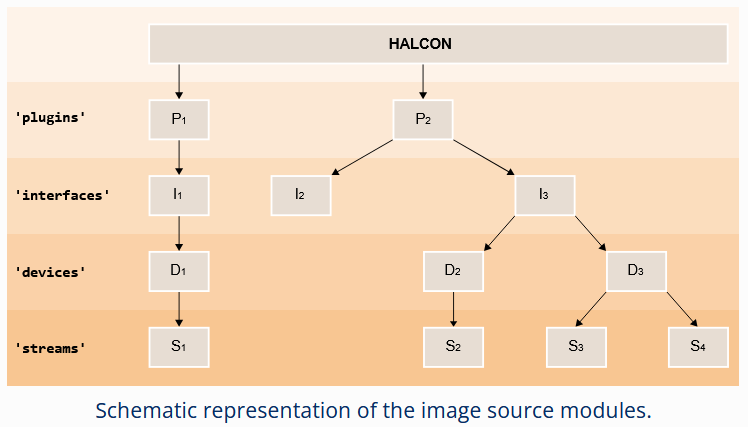
The mvtec_gigevision plugin implements the GenICam GenTL standard, which specifies a set of five configurable modules.
These are the plugin (in GenTL referred to as System), interface, local_device, device, and stream modules (1).
Refer to the HALCON Operator Reference for more information about these modules.
In the following section all configuration parameters of the different modules are listed.
Plugin
Only one instance of the plugin module exists per plugin.
This module serves mostly informational purposes.
Its parameters can be grouped broadly in two different categories:
-
Generic information about the plugin itself (such as
TLType,TLModelName, andTLVendorName). -
Generic information about the available interfaces on the given system (e.g.
InterfaceID) and GigE Vision specific information about the available interfaces (such asGevInterfaceDefaultIPAddressandGevInterfaceMACAddress).
The discovery of these interfaces can be triggered via the commandInterfaceUpdateList. All the parameters mentioned in this second group are selected by theInterfaceSelector. To discover information about all reachable interfaces, increment the value of theDeviceSelectorone-by-one and query the corresponding interface parameters in each iteration (1).- Refer to the example
mvtec_gigevision_force_ip.hdev
for HDevelop code that uses this approach.
- Refer to the example
HDevelop: How to access parameters for the plugin module
| Parameter | Description type read-only values default |
|---|---|
GenTLSFNCVersionMajor |
Major version number of the GenTL Standard Features Naming Convention used to create this GenTL Producer's XML.integer read-only |
GenTLSFNCVersionMinor |
Minor version number of the GenTL Standard Features Naming Convention used to create this GenTL Producer's XML.integer read-only |
GenTLVersionMajor |
Major version number of the GenTL specification this GenTL Producer complies with.integer read-only |
GenTLVersionMinor |
Minor version number of the GenTL specification this GenTL Producer complies with.integer read-only |
GevInterfaceDefaultIPAddress |
IP address of the first subnet of the selected interface. Stored as an integer, but might be displayed in the human readable format by an application. integer read-only |
GevInterfaceDefaultSubnetMask |
Subnet mask of the first subnet of the selected interface. Stored as an integer, but might be displayed in the human readable format by an application. integer read-only |
GevInterfaceMACAddress |
48-bit MAC address of the selected interface. Stored as an integer, but might be displayed in the human readable format by an application. integer read-only |
GevTLSubsystemInfo |
Information about the internal subsystems in the GigE Vision implementation. Including version numbers. Intended primarily for troubleshooting and support. string read-only |
InterfaceID |
GenTL Producer wide unique identifier of the selected interface. This interface list only changes on execution of InterfaceUpdateList.string read-only |
InterfaceSelector |
Selector for the different GenTL Producer interfaces. This interface list only changes on execution of InterfaceUpdateList.integer 0 |
InterfaceUpdateList |
Updates the internal interface list.command |
InterfaceUpdateTimeout |
Specifies timeout for the InterfaceUpdateList Command.integer 0 ms |
TLFileName |
File name including extension of the library.string read-only |
TLID |
Unique identifier of this GenTL Producer.string read-only |
TLModelName |
Name of this GenTL Producer to distinguish different kinds of GenTL Producer implementations from one vendor.string read-only |
TLPath |
Full path to this GenTL Producer including name and extension.string read-only |
TLType |
Transport layer type of this GenTL Producer.GigEVision: GigE Visionenumeration read-only GigEVision |
TLVendorName |
Name of the GenTL Producer vendor.string read-only |
TLVersion |
Vendor specific version string.string read-only |
Interface
The mvtec_gigevision plugin models each Ethernet port of the host machine as an interface module.
The parameters of the interface module can be grouped broadly in three different categories:
-
Generic information about the interface itself (such as
InterfaceIDandInterfaceTLVersionMajor) and GigE Vision specific information about the interface itself. For the latter these are mostly Ethernet-related read-only parameters which correspond to the current settings of the host operating system (such asGevInterfaceSubnetIPAddress,GevInterfaceMTU, andGevInterfaceMACAddress). The same information is available on the plugin module under theInterfaceSelector. -
Information about the discovered devices on this interface. These again fall into two categories:
- Generic information such as
DeviceModelName,DeviceSerialNumber, andDeviceVendorName. - GigE Vision specific information such as
GevDeviceIPAddressandGevDeviceMACAddress.
The discovery of these devices can be triggered via the command
DeviceUpdateList. All the parameters mentioned in this second group are selected by theDeviceSelector. To discover information about all reachable devices, increment the value of theDeviceSelectorone-by-one and query the corresponding device parameters in each iteration. - Generic information such as
-
Action command related parameters:
Action commands are a GigE Vision feature which allows the application to send commands to multiple devices at the same time via IP broadcast packets. This feature is designed for advanced setups, where multiple cameras are reachable via a network switch.
HDevelop: How to access parameters for the interface module
| Parameter | Description type read-only values default |
|---|---|
ActionCommand |
Sends an Action Command to device(s).command |
ActionDeviceKey |
The Action Command Device Key to use in the Action Command.integer 0 |
ActionGroupKey |
The Action Command Group Key to use in the Action Command.integer 0 |
ActionGroupMask |
The Action Command Group Mask to use in the Action Command.integer 0 |
ActionScheduledTime |
Specifies the time in a time enabled Action Command. The unit must be in same domain as the target device's timestamp value. integer 0 |
ActionScheduledTimeEnable |
Specifies if a time enabled Action Command is given.boolean false |
DeviceAccessStatus |
Access status of the selected device at the moment of the last execution of DeviceUpdateList.This value only changes on execution of DeviceUpdateList.Unknown: Unknown statusReadWrite: Full accessReadOnly: Read-only accessNoAccess: The device is seen but unreachableBusy: The device is open by another entityOpenReadWrite: The device is open by this GenTL Producer with RW accessOpenReadOnly: The device is open by this GenTL Producer with RO accessenumeration read-only Unknown, ReadWrite, ReadOnly, NoAccess, Busy, OpenReadWrite, OpenReadOnly |
DeviceID |
Interface wide unique identifier of the selected device. This value only changes on execution of DeviceUpdateList.string read-only |
DeviceModelName |
Name of the device model of the selected device. This value only changes on execution of DeviceUpdateList.string read-only |
DeviceSelector |
Selector for the different devices on this interface. This value only changes on execution of DeviceUpdateList.integer 0 |
DeviceSerialNumber |
Serial number of the selected device. This value only changes on execution of DeviceUpdateList.string read-only |
DeviceTLVersionMajor |
Major version number of the transport layer specification of the selected device.integer read-only |
DeviceTLVersionMinor |
Minor version number of the transport layer specification of the selected device.integer read-only |
DeviceUpdateList |
Updates the internal device list.command |
DeviceUpdateTimeout |
Specifies timeout for the DeviceUpdateList Command.integer 0 ms |
DeviceUserID |
User-programmable device identifier of the selected device. This value only changes on execution of DeviceUpdateList.string read-only |
DeviceVendorName |
Name of the device vendor of the selected device. This value only changes on execution of DeviceUpdateList.string read-only |
GevActionDestinationIPAddress |
Specifies destination the IP address for the Action Command. This can be any valid destination address (thus including the broadcast addresses for this interface). Stored as an integer, but might be displayed in the human readable format by an application. integer 0.0.0.0 |
GevDeviceForceGateway |
Static default gateway IP address to be forced onto the selected device using the GevDeviceForceIP command.The command will transmit the desired IP address, subnet mask and gateway address all at once. Stored as an integer, but might be displayed in the human readable format by an application. Use with care. integer 0.0.0.0 |
GevDeviceForceIP |
Sends a force-IP request to the selected device using the configured static IP parameters. The command will transmit the desired IP address, subnet mask and gateway address all at once. These are read from the values in GevDeviceForceIPAddress, GevDeviceForceSubnetMask and GevDeviceForceGateway. The settings will not persist the device's power cycle. The user application should wait for the completion of the command, afterwards the GevDeviceLastForceIPSuccess can be read to verify that the camera accepted the request. Currently connected devices will ignore the request.Use with care. command |
GevDeviceForceIPAddress |
Static IP address to be forced onto the selected device using the GevDeviceForceIP command.The command will transmit the desired IP address, subnet mask and gateway address all at once. Stored as an integer, but might be displayed in the human readable format by an application. Use with care. integer 0.0.0.0 |
GevDeviceForceIPTimeout |
Specifies the timeout (in microseconds) for the GevDeviceForceIP command.The device is expected to ARP-validate the address before use. This means the device might need to wait up to 7 seconds for ARP responses. Consequently this timeout should be long enough. integer 7000000 |
GevDeviceForceSubnetMask |
Static subnet mask to be forced onto the selected device using the GevDeviceForceIP command.The command will transmit the desired IP address, subnet mask and gateway address all at once. Stored as an integer, but might be displayed in the human readable format by an application. Use with care. integer 0.0.0.0 |
GevDeviceGateway |
Current gateway IP address of the GVCP interface of the selected device. Stored as an integer, but might be displayed in the human readable format by an application. integer read-only |
GevDeviceIPAddress |
Current IP address of the GVCP interface of the selected device. Stored as an integer, but might be displayed in the human readable format by an application. integer read-only |
GevDeviceLastForceIPSuccess |
Reports whether the last finished GevDeviceForceIP operation was successful.The user application must wait for the completion of the GevDeviceForceIP command before reading this value.boolean read-only |
GevDeviceMACAddress |
48-bit MAC address of the GVCP interface of the selected device. Stored as an integer, but might be displayed in the human readable format by an application. integer read-only |
GevDeviceProposeIP |
Proposes suitable static IP parameters for the selected device which match the IP configuration of the interface. The computed values will match the subnet of the device to the subnet of the interface, such that the device will be reachable. The values are stored in the parameters GevDeviceForceIPAddress, GevDeviceForceSubnetMask, and GevDeviceForceGateway.command |
GevDeviceSubnetMask |
Current subnet mask of the GVCP interface of the selected device. Stored as an integer, but might be displayed in the human readable format by an application. integer read-only |
GevInterfaceGateway |
IP address of the selected gateway entry of this interface. Stored as an integer, but might be displayed in the human readable format by an application. integer read-only |
GevInterfaceGatewaySelector |
Selector for the different gateway entries for this interface.integer 0 |
GevInterfaceMACAddress |
48-bit MAC address of this interface. Stored as an integer, but might be displayed in the human readable format by an application. integer read-only |
GevInterfaceMTU |
Maximum transmission unit (MTU) currently accepted by this interface. It can be used to verify that Jumbo Frames have been correctly enabled. integer read-only |
GevInterfaceSubnetIPAddress |
IP address of the selected subnet of this interface. Stored as an integer, but might be displayed in the human readable format by an application. integer read-only |
GevInterfaceSubnetMask |
Subnet mask of the selected subnet of this interface. Stored as an integer, but might be displayed in the human readable format by an application. integer read-only |
GevInterfaceSubnetSelector |
Selector for the subnet of this interface.integer 0 |
InterfaceID |
GenTL Producer wide unique identifier of the selected interface.string read-only |
InterfaceTLVersionMajor |
Major version number of the transport layer specification this GenTL Producer interface complies with. The TL version of the Interface can be compared with the TL version of the device to assure compatibility. integer read-only |
InterfaceTLVersionMinor |
Minor version number of the transport layer specification this GenTL Producer interface complies with. The TL version of the Interface can be compared with the TL version of the device to assure compatibility. integer read-only |
InterfaceType |
Transport layer type of the interface.GigEVision: GigE Visionenumeration read-only GigEVision |
Local Device
As mandated by the GenTL standard, for each detected physical GigE Vision device, the mvtec_gigevision plugin also instantiates a so called 'local device' module.
This provides information and configuration parameters for the device as it is seen by the GigE Vision receiver implementation.
The list of available parameters therefore is independent of the actual device.
This is contrary to the device module. Its parameters are fully defined by the connected device and its on-board GenICam feature description file.
The parameters of the local device module can be grouped broadly in three different categories:
-
Information about the real device as seen by the
mvtec_gigevisionplugin (such asDeviceAccessStatus,DeviceModelName, andGevDeviceIPAddress). The same information is available on the interface module under theDeviceSelector. -
Information and configuration options regarding the connection to the specific device (as opposed to the configuration of the network port). Examples of such parameters are
DeviceLinkHeartbeatTimeout,DeviceMessageChannelKeepAliveTimeout, andForceSocketDriver. -
Information about the discovered streams on this device (
StreamSelectorandStreamID). However, as most GigE Vision cameras only provide one stream, themvtec_gigevisionplugin only supports streaming images from the first stream.
HDevelop: How to access parameters for the local_device module
| Parameter | Description type read-only values default |
|---|---|
DeviceAccessStatus |
Gets the access status the GenTL Producer has on the device.Unknown: Unknown statusOpenReadWrite: The device is open by this GenTL Producer with RW accessOpenReadOnly: The device is open by this GenTL Producer with RO accessenumeration read-only Unknown, OpenReadWrite, OpenReadOnly |
DeviceEndianessMechanism |
Identifies the endianess handling mode.Legacy: Handling the device endianess according to GenICam Schema 1.0Standard: Handling the device endianess according to GenICam Schema 1.1 and laterenumeration Legacy, Standard |
DeviceEventsThreadApplyPriority |
Applies desired thread priority parameter(s) to the internal event handling thread. Also triggers a re-read of the actual values. The values must be configured with the DeviceEventsThreadPriority and DeviceEventsThreadSchedulingPolicy parameters beforehand. Executing this command and changing the thread priority parameter(s) might require administrative privileges.Only available if the device supports device events. Use with care. command |
DeviceEventsThreadPriority |
OS-specific thread priority value used for the internal event handling thread. The value can be applied with the DeviceEventsThreadApplyPriority command. Afterwards the value in effect can be read back. The value must fall within the range of values expected by the operating system, i.e. as expected in the struct sched_param under Linux or in the call to SetThreadPriority under Windows. Even per default the implementation tries to apply a higher-than-normal priority to this thread.Only available if the device supports device events. Use with care. integer |
DeviceEventsThreadSchedulingPolicy |
OS-specific scheduling policy value used for the internal event handling thread. The value can be applied with the DeviceEventsThreadApplyPriority command. Afterwards the value in effect can be read back. The value must be one of the values of the priority identifiers of the operating system, e.g. SCHED_FIFO, SCHED_RR and so on.Only available on Linux systems. Only available if the device supports device events. Use with care. integer |
DeviceID |
Interface-wide unique identifier of this device.string read-only |
DeviceLinkHeartbeatMode |
Activate/deactivate the device heartbeat mechanism. This mechanism allows the device and the application to monitor the connection status. Availability of this feature depends on the connected device. It is advised not to switch off the heartbeat mechanism. A possible exception to this rule is to switch off the mechanism while developing applications in debug mode. Off: Disables the heartbeat.On: Enables the heartbeat.enumeration Off, On On |
DeviceLinkHeartbeatTimeout |
Controls the current heartbeat timeout (in microseconds) of the device. The device expects to receive heartbeat packages from the application in regular intervals, shorter than this timeout. If this is not the case, it assumes loss of communication, closes its channels, and appears available for other applications in the network. The GigE Vision control application will send heartbeat packages to the device in an interval one third of the configured timeout. A possible exception to this rule is to increase the value while developing applications in debug mode. It is advised not to change the default value. float |
DeviceManufacturerInfo |
Manufacturer information about the remote device.string read-only |
DeviceMessageChannelKeepAliveTimeout |
Interval (in milliseconds) between packets sent to the device via the GVCP message channel. The message channel is used by GigE Vision devices for asynchronous device events. Without generating such outbound traffic, a firewall might not be able to detect that inbound traffic on the given port is desired by the application. The required interval might be specific to the firewall in use. Zero means no keep-alive packets are sent. float 30000.0 |
DeviceModelName |
Name of the remote device model.string read-only |
DeviceSerialNumber |
Serial number of the remote device.string read-only |
DeviceType |
Transport layer type of the device.GigEVision: GigE Visionenumeration read-only GigEVision |
DeviceUserID |
User-programmable device identifier of the remote device.string read-only |
DeviceVendorName |
Name of the remote device vendor.string read-only |
DeviceVersion |
Name of the version of the remote device model.string read-only |
EventDeviceLost |
Notifies about losing the connection to the device. Sending the notification must be enabled using EventNotification and EventSelector first. Receiving the notification requires to register a GenICam feature change callback on the feature. The actually value of this parameter is insignificant. After losing the connection to the device, the device handle is not usable anymore and should be closed.integer |
EventNotification |
Activate/deactivate sending notifications to the host application for the selected event.Off: The selected Event notification is disabled.On: The selected Event notification is enabled.enumeration Off, On Off |
EventSelector |
Selects a (local) device module event to signal to the host application. Activate the event with EventNotification.DeviceLost: Raised when the local host loses connection to the physical (remote) device.enumeration DeviceLost |
ForceSocketDriver |
Allows forcing use of the socket driver (disabling filter driver) stream engine for GVSP streams (ignored for RDMA streams). This flag will have an effect the next time a stream is opened. It has no effect on currently opened streams. boolean false |
GevDeviceGateway |
Current default gateway IP address of the device. Stored as an integer, but might be displayed in the human readable format by an application. integer read-only |
GevDeviceIPAddress |
Current IP address of the device. Stored as an integer, but might be displayed in the human readable format by an application. integer read-only |
GevDeviceMACAddress |
48-bit MAC address of the device. Stored as an integer, but might be displayed in the human readable format by an application. integer read-only |
GevDeviceSubnetMask |
Current subnet mask of the device. Stored as an integer, but might be displayed in the human readable format by an application. integer read-only |
LinkCommandRetryCount |
Specifies the number of retries before failing a control channel (GVCP) command. If no GVCP response is received within the timeout configured via LinkCommandRetryCount, the implementation assumes the request got lost and sends it again. If the retry attempts are exhausted, and there was still no response, the command fails completely.It is advised not to change the default value. integer 3 |
LinkCommandTimeout |
Specifies the timeout (in microseconds) the GigE Vision control application will wait for ACK packages during control channel (GVCP) commands. If no GVCP response is received within this timeout the implementation assumes the request got lost and performs a retry according to LinkCommandRetryCount.It is advised not to change the default value. float 270000.0 |
StreamID |
Device unique ID for the stream. For example a GUID. string read-only |
StreamSelector |
Selector for the different stream channels.integer 0 |
Device
When using the mvtec_gigevision plugin, the parameters available in the device module are fully defined by the connected device.
This is possible because the GigE Vision standard mandates that each GigE Vision device (e.g. camera, lighting controller, etc) must contain a GenICam compatible feature description file. This file is automatically downloaded by the plugin and interpreted by the connecting application (i.e. HALCON).
To get more information about these device parameters, there are three possibilities:
-
Refer to the appropriate documentation provided by the manufacturer of your device.
-
Common device parameters like
ExposureTime,AcquisitionMode,Width,Height, etc. are standardized across manufacturers of GigE Vision devices. Explanations regarding these parameters can be found in the GenICam document "GenICam Standard Features Naming Convention (SFNC)". It is available on the GenICam download page. -
The GenICam feature description file can also contain description texts for the parameters. You can query these descriptions of the parameters directly at runtime. Example:
get_image_source_param (ImageSourceHandle, <ParamName>, ['property'], ['description'], ParamDescription)
HDevelop: How to access parameters for the device module
The parameters of the device module are selected per default.
Therefore specifying the generic parameter group==device can be omitted.
Stream
The mvtec_gigevision plugin automatically instantiates one stream module per connected device.
The purpose of the stream module is to configure parameters related to the transmission and receiving of image data.
Besides some other parameters, the stream parameters of the mvtec_gigevision plugin serve two important functions:
-
Fine tune the packet receiving algorithm and observe its performance:
Parameters related to this task are calledGevStream*. See Optimizing GVSP Performance for more information. -
Check the used packet size and re-trigger the packet size negotiation algorithm:
Parameters related to this task are calledDeviceStreamChannel*PacketSize.
HDevelop: How to access parameters for the stream module
| Parameter | Description type read-only values default |
|---|---|
DeviceStreamChannelKeepAliveTimeout |
Interval (in milliseconds) between keep-alive packets sent to the device's stream channel port. Without generating such outbound traffic, a firewall might not be able to detect that inbound traffic on the given port is desired by the application. The required interval might be specific to the firewall in use. Zero means no keep-alive packets are sent. Not available for RDMA streams. float 30000.0 |
DeviceStreamChannelNegotiatePacketSize |
Triggers the algorithm negotiating the optimal GVSP packet size. The resulting packet size might be limited by the device, the host, and their connection path. The algorithm works by requesting increasingly large test packets, until the size is too large, at which point the last successful value is taken as the result. Afterwards, the value in effect can be read using the DeviceStreamChannelPacketSize. This algorithm is executed automatically, when the stream module is opened.Not available for RDMA streams. command |
DeviceStreamChannelPacketSize |
Packet size (in bytes) configured for GVSP packets sent via the device stream channel. A similar feature might be available on the remote device. Changing this value updates the value in the remote device as well as in the GigE Vision stream receiver. A bigger packet size increases performance. When the stream module is opened, it tries to maximize the packet size automatically. Not available for RDMA streams. integer |
DeviceStreamChannelPacketSizeInc |
Sets the packet size increment value used by the algorithm negotiating the optimal packet size. This value affects the increment of DeviceStreamChannelPacketSize and is also used during the DeviceStreamChannelNegotiatePacketSize command. When the device limits are unknown, the initial value is set to 4.Not available for RDMA streams. integer |
DeviceStreamChannelPacketSizeMax |
Sets the maximum packet size value used by the algorithm negotiating the optimal packet size. This value affects the maximum of DeviceStreamChannelPacketSize and is also used during the DeviceStreamChannelNegotiatePacketSize command. When the device limits are unknown, the initial value is set to the MTU size accepted by the network interface.Not available for RDMA streams. integer |
DeviceStreamChannelPacketSizeMin |
Sets the minimum packet size value used by the algorithm negotiating the optimal packet size. This value affects the minimum of DeviceStreamChannelPacketSize and is also used during the DeviceStreamChannelNegotiatePacketSize command. When the device limits are unknown, the initial value is set to 46.Not available for RDMA streams. integer |
EventNotification |
Activate/deactivate sending notifications to the host application for the selected event.Off: The selected Event notification is disabled.On: The selected Event notification is enabled.enumeration Off, On Off |
EventSelector |
Selects a stream module event to signal to the host application. Activate the event with EventNotification.TransferEnd: Notifies about completing a transfer inside the streaming engine. There is no direct mapping of EventTransferEnd notifications and buffers delivered to the application. Received blocks can be invalid, valid blocks can later be discarded based on the StreamBufferHandlingMode.enumeration TransferEnd |
EventTransferEnd |
Notifies about completing a transfer inside the streaming engine. There is no direct mapping of EventTransferEnd notifications and buffers delivered to the application. Received blocks can be invalid, valid blocks can later be discarded based on the StreamBufferHandlingMode. Sending the notification must be enabled using EventNotification and EventSelector first. Receiving the notification requires to register a GenICam feature change callback on the feature.The actual value of this feature is insignificant. integer read-only |
EventTransferEndBufferUndeliverable |
Flag indicating whether the last buffer, for which the EventTransferEnd was signaled, was deliverable.Undeliverable buffers will be discarded by the streaming engine. Even valid buffers can be discarded based on the StreamBufferHandlingMode.boolean read-only |
EventTransferEndFrameID |
ID of the last frame, for which the EventTransferEnd was signaled.integer read-only |
EventTransferEndUndeliverabilityReason |
Constant indicating why the last buffer, for which the EventTransferEnd was signaled, was not deliverable.Reported only when EventTransferEndBufferUndeliverable is true.Unspecified: Generic option used when further details about the reason cannot be currently reported.InvalidPacket: Invalid packet received for corresponding buffer. This can be overflown leader/trailer, packet ID out of expected range or other corruption.IncompleteBuffer: The buffer is incomplete and delivery of incomplete buffers was switched off. Refer to the GevStreamDeliverIncompleteBlocks control feature.ValidationFailedNoTrailer: Validation of the buffer failed and there is no trailer. This usually means that the stream engine gave up receiving this buffer based on resend or timeout related parameters.ValidationFailed: Validation of the buffer failed for other reason than missing trailer. Could be for example corruption in a control packet (leader, trailer, GenDC descriptor).enumeration read-only Unspecified, InvalidPacket, IncompleteBuffer, ValidationFailedNoTrailer, ValidationFailed |
GevStreamAbortCheckPeriod |
Interval (in microseconds) in which the stream processing thread checks for stop requests. Shorter time ensures faster acquisition stop, but implies higher thread activity. Not available for RDMA streams. float 300000.0 |
GevStreamActiveEngine |
Informs which stream engine (filter driver / socket driver) is currently active. Not available on Linux systems because there the socket driver is the only option. Not available for RDMA streams. SocketDriver: The GVSP packets are received in user-space by reading from a socket.FilterDriver: The GVSP packets are received in kernel-space by a filter driver.enumeration read-only SocketDriver, FilterDriver |
GevStreamDeliverIncompleteBlocks |
Flag indicating if incomplete blocks (with missing packets) should be delivered or discarded. If such blocks are delivered the images will contain stripe-like artifacts. The allowed amount of missing packets is influenced by GevStreamMaxPacketGaps. If the leader or trailer of a block is missing it will be discarded anyway.Not available for RDMA streams. boolean true |
GevStreamDeliveredPacketCount |
Number of packets successfully received in the delivered blocks. The packets from skipped or discarded blocks are not counted. Not available for RDMA streams. integer read-only |
GevStreamDiscardedBlockCount |
Number of blocks that were discarded for any reason. This can include corruption, too many missing packets, missing leader, or missing trailer. integer read-only |
GevStreamDuplicatePacketCount |
Number of packets that were received twice. This typically happens when the resend request arrived too early. Not available for RDMA streams. integer read-only |
GevStreamEngineUnderrunCount |
Number of blocks that were discarded because the acquisition engine had no free buffers available. If the application processes the received buffers fast enough, this number should stay at zero. Not available for RDMA streams. integer read-only |
GevStreamFullBlockTerminatesPrev |
Flag indicating whether receiving a complete block immediately terminates older ones in the queue. If activated, the previous blocks are delivered incomplete (or discarded if too many packets are missing). This prevents older blocks from blocking the queue longer than needed. Not available for RDMA streams. boolean false |
GevStreamIncompleteBlockCount |
Number of blocks that were delivered incomplete. These blocks were delivered although they had missing packets. integer read-only |
GevStreamLostPacketCount |
Number of packets missing (even after resends) in the delivered blocks. The packets from skipped or discarded blocks are not counted. In an optimal setup this number should stay at zero. Not available for RDMA streams. integer read-only |
GevStreamMaxBlockDuration |
Duration (in microseconds) expected for full block transmissions. It is measured from receiving the GVSP leader packet to receiving the corresponding trailer packet. If the trailer packet is not received within this time, the receiver implementation assumes it has been lost and issues a resend request. Zero disables this mechanism, which is the default behavior and should be used for triggered line-scan cameras, where the line-trigger frequency is unpredictable. For area-scan cameras in hardware or software trigger mode, activate the mechanism by setting a suitable value, obtained by calculation or measurement. Not available for RDMA streams. float 0.0 |
GevStreamMaxPacketGaps |
Maximum number of packet gaps accepted in a block transmission. When exceeded, the engine will stop requesting resends for new gaps, and the block will either be discarded or delivered (based on GevStreamDeliverIncompleteBlocks). A smaller value means more likely the block will be discarded than delivered. The socket driver counts packet gaps independent of their size and uses the limit as is. The filter driver counts individual missing packets and interprets the limit as percentage of expected packets per block.Not available for RDMA streams. integer 30 |
GevStreamOversizedBlockCount |
Number of blocks that were detected as oversized. This means the allocated buffer was not large enough for the data received from the device. Not available for RDMA streams. integer read-only |
GevStreamPacketOrderDelay |
Value controlling how long to wait for packets arriving out of order. Its purpose is to avoid resends being requested too early. For the socket driver it is the time (in microseconds) after which a resend request is sent for a detected packet gap. For the filter driver it is the number of packets received after the detected packet gap. If the value is exceeded a resend request is sent. Out of order packets are expected in certain situations such as link aggregation. Not available for RDMA streams. float 10.0 |
GevStreamReceiveSocketSize |
Size (in bytes) of the socket receive buffer. Maps directly to the SO_RCVBUF socket option. The value can be increased to tackle performance problems, i.e. GVSP packet loss. On Linux systems, try increasing this value to the maximum, allowed by the sysctl 'rmem_max' parameter. On Windows systems, try increasing this value up to 512000. Measure the performance after each change to determine the optimum value. Also see GevStreamRingBufferSize.Not used by the filter driver. Not available for RDMA streams. integer |
GevStreamResendCommandCount |
Number of sent resend requests. A request might regard one or multiple packets. Each request is counted, even if sent multiple times for the same packet. Not available for RDMA streams. integer read-only |
GevStreamResendPacketCount |
Number of resend-requested packets. Each resend is counted, even if sent multiple times for the same packet. When asking for resend of the block's tail only a single packet is counted, the actual number of packets is unknown. Not available for RDMA streams. integer read-only |
GevStreamRingBufferSize |
Size (in bytes) of the stream engine packet ring buffer. The ring buffer separates the socket draining and stream processing threads. The value can be increased to tackle performance problems, i.e. GVSP packet loss. Setting it as high as the size of a few full blocks might give the best results (especially on Windows systems). Measure the performance after each change to determine the optimum value. Also see GevStreamReceiveSocketSize.Not used by the filter driver. Not available for RDMA streams. integer |
GevStreamSeenPacketCount |
Number of all packets (incl. invalid or duplicate) seen by the GigE Vision stream receiver. Not available for RDMA streams. integer read-only |
GevStreamSkippedBlockCount |
Number of blocks that were skipped. The GigE Vision stream receiver has never seen any valid packet for these blocks. integer read-only |
GevStreamUnavailablePacketCount |
Number of packets explicitly announced as unavailable by the device. This typically means the resend request came too late and the device no longer has them in memory. This does not count packets that were not resent silently. Not available for RDMA streams. integer read-only |
PayloadSize |
Size of the expected data in bytes. Note that this feature "overwrites" the PayloadSize of the remote device, see corresponding sections of the GenICam GenTL standard.integer read-only |
StreamAnnounceBufferMinimum |
Minimal number of buffers to announce to enable selected buffer handling mode.integer read-only 0 |
StreamAnnouncedBufferCount |
Number of announced (known) buffers on this stream. This value is volatile. It may change if additional buffers are announced and/or buffers are revoked by the GenTL Consumer. integer read-only |
StreamAuxiliaryBufferCount |
Number of auxiliary buffers the acquisition engine will allocate to keep the stream going when not enough user buffers are available.integer |
StreamBufferHandlingMode |
Selects the buffer handling mode in use for this Data Stream. This influences how the streaming engine handles new complete transmissions, especially when they arrive faster than the application is processing them. Not writeable while streaming is active. OldestFirst: The acquired buffers are delivered to the application in a FIFO manner. New data will be discarded if no free buffers are available. Typically used when each image must be processed, even when short load-spikes slow down processing momentarily.OldestFirstOverwrite: The acquired buffers are delivered to the application in a FIFO manner. New data will overwrite the oldest buffer if no free buffers are available. Typically used when each image must be processed, even when short load-spikes slow down processing momentarily.NewestOnly: The application always receives the newest acquired buffer. New data will replace any other one already received and not yet given to the application. Typically used for displaying or when having the latest results is more important than having all results.enumeration OldestFirst, OldestFirstOverwrite, NewestOnly OldestFirst |
StreamID |
Device unique ID for the data stream. For example a GUID. string read-only |
StreamThreadApplyPriority |
Applies desired thread priority parameter(s) to the internal stream processing thread. Also triggers a re-read of the actual values. The values must be configured with the StreamThreadPriority and StreamThreadSchedulingPolicy parameters beforehand. Executing this command and changing the thread priority parameter(s) might require administrative privileges.Use with care. command |
StreamThreadPriority |
OS-specific thread priority value used for the internal stream processing thread. The value can be applied with the StreamThreadApplyPriority command. Afterwards the value in effect can be read back. The value must fall within the range of values expected by the operating system, i.e. as expected in the struct sched_param under Linux or in the call to SetThreadPriority under Windows. Even per default the implementation tries to apply a higher-than-normal priority to this thread.Use with care. integer |
StreamThreadSchedulingPolicy |
OS-specific scheduling policy value used for the internal stream processing thread. The value can be applied with the StreamThreadApplyPriority command. Afterwards the value in effect can be read back. The value must be one of the values of the priority identifiers of the operating system, e.g. SCHED_FIFO, SCHED_RR and so on.Only available on Linux systems. Use with care. integer |
StreamType |
Transport layer type of the Data Stream.GigEVision: GigE Visionenumeration read-only GigEVision |
Examples
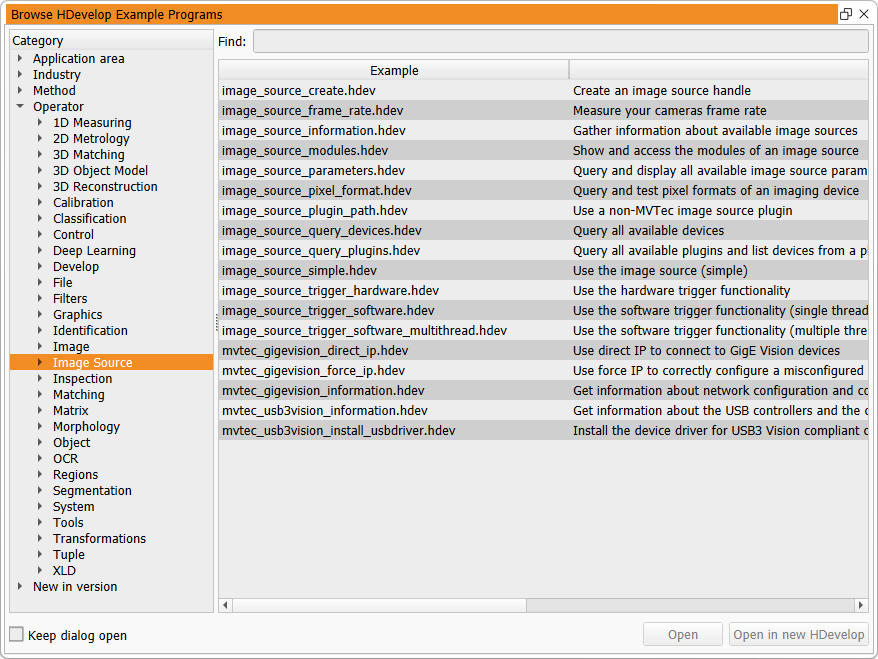
Bundled with the mvtec_gigevision plugin are example scripts in the HDevelop programming language, that highlight important concepts when using the plugin.
These examples can be opened in HDevelop with the HDevelop Example Browser (1):
-
mvtec_gigevision_direct_ip.hdev
Use direct IP to connect to GigE Vision devices.
With this connection method an otherwise implicitly executed device discovery can be avoided. This speeds up the connection process. -
mvtec_gigevision_force_ip.hdev
Use force IP to correctly configure a misconfigured GigE Vision device.
This example automatically finds such misconfigured devices and shows how to assign an IP address programmatically. These forced IP addresses are not persistent, and usually the device needs to go through this process again after a device reboot. -
mvtec_gigevision_information.hdev
Get information about network configuration and connected GigE Vision compliant cameras.
This script is intended for troubleshooting purposes. Its output should be sent to MVTec for further analysis of the system setup.
Troubleshooting
In case of image acquisition problems with the mvtec_gigevision plugin, the following hints might help to solve them.
- Check if the latest revision of the
mvtec_gigevisionplugin is used. - Check the System Requirements.
- Check if the device has the latest firmware.
- Check the extended error messages for detailed error descriptions. These are automatically displayed in HDevelop, but might need to be queried explicitly when programming in HALCON/C++ or HALCON/C# for example.
-
If the plugin cannot be loaded (1), it might not be properly installed.
Check if it is installed via the SOM (see installation).
Verify manually that the file 'mvtec_gigevision.cti' is present in the folder%HALCONROOT%\bin\%HALCONARCH%() or$HALCONROOT/lib/$HALCONARCH().- Error
"Image source module not found (HALCON error code: 5809)"
or extended error message containing
"Cannot identify producer to open"
while usingquery_image_sourceorconnect_image_source.
- Error
-
If a firewall is active, it must allow full access to connected devices for all relevant applications, including HDevelop and custom HALCON apps. If the firewall is configured wrongly, it will block image transmissions although cameras can be discovered and connected.
To rule out firewall issues, temporarily disable it. If the problem disappears, adjust the firewall to allow only the necessary GigE Vision ports for the required applications.
Cameras that support firewall traversal might work without manually configuring the firewall. The firewall traversal mechanism can be fine-tuned with thelocal_deviceparameterDeviceMessageChannelKeepAliveTimeoutand thestreamparameterDeviceStreamChannelKeepAliveTimeout. - Random fetch timeouts (when using the GVSP stream type) may indicate excessive packet loss.
Verify that all your networking components can handle the camera´s data rate.
Monitor packet gaps using the
streamparametersGevStreamResendPacketCount, then tune the resend mechanism, for example by adjustingGevStreamMaxPacketGapsorGevStreamMaxBlockDuration. Re-read Optimizing GVSP Performance for an in-depth explanation. - If you run the cameras in a triggered setting (software trigger or hardware trigger),
you might observe inconsistent running times of the
fetch_from_image_sourceoperator or even sudden stops of the acquisition loop. In that case try activating time-based block termination by setting the parameterGevStreamMaxBlockDurationto a suitable value. - Capturing Wireshark while using the MVTec GigE Vision Streaming Filter:
In case there are problems with streaming while the filter driver is active, it will not be possible to capture a network packet trace to analyze the problems. Set the environment variableMVTEC_GIGEVISION_FILTER_PASSTHROUGH=1to give other filters like Wireshark's pcap access to the packets. - Device discovery on Linux systems:
The discovery of misconfigured (wrong subnet) devices might not be possible if 'reverse path filtering' is switched on in the system. Reverse path filtering is a security option dropping incoming packets on the interface if the reverse path traffic (to the source of the incoming packet) would not be routed on that interface. This means that the discovery packet where the device announces itself will be dropped by this setting.
To prevent this, it is recommended to switch off the reverse path filtering option on any interfaces where GigE Vision devices are to be discovered. To temporarily disable reverse path filtering on eth0, execute To make the changes permanent, adjust these options in the sysctl configuration file (such as/etc/sysctl.confor/etc/sysctl.dtree):
Requesting help
If you experience problems not solvable with the tips of the previous section, MVTec and its worldwide partner network are ready to help. Please refer to www.mvtec.com/support for directions.
Include the following in your support request for maximum efficiency
- Used HALCON and image source plugin version.
- Used HALCON architecture (e.g. x64-win64, x64-linux, aarch64-linux or armv7a-linux).
- Camera manufacturer, model and firmware version.
- Details about the host machine, like operating system, RAM and CPU.
- Description of the observed and expected behavior.
- Minimal sample code (if possible HDevelop script) to reproduce the issue.
- If applicable, any error codes and error messages observed.
- Complete output of the HDevelop example
mvtec_gigevision_information.hdev.
FOSS libraries
The mvtec_gigevision plugin depends on free and open-source software (FOSS) libraries.
See the file third_party_mvtec_gigevision.txt in the HALCON base directory for copyright and license information.
Libraries are used without modifications unless explicitly stated in the file.
You can request the source for those third-party libraries licensed under LGPL via email to info@mvtec.com with the subject "Request source code of third-party libraries".
Release notes
-
Version 1.1.0 (2025-10-09)
- GigE Vision specification version 3.0 is now also supported on Linux. It adds remote direct memory access (RDMA) over Converged Ethernet (RoCE).
- Action commands could fail due to an uninitialized source port. This problem has been fixed.
-
Version 1.0.0 (2025-04-16)
- First official version of the MVTec GigE Vision implementation as a standalone GenTL compatible plugin.