Image Source Plugin for the Microsoft Media Foundation API
The Media Foundation Image Source Plugin provides access to webcams via the Microsoft Media Foundation API which is the native way of accessing cameras on Microsoft Windows systems. The plugin is available via the MVTec Software Manager (SOM) as an optional component of a HALCON installation.
| Plugin Name | mvtec_mediafoundation |
|---|---|
| Version | |
| Date | 2025-04-16 |
| Available Architectures | x64-win64 |
Features
- Support of the camera settings control.
- Support of feature persistence.
Limitations
- Only the following Microsoft Media Foundation video formats are fully supported:
MFVideoFormat_L8,MFVideoFormat_L16,MFVideoFormat_RGB24,MFVideoFormat_RGB32,MFVideoFormat_YUY2,MFVideoFormat_NV12,MFVideoFormat_NV21, andMFVideoFormat_MJPG. - Triggering is not supported.
- The following SFNC features are read-only:
Height,Width, andAcquisitionFrameRate. - Only tested with webcams.
Installation
You can install the mvtec_mediafoundation plugin via the SOM:
- For an already installed HALCON version choose the Manage packages functionality in the context menu.
- When installing a HALCON version from scratch, go to the Available products tab, and click install. You may need to choose the Advanced installation to select individual packages.
-
In both cases the Image Source Plugins can be found in the package group Image Acquisition Interfaces (1).
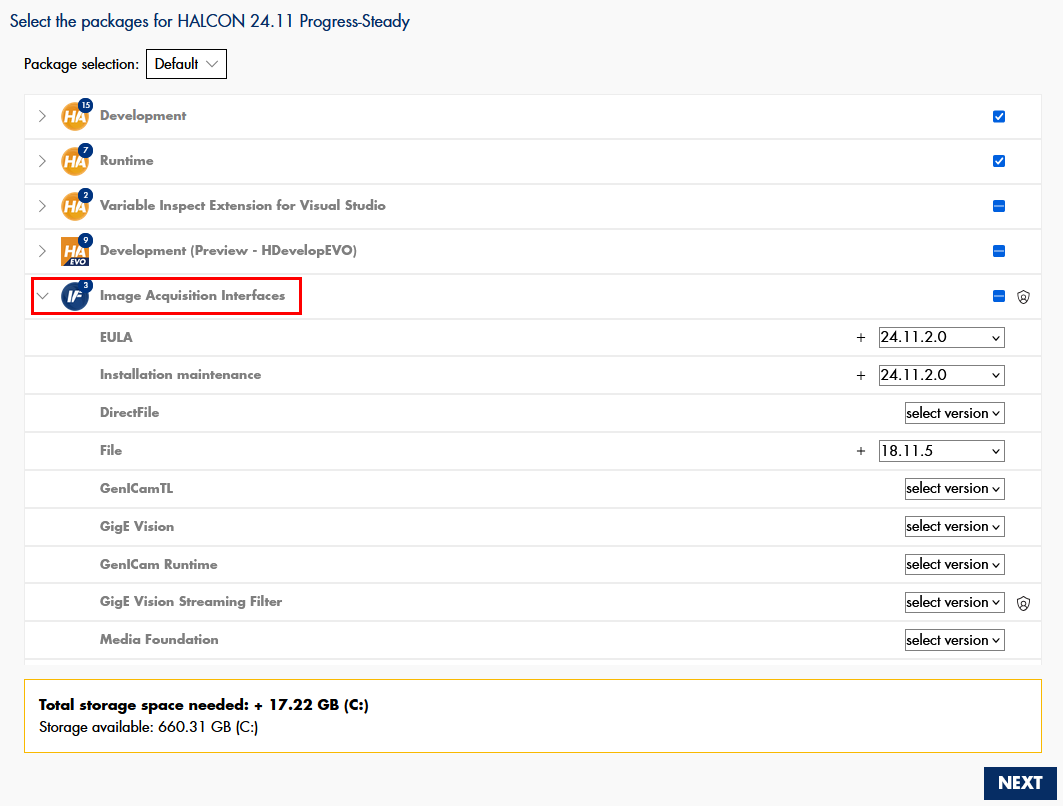
The SOM will place all necessary components at the correct location, such that the plugin is ready to use from within HALCON.
System requirements
- This plugin requires Windows 10 or later.
- It is linked against the Windows SDK version 10.0.22000.0. Make sure that the system includes this or a compatible version of the SDK.
Usage and concepts
Microsoft Media Foundation is a Windows native multimedia framework. It offers a modern platform for handling
video and audio content. However, the mvtec_mediafoundation plugin does not support any audio-related features.
The mvtec_mediafoundation plugin is built on top of the Windows SDK and does not require any additional installation.
If a device can be accessed using the Windows Camera App, it should also work seamlessly with the mvtec_mediafoundation plugin.
Identifying/Connecting devices
The mvtec_mediafoundation plugin implements a single GenTL interface module.
HALCON image sources provide shortcuts to discover all reachable devices with just one operator call.
Device identifier
The mvtec_mediafoundation plugin identifies compatible devices using the device ID, which is guaranteed to be unique
on the given host. It remains persistent across sessions, as long as the device stays connected to the same USB port.
To ensure persistent uniqueness, the device ID combines the device's friendly name with its USB device instance path, e.g.
Integrated_Camera_vid_174f&pid_11af&mi_00#6&27160867&0&0000.
HDevelop: Using the unique ID to specify your camera
Device discovery
By using the HALCON operator query_image_sources, the device discovery is automatically triggered.
For each discovered device, an image source handle in unconnected state is returned.
These handles can be used for connecting directly.
HDevelop: Discover devices and connect to one of them
Interface
By default, the HALCON operator connect_image_source automatically
searches and connects the interface module.
Although it is technically possible to open a connection to the interface module without connecting to a device, this option has no practical use for this plugin.
 The
The interface_id is always MasimovTL_ITF_GenTLMediaFoundationDefaultInterface.
Buffer timestamp
The timestamp associated with the last captured image corresponds to the presentation time of the video sample, as reported by the media source through the IMFSourceReader::ReadSample method in Microsoft Media Foundation. This time value is converted to nanoseconds before being returned.
Configuration parameters
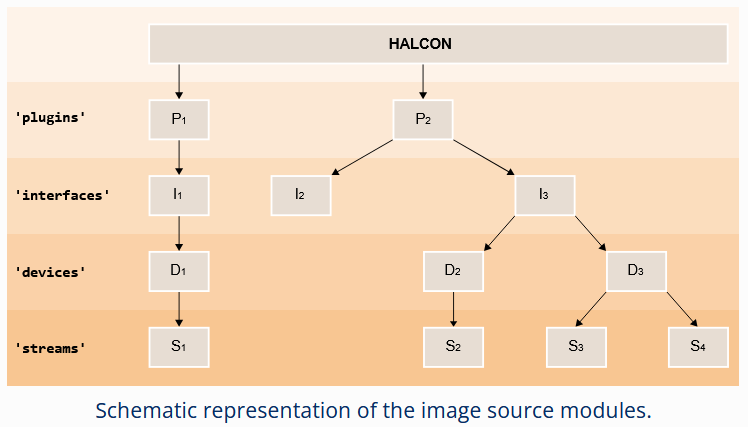
The mvtec_mediafoundation plugin implements the GenICam GenTL standard, which specifies a set of five configurable modules.
These are the plugin (in GenTL referred to as System), interface, local_device, device, and stream modules (1).
Refer to the HALCON Operator Reference for more information about these modules.
In the following section all configuration parameters of the different modules are listed.
Plugin
Only one instance of the plugin module exists per plugin.
This module serves mostly informational purposes.
Its parameters can be grouped broadly in two different categories:
-
Generic information about the plugin itself (such as
TLType,TLModelName, andTLVendorName). -
Generic information about the available interfaces on the given system (e.g.
InterfaceID)
HDevelop: How to access parameters for the plugin module
| Parameter | Description type read-only values default |
|---|---|
GenTLSFNCVersionMajor |
Major version number of the GenTL Standard Features Naming Convention used to create this GenTL Producer's XML.integer read-only |
GenTLSFNCVersionMinor |
Minor version number of the GenTL Standard Features Naming Convention used to create this GenTL Producer's XML.integer read-only |
GenTLVersionMajor |
Major version number of the GenTL specification this GenTL Producer complies with.integer read-only |
GenTLVersionMinor |
Minor version number of the GenTL specification this GenTL Producer complies with.integer read-only |
InterfaceID |
GenTL Producer wide unique identifier of the selected interface. This interface list only changes on execution of InterfaceUpdateList.string read-only |
InterfaceSelector |
Selector for the different GenTL Producer interfaces. This interface list only changes on execution of InterfaceUpdateList.integer 0 |
InterfaceUpdateList |
Updates the internal interface list.command |
InterfaceUpdateTimeout |
Specifies timeout for the InterfaceUpdateList Command.integer 0 ms |
TLFileName |
File name including extension of the library.string read-only |
TLID |
Unique identifier of this GenTL Producer.string read-only |
TLModelName |
Name of this GenTL Producer to distinguish different kinds of GenTL Producer implementations from one vendor.string read-only |
TLPath |
Full path to this GenTL Producer including name and extension.string read-only |
TLType |
Transport layer type of this GenTL Producer.Custom: Media Foundation GenTL Producerenumeration read-only Custom |
TLVendorName |
Name of the GenTL Producer vendor.string read-only |
TLVersion |
Vendor specific version string.string read-only |
Interface
The mvtec_mediafoundation plugin provides unified access to all devices through a single interface module.
The parameters of the interface module can be grouped broadly in two different categories:
-
Generic information about the interface itself (such as
InterfaceIDandInterfaceTLVersionMajor). -
Generic information about the discovered devices on the interface (such as
DeviceModelName,DeviceSerialNumber, andDeviceVendorName).The discovery of these devices can be triggered via the command
DeviceUpdateList. All the parameters mentioned in this second group are selected by theDeviceSelector. To discover information about all reachable devices, increment the value of theDeviceSelectorone-by-one and query the corresponding device parameters in each iteration.
HDevelop: How to access parameters for the interface module
| Parameter | Description type read-only values default |
|---|---|
DeviceAccessStatus |
Access status of the selected device at the moment of the last execution of DeviceUpdateList.This value only changes on execution of DeviceUpdateList.Unknown: Unknown statusReadWrite: Full accessReadOnly: Read-only accessNoAccess: The device is seen but unreachableBusy: The device is open by another entityOpenReadWrite: The device is open by this GenTL Producer with RW accessOpenReadOnly: The device is open by this GenTL Producer with RO accessenumeration read-only Unknown, ReadWrite, ReadOnly, NoAccess, Busy, OpenReadWrite, OpenReadOnly |
DeviceID |
Interface wide unique identifier of the selected device. This value only changes on execution of DeviceUpdateList.string read-only |
DeviceModelName |
Name of the device model of the selected device. This value only changes on execution of DeviceUpdateList.string read-only |
DeviceSelector |
Selector for the different devices on this interface. This value only changes on execution of DeviceUpdateList.integer 0 |
DeviceSerialNumber |
Serial number of the selected device. This value only changes on execution of DeviceUpdateList.string read-only |
DeviceTLVersionMajor |
Major version number of the transport layer specification of the selected device.integer read-only |
DeviceTLVersionMinor |
Minor version number of the transport layer specification of the selected device.integer read-only |
DeviceUpdateList |
Updates the internal device list.command |
DeviceUpdateTimeout |
Specifies timeout for the DeviceUpdateList Command.integer 0 ms |
DeviceUserID |
User-programmable device identifier of the selected device. This value only changes on execution of DeviceUpdateList.string read-only |
DeviceVendorName |
Name of the device vendor of the selected device. This value only changes on execution of DeviceUpdateList.string read-only |
InterfaceID |
GenTL Producer wide unique identifier of the selected interface.string read-only |
InterfaceTLVersionMajor |
Major version number of the transport layer specification this GenTL Producer interface complies with. The TL version of the Interface can be compared with the TL version of the device to assure compatibility. integer read-only |
InterfaceTLVersionMinor |
Minor version number of the transport layer specification this GenTL Producer interface complies with. The TL version of the Interface can be compared with the TL version of the device to assure compatibility. integer read-only |
InterfaceType |
Transport layer type of the interface.Custom: Media Foundation GenTL Producerenumeration read-only Custom |
Local Device
As mandated by the GenTL standard, for each detected physical device, the mvtec_mediafoundation
plugin also instantiates a so called 'local device' module. This provides information and configuration parameters
for the device as it is seen by the Media Foundation image source plugin. The list of available parameters
therefore is independent of the actual device.
This is contrary to the device module. Its parameters are fully defined by the connected device and its on-board GenICam feature description file.
The parameters of the local device module can be grouped broadly in two different categories:
-
Information about the real device as seen by the
mvtec_mediafoundationplugin (such asDeviceAccessStatusandDeviceModelName). -
Information about the discovered streams on this device (
StreamSelectorandStreamID). However, as most Media Foundation cameras only provide one stream, themvtec_mediafoundationplugin only supports streaming images from the first stream.
HDevelop: How to access parameters for the local_device module
| Parameter | Description type read-only values default |
|---|---|
DeviceAccessStatus |
Gets the access status the GenTL Producer has on the device.Unknown: Unknown statusOpenReadWrite: The device is open by this GenTL Producer with RW accessOpenReadOnly: The device is open by this GenTL Producer with RO accessenumeration read-only Unknown, OpenReadWrite, OpenReadOnly |
DeviceEventsThreadApplyPriority |
Applies desired thread priority parameter(s) to the internal event handling thread. Also triggers a re-read of the actual values. The values must be configured with the DeviceEventsThreadPriority and DeviceEventsThreadSchedulingPolicy parameters beforehand. Executing this command and changing the thread priority parameter(s) might require administrative privileges.Only available if the device supports device events. Use with care. command |
DeviceEventsThreadPriority |
OS-specific thread priority value used for the internal event handling thread. The value can be applied with the DeviceEventsThreadApplyPriority command. Afterwards the value in effect can be read back. The value must fall within the range of values expected by the operating system, i.e. as expected in the struct sched_param under Linux or in the call to SetThreadPriority under Windows. Even per default the implementation tries to apply a higher-than-normal priority to this thread.Only available if the device supports device events. Use with care. integer |
DeviceEventsThreadSchedulingPolicy |
OS-specific scheduling policy value used for the internal event handling thread. The value can be applied with the DeviceEventsThreadApplyPriority command. Afterwards the value in effect can be read back. The value must be one of the values of the priority identifiers of the operating system, e.g. SCHED_FIFO, SCHED_RR and so on.Only available on Linux systems. Only available if the device supports device events. Use with care. integer |
DeviceID |
Interface-wide unique identifier of this device.string read-only |
DeviceManufacturerInfo |
Manufacturer information about the remote device.string read-only |
DeviceModelName |
Name of the remote device model.string read-only |
DeviceSerialNumber |
Serial number of the remote device.string read-only |
DeviceType |
Transport layer type of the device.Custom: Media Foundation GenTL Producerenumeration read-only Custom |
DeviceUserID |
User-programmable device identifier of the remote device.string read-only |
DeviceVendorName |
Name of the remote device vendor.string read-only |
DeviceVersion |
Name of the version of the remote device model.string read-only |
StreamID |
Device unique ID for the stream. For example a GUID. string read-only |
StreamSelector |
Selector for the different stream channels.integer 0 |
Device
In plugins such as mvtec_gigevision and mvtec_usb3vision, the available parameters in the device module are defined by the
GenICam feature description file provided by the connected device and automatically retrieved by the plugin.
However, the mvtec_mediafoundation plugin interfaces with devices that do not expose such a file.
Instead, it dynamically queries the device's settings at runtime and exposes a custom GenICam-compliant feature description file.
HDevelop: How to access parameters for the device module
The parameters of the device module are selected per default.
Therefore specifying the generic parameter group==device can be omitted.
Note
Not all listed parameters are guaranteed to be available, this depends on the camera's supported features.
| Parameter | Description type read-only values default |
|---|---|
AcquisitionFrameRate |
Acquisition rate (in Hertz) at which the frames are captured. Returns the frame rate selected in MFMediaType.float read-only |
AcquisitionMode |
Sets the acquisition mode of the device.Continuous: Frames are captured continuously until stopped with the AcquisitionStop command.enumeration read-only Continuous |
Aperture |
Specifies the aperture (iris) setting. This parameter corresponds to the CameraControl_Iris property of the DirectShow's IAMCameraControl interface. float |
ApertureAuto |
Specifies the automatic aperture (iris) mode. This parameter corresponds to the CameraControl_Iris capability CameraControlFlags of the DirectShow's IAMCameraControl interface. If set to Continuous, Aperture is not available.Off: Aperture is adjusted manually.Continuous: Aperture is adjusted automatically.enumeration Off, Continuous |
BacklightCompensation |
Specifies the backlight compensation setting. This parameter corresponds to the VideoProcAmp_BacklightCompensation property of the DirectShow's IAMVideoProcAmp interface. Off: Backlight compensation disabled.On: Backlight compensation enabled.enumeration Off, On |
BlackLevel |
Specifies the black level (brightness) setting. This parameter corresponds to the VideoProcAmp_Brightness property of the DirectShow's IAMVideoProcAmp interface. float |
BlackLevelAuto |
Specifies the automatic black level (brightness) mode. This parameter corresponds to the VideoProcAmp_Brightness capability VideoProcAmpFlags of the DirectShow's IAMVideoProcAmp interface. If set to Continuous, BlackLevel is not available.Off: BlackLevel is adjusted manually.Continuous: BlackLevel is adjusted automatically.enumeration Off, Continuous |
ColorEnable |
Specifies the color enable setting. This parameter corresponds to the VideoProcAmp_ColorEnable property of the DirectShow's IAMVideoProcAmp interface. Off: Color disabled.On: Color enabled.enumeration Off, On |
Contrast |
Specifies the contrast setting. This parameter corresponds to the VideoProcAmp_Contrast property of the DirectShow's IAMVideoProcAmp interface. integer |
ContrastAuto |
Specifies the automatic contrast mode. This parameter corresponds to the VideoProcAmp_Contrast capability VideoProcAmpFlags of the DirectShow's IAMVideoProcAmp interface. If set to Continuous, Contrast is not available.Off: Contrast is adjusted manually.Continuous: Contrast is adjusted automatically.enumeration Off, Continuous |
DeviceModelName |
Device USB product ID.string read-only |
DeviceScanType |
Returns the scan type of the device's sensor.Areascan: 2D sensor outputting an image created from a unique sensor acquisition.enumeration read-only Areascan |
DeviceVendorName |
Device USB vendor ID.string read-only |
ExposureAuto |
Specifies the automatic exposure mode. This parameter corresponds to the CameraControl_Exposure capability CameraControlFlags of the DirectShow's IAMCameraControl interface. If set to Continuous, ExposureTime is not available.Off: Exposure duration is manually controlled using ExposureTime.Continuous: Exposure duration is constantly adapted by the device to maximize the dynamic range.enumeration Off, Continuous |
ExposureTime |
Specifies the exposure time in microseconds. This parameter corresponds to the CameraControl_Exposure property of the DirectShow's IAMCameraControl interface. float |
Focus |
Specifies the focus setting. This parameter corresponds to the CameraControl_Focus property of the DirectShow's IAMCameraControl interface. integer |
FocusAuto |
Specifies the automatic focus mode. This parameter corresponds to the CameraControl_Focus capability CameraControlFlags of the DirectShow's IAMCameraControl interface. If set to Continuous, Focus is not available.Off: Focus is adjusted manually.Continuous: Focus is adjusted automatically.enumeration Off, Continuous |
Gain |
Specifies the gain setting. This parameter corresponds to the VideoProcAmp_Gain property of the DirectShow's IAMVideoProcAmp interface. float |
GainAuto |
Specifies the automatic gain mode. This parameter corresponds to the VideoProcAmp_Gain capability VideoProcAmpFlags of the DirectShow's IAMVideoProcAmp interface. If set to Continuous, Gain is not available.Off: Gain is adjusted manually.Continuous: Gain is adjusted automatically.enumeration Off, Continuous |
Gamma |
Specifies the gamma setting. This parameter corresponds to the VideoProcAmp_Gamma property of the DirectShow's IAMVideoProcAmp interface. float |
GammaAuto |
Specifies the automatic gamma mode. This parameter corresponds to the VideoProcAmp_Gamma capability VideoProcAmpFlags of the DirectShow's IAMVideoProcAmp interface. If set to Continuous, Gamma is not available.Off: Gamma is adjusted manually.Continuous: Gamma is adjusted automatically.enumeration Off, Continuous |
Height |
Height of the image provided by the device (in pixels).integer read-only |
Hue |
Specifies the hue setting. This parameter corresponds to the VideoProcAmp_Hue property of the DirectShow's IAMVideoProcAmp interface. integer |
HueAuto |
Specifies the automatic hue mode. This parameter corresponds to the VideoProcAmp_Hue capability VideoProcAmpFlags of the DirectShow's IAMVideoProcAmp interface. If set to Continuous, Hue is not available.Off: Hue is adjusted manually.Continuous: Hue is adjusted automatically.enumeration Off, Continuous |
MFMediaType |
Media Foundation Media Type. Configures the Microsoft Media Foundation video format, including subtype, resolution, and frame rate. Format: <video_subtype><width>x<height><framerate>fps (e.g., YUY2_1280x720_10fps). When the device is opened, an RGB subtype (if available) with the highest resolution and frame rate is chosen by default. The features PixelFormat, Width, Height, and AcquisitionFrameRate reflect the selected format. Changing the PixelFormat updates the MFMediaType to the corresponding subtype with optimal settings.MFMT_Default_0: Enumeration values are dynamically generated based on the current device.enumeration MFMT_Default_0 |
Pan |
Specifies the pan setting. This parameter corresponds to the CameraControl_Pan property of the DirectShow's IAMCameraControl interface. integer |
PanAuto |
Specifies the automatic pan mode. This parameter corresponds to the CameraControl_Pan capability CameraControlFlags of the DirectShow's IAMCameraControl interface. If set to Continuous, Pan is not available.Off: Pan is adjusted manually.Continuous: Pan is adjusted automatically.enumeration Off, Continuous |
PayloadSize |
Provides the number of bytes transferred for each image.integer read-only |
PixelFormat |
Format of the pixels provided by the device. Changing this value updates MFMediaType to the best-matching video subtype.Mono8: Monochrome 8-bit (MFVideoFormat_L8)Mono16: Monochrome 16-bit (MFVideoFormat_L16)BGR8: Red-Green-Blue 8-bit (MFVideoFormat_RGB24)BGRa8: Blue-Green-Red-alpha 8-bit (MFVideoFormat_RGB32)YUV422_8: YUV 4:2:2 8-bit (MFVideoFormat_YUY2)YCbCr420_8_YY_CbCr_Semiplanar: YCbCr 4:2:0 8-bit YY/CbCr Semiplanar (MFVideoFormat_NV12)YCbCr420_8_YY_CrCb_Semiplanar: YCbCr 4:2:0 8-bit YY/CrCb Semiplanar (MFVideoFormat_NV21)enumeration Mono8, Mono16, BGR8, BGRa8, YUV422_8, YCbCr420_8_YY_CbCr_Semiplanar, YCbCr420_8_YY_CrCb_Semiplanar |
Roll |
Specifies the roll setting. This parameter corresponds to the CameraControl_Roll property of the DirectShow's IAMCameraControl interface. integer |
RollAuto |
Specifies the automatic roll mode. This parameter corresponds to the CameraControl_Roll capability CameraControlFlags of the DirectShow's IAMCameraControl interface. If set to Continuous, Roll is not available.Off: Roll is adjusted manually.Continuous: Roll is adjusted automatically.enumeration Off, Continuous |
Saturation |
Specifies the saturation setting. This parameter corresponds to the VideoProcAmp_Saturation property of the DirectShow's IAMVideoProcAmp interface. integer |
SaturationAuto |
Specifies the automatic saturation mode. This parameter corresponds to the VideoProcAmp_Saturation capability VideoProcAmpFlags of the DirectShow's IAMVideoProcAmp interface. If set to Continuous, Saturation is not available.Off: Saturation is adjusted manually.Continuous: Saturation is adjusted automatically.enumeration Off, Continuous |
Sharpness |
Specifies the sharpness setting. This parameter corresponds to the VideoProcAmp_Sharpness property of the DirectShow's IAMVideoProcAmp interface. integer |
SharpnessAuto |
Specifies the automatic sharpness mode. This parameter corresponds to the VideoProcAmp_Sharpness capability VideoProcAmpFlags of the DirectShow's IAMVideoProcAmp interface. If set to Continuous, Sharpness is not available.Off: Sharpness is adjusted manually.Continuous: Sharpness is adjusted automatically.enumeration Off, Continuous |
Tilt |
Specifies the tilt setting. This parameter corresponds to the CameraControl_Tilt property of the DirectShow's IAMCameraControl interface. integer |
TiltAuto |
Specifies the automatic tilt mode. This parameter corresponds to the CameraControl_Tilt capability CameraControlFlags of the DirectShow's IAMCameraControl interface. If set to Continuous, Tilt is not available.Off: Tilt is adjusted manually.Continuous: Tilt is adjusted automatically.enumeration Off, Continuous |
WhiteBalance |
Specifies the white balance setting. This parameter corresponds to the VideoProcAmp_WhiteBalance property of the DirectShow's IAMVideoProcAmp interface. integer |
WhiteBalanceAuto |
Specifies the automatic white balance mode. This parameter corresponds to the VideoProcAmp_WhiteBalance capability VideoProcAmpFlags of the DirectShow's IAMVideoProcAmp interface. If set to Continuous, WhiteBalance is not available.Off: WhiteBalance is adjusted manually.Continuous: WhiteBalance is adjusted automatically.enumeration Off, Continuous |
Width |
Width of the image provided by the device (in pixels).integer read-only |
Zoom |
Specifies the zoom setting. This parameter corresponds to the CameraControl_Zoom property of the DirectShow's IAMCameraControl interface. integer |
ZoomAuto |
Specifies the automatic zoom mode. This parameter corresponds to the CameraControl_Zoom capability CameraControlFlags of the DirectShow's IAMCameraControl interface. If set to Continuous, Zoom is not available.Off: Zoom is adjusted manually.Continuous: Zoom is adjusted automatically.enumeration Off, Continuous |
Stream
The mvtec_mediafoundation plugin automatically instantiates one stream module per connected device.
The purpose of the stream module is to configure parameters related to the transmission and receiving of image data.
HDevelop: How to access parameters for the stream module
| Parameter | Description type read-only values default |
|---|---|
PayloadSize |
Size of the expected data in bytes. Note that this feature "overwrites" the PayloadSize of the remote device, see corresponding sections of the GenICam GenTL standard.integer read-only |
StreamAnnounceBufferMinimum |
Minimal number of buffers to announce to enable selected buffer handling mode.integer read-only 0 |
StreamAnnouncedBufferCount |
Number of announced (known) buffers on this stream. This value is volatile. It may change if additional buffers are announced and/or buffers are revoked by the GenTL Consumer. integer read-only |
StreamAuxiliaryBufferCount |
Number of auxiliary buffers the acquisition engine will allocate to keep the stream going when not enough user buffers are available.integer |
StreamBufferHandlingMode |
Selects the buffer handling mode in use for this Data Stream. This influences how the streaming engine handles new complete transmissions, especially when they arrive faster than the application is processing them. Not writeable while streaming is active. OldestFirst: The acquired buffers are delivered to the application in a FIFO manner. New data will be discarded if no free buffers are available. Typically used when each image must be processed, even when short load-spikes slow down processing momentarily.OldestFirstOverwrite: The acquired buffers are delivered to the application in a FIFO manner. New data will overwrite the oldest buffer if no free buffers are available. Typically used when each image must be processed, even when short load-spikes slow down processing momentarily.NewestOnly: The application always receives the newest acquired buffer. New data will replace any other one already received and not yet given to the application. Typically used for displaying or when having the latest results is more important than having all results.enumeration OldestFirst, OldestFirstOverwrite, NewestOnly OldestFirst |
StreamID |
Device unique ID for the data stream. For example a GUID. string read-only |
StreamThreadApplyPriority |
Applies desired thread priority parameter(s) to the internal stream processing thread. Also triggers a re-read of the actual values. The values must be configured with the StreamThreadPriority and StreamThreadSchedulingPolicy parameters beforehand. Executing this command and changing the thread priority parameter(s) might require administrative privileges.Use with care. command |
StreamThreadPriority |
OS-specific thread priority value used for the internal stream processing thread. The value can be applied with the StreamThreadApplyPriority command. Afterwards the value in effect can be read back. The value must fall within the range of values expected by the operating system, i.e. as expected in the struct sched_param under Linux or in the call to SetThreadPriority under Windows. Even per default the implementation tries to apply a higher-than-normal priority to this thread.Use with care. integer |
StreamThreadSchedulingPolicy |
OS-specific scheduling policy value used for the internal stream processing thread. The value can be applied with the StreamThreadApplyPriority command. Afterwards the value in effect can be read back. The value must be one of the values of the priority identifiers of the operating system, e.g. SCHED_FIFO, SCHED_RR and so on.Only available on Linux systems. Use with care. integer |
StreamType |
Transport layer type of the Data Stream.Custom: Media Foundation GenTL Producerenumeration read-only Custom |
Troubleshooting
In case of image acquisition problems with the mvtec_mediafoundation plugin, the following hints might help to solve them.
- Check if the latest revision of the
mvtec_mediafoundationplugin is used. - Check the System Requirements.
- Check if the device has the latest firmware.
- Check the extended error messages for detailed error descriptions. These are automatically displayed in HDevelop, but might need to be queried explicitly when programming in HALCON/C++ or HALCON/C# for example.
-
If the plugin cannot be loaded (1), it might not be properly installed.
Check if it is installed via the SOM (see installation).
Verify manually that the file 'mvtec_mediafoundation.cti' is present in the folder%HALCONROOT%\bin\%HALCONARCH%() or$HALCONROOT/lib/$HALCONARCH().- Error
"Image source module not found (HALCON error code: 5809)"
or extended error message containing
"Cannot identify producer to open"
while usingquery_image_sourceorconnect_image_source.
- Error
-
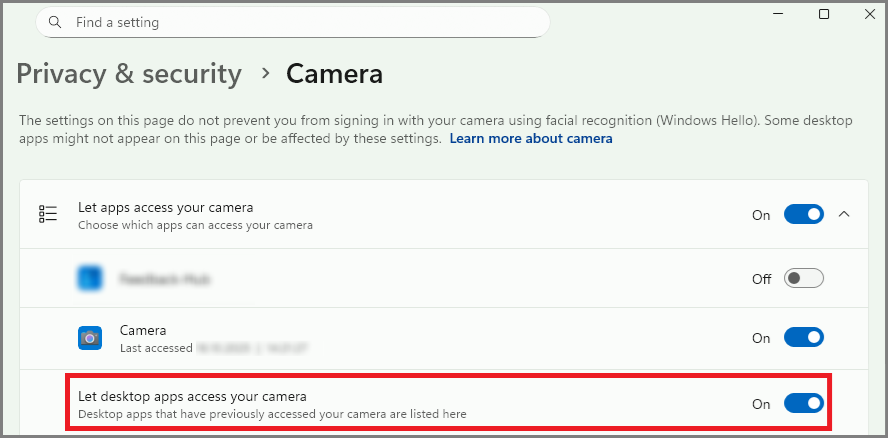
Check that the device is accessible using the Windows Camera App.
-
Verify that desktop apps can access the camera (1).
Requesting help
If you experience problems not solvable with the tips of the previous section, MVTec and its worldwide partner network are ready to help. Please refer to www.mvtec.com/support for directions.
Include the following in your support request for maximum efficiency
- Used HALCON and image source plugin version.
- Used HALCON architecture (e.g. x64-win64, x64-linux, aarch64-linux or armv7a-linux).
- Camera manufacturer, model and firmware version.
- Details about the host machine, like operating system, RAM and CPU.
- Description of the observed and expected behavior.
- Minimal sample code (if possible HDevelop script) to reproduce the issue.
- If applicable, any error codes and error messages observed.
- Complete output of the HDevelop example
mvtec_mediafoundation_information.hdev.
FOSS libraries
The mvtec_mediafoundation plugin depends on free and open-source software (FOSS) libraries.
See the file third_party_mvtec_mediafoundation.txt in the HALCON base directory for copyright and license information.
Libraries are used without modifications unless explicitly stated in the file.
You can request the source for those third-party libraries licensed under LGPL via email to info@mvtec.com with the subject "Request source code of third-party libraries".
Release notes
- Version 1.0.0 (2025-04-16)
- First official version of the MVTec Media Foundation implementation as a standalone GenTL compatible plugin.