Examples for fuzzy membership functions🔗
For each set type, the typical range of the x values of the fuzzy membership functions as well as one fuzzy membership function is given.
If the set type allows the creation of the fuzzy measure object with fuzzy membership functions and normalized fuzzy membership functions, both fuzzy membership functions are displayed.
In this case, the normalized fuzzy membership function is defined such that, together with the stated PairSize, it creates the same fuzzy measure object as the direct fuzzy membership function.
Then, mostly a PairSize of 10.0 is used to make it easy to compare the two fuzzy membership functions.
The effect of the specification of the fuzzy membership function is shown by means of the results of the fuzzy measure object applied to the test image shown in Figure 1.

The results of the standard measure object applied to this test image:
 |
 |
|---|---|
Edges determined with the operator measure_pos |
Edge pairs determined with the operator measure_pairs |
Both operators were applied with the following parameter settings:
| Parameter | Value |
|---|---|
Sigma |
1.0 |
Threshold |
10.0 |
Transition |
‘all’ |
Select |
‘all’ |
FuzzyThresh |
0.5 |
The following sections shall give an impression of the effect of different fuzzy membership functions specified for different set types.
They are in no way complete.
Note that all the edge pairs are extracted with the operator fuzzy_measure_pairing, not with the operator fuzzy_measure_pairs.
Set type contrast🔗
Subtype 'contrast'🔗
Fuzzy membership function example
Evaluates the amplitude of the edges.
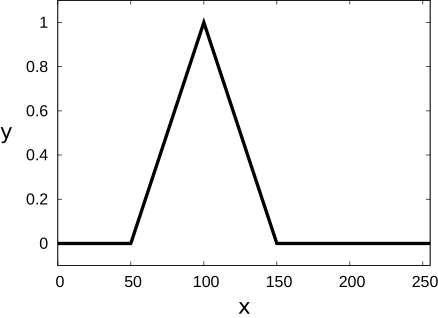
The x values of fuzzy membership functions for the sub set type 'contrast' must lie within the range of gray values, for example,
shows a fuzzy membership function that can be used to extract fairly strong edges in byte images.
  |
The sub set type 'contrast' cannot be specified with a normalized fuzzy membership function. |
| x: feature value y: membership value |
Figure 2 Shows the positions of the edges that will be extracted if the fuzzy measure object is created with the fuzzy membership function displayed in . With this fuzzy measure object, only those edges are extracted that have a contrast between 75 and 125.

The fuzzy membership function displayed in can be created with the following code:
Set type position🔗
Subtype 'position'🔗
Fuzzy membership function example
Evaluates the signed distance of the edges to the reference point of the fuzzy measure object. The reference point is located at the start of the profile line.
The x values of fuzzy membership functions for the sub set type 'position' must lie within the range
where \(l\) is the length of the ROI.
and
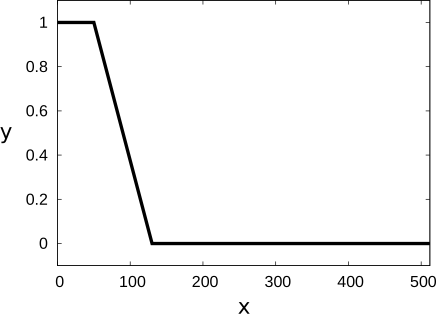
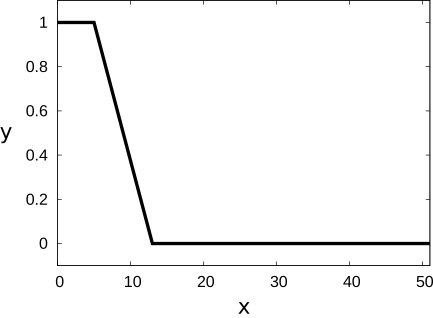
show fuzzy membership functions that can be used to extract edges at the beginning of the profile line (SetType = 'position', PairSize = 10)).
  |
  |
| x: feature value y: membership value |
x: normalized feature value y: membership value |
Figure 3 shows the positions of the edges that will be extracted if the fuzzy measure object is created with the fuzzy membership function displayed in and . Only the first four edges are returned.

The fuzzy membership function displayed in can be created with the following code:
SetType := 'position'
create_funct_1d_pairs ([50,130], [1,0], FuzzyMembershipFunction)
set_fuzzy_measure (MeasureHandle, SetType, FuzzyMembershipFunction)
The equivalent normalized fuzzy membership function, which is displayed in can be created with the following code:
Subtype 'position_center'🔗
Fuzzy membership function example
'position_center' behaves like 'position' with the reference point located at the center of the profile line.
The x values of fuzzy membership functions for the sub set type 'position_center' must lie within the range
where \(l\) is the length of the ROI.
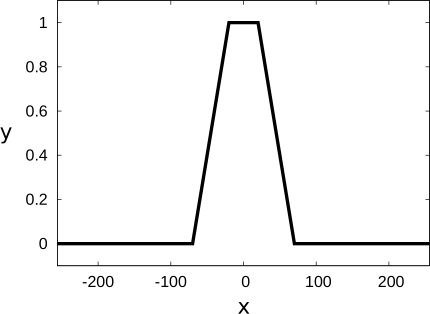
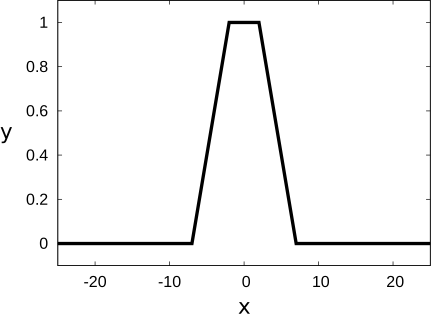
and show fuzzy membership functions that can be used to extract edges in the center of the profile line.
  |
  |
| x: feature value y: membership value |
x: normalized feature value y: membership value |
Figure 4 shows the positions of the edges that will be extracted if the fuzzy measure object is created with the fuzzy membership function displayed in and . Only the edges in the center of the profile line are returned.

The fuzzy membership function displayed in can be created with the following code:
SetType := 'position_center'
create_funct_1d_pairs ([-70,-20,20,70], [0,1,1,0], FuzzyMembershipFunction)
set_fuzzy_measure (MeasureHandle, SetType, FuzzyMembershipFunction)
The equivalent normalized fuzzy membership function, which is displayed in can be created with the following code:
Subtype 'position_end'🔗
Fuzzy membership function example
'position_end' behaves like 'position' with the reference point located at the end of the profile line.
The x values of fuzzy membership functions for the sub set type 'position_end' must lie within the range
where \(l\) is the length of the ROI.
and
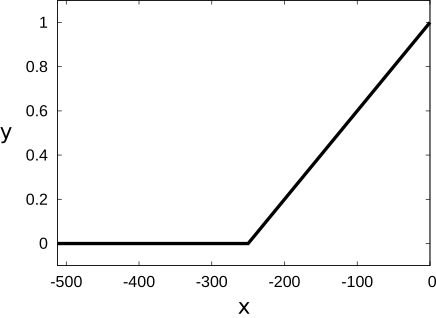
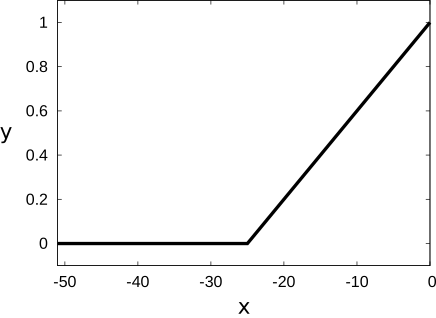
show fuzzy membership functions that can be used to extract edges at the end of the profile line (SetType = 'position_end', PairSize = 10).
  |
  |
| x: feature value y: membership value |
x: normalized feature value y: membership value |
Figure 5 shows the positions of the edges that will be extracted if the fuzzy measure object is created with the fuzzy membership function displayed in and . Only the edges at the end of the profile line are returned.

The fuzzy membership function displayed in can be created with the following code:
SetType := 'position_end'
create_funct_1d_pairs ([-250,0], [0,1], FuzzyMembershipFunction)
set_fuzzy_measure (MeasureHandle, SetType, FuzzyMembershipFunction)
The equivalent normalized fuzzy membership function, which is displayed in can be created with the following code:
Subtype 'position_first_edge'🔗
Fuzzy membership function example
'position_first_edge' behaves like 'position' with the reference point located at the first edge.
The x values of fuzzy membership functions for the sub set type 'position_first_edge' must lie within the range
where \(l\) is the length of the ROI.
and
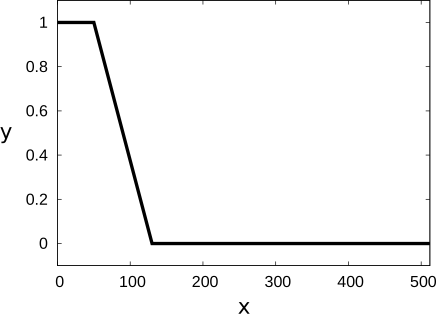
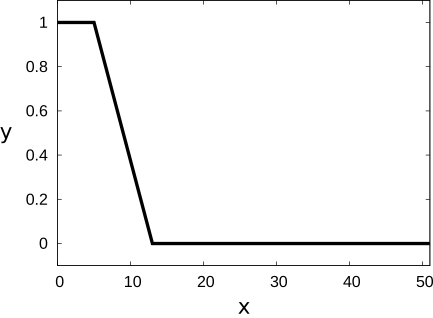
show fuzzy membership functions that can be used to extract edges close to the first edge (SetType = 'position_first_edge', PairSize = 10).
  |
  |
| x: feature value y: membership value |
x: normalized feature value y: membership value |
Figure 6 shows the positions of the edges that will be extracted if the fuzzy measure object is created with the fuzzy membership function displayed in and . Only the edges at the end of the profile line are returned.

The fuzzy membership function displayed in can be created with the following code:
SetType := 'position_first_edge'
create_funct_1d_pairs ([50,130], [1,0], FuzzyMembershipFunction)
set_fuzzy_measure (MeasureHandle, SetType, FuzzyMembershipFunction)
The equivalent normalized fuzzy membership function, which is displayed in can be created with the following code:
Subtype 'position_last_edge'🔗
Fuzzy membership function example
'position_last_edge' behaves like 'position' with the reference point located at the last edge.
The x values of fuzzy membership functions for the sub set type 'position_last_edge' must lie within the range
where \(l\) is the length of the ROI.
and
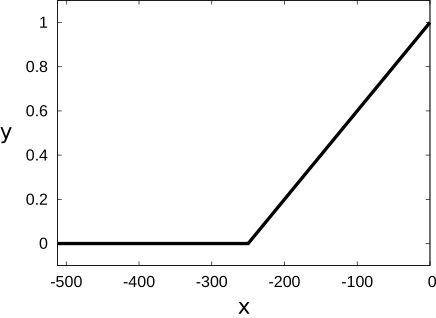
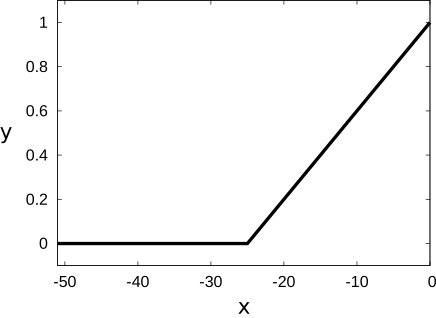
show fuzzy membership functions that can be used to extract edges close to the last edge (SetType = 'position_last_edge', PairSize = 10).
  |
  |
| x: feature value y: membership value |
x: normalized feature value y: membership value |
Figure 7 shows the positions of the edges that will be extracted if the fuzzy measure object is created with the fuzzy membership function displayed in and . Only the edges at the end of the profile line are returned.

The fuzzy membership function displayed in can be created with the following code:
SetType := 'position_last_edge'
create_funct_1d_pairs ([-250,0], [0,1], FuzzyMembershipFunction)
set_fuzzy_measure (MeasureHandle, SetType, FuzzyMembershipFunction)
The equivalent normalized fuzzy membership function, which is displayed in can be created with the following code:
Set type position_pair🔗
Note that for the extraction of edge pairs all possible pairs of edges are internally analyzed according to the specified fuzzy membership functions. If only partial knowledge about the edge pairs to be determined is specified with the fuzzy membership functions, this might possibly lead to unintuitive results. For example, if the position of the edge pairs is specified but not their size, some small edge pairs might possibly be omitted because of a large edge pair that consists of the first edge of the first small edge pair and the second edge of the last small edge pair and that has a membership value equal to or higher than that of the small edge pairs. Therefore, all the available knowledge about the edge pairs to be extracted should be specified with fuzzy membership functions.
Subtype 'position_pair'🔗
Fuzzy membership function example
Evaluates the signed distance of the edge pairs to the reference point of the fuzzy measure object. The position of an edge pair is defined as the center of the two edges. The reference point is located at the start of the profile line.
The x values of fuzzy membership functions for the sub set type 'position_pair' must lie within the range
where \(l\) is the length of the ROI.
and
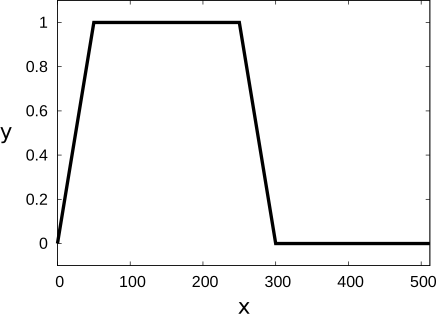
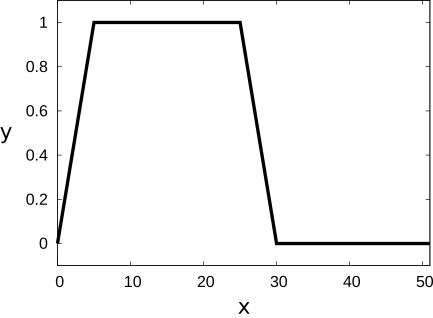
show fuzzy membership functions that can be used to extract edge pairs in approximately the first half of the profile line (SetType = 'position_pair', PairSize = 10).
  |
  |
| x: feature value y: membership value |
x: normalized feature value y: membership value |
Figure 8 shows the positions of the edge pairs that will be extracted if the fuzzy measure object is created with the fuzzy membership function displayed i and . Only edge pairs in approximately the first half of the profile line are returned.

The fuzzy membership function displayed in can be created with the following code:
SetType := 'position_pair'
create_funct_1d_pairs ([0,50,250,300], [0,1,1,0], FuzzyMembershipFunction)
set_fuzzy_measure (MeasureHandle, SetType, FuzzyMembershipFunction)
The equivalent normalized fuzzy membership function, which is displayed in can be created with the following code:
Subtype 'position_pair_center'🔗
Fuzzy membership function example
'position_pair_center' behaves like 'position_pair' with the reference point located at the center of the profile line.
The x values of fuzzy membership functions for the sub set type 'position_pair_center' must lie within the range
where \(l\) is the length of the ROI.
and
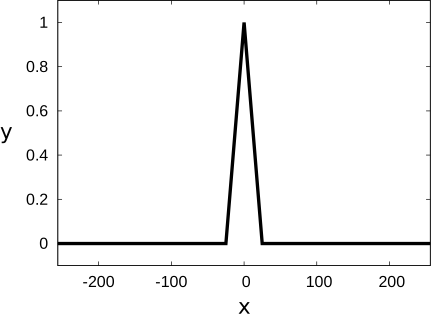
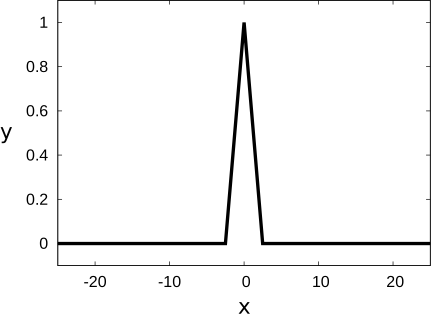
show fuzzy membership functions that can be used to extract edge
pairs in the middle of the profile line
(SetType = 'position_pair_center', PairSize = 10).
  |
  |
| x: feature value y: membership value |
x: normalized feature value y: membership value |
Figure 9 shows the positions of the edge pairs that will be extracted if the fuzzy measure object is created with the fuzzy membership function displayed in and . Only one edge pair in the middle of the profile line is returned. Note that only the position of the edge pair, that is, the position of the center between the two edges of the edge pair is used to restrict the extraction of edge pairs. The position of the individual edges of the edge pair is not restricted. In this case, one large edge pair with its center in the middle of the profile line is returned.

The fuzzy membership function displayed in can be created with the following code:
SetType := 'position_pair_center'
create_funct_1d_pairs ([-25,0,25], [0,1,0], FuzzyMembershipFunction)
set_fuzzy_measure (MeasureHandle, SetType, FuzzyMembershipFunction)
The equivalent normalized fuzzy membership function, which is displayed in can be created with the following code:
Subtype 'position_pair_end'🔗
Fuzzy membership function example
'position_pair_end' behaves like 'position_pair' with the reference point located at the end of the profile line.
The x values of fuzzy membership functions for the sub set type 'position_pair_end' must lie within the range
where \(l\) is the length of the ROI.
and
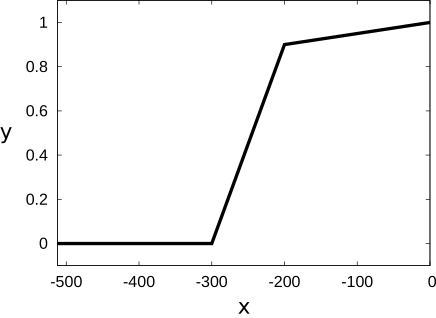
show fuzzy membership functions that can be used to extract edge
pairs at the end of the profile line (SetType = 'position_pair_end', PairSize = 10).
  |
  |
| x: feature value y: membership value |
x: normalized feature value y: membership value |
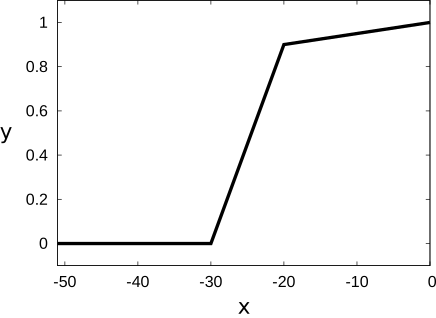
Figure 10 shows the positions of the edge pairs that will be extracted if the fuzzy measure object is created with the fuzzy membership function displayed in and . Only edge pairs at the end of the profile line are returned.

The fuzzy membership function displayed in can be created with the following code:
SetType := 'position_pair_end'
create_funct_1d_pairs ([-300,-200,0], [0,0.9,1], FuzzyMembershipFunction)
set_fuzzy_measure (MeasureHandle, SetType, FuzzyMembershipFunction)
The equivalent normalized fuzzy membership function, which is displayed in can be created with the following code:
Subtype 'position_first_pair'🔗
Fuzzy membership function example
'position_first_pair' behaves like 'position_pair' with the reference point located at the position of the first edge pair.
The x values of fuzzy membership functions for the sub set type 'position_first_pair' must lie within the range
where \(l\) is the length of the ROI.
and
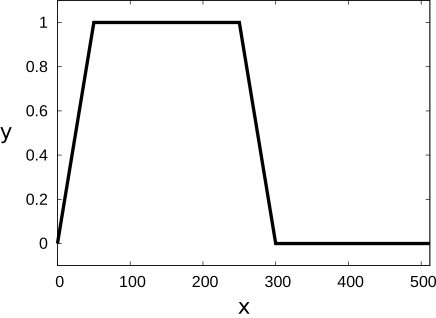
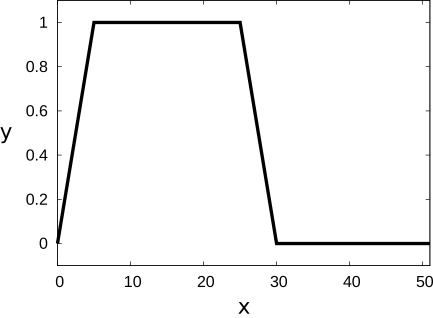
show fuzzy membership functions that can be used to extract edge pairs in approximately the first half of the profile line (SetType = 'position_first_pair', PairSize = 10).
  |
  |
| x: feature value y: membership value |
x: normalized feature value y: membership value |
Figure 11 shows the positions of the edge pairs that will be extracted if the fuzzy measure object is created with the fuzzy membership function displayed in and . Only edge pairs are returned that have a distance from the first edge pair that corresponds to the specified values. See this example where in addition to a fuzzy membership function for the position of the edge pairs a fuzzy membership function for their size is specified.

The fuzzy membership function displayed in can be created with the following code:
SetType := 'position_first_pair'
create_funct_1d_pairs ([0,50,250,300], [0,1,1,0], FuzzyMembershipFunction)
set_fuzzy_measure (MeasureHandle, SetType, FuzzyMembershipFunction)
The equivalent normalized fuzzy membership function, which is displayed in can be created with the following code:
Subtype 'position_last_pair'🔗
Fuzzy membership function example
'position_last_pair' behaves like 'position_pair' with the reference point located at the position of the first edge pair.
The x values of fuzzy membership functions for the sub set type 'position_last_pair' must lie within the range
where \(l\) is the length of the ROI.
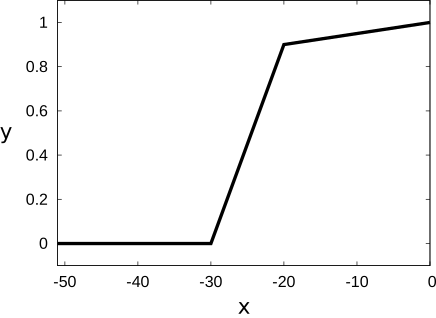
and
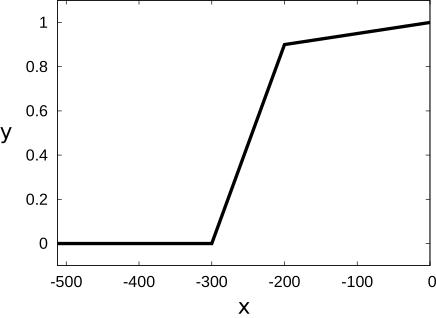
show fuzzy membership functions that can be used to extract edge pairs close to the last edge pair (SetType = 'position_last_pair', PairSize = 10).
  |
  |
| x: feature value y: membership value |
x: normalized feature value y: membership value |
Figure 12 shows the positions of the edge pairs that will be extracted if the fuzzy measure object is created with the fuzzy membership function displayed in
and
.
Only edge pairs in the second half of the profile line are returned.
Note that even though the same fuzzy membership function has been used as for 'position_pair_end', more edge pairs are extracted.
This is because the reference point is located at the last edge pair instead of the end of the profile line.

The fuzzy membership function displayed in can be created with the following code:
SetType := 'position_last_pair'
create_funct_1d_pairs ([-300,-200,0], [0,0.9,1], FuzzyMembershipFunction)
set_fuzzy_measure (MeasureHandle, SetType, FuzzyMembershipFunction)
The equivalent normalized fuzzy membership function, which is displayed in can be created with the following code:
Set type size🔗
Subtype 'size'🔗
Fuzzy membership function example
Evaluates the size of the edge pairs, that is, the distance between the two edges.
The x values of fuzzy membership functions for the sub set type 'size' must lie within the range
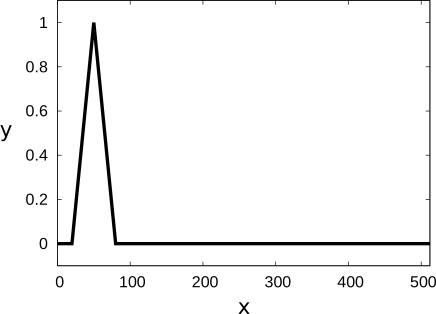
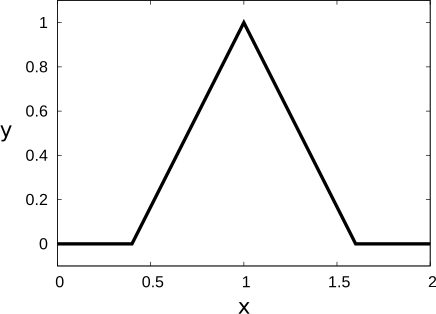
and
show fuzzy membership functions that can be used to extract edge pairs close to the last edge pair (SetType = 'size', PairSize = 50).
  |
  |
| x: feature value y: membership value |
x: normalized feature value y: membership value |
Figure 13 shows the positions of the edge pairs that will be extracted if the fuzzy measure object is created with the fuzzy membership function displayed in and . Only edge pairs that are approximately 50 pixels wide are returned.

The fuzzy membership function displayed in can be created with the following code:
SetType := 'size'
create_funct_1d_pairs ([20,50,80], [0,1,0], FuzzyMembershipFunction)
set_fuzzy_measure (MeasureHandle, SetType, FuzzyMembershipFunction)
The equivalent normalized fuzzy membership function, which is displayed in can be created with the following code:
Subtype 'size_diff'🔗
Fuzzy membership function example
Evaluates the signed difference between the desired PairSize and the actual size of the edge pairs.The signed difference is defined by:
where \(a\) is the actual size of a pair.
The x values of fuzzy membership functions for the sub set type 'size_diff' must lie within the range
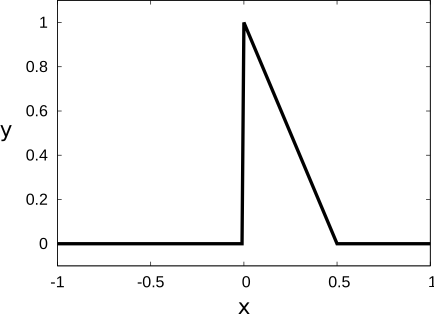
shows a fuzzy membership function that can be used to extract edge pairs that have the specified 'PairSize' or are a little bit smaller (SetType = 'size_diff', PairSize = 15).
The sub set type 'size_diff' can only be specified with a normalized fuzzy membership function. |
  |
| x: normalized feature value y: membership value |
Figure 14 shows the positions of the edge pairs that will be extracted if the fuzzy measure object is created with the fuzzy membership function displayed in . Only edge pairs that are between 11 pixels and 15 pixels wide are returned.

The normalized fuzzy membership function, which is displayed in can be created with the following code:
SetType := 'size_diff'
PairSize := 15
create_funct_1d_pairs ([-0.01,0,0.5], [0,1,0], NormalizedFuzzyMembershipFunction)
set_fuzzy_measure_norm_pair (MeasureHandle, PairSize, SetType, NormalizedFuzzyMembershipFunction)
Note that with the subtype 'size_diff' asymmetrical fuzzy membership functions can be specified for the difference between the PairSize and the actual size of an edge pair.
This is not possible with the subtype 'size_abs_diff'.
Subtype 'size_abs_diff'🔗
Fuzzy membership function example
Evaluates the absolute difference between the desired PairSize and the actual size of the edge pairs.The absolute difference is defined by:
where \(a\) is the actual size of a pair.
The x values of fuzzy membership functions for the sub set type 'size_abs_diff' must lie within the range
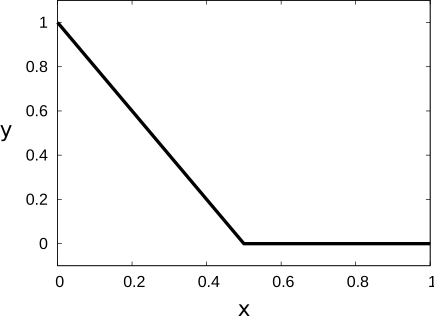
shows a fuzzy membership function that can be used to extract edge pairs that are approximately as
wide as the specified (SetType = 'size_abs_diff', PairSize = 15).
The sub set type 'size_abs_diff' can only be specified with a normalized fuzzy membership function. |
  |
| x: normalized feature value y: membership value |
Figure 15 shows the positions of the edge pairs that will be extracted if the fuzzy measure object is created with the fuzzy membership function displayed in
.
Only edge pairs that are between 11 pixels and 19 pixels wide are returned.
Note that in addition to the edge pairs that are extracted for 'size_diff', also larger edge pairs are returned.

The normalized fuzzy membership function, which is displayed in can be created with the following code:
SetType := 'size_diff'
PairSize := 15
create_funct_1d_pairs ([-0.01,0,0.5], [0,1,0], NormalizedFuzzyMembershipFunction)
set_fuzzy_measure_norm_pair (MeasureHandle, PairSize, SetType, NormalizedFuzzyMembershipFunction)
Note that with the subtype 'size_abs_diff' only symmetrical fuzzy membership functions can be specified for the difference between the PairSize and the actual size of an edge pair.
To specify asymmetrical fuzzy membership functions, use the subtype 'size_diff'.
Set type gray🔗
Subtype 'gray'🔗
Fuzzy membership function example
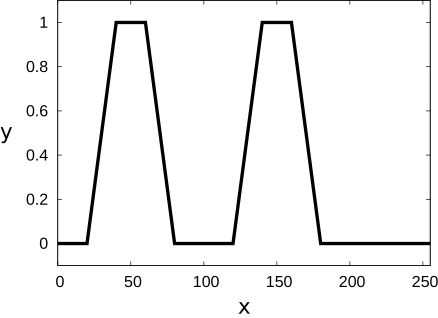
Evaluates the mean gray value between the two edges of edge pairs.
The x values of fuzzy membership functions for the sub set type 'gray' must lie within the range of gray values,
for example,
shows a fuzzy membership function that can be used to extract edge pairs that enclose areas with a
gray value of approximately 50 or 150 (SetType = 'gray').
  |
The sub set type 'gray' cannot be specified with a normalized fuzzy membership function. |
| x: feature value y: membership value |
Figure 16 shows the positions of the edges that will be extracted if the fuzzy measure object is created with the fuzzy membership function displayed in . With this fuzzy measure object, only those edge pairs are returned that enclose areas of the specified gray values.

The fuzzy membership function displayed in can be created with the following code:
Set type position_pair combined with size🔗
Subtype 'position_pair' and 'size'🔗
Fuzzy membership function example
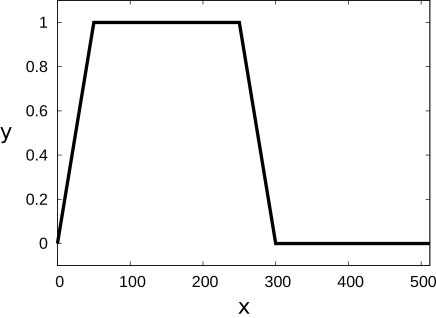
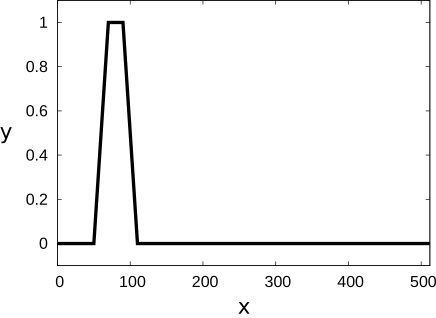
and show two fuzzy membership functions that can be used to determine edge pairs in approximately the first half of the profile line. In addition to only specifying the position of the edge pairs, also a fuzzy membership function for the size of the edge pairs is specified. With this, it is possible to define precisely which kind of edge pairs must be returned.
  |
  |
| x: feature value y: membership value |
x: feature value y: membership value |
Figure 17 shows the positions of the edge pairs that will be extracted if the the fuzzy measure object is created with the fuzzy membership functions displayed in
and
.
Only larger edge pairs in approximately the first half of the profile line are returned.
Note that the smaller edge pairs returned in the 'position_pair' example are not extracted.
This is because of the constraint on the size of the edge pairs, which is introduced by the fuzzy membership function
for the size of the edge pairs.

The fuzzy membership function displayed in can be created with the following code:
The fuzzy membership function displayed in can be created with the following code:
Then, the fuzzy measure object can be created: