Fuzzy measure objects🔗
Some applications require that the selection of the edges or edge pairs can be controlled in more detail. With the standard measure object, edges or edge pairs can be selected only based on their contrast and transition. With a fuzzy measure object it is possible to select edges also based on their contrast and position. The selection of edge pairs can be additionally controlled based on their position and size, as well as based on the gray value between the two edges of the pair. The name fuzzy measure object does not mean that the measurements are “fuzzy”; it comes from the so-called “fuzzy membership functions” that control the selection of edges.
Example case🔗
The fuzzy measure object is an extension to the standard measure object. It allows to control the selection of edges by specifying weighting functions.
The example program %HALCONEXAMPLES%\solution_guide\1d_measuring\fuzzy_measure_switch.hdev shows a possible usage of the fuzzy measure object.
Again, the width of and the distance between the pins of a switch must be measured.
In this case, there are reflections on the middle pin (see Figure 1), which will lead to wrong results if the standard measure object is used.
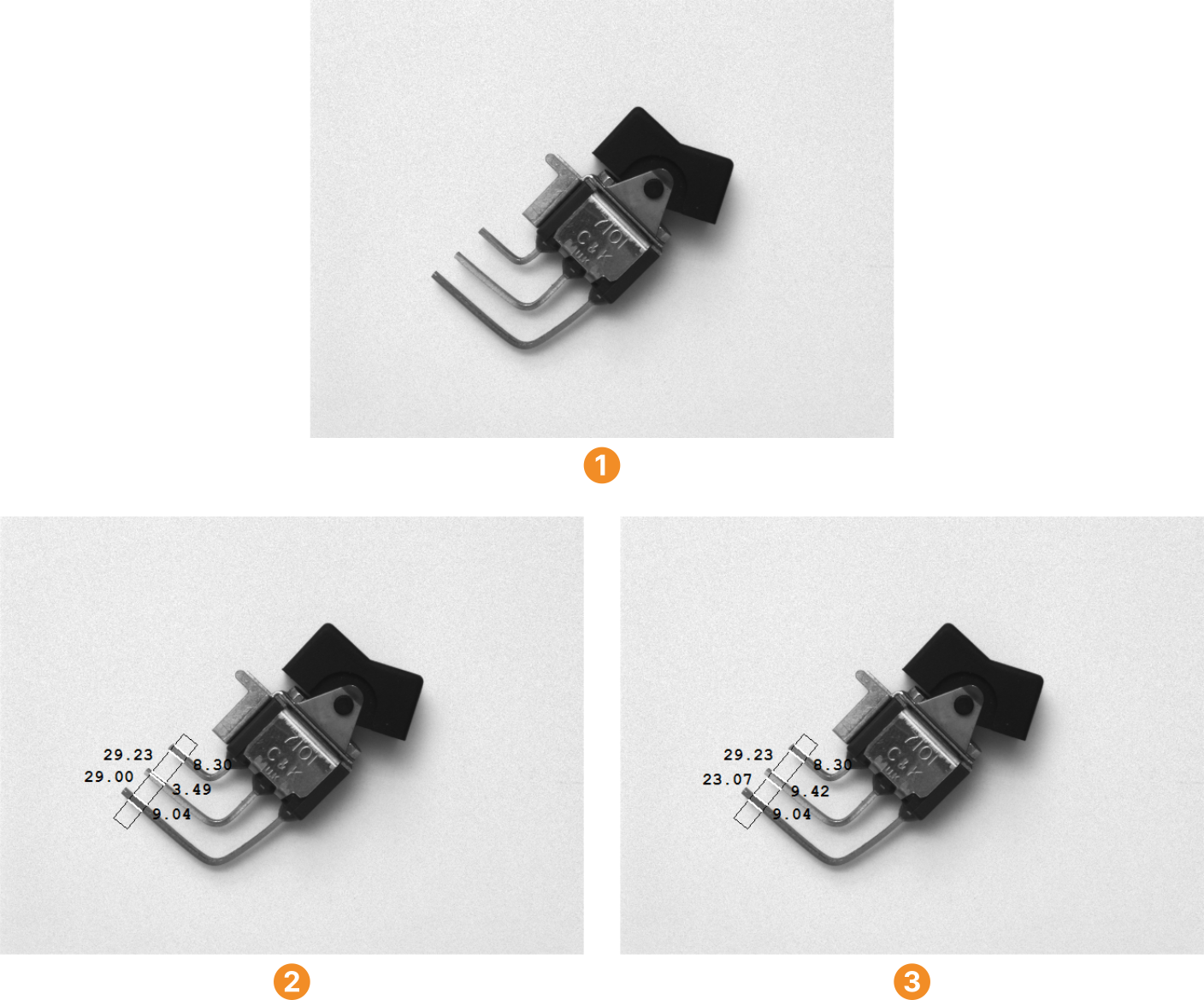
The selection of edges can be improved if additional information is available.
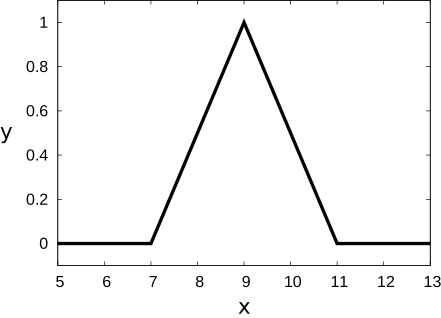
In the example, the pins are approximately 9 pixels wide.
This information can be translated into a fuzzy membership function.
Figure 2 shows this fuzzy membership function.
It returns 1.0 for the desired pair size and 0.0 if the size of the pairs deviates more than two pixels from the desired pair size.
The intermediate values are interpolated linearly.
In HALCON, this fuzzy membership function is created with the operator create_funct_1d_pairs:

The standard measure object is transformed into a fuzzy measure object with the operator set_fuzzy_measure.
As parameters, you pass the handle of the standard measure object, the fuzzy membership function, and the name of the feature to which the fuzzy membership function applies.
The resulting fuzzy measure object can be used to extract edge pairs that are approximately 9 pixels wide, with the term ‘approximately’ being defined by the fuzzy membership function.
Then, the fuzzy measure object is applied to extract the desired edge pairs:
Sigma := 1.1
AmpThresh := 20
FuzzyThresh := 0.5
Transition := 'negative'
fuzzy_measure_pairs (Image, MeasureHandle, Sigma, AmpThresh, FuzzyThresh, Transition, RowEdgeFirst, ColumnEdgeFirst, AmplitudeFirst, RowEdgeSecond, ColumnEdgeSecond, AmplitudeSecond, RowEdgeCenter, ColumnEdgeCenter, FuzzyScore, IntraDistance, InterDistance)
Internally, the specified fuzzy membership function is used to weight all the possible edge pairs.
The width of each possible edge pair is determined and transformed into a fuzzy value.
If this fuzzy value lies above the user defined threshold FuzzyThresh, the edge pair is accepted, otherwise it is rejected.
Controlling the selection of edges and edge pairs🔗
The selection of edges and edge pairs can be controlled based on various feature. The constraints on the feature values are defined with fuzzy membership functions.
Features that can be used to control the selection of edges and edge pairs🔗
In the example program %HALCONEXAMPLES%\solution_guide\1d_measuring\fuzzy_measure_switch.hdev described above, the selection of edge pairs has been controlled by the approximately known pair size.
There are further features according to which the edges or edge pairs can be selected.
These features are grouped into so-called set types (parameter SetType of the operators set_fuzzy_measure and set_fuzzy_measure_norm_pair).
The set types that describe positions or sizes can be specified either with fuzzy membership functions that directly describe the constraint on the feature value like the one displayed in Figure 2 or with normalized fuzzy membership functions, that is, fuzzy membership functions that are defined relative to the desired pair width.
The first method uses the operator set_fuzzy_measure to specify the fuzzy membership function.
The second method uses the operator set_fuzzy_measure_norm_pair, which enables a generalized usage of the fuzzy membership function because the pair size is set independently of the fuzzy membership function.
The set types that refer to features of edge pairs will only take effect if edge pairs are determined, that is, if the operators fuzzy_measure_pairs or fuzzy_measure_pairing are used.
Note that for the extraction of edge pairs all possible pairs of edges are internally analyzed according to the specified fuzzy membership functions. If only partial knowledge about the edge pairs to be determined is specified with the fuzzy membership functions, this might possibly lead to unintuitive results. For example, if the position of the edge pairs is specified but not their size, some small edge pairs might possibly be omitted because of a large edge pair that consists of the first edge of the first small edge pair and the second edge of the last small edge pair and that has a membership value equal to or higher than that of the small edge pairs. Therefore, all the available knowledge about the edge pairs to be extracted should be specified with fuzzy membership functions.
Defining the constraints on the feature values with fuzzy membership functions🔗
The constraints for the selection of edges and edge pairs are defined with fuzzy membership functions. These functions transform the feature values into membership values. The decision whether an edge or an edge pair is accepted is made based on these membership values. For this so-called defuzzyfication, the membership values are compared with a given threshold.
Fuzzy membership functions🔗
Fuzzy logic handles the concept of partial truth, that is, truth values between “completely true” and “completely false”. A fuzzy set is a set whose elements have degrees of membership. The degree of membership is defined by the feature value of the element and by the fuzzy membership function, which transforms the feature value into a membership value, that is, the degree of membership.
With this, fuzzy logic provides a framework for the representation of knowledge that is afflicted with uncertainties or can only be described vaguely. This applies often to knowledge that is expressed in natural language, for example, “the distance between the two edges of a pair is approximately 9 pixel,” or “the edges are strong and they are located at the beginning of the profile line.”
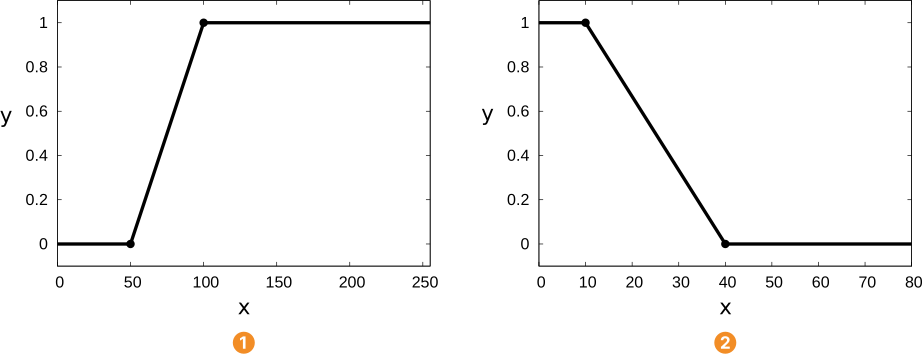
For example, a fuzzy membership function for the requirement that the edges must be strong could look like the one displayed in . Here, any edge that has an amplitude of less than 50 will not be part of the fuzzy set of strong edges. Edges with an amplitude higher than 100 are full members of the fuzzy set, i.e, they have a membership value of 1.0. Edges with amplitudes between 50 and 100 are partial members of the fuzzy set, for example, an edge with an amplitude of 75 will have a membership value of 0.5.

create_funct_1d_pairs.
x-axis: feature value 'contrast', y-axis: membership value
x-axis: feature value 'position', y-axis: membership value
In general, a fuzzy membership function is a mathematical function that defines the degree of an element’s membership in a fuzzy set.
In HALCON, fuzzy membership functions are defined as piecewise linear functions by at least two pairs of values, sorted in an ascending order by their x value.
They are created with the operator create_funct_1d_pairs:
The x values represent the feature of the edges or edge pairs and must lie within the parameter space of the set type, that is, in case of 'contrast' and 'gray' features and, for example, byte images within the range 0.0 ≤ x ≤ 255.0.
For 'size', x has to satisfy 0.0 ≤ x, whereas for 'position' and 'position_pair', x can be any real number.
The y values of the fuzzy membership function represent the resulting membership value for the corresponding feature value and have to satisfy 0.0 ≤ y ≤ 1.0.
Outside of the function’s interval, defined by the smallest and the largest specified x value, the y values of the interval borders are continued with constant values equal to the closest defined y value.
Therefore, the fuzzy membership function displayed in is defined by the following code, which specifies the coordinates of the two control points of the fuzzy membership function.
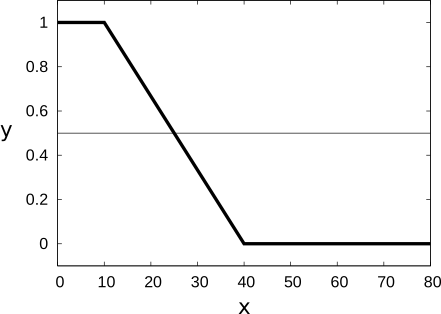
A fuzzy membership function describing the condition that the edge must be at the beginning of the profile line could look like the one displayed in (assuming that the profile line has a length of 80 pixels). It can be defined as follows:
Defuzzyfication🔗
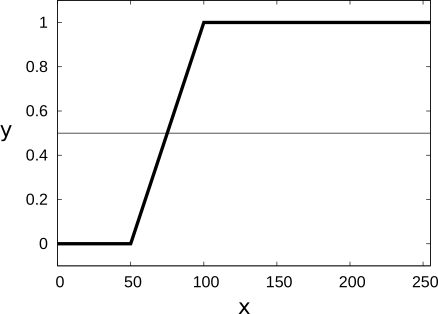
Finally, to decide whether an edge or an edge pair meets the constraint, the membership value must be “defuzzyfied”. This is done by calculating a fuzzy score between 0 and 1 from the fuzzy membership values of all used fuzzy sets, and comparing it against a user-defined fuzzy threshold. If the fuzzy score lies below the fuzzy threshold, the edge (pair) will be rejected. Otherwise, it will be accepted. If, for example, a fuzzy threshold of 0.5 is assumed as in the plots below, all edges that have a membership value of at least 0.5 will be accepted. For the fuzzy membership function displayed in , these are all edges with a feature value of at least 75; for the fuzzy membership function of , edges will only be accepted if their feature value is at most 25.
  |
  |
x: feature value for 'contrast'y: membership value |
x: feature value for 'position' y: membership value |
| Fuzzy membership function (thick) with a fuzzy threshold (thin). | Fuzzy membership function (thick) with a fuzzy threshold (thin). |
The specification of the fuzzy membership function and the definition of the fuzzy threshold are separated for fuzzy measure objects.
The fuzzy membership function is specified with the operator set_fuzzy_measure or set_fuzzy_measure_norm_pair, respectively, that is, during the creation of the fuzzy measure object.
In contrast, the fuzzy threshold is defined when the fuzzy measure object is used with one of the operators fuzzy_measure_pos, fuzzy_measure_pairs, or fuzzy_measure_pairing.
This separation between the specification of the fuzzy membership function and the definition of the fuzzy threshold allows a flexible use of the fuzzy measure object: Often, it will be sufficient to adjust only the fuzzy threshold to varying imaging conditions.
Creating the fuzzy measure object🔗
This section describes how to create a fuzzy measure object from an existing measure object. Fuzzy measure objects can be created by specifying a fuzzy membership function. Fuzzy measure objects can also be created with normalized fuzzy membership functions, that is, fuzzy membership functions that are defined relative to the desired pair width. It is even possible to specify multiple fuzzy membership functions for different set types of one fuzzy measure object.
Specifying a fuzzy membership function🔗
To transform a standard measure object into a fuzzy measure object, you specify a fuzzy membership function with the operator set_fuzzy_measure.
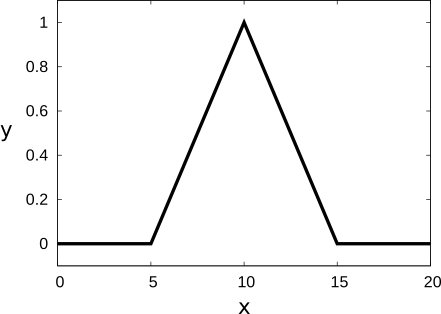
For example, you can create a fuzzy measure object for the extraction of edge pairs that have a size of approximately 10 pixels with the following lines of code:
create_funct_1d_pairs ([5,10,15], [0,1,0], FuzzyMembershipFunctionPairSize10)
set_fuzzy_measure (MeasureHandle, 'size', FuzzyMembershipFunctionPairSize10)

Specifying a normalized fuzzy membership function🔗
Fuzzy measure objects can also be created with normalized fuzzy membership functions, that is, fuzzy membership functions that are defined relative to the desired pair width.
For this, the operator set_fuzzy_measure_norm_pair must be used.
To create a fuzzy measure object that is identical to the one created in the fuzzy membership function example, the following code can be used:
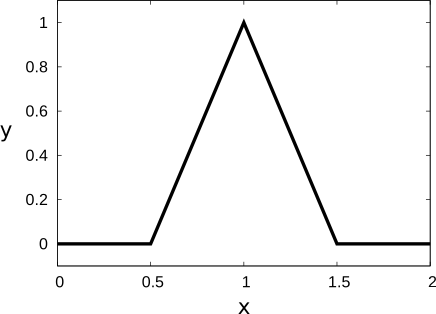
create_funct_1d_pairs ([0.5,1,1.5], [0,1,0], FuzzyMembershipFunctionPairSizeNormalized)
PairSize := 10
set_fuzzy_measure_norm_pair (MeasureHandle, PairSize, 'size', FuzzyMembershipFunctionPairSizeNormalized)
Here, the normalized fuzzy membership function is used, which is displayed in Figure 5.
Internally, the operator set_fuzzy_measure_norm_pair multiplies the x values of the normalized fuzzy membership function with the given pair size.
One major advantage of using the normalized form of fuzzy membership functions is that the application can very easily be adapted to varying sizes of the object to be measured. If, for example, larger objects must be measured or if a camera with a higher resolution is used, it will suffice to adapt the pair size

If, for example, the above example for the extraction of 10 pixel wide edge pairs must be adapted to the extraction of 20 pixel wide edge pairs, simply the definition of the pair size must be changed:
PairSize := 20
set_fuzzy_measure_norm_pair (MeasureHandle, PairSize, 'size', FuzzyMembershipFunctionPairSizeNormalized)
This creates a fuzzy measure object that uses the fuzzy membership function internally.

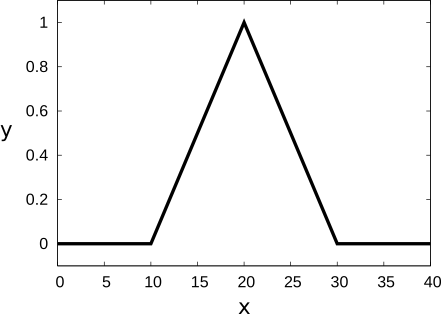
To achieve such a fuzzy measure object without normalized fuzzy membership functions, the definition of the fuzzy membership function itself must be adapted:
create_funct_1d_pairs ([10,20,30], [0,1,0], FuzzyMembershipFunctionPairSize20)
set_fuzzy_measure (MeasureHandle, 'size', FuzzyMembershipFunctionPairSize20)
In the following, a list of the possible set types is given. It is possible to use multiple set types. Note that the subtypes of each set are mutually exclusive, that is, only one subtype of each set can be specified for a fuzzy measure object.
| Subtype | Direct membership function | Normalized membership function |
|---|---|---|
contrast |
 |
 |
| Subtype | Direct membership function | Normalized membership function |
|---|---|---|
position |
|
|
position_center |
|
|
position_end |
|
|
position_first_edge |
|
|
position_last_edge |
|
|
| Subtype | Direct membership function | Normalized membership function |
|---|---|---|
position_pair |
|
|
position_pair_center |
|
|
position_pair_end |
|
|
position_first_pair |
|
|
position_last_pair |
|
|
| Subtype | Direct membership function | Normalized membership function |
|---|---|---|
size |
|
|
size_diff |
|
|
size_abs_diff |
|
|
| Subtype | Direct membership function | Normalized membership function |
|---|---|---|
gray |
|
|
Specifying multiple fuzzy membership functions🔗
You can also specify fuzzy membership functions for different set types by repeatedly calling the operator set_fuzzy_measure or set_fuzzy_measure_norm_pair, respectively:
set_fuzzy_measure (MeasureHandle, 'contrast', FuzzyMembershipFunction1)
set_fuzzy_measure (MeasureHandle, 'position', FuzzyMembershipFunction2)
If more than one set is defined in this way, the individual membership values will be aggregated with a fuzzy and operator: The overall membership value is derived by the geometric mean of the individual membership values of each set.
Geometric mean
The geometric mean of a sequence \(\{a_i\}_{i=1}^n\) is defined by
Thus,
For example, the two set types 'contrast' and 'position' are used to achieve the selection of strong edges at the beginning of the profile line(see Figure 3).
Assuming an edge at the position 20 along the profile line that has an amplitude of 80, the membership value is determined as follows.
First, the membership values of the individual fuzzy sets are determined:
with \(y\) being the membership value. Then, the geometric mean is calculated:
This value is compared to the fuzzy threshold. If it lies above this threshold, the respective edge will be accepted, otherwise it will be rejected.
Figure 7
shows a plot of the membership value over the two feature values for 'contrast' and 'position'.
Assuming a fuzzy threshold of 0.5, the thick line in
marks the boundary of the domain of the feature values that lead to an acceptance of the respective edge.
All edges with position/amplitude combinations that lie in this domain in the upper left corner will be accepted.
The thin line marks the domain that results if both constraints must be satisfied individually.
As can be seen, the domain that results from the combination of several set types is a bit larger.
In particular, if one feature value meets the requirement very well, the other value may be slightly worse than allowed by the respective individual constraint

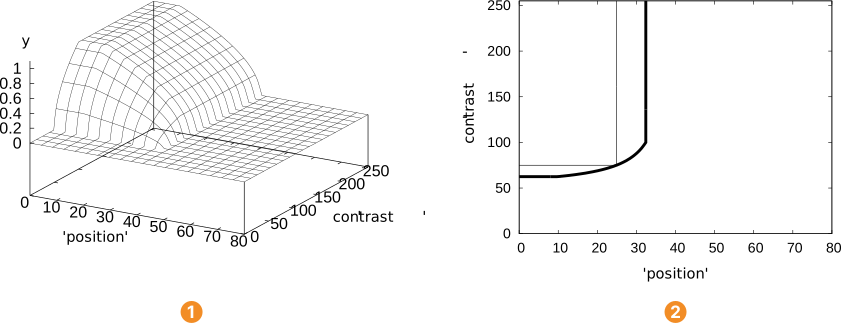
To illustrate this, an edge at the position 10 having an amplitude of 65 is assumed. The individual membership values are:
with \(y\) being the membership value. With this, the membership value can be calculated:
The overall membership value lies above 0.5 although the individual membership value for the contrast of the edge lies well below this value.
Note that it is not possible to specify multiple fuzzy membership functions for one and the same set type. Setting a further fuzzy membership function to a set discards the previously defined function and replaces it by the new one.
Changing and resetting a fuzzy measure object🔗
Fuzzy membership functions that have been specified for a particular set type can be changed and reset.
To change a fuzzy membership function for a set type, simply specify the new fuzzy membership function for this set type with one of the operators set_fuzzy_measure and set_fuzzy_measure_norm_pair.
A fuzzy measure object can be reset with the operator reset_fuzzy_measure.
This discards the fuzzy membership function of the specified fuzzy set SetType.
For example, the fuzzy membership function of the set type 'contrast' is discarded with the following lines of code:
Using the standard measure object functionality🔗
All operators that provide functionality for the standard measure object can also be applied to fuzzy measure objects.
This includes especially the operators measure_projection, measure_thresh, translate_measure, and close_measure.
The operators for the standard measure object ignore the specified fuzzy membership functions and return the same results as if they were applied to a standard measure object.