gen_binocular_rectification_map🔗
Short description🔗
gen_binocular_rectification_map — Generate transformation maps that describe the mapping of the images
of a binocular camera pair to a common rectified image plane.
Signature🔗
gen_binocular_rectification_map( out image Map1, out image Map2, campar CamParam1, campar CamParam2, pose RelPose, real SubSampling, string Method, string MapType, out campar CamParamRect1, out campar CamParamRect2, out pose CamPoseRect1, out pose CamPoseRect2, out pose RelPoseRect )
Description🔗
Given a pair of stereo images, rectification determines a
transformation of each image plane in a way that pairs of conjugate
epipolar lines become collinear and parallel to the horizontal image
axes. This is required for an efficient calculation of disparities
or distances with operators such as binocular_disparity or
binocular_distance. The rectified images can be thought of
as acquired by a new stereo rig, obtained by rotating and, in case
of telecentric area scan and line scan cameras, translating the
original cameras. The projection centers (i.e., in the telecentric
case, the direction of the optical axes) are maintained. For
perspective cameras, the image planes are additionally transformed
into a common plane, which means that the focal lengths are set
equal, and the optical axes are parallel. For a stereo setup of
mixed type (i.e., one perspective and one telecentric camera), the
image planes are also transformed into a common plane, as described
below.
To achieve the transformation map for rectified images
gen_binocular_rectification_map requires the internal camera
parameters CamParam1 of camera 1 and CamParam2 of
camera 2, as well as the relative pose RelPose,
\(\mvPoseVar{{ccs1}}{{ccs2}}\),
defining a point transformation from camera coordinate system 2
(ccs2) into camera coordinate system 1 (ccs1), see
Transformations / Poses and
“Solution Guide III-C - 3D Vision”.
These parameters can be obtained, e.g., from the operator
calibrate_cameras.
The internal camera parameters, modified by the rectification, are
returned in CamParamRect1 for camera 1 and
CamParamRect2 for camera 2, respectively. The rotation and,
in case of telecentric cameras, translation of the rectified camera
in relation to the original camera is specified by
CamPoseRect1 and CamPoseRect2,
respectively. These poses are in the form
\(\mvPoseVar{{ccsX}}{{ccsRX}}\) with
ccsX: camera coordinate system of camera X and
ccsRX: camera coordinate system of camera X for the rectified
image. Finally, RelPoseRect returns
\(\mvPoseVar{{ccsR1}}{{ccsR2}}\), the relative pose of the
rectified camera coordinate system 2 (ccsR2) relative to the
rectified camera coordinate system 1 (ccsR1).
Rectification Method🔗
For perspective area scan cameras, RelPoseRect only has a
translation in x. Generally, the transformations are defined in a
way that the rectified camera 1 is left of the rectified camera
2. This means that the optical center of camera 2 has a positive x
coordinate of the rectified coordinate system of camera 1.
The projection onto a common plane has many degrees of freedom,
which are implicitly restricted by selecting a certain method in
Method:
-
'viewing_direction' uses the baseline as the x-axis of the common image plane. The mean of the viewing directions (z-axes) of the two cameras is used to span the x-z plane of the rectified system. The resulting rectified z-axis is the orientation of the common image plane and as such located in this plane and orthogonal to the baseline. In many cases, the resulting rectified z-axis will not differ much from the mean of the two old z-axes. The new focal length is determined in such a way that the old principal points have the same distance to the new common image plane. The different z-axes directions are illustrated in the schematic below.
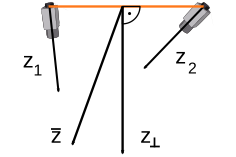
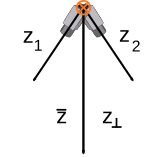
(1) (2) Illustration for the different z-axes directions using 'viewing_direction'. (1): View facing the base line (in orange). (2): View along the base line (pointing into the page, in orange).
-
'geometric' specifies the orientation of the common image plane by the cross product of the baseline and the line of intersection of the original image planes. The new focal length is determined in such a way that the old principal points have the same distance to the new common image plane.
For telecentric area scan and line scan cameras, the parameter
Method is ignored. The relative pose of both cameras is
not uniquely defined in such a system since the cameras return
identical images no matter how they are translated along their
optical axis. Yet, in order to define an absolute distance
measurement to the cameras, a standard position of both cameras is
considered. This position is defined as follows: Both cameras are
translated along their optical axes until their distance is one
meter and until the line between the cameras (baseline) forms the
same angle with both optical axes (i.e., the baseline and the
optical axes form an isosceles triangle). The optical axes remain
unchanged. The relative pose of the rectified cameras
RelPoseRect may be different from the relative pose of the
original cameras RelPose.
For a stereo setup of mixed type (i.e., one perspective and one
telecentric camera), the parameter Method is ignored. The
rectified image plane is determined uniquely from the geometry of
the perspective camera and the relative pose of the two cameras.
The normal of the rectified image plane is the vector that points
from the projection center of the perspective camera to the point on
the optical axis of the telecentric camera that has the shortest
distance from the projection center of the perspective camera. This
is also the z-axis of the rectified perspective camera. The
geometric base of the mixed camera system is a line that passes
through the projection center of the perspective camera and has the
same direction as the z-axis of the telecentric camera, i.e., the
base is parallel to the viewing direction of the telecentric camera.
The x-axis of the rectified perspective camera is given by the base
and the y-axis is constructed to form a right-handed coordinate
system. To rectify the telecentric camera, its optical axis must be
shifted to the base and the image plane must be tilted by
\(90^\circ\) or \(-90^\circ\). To achieve this, a
special type of object-side telecentric camera that is able to
handle this special rectification geometry (indicated by a negative
image plane distance ImagePlaneDist) must be used for the
rectified telecentric camera. The representation of this special
camera type should be regarded as a black box because it is used
only for rectification purposes in HALCON (for this reason, it is
not documented in camera_calibration). The rectified
telecentric camera has the same orientation as the original
telecentric camera, while its origin is translated to a point on the
base.
Rectification Maps🔗
The mapping functions for the images of camera 1 and camera 2 are
returned in the images Map1 and Map2.
MapType is used to specify the type of the output maps. If
'nearest_neighbor' is chosen, both maps consist of one
image containing one channel, in which for each pixel of the
resulting image the linearized coordinate of the pixel of the input
image is stored that is the nearest neighbor to the transformed
coordinates. If 'bilinear' interpolation is chosen, both
maps consists of one image containing five channels. In the first
channel for each pixel in the resulting image the linearized
coordinates of the pixel in the input image is stored that is in the
upper left position relative to the transformed coordinates. The
four other channels contain the weights of the four neighboring
pixels of the transformed coordinates which are used for the
bilinear interpolation, in the following order:
| 2 | 3 |
|---|---|
| 4 | 5 |
The second channel, for example, contains the weights of the pixels that lie to the upper left relative to the transformed coordinates. If 'coord_map_sub_pix' is chosen, both maps consist of one vector field image, in which for each pixel of the resulting image the subpixel precise coordinates in the input image are stored.
The size and resolution of the maps and of the transformed images
can be adjusted by the SubSampling parameter which applies
a sub-sampling factor to the original images.
If you want to re-use the created map in another program, you can
save it as a multi-channel image with the operator
write_image, using the format 'tiff'.
Attention🔗
Stereo setups that contain cameras with and without hypercentric lenses at the same time are not supported.
Execution information🔗
Execution information
-
Multithreading type: reentrant (runs in parallel with non-exclusive operators).
-
Multithreading scope: global (may be called from any thread).
-
Processed without parallelization.
Parameters🔗
Map1 (output_object) (multichannel-)image → object (int4 / uint2 / vector_field)
Image containing the mapping data of camera 1.
Map2 (output_object) (multichannel-)image → object (int4 / uint2 / vector_field)
Image containing the mapping data of camera 2.
CamParam1 (input_control) campar → (real / integer / string)
Internal parameters of camera 1.
CamParam2 (input_control) campar → (real / integer / string)
Internal parameters of camera 2.
RelPose (input_control) pose → (real / integer)
Point transformation from camera 2 to camera 1.
Number of elements: 7
SubSampling (input_control) real → (real)
Subsampling factor.
Default: 1.0
Suggested values: 0.5, 0.66, 1.0, 1.5, 2.0, 3.0, 4.0
Method (input_control) string → (string)
Type of rectification.
Default: 'viewing_direction'
List of values: 'geometric', 'viewing_direction'
MapType (input_control) string → (string)
Type of mapping.
Default: 'bilinear'
List of values: 'bilinear', 'coord_map_sub_pix', 'nearest_neighbor'
CamParamRect1 (output_control) campar → (real / integer / string)
Rectified internal parameters of camera 1.
CamParamRect2 (output_control) campar → (real / integer / string)
Rectified internal parameters of camera 2.
CamPoseRect1 (output_control) pose → (real / integer)
Point transformation from the rectified camera 1 to the original camera 1.
Number of elements: 7
CamPoseRect2 (output_control) pose → (real / integer)
Point transformation from the rectified camera 1 to the original camera 1.
Number of elements: 7
RelPoseRect (output_control) pose → (real / integer)
Point transformation from the rectified camera 2 to the rectified camera 1.
Number of elements: 7
Example🔗
(HDevelop)
* Set internal and external stereo parameters.
* Note that, typically, these values are the result of a prior
* calibration.
gen_cam_par_area_scan_division (0.01, -665, 5.2e-006, 5.2e-006, \
                                622, 517, 1280, 1024, CamParam1)
gen_cam_par_area_scan_division (0.01, -731, 5.2e-006, 5.2e-006, \
                                654, 519, 1280, 1024, CamParam2)
create_pose (0.1535,-0.0037,0.0447,0.17,319.84,359.89, \
             'Rp+T', 'gba', 'point', RelPose)

* Compute the mapping for rectified images.
gen_binocular_rectification_map (Map1, Map2, CamParam1, CamParam2, \
                                 RelPose, 1,'viewing_direction', 'bilinear',\
                                 CamParamRect1, CamParamRect2, \
                                 CamPoseRect1, CamPoseRect2, \
                                 RelPoseRect)

* Compute the disparities in online images.
while (1)
  grab_image_async (Image1, AcqHandle1, -1)
  map_image (Image1, Map1, ImageMapped1)
 grab_image_async (Image2, AcqHandle2, -1)
  map_image (Image2, Map2, ImageMapped2)
 binocular_disparity(ImageMapped1, ImageMapped2, Disparity, Score, \
                      'sad', 11, 11, 20, -40, 20, 2, 25, \
                      'left_right_check', 'interpolation')
endwhile
// Set internal and external stereo parameters.
// Note that, typically, these values are the result of a prior
// calibration.
gen_cam_par_area_scan_division (0.01, -665, 5.2e-006, 5.2e-006,
                                622, 517, 1280, 1024, &CamParam1)\;
gen_cam_par_area_scan_division (0.01, -731, 5.2e-006, 5.2e-006,
                                654, 519, 1280, 1024, &CamParam2)\;
create_pose (0.1535,-0.0037,0.0447,0.17,319.84,359.89,
             "Rp+T", "gba", "point", &RelPose)\;
// Compute the mapping for rectified images.
gen_binocular_rectification_map(&Map1,&Map2,CamParam1,CamParam2,
                                RelPose,1,"viewing_direction","bilinear",
                                &CamParamRect1,&CamParamRect2,
                                &CamPoseRect1,&CamPoseRect2,
                                &RelPosRect)\;
// Compute the disparities in online images.
while (1)
{
  grab_image_async(&Image1,AcqHandle1,-1)\;
  map_image(Image1,Map1,&ImageMapped1)\;
 grab_image_async(&Image2,AcqHandle2,-1)\;
  map_image(Image2,Map2,&ImageMapped2)\;
 binocular_disparity(ImageMapped1,ImageMapped2,&Disparity,&Score,
                      "sad",11,11,20,-40,20,2,25,"left_right_check",
                      "interpolation")\;
}
Result🔗
gen_binocular_rectification_map returns 2 (H_MSG_TRUE) if all
parameter values are correct. If necessary, an exception is raised.
Combinations with other operators🔗
Combinations
Possible predecessors
Possible successors
Alternatives
See also
map_image, binocular_disparity, binocular_distance, binocular_disparity_mg, binocular_distance_mg, binocular_disparity_ms, binocular_distance_ms, gen_image_to_world_plane_map, contour_to_world_plane_xld, image_points_to_world_plane
Module🔗
3D Metrology