reconstruct_surface_stereo🔗
Short description🔗
reconstruct_surface_stereo — Reconstruct surface from calibrated multi-view stereo images.
Signature🔗
reconstruct_surface_stereo( image Images, stereo_model StereoModelID, out object_model_3d ObjectModel3D )
Description🔗
The operator reconstruct_surface_stereo reconstructs a surface
from multiple Images, acquired with a calibrated multi-view
setup associated with a stereo model StereoModelID.
The reconstructed surface is stored in the handle ObjectModel3D.
Preparation and requirements🔗
A summary of the preparation of a stereo model for surface reconstruction:
-
Obtain calibrated camera setup model (use
calibrate_camerasorcreate_camera_setup_model) and configure it. -
Create a stereo model with
create_stereo_modelby selectingMethod='surface_pairwise' or 'surface_fusion' (see ‘Reconstruction algorithm’). -
Configure the rectification parameters with
set_stereo_model_paramand afterwards set the image pairs withset_stereo_model_image_pairs. -
Configure the bounding box for the system with
set_stereo_model_param(GenParamName='bounding_box'). -
Configure parameters of pairwise reconstruction with
set_stereo_model_param. -
For models with
Method='surface_fusion' configure parameters of the fusion algorithm withset_stereo_model_param. -
Acquire images with the calibrated cameras setup and collect them in an image array
Images. -
Perform surface reconstruction with
reconstruct_surface_stereo. -
Query and analyze intermediate results with
get_stereo_model_objectandget_stereo_model_object_model_3d. -
Readjust the parameters of the stereo model to improve the results with respect to quality and runtime with
set_stereo_model_param.
A camera setup model is associated with the stereo model
StereoModelID upon its creation with create_stereo_model.
The camera setup must contain calibrated information about the
cameras, with which the images in the image array Images were
acquired: the I-th image from the array corresponds to the camera
with index I-1 from the camera setup; the number of images in the
array must be the same as the number of cameras in the camera setup.
The Images must represent a static scene or they must be taken
simultaneously, otherwise, the reconstruction of the surface might
be impossible.
A well-calibrated camera setup is the main requirement for a precise
surface reconstruction. Therefore, special attention should be paid to
obtaining a precise calibration of the cameras in the multi-view stereo
setup used. HALCON provides calibration of a multi-view setup with
the operator calibrate_cameras. The resulting calibrated camera
setup can be accessed with a successive call to get_calib_data.
Alternatively, for camera setups with known parameters a calibrated
camera setup can be created with create_camera_setup_model.
The proper selection of image pairs (see
set_stereo_model_image_pairs) has an important role for the
general quality of the surface reconstruction. On the one hand,
camera pairs with a small base line (small distance between the camera
centers) are better suited for the binocular stereo disparity algorithms.
On the other hand, in order to derive more accurate depth information of
the scene, pairs with a long base line should be preferred. Camera pairs
should provide different points of view, such that if one pair does not
see a certain area of the surface, it is covered by another pair.
Please note that the number of pairs linearly affects the
runtime of the pairwise reconstruction. Therefore, use "as many as needed
and just as few as possible” image pairs in order to handle the trade-off
between completeness of the surface reconstruction and reconstruction
runtime.
A bounding box is associated with the stereo model
StereoModelID. For the surface stereo reconstruction,
it is required that the bounding box is valid (see
set_stereo_model_param for further details).
The reconstruction algorithm needs the bounding box for three reasons:
-
First, if
MinDisparityandMaxDisparitywere not set manually using the operatorscreate_stereo_modelorset_stereo_model_param, it uses the projection of the bounding box into both images of each image pair in order to estimate the values forMinDisparityandMaxDisparity, which in turn are used in the internal call tobinocular_disparityandbinocular_disparity_ms. In the case of usingbinocular_disparity_mgas disparity method, suitable values for the parametersInitialGuessand 'initial_level' are derived from the above-mentioned parameters. However, the automatic estimation for this method is only used if called with default values for the two parameters. Otherwise, the values as set by the user withset_stereo_model_paramare used. -
Secondly, the default parameters for the fusion of pairwise reconstructions are calculated based on the bounding box. They are reset in case the bounding box is changed. The bounding box should be tight around the volume of interest. Else, the runtime will increase unnecessarily and drastically.
-
Thirdly, the surface fragments lying outside the bounding box are clipped and are not returned in
ObjectModel3D. A too large bounding box results in a large difference betweenMinDisparityandMaxDisparityand this usually slows down the execution ofbinocular_disparity,binocular_disparity_msorbinocular_disparity_mgand thereforereconstruct_surface_stereo. A too small bounding box might result in clipping valid surface areas.
Note that the method 'surface_fusion' will try to produce a closed surface. If the object is only observed and reconstructed from one side, the far end of the bounding box usually determines where the object is cut off.
Setting parameters of pairwise reconstruction before setting
parameters of fusion is essential since the pairwise reconstruction of the
object is input for the fusion algorithm. For a description of parameters,
see set_stereo_model_param.
The choice of 'disparity_method' has a major influence.
The objects in the scene should expose certain surface properties in
order to make the scene suitable for the dense surface reconstruction.
First, the surface reflectance should exhibit Lambertian properties as
closely as possible (i.e., light falling on the surface is scattered such
that its apparent brightness is the same regardless of the angle of view).
Secondly, the surface should exhibit enough texture, but no repeating
patterns.
get_stereo_model_object can be used to view
intermediate results, in particular rectified, disparity and score
images.
get_stereo_model_object_model_3d can be used to view the result of
pairwise reconstruction for models with
Method='surface_fusion'. See the paragraph
"Troubleshooting for the configuration of a stereo model"
on how to use the obtained results.
Reconstruction algorithm🔗
The operator reconstruct_surface_stereo performs multiple
binocular stereo reconstructions and subsequently combines the results.
The image pairs of this pairwise reconstruction are specified in
StereoModelID as pairs of cameras of an associated calibrated
multi-view setup.
For each image pair, the images are rectified before internally one of the
operators binocular_disparity, binocular_disparity_mg or
binocular_disparity_ms is called.
The disparity information is then converted to points in the coordinate
system of the from-camera by an internal call of
disparity_image_to_xyz.
In the next step, the points are transformed into the common coordinate
system that is specified in the camera setup model associated with
StereoModelID and stored in a common point cloud together with the
points extracted from other image pairs.
-
'surface_pairwise' If the stereo model is of type 'surface_pairwise' (compare
create_stereo_model), the point cloud obtained as described above is directly returned inObjectModel3D. For each point, the normal vector is calculated by fitting a plane through the neighboring 3D points. In contrast tosurface_normals_object_model_3d, the neighboring points are not determined in 3D but simply in 2D by using the neighboring points in the X, Y, and Z images. The normal vector of each 3D point is then set to the normal vector of the respective plane. Additionally, the score of the calculated disparity is attached to every reconstructed 3D point and stored as an extended attribute. Furthermore, transformed coordinate images can be sub-sampled. If only one image pair is processed and no point meshing is enabled,reconstruct_surface_stereostores a'xyz_mapping'attribute inObjectModel3D, which reveals the mapping of the reconstructed 3D points to coordinates of the first image of the pair. This attribute is required by operators likesegment_object_model_3dorobject_model_3d_to_xyz(withType='from_xyz_map'). In contrast to the single pair case, if two or more image pairs are processed,reconstruct_surface_stereodoes not store the'xyz_mapping'attribute since single reconstructed points would originate from different image pairs. The presence of the attribute in the output object model can be verified by callingget_object_model_3d_paramswithGenParamName='has_xyz_mapping'.The so-obtained point cloud can be additionally meshed in a post-processing step. The object model returned in
ObjectModel3Dthen contains the description of the mesh. The used meshing algorithm depends on the type of the stereo model. For a stereo model of type 'surface_pairwise', only a Poisson solver is supported which can be activated by setting the parameter 'point_meshing' to 'poisson'. It creates a water-tight mesh, therefore surface regions with missing data are covered by an interpolated mesh. -
'surface_fusion' If the stereo model is of type 'surface_fusion', the point cloud obtained as described above is processed further. The goal is to obtain a preferably smooth surface while keeping form fidelity. To this end, the bounding box is sampled and each sample point is assigned a distance to a so-called isosurface (consisting of points with distance 0). The final distance values (and thus the isosurface) are obtained by minimizing an error function based on the points resulting from pairwise reconstruction. This leads to a fusion of the reconstructed point clouds of all camera pairs (see the second paper in References below).
The calculation of the isosurface can be influenced by
set_stereo_model_paramwith the parameters 'resolution', 'surface_tolerance', 'min_thickness' and 'smoothing'. The distance between sample points in the bounding box (in each coordinate direction) can be set by the parameter 'resolution'. The parameter 'smoothing' regulates the ‘jumpiness’ of the distance function by weighting the two terms in the error function: Fidelity to the initial point clouds obtained by pairwise reconstruction on the one hand, total variation of the distance function on the other hand. Note that the actual value of 'smoothing' for a given data set to be visually pleasing has to be found by trial and error. Too small values lead to integrating many outliers into the surface even if the object surface then exhibits many jumps. Too large values lead to loss of fidelity towards the point cloud of pairwise reconstruction. Fidelity to the initial surfaces obtained by pairwise reconstruction is not maintained in the entire bounding box, but only in cones of sight of cameras to the initial surface. A sample point in such a cone is considered surely outside of the object (in front of the surface) or surely inside the object (behind the surface) with respect to the given camera if its distance to the initial surface exceeds a given value which can be set by the parameter 'surface_tolerance'. The length of considered cones behind the initial surface can roughly be set by the parameter 'min_thickness' (seeset_stereo_model_paramfor more details). 'min_thickness' always has to be larger than or equal to 'surface_tolerance'.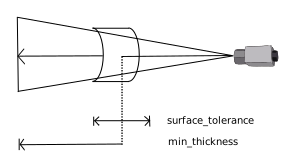
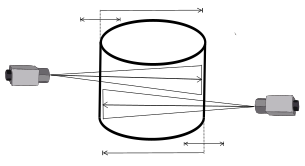
(1) (2) The parameters 'surface_tolerance' and 'min_thickness' regulate the fidelity to the initial surface obtained by pairwise reconstruction. Points in a cone of sight of a camera are considered surely outside of the object (in front of the surface) or surely inside the object (behind the surface) with respect to the given camera if their distance to the initial surface exceeds 'surface_tolerance'. Points behind the surface (viewed from the given camera) are only considered to lie inside the object if their distance to the initial surface does not exceed 'min_thickness'.
Each 3D point of the object model returned in
ObjectModel3Dis extracted from the isosurface where the distance function equals zero. Its normal vector is calculated from the gradient of the distance function. While the method 'surface_fusion' requires the setting of more parameters than simple pairwise reconstruction, post-processing of the obtained point cloud representing the object surface will probably get a lot simpler. In particular, suppression of outliers, smoothing, equidistant sub-sampling and hole filling can be handled nicely and often in high quality by this method. The same can be said about the possible internal meshing of the output surface, see the next paragraph. Note that the algorithm will try to produce a closed surface. If the object is only observed and reconstructed from one side, the far end of the bounding box usually determines where the object is cut off. The method 'surface_fusion' may take considerably longer than simple pairwise reconstruction, depending mainly on the parameter 'resolution'.Additionally, the so-obtained point cloud can be meshed in a post-processing step. The object model returned in
ObjectModel3Dthen contains the description of the mesh. For a stereo model of type 'surface_fusion', the algorithm ‘marching tetrahedra’ is used which can be activated by setting the parameter 'point_meshing' to 'isosurface'. The wanted meshed surface is extracted as the isosurface where the distance function equals zero. Note that there are more points inObjectModel3Dif meshing of the isosurface is enabled even if the used 'resolution' is the same.
Coloring the 3D object model🔗
It is possible to provide color information for 3D object models that have
been reconstructed with reconstruct_surface_stereo from the input
images.
The computation of the color depends on the chosen
method set with set_stereo_model_param (see explanation in the list
there).
Each 3D point is assigned a color value consisting of a red, green
and blue channel which are stored as attributes named 'red',
'green' and 'blue' in the output 3D object model
ObjectModel3D. These attributes can for example be used
in the procedure visualize_object_model_3d with
GenParamName = 'red_channel_attrib',
'green_channel_attrib' and 'blue_channel_attrib'.
They can also be queried with
get_object_model_3d_params or be processed with
select_points_object_model_3d or other operators that use
extended attributes.
If the reconstruction has been performed using gray value images, the color
value for the three channels is identical. If multi-channel images are used,
the reconstruction is performed using the first channel only. The remaining
channels are solely used for the calculation of the color values.
If stereo models of type 'surface_fusion' are used, the
reconstruction will contain points without a direct correspondence to points
in the images. These points are not seen by any of the cameras of the stereo
system and are therefore "invisible". A color value for these points is
derived by assigning the value of the nearest visible neighbor. Normally,
the nearest neighbor search is not very time-consuming and can remain
active. However, it may happen that the value for the parameter
'resolution' is considerably finer than the available image
resolution.
In this case, many invisible 3D points are reconstructed making the nearest
neighbor search very time consuming. In order to avoid an increased
runtime, it is recommended to either adapt the value of
'resolution' or to switch off the calculation for invisible points.
This can be done by calling set_stereo_model_param with
GenParamName='color_invisible' and GenParamValue=
'false'. In this case, invisible points are assigned 255 as gray
value.
Troubleshooting for the configuration of a stereo model🔗
The proper configuration of a stereo model is not always easy. Please follow the workflow above. If the reconstruction results are not satisfactory, please consult the following hints and ideas:
-
Run in persistence mode If you enable the 'persistence' mode of stereo model (call
set_stereo_model_paramwithGenParamName='persistence') a successive call toreconstruct_surface_stereowill store intermediate iconic results, which provide additional information. They can be accessed byget_stereo_model_object_model_3dandget_stereo_model_object. -
Check the quality of the calibration
-
If the camera setup was obtained by
calibrate_cameras, it stores some quality information about the camera calibration in form of standard deviations of the camera internal parameters. This information is then carried in the camera setup model associated with the stereo model. It can be queried by first callingget_stereo_model_paramwithGenParamName='camera_setup_model' and then inspecting the camera parameter standard deviations by callingget_camera_setup_paramwithGenParamName='params_deviations'. Unusually big standard deviation values might indicate a bad camera calibration. -
After setting the stereo model 'persistence' mode, we recommend inspecting the rectified images for each image pair. The rectified images are returned by
get_stereo_model_objectwith a camera index pair[From, To]specifying the pair of interest in the parameterPairIndexand the values 'from_image_rect' and 'to_image_rect' inObjectName, respectively. If the images are properly rectified, all corresponding image features must appear in the same row in both rectified images. A discrepancy of several rows is a serious indication for a bad camera calibration.
-
-
Inspect the used bounding box Make sure that the bounding box is tight around the volume of interest. If the parameters 'min_disparity' and 'max_disparity' are not set manually by using
create_stereo_modelorset_stereo_model_param, the algorithm uses the projection of the bounding box into both images of each image pair in order to estimate the values forMinDisparityandMaxDisparity, which in turn are used in the internal call tobinocular_disparityandbinocular_disparity_ms. These values can be queried usingget_stereo_model_paramand if needed, can be adapted usingset_stereo_model_param. If the disparity values are set manually, the bounding box is only used to restrict the reconstructed 3D points. In the case of usingbinocular_disparity_mgas disparity method, suitable values for the parametersInitialGuessand 'initial_level' are derived from the bounding box. However, these values can also be reset usingset_stereo_model_param. Use the proceduresgen_bounding_box_object_model_3dto create a 3D object model of your stereo model, and inspect it in conjunction with the reconstructed 3D object model to verify the bounding box visually. -
Improve the quality of the disparity images After setting the stereo model 'persistence' mode (see above), inspect the disparity and the score images for each image pair. They are returned by
get_stereo_model_objectwith a camera index pair[From, To]specifying the pair of interest in the parameterPairIndexand the values 'disparity_image' and 'score_image' inObjectName, respectively. If both images exhibit significant imperfection (e.g., the disparity image does not really resemble the shape of the object seen in the image), try to adjust the parameters used for the internal call tobinocular_disparity(the parameters with a 'binocular_' prefix) by modifyingset_stereo_model_paramuntil some improvement is achieved.Alternatively, a different method to calculate the disparities can be used. Besides the above-mentioned internal call of
binocular_disparity, HALCON also provides the two other methodsbinocular_disparity_mgandbinocular_disparity_ms. These methods feature e.g., the calculation of disparities in textureless regions at an expanse of the reconstruction time if compared with cross-correlation methods. However, for these methods, it can be necessary to adapt the parameters to the underlying dataset as well. Dependent on the chosen method, the user can either set the parameters with a 'binocular_mg_' or a 'binocular_ms_' prefix until some improvement is achieved.A detailed description of the provided methods and their parameters can be found in
binocular_disparity,binocular_disparity_mgorbinocular_disparity_ms, respectively. -
Fusion parameters If the result of pairwise reconstruction as inspected by
get_stereo_model_object_model_3dcan not be improved anymore, begin to adapt the fusion parameters. For a description of parameters see alsoset_stereo_model_param. Note that the pairwise reconstruction is sometimes not discernible when the fusion algorithm can still tweak it into something sensible. In any case, pairwise reconstruction should yield enough points as input for the fusion algorithm.
Runtime🔗
In order to improve the runtime, consider the following hints:
-
Extent of the bounding box The bounding box should be tight around the volume of interest. Else, the runtime will increase unnecessarily and - for the method 'surface_fusion' - drastically.
-
Reduce the domain of the input images Reducing the domain of the input images (e.g., with
reduce_domain) to the relevant part of the image may heavily speed up the algorithm, especially for large images. -
Sub-sampling in the rectification step The stereo model parameter 'rectif_sub_sampling' (see
set_stereo_model_param) controls the sub-sampling in the rectification step. Setting this factor to a value > 1.0 will reduce the resolution of the rectified images compared to the original images. This factor has a direct impact on the succeeding performance of the chosen disparity method, but it causes loss of image detail. The parameter 'rectif_interpolation' could have also some impact, but typically not a significant one. -
Disparity parameters There is a trade-off between completeness of the pairwise surface reconstruction on the one hand and reconstruction runtime on the other. The stereo model offers three different methods to calculate the disparity images. Dependent on the chosen method, the stereo model provides a particular set of parameters that enables a precise adaption of the method to the used dataset. If the method
binocular_disparityis selected, only parameters with a 'binocular_' prefix can be set. For the methodbinocular_disparity_mg, all settable parameters have to exhibit the prefix 'binocular_mg_', whereas for the methodbinocular_disparity_msonly parameters with 'binocular_ms_' are applicable.-
Parameters using the method
binocular_disparity:-
NumLevels -
MaskWidth -
MaskHeight -
Filter -
SubDisparity
Each of these parameters of
binocular_disparityhas a corresponding stereo model parameter written in snake case and with the prefix 'binocular_', and has, some more or others less, impact on the performance. Adapting them properly could improve the performance. performance. -
-
Parameters using the method
binocular_disparity_mg:-
GrayConstancy -
GradientConstancy -
Smoothness -
InitialGuess -
'mg_solver'
-
'mg_cycle_type'
-
'mg_pre_relax'
-
'mg_post_relax'
-
'initial_level'
-
'iterations'
-
'pyramid_factor'
Each of these parameters of
binocular_disparity_mghas a corresponding stereo model parameter written in snake case and with the prefix 'binocular_mg_', and has, some more or others less, impact on the performance and the result. Adapting them properly could improve the performance. -
-
Parameters using the method
binocular_disparity_ms:-
SurfaceSmoothing -
EdgeSmoothing -
'consistency_check'
-
'similarity_measure'
-
'sub_disparity'
Each of these parameters of
binocular_disparity_mshas a corresponding stereo model parameter written in snake case and with the prefix 'binocular_ms_', and has, some more or others less, impact on the performance and the result. Adapting them properly could improve the performance. -
-
-
Reconstruct only points with high disparity score Besides adapting the sub-sampling it is also possible to exclude points of the 3D reconstruction because of their computed disparity score. In order to do this, the user should first query the score images for the disparity values by calling
get_stereo_model_objectusingGenParamName= 'score_image'. Dependent on the distribution of these values, the user can decide whether disparities with a score beneath a certain threshold should be excluded from the reconstruction. This can be achieved withset_stereo_model_paramusing eitherGenParamName= 'binocular_score_thresh'. The advantage of excluding points of the reconstruction is a slight speed-up since it is not necessary to process the entire dataset. As an alternative to the above-mentioned procedure, it is also possible to exclude points after executingreconstruct_surface_stereoby filtering reconstructed 3D points. The advantage of this is that at the expense of a slightly increased runtime, a second call toreconstruct_surface_stereois not necessary. -
Sub-sampling of X,Y,Z data For the method 'surface_pairwise', you can use a larger sub-sampling step for the X,Y,Z data in the last step of the reconstruction algorithm by modifying
GenParamName='sub_sampling_step' withset_stereo_model_param. The reconstructed data will be much sparser, thus speeding up the post-processing. -
Fusion parameters For the method 'surface_fusion', enlarging the parameter 'resolution' will speed up the execution considerably.
Execution information🔗
Execution information
-
Supports OpenCL compute devices.
-
Multithreading type: reentrant (runs in parallel with non-exclusive operators).
-
Multithreading scope: global (may be called from any thread).
-
Automatically parallelized on internal data level.
This operator returns a handle. Note that the state of an instance of this handle type may be changed by specific operators even though the handle is used as an input parameter by those operators.
Parameters🔗
Images (input_object) singlechannelimage-array → object (byte)
An image array acquired by the camera setup associated with the stereo model.
StereoModelID (input_control) stereo_model → (handle)
Handle of the stereo model.
ObjectModel3D (output_control) object_model_3d → (handle)
Handle to the resulting surface.
Combinations with other operators🔗
Combinations
Possible predecessors
create_stereo_model, get_calib_data, set_stereo_model_image_pairs
Possible successors
get_stereo_model_object_model_3d
Alternatives
References🔗
M. Kazhdan, M. Bolitho, and H. Hoppe: “Poisson Surface Reconstruction.” Symposium on Geometry Processing (June 2006).,
C. Zach, T. Pock, and H. Bischof: ``A globally optimal algorithm for robust TV-L1 range image integration.’’ Proceedings of IEEE International Conference on Computer Vision (ICCV 2007).
Module🔗
3D Metrology