Preprocessing difficult images🔗
The different methods for changing the model parameters follow two complementary goals. The global parameter
settings of the enhanced mode extend the ranges for the parameter values of the 2D data code model so that almost
any symbol can be read. An automatic training or a manual parameter setting on the other hand restricts the ranges
to enhance the run time for the images of a specific application. Therefore, if a symbol cannot be read in enhanced
mode it is most likely not readable with other parameter settings as well. There are few exceptional parameters that may
be out of the range specified for the enhanced mode. Reasons for a failure
of the 2D data code reader comprise various irreparable distortions
of the symbol, and several problems that occur because of the bad quality of the symbol’s appearance.
Both problems should be avoided already when acquiring the image. But if you nevertheless have to work with
images of bad quality, at least the following problems have a chance to be solved by preprocessing the image
before applying the operator find_data_code_2d:
- The symbol cannot be read because it is slanted beyond the allowed slant angle,
- the gaps between the modules of a matrix code are larger than the biggest allowed module gap,
- there is too much noise in the image so that foreground and background of the symbol cannot be clearly distinguished anymore
Slanted symbols (Perspective Distortion)🔗
Small slant angles are allowed for the L-shaped finder element
of a Data Matrix ECC 200 code. PDF417, QR Code, Micro QR Code, Aztec Code, and DotCode can also be
read with slight perspective or radial distortions. Large slant angles may lead to problems for all symbols,
independent of the symbol type. If a symbol is strongly skewed because of radial or perspective distortions, a
PDF417, a QR Code, a Micro QR Code, or an Aztec Code cannot be decoded and a Data Matrix ECC 200 is
not even detected as a valid symbol. To nevertheless decode those symbols, you have to rectify the image before
applying the operator find_data_code_2d. If you have a set of images with slanted symbols we recommend
a calibrated rectification.
For single symbols or a set of symbols lying in the same plane, the HDevelop program
%HALCONEXAMPLES%\hdevelop\Identification\Data-Code\2d_data_codes_rectify_symbol.hdev provides a fast
solution for an uncalibrated rectification of a perspective distortion, which requires a little manual effort.
After reading an image with a slanted symbol, we use the online zooming tool of HDevelop to obtain the coordinates
of all four corners of the symbol. Then, we define the coordinates of the four corners of the rectified
symbol we want to obtain as result of the rectification. The shape of the rectified symbol depends on the ratio
of rows and columns for the specified symbol type. As the symbol in our image is a Data Matrix ECC 200 with
an equal number of rows and columns, we choose a square shape and define its corner coordinates.
The operator hom_vector_to_proj_hom_mat2d uses the coordinates of the slanted symbol and the coordinates of the rectified symbol to compute a transformation matrix, which is then used by the operator projective_trans_image to transform the slanted symbol into a square symbol with the defined extent.
If you have a set of symbols lying in the same plane, the transformation matrix only has to be computed once since it can be used to rectify the other symbols as well.
hom_vector_to_proj_hom_mat2d (XCoordCorners, YCoordCorners, [1, 1, 1, 1], [70, 270, 270, 70], [100, 100, 300, 300], [1, 1, 1, 1], normalized_dlt', HomMat2D)
projective_trans_image (Image_slanted, Image_rectified, HomMat2D, 'bilinear', 'false', 'false')
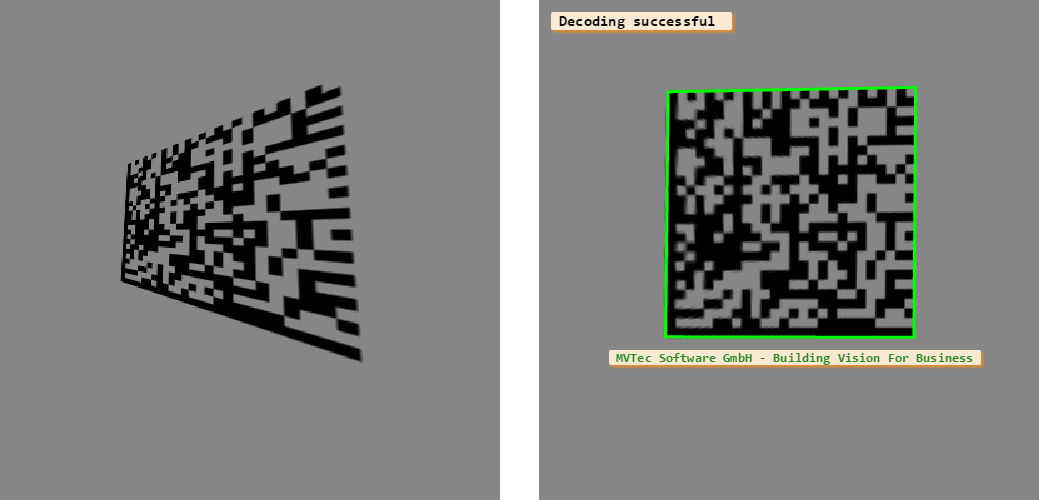
Figure 1 shows the slanted symbol before and after the rectification and decoding.
Large module gaps🔗
For matrix codes, gaps between modules are allowed in a certain range. The HDevelop program
%HALCONEXAMPLES%\hdevelop\Identification\Data-Code\2d_data_codes_minimize_module_gaps.hdev shows
how to read a Data Matrix ECC 200 with very large gaps. First, we try to adapt the parameters
for the 2D data code model, i.e., we adapt the parameter module_gap_min to the
biggest allowed module gap big before trying to read the code. The adaptation can be done either with
the operator set_data_code_2d_param or as shown in the following code lines within the operator
create_data_code_2d_model.
create_data_code_2d_model ('Data Matrix ECC 200', ['module_gap_min', 'module_gap_max'], ['no', 'big'], DataCodeHandle)Because the gaps in our image are larger than the biggest allowed module gap, i.e., bigger than 50% of the module size, the reading of the symbol fails. Getting no result by adapting the parameters of the model, we have to adapt the image to suite the model. Here, we use gray value morphology, in particular a gray value erosion with a rectangular structuring element, to enlarge the foreground modules and thus minimize the size of the gaps. Figure 2 shows the symbol before and after the gray value morphology. After the preprocessing, the symbol is found, read, and decoded.
gray_erosion_shape (Image, ImageMin, 15, 15, 'rectangle')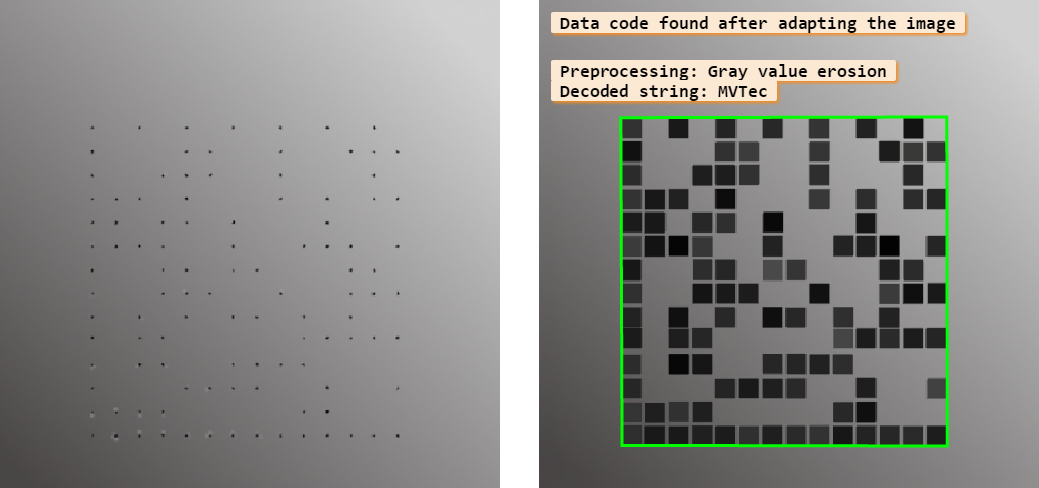
Note that this procedure mainly works for matrix codes, i.e., Data Matrix ECC 200, QR Code, Micro QR Code, Aztec Code, and DotCode. For them, the distance between the modules only have to become smaller, whereas for PDF417 no gaps are allowed at all and the exact closing of the gaps is rather challenging, especially with gaps of slightly different size.
Noisy images🔗
For the detection of 2D data code symbols, background and foreground should be clearly distinguishable, i.e., the
modules should consist of homogeneous or at least low-textured regions. If you cannot read a symbol because there
is too much texture or noise in the image you can try to preprocess the image with gray value morphology, a median
filter, or a combination of both. The HDevelop program %HALCONEXAMPLES%\hdevelop\Identification\Data-Code\2d_data_codes_minimize_noise.hdev
reads a symbol with several parts distorted by noise.
Especially the quiet zone in the lower part of the symbol is distorted by a noisy streak. We apply both preprocessing
steps separately. For the gray value morphology, the operator gray_opening_shape with a rectangular structuring
element is used. It partly closes the gaps and, what is more important here, reduces noise (see Figure 3).
gray_opening_shape (Image, ImageOpening, 7, 7, 'octagon')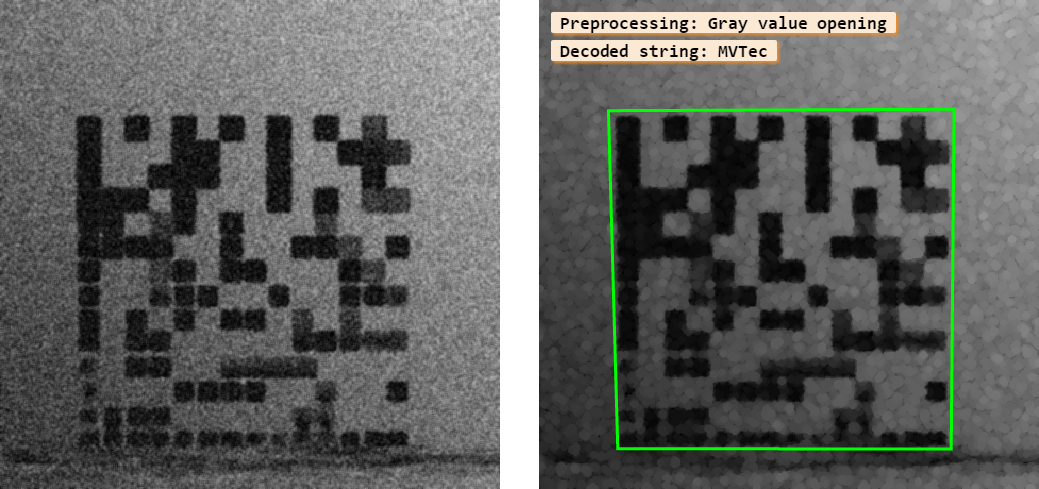
The median filter smoothes edges and also reduces noise (see Figure 4).
median_image (Image, ImageMedian, 'circle', 3, 'continued')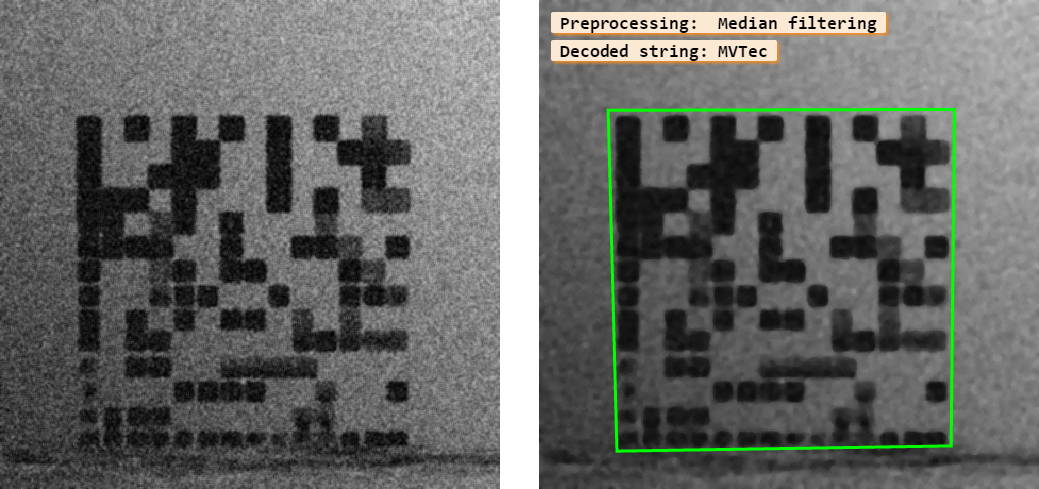
For both procedures, because of the noise reduction, the difference between the symbol and the disturbing streak in the quiet zone becomes more obvious and the reading is successful. So, in this case both preprocessing steps lead to a successful 2D data code reading.