Model adaptation🔗
To be able to find a symbol in an image, the operator find_data_code_2d needs a set of parameters. In our
first HDevelop program %HALCONEXAMPLES%\hdevelop\Applications\Data-Codes\ecc200_simple.hdev
we did not explicitly set any parameters besides the SymbolType we were looking for. Thus, for all parameters
needed for the chosen type, default values were used. These work for symbols fulfilling the following requirements:
- The code must be printed dark on light
- The contrast value must be bigger than 30
- The sizes of symbol and modules are in the symbol-specific range
- There is only a small gap between neighboring modules of matrix codes
- Position detection pattern must be visible as well
- The code must be printed dark on light
- The contrast value must be bigger than 30
- The sizes of symbol and modules are in the symbol-specific range
- There is no gap between neighboring modules of matrix codes
- The code must be printed dark on light
- The contrast value must be bigger than 30
- The sizes of symbol and modules are in the symbol-specific range
- There is no gap between neighboring modules of matrix codes
- The code must be printed dark on light
- The contrast value must be bigger than 30
- The sizes of symbol and modules are in the symbol-specific range
- There is no gap between neighboring modules of matrix codes
- Single position detection pattern must be visible
- The code must be printed dark on light
- The contrast value must be bigger than 30
- The sizes of symbol and modules are in the symbol-specific range
- The code must be printed dark on light
- The contrast value must be bigger than 30
- The sizes of symbol and modules are in the symbol-specific range
- There is no gap between neighboring modules of matrix codes
- All three position detection patterns must be visible
In many cases, you face symbols that do not fulfill all the requirements and therefore are not found. In this case, and also if you want to enhance the run time of your application, you have to modify the parameters in order to adapt the 2D data code model to your specific set of images:
- Choose one of three predefined parameter sets to read a wider range of symbol
- Train the model automatically with a set of representative images
- Set specific parameters manually to optimize the model
- Enhance the run time and save the modified model into a file
Global parameter settings🔗
There are three predefined sets of parameters for the 2D data code model.
'standard_recognition':
is chosen by default when no other parameter settings are applied. It uses a restricted range of values for each parameter, is rather fast, and works fine for many, but not all, 2D data codes.'enhanced_recognition':
a large range of values common for each parameter is checked. Therefore, it is not as fast as the standard mode, but now almost all readable symbols can be read'maximum_recognition':
additionally to the enhancements of the enhanced mode, the size of the modules may be smaller and for Data Matrix ECC 200 the robustness in the presence of strong local contrast variations is improved. For Aztec Code the finder pattern may be distorted or partially occluded and for Data Matrix ECC 200 the finder pattern may also be distorted or even missing. But note that this mode should be used only in very rare cases as it is even slower and needs significantly more memory space than the enhanced mode. Additionally, it should be used only with additional parameter adjustments, especially concerning the size of the symbol
See the operator reference of create_data_code_2d_model for the detailed parameter settings for each
of the predefined parameter sets.
All modes can be set using the operator set_data_code_2d_param, although for the standard mode this is
only necessary to reset a 2D data code model after using another 2D data code model. The HDevelop program
%HALCONEXAMPLES%\hdevelop\Identification\Data-Code\2d_data_codes_default_settings.hdev
creates three models, one for each mode, and the results are compared.
create_data_code_2d_model (SymbolType[Index], 'default_parameters', 'standard_recognition', DataCodeHandleStandard)
create_data_code_2d_model (SymbolType[Index], 'default_parameters', 'enhanced_recognition', DataCodeHandleEnhanced)
create_data_code_2d_model (SymbolType[Index], 'default_parameters', 'maximum_recognition', DataCodeHandleMaximum)
When running the program, the data codes are searched with each data code model and thus in all three modes.
Symbols that were not found in standard mode are correctly decoded in enhanced or maximum mode. Even
symbols that were not found in enhanced mode are correctly decoded in maximum mode. Switching from standard
mode to enhanced mode or maximum mode is the easiest way to find symbols that do not fulfill the requirements
of the standard mode. However, because for each parameter more alternatives have to be checked, the time needed
for the search process increases, especially when no code is found at all. The following code lines measure the time
needed to run the operator find_data_code_2d in standard mode. The time measurements in enhanced mode
and in maximum mode are done in the same way. Thus, you can compare the run time needed for reading the data
code with each of the global parameter sets. For example, in Figure 1 the run time needed in enhanced mode is
approximately twice the time needed in standard mode and the run time needed in maximum mode is nearly five
times longer than in standard mode.
count_seconds (T1)
for N := 1 to NLoops by 1
    find_data_code_2d (Image, SymbolXLDs, DataCodeHandleMaximum, [], [], ResultHandles, DecodedDataStrings)
endfor
count_seconds (T2)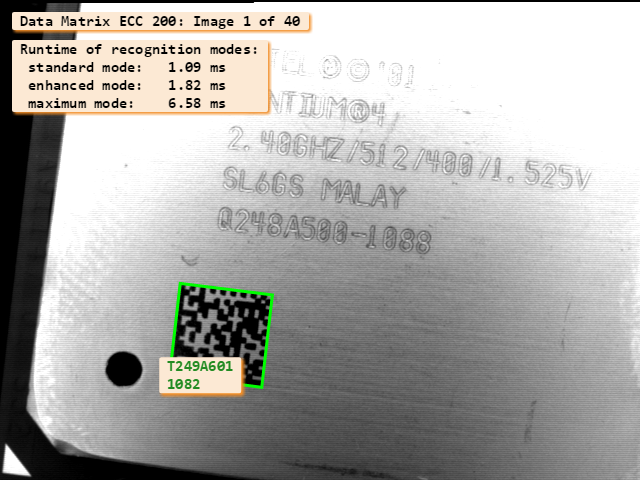
Because of the increased run time and memory usage in enhanced mode and maximum mode, the model should always be specified as exactly as possible. For ECC 200 symbols, for example, the symbol size should be specified as exactly as possible if the maximum recognition mode is chosen.
Important
To decrease the run time, you have to adapt the parameters to your specific images. Thus, it is strongly recommended to use the standard mode and additionally adjust the parameters either by applying an automatic training or by setting specific parameters manually.
If your symbols cannot be decoded in enhanced or maximum mode, apart from a few exceptions, a further adaptation of the model will not work either. In such case, you should enhance the quality of your images. This can be done either during the image acquisition (pay attention, for example, to the lighting conditions ), which is recommended, or by preprocessing the images.
Training🔗
If you have a set of symbols you want to find, read, and decode, in most cases the individual symbols have similar attributes. This similarity can be used to train your 2D data code model, i.e., you use a subset of your symbols to automatically obtain an individual set of parameters suited best for your specific application. After the training, you use this parameter set to find the symbols in your remaining images. By this means, you can find the symbols also if they do not fulfill the requirements of the standard mode. But opposite to using the enhanced mode or even the maximum recognition mode, in most cases more restricted parameter values are checked and therefore the search process becomes faster.
Train the model🔗
In the HDevelop program %HALCONEXAMPLES%\hdevelop\Identification\Data-Code\ecc200_training.hdev,
the 2D data code model created by create_data_code_2d_model is trained with two different images.
For training, the operator find_data_code_2d, i.e., the same operator as for reading a
2D data code, is applied. This time, the additional parameter 'train' is assigned. Its value determines the group
of parameters that will be affected by the training. Here, we choose 'all', i.e., all available model parameters are
trained. If you want to train only specific groups like 'symbol_size', 'module_size', or 'contrast', you
can combine them using tuples. Inside a tuple, you can also choose the value 'all' and exclude specific groups
from the training by using their name with a preceding '~'. A complete list of valid values for the parameter
'train' is provided in the description of the operator find_data_code_2d. If you
work with images that contain more than one symbol, you can use all symbols for training by setting the additional
parameter 'stop_after_result_num' to the correct number of expected symbols. If you want to use only
specific symbols, you can reduce the domain to a region of interest
(ROI) containing only the specific symbols.
The operator find_data_code_2d is applied to each training image individually. The training of the first image
restricts the model to the parameter values needed to find, read, and decode the symbol of that specific image.
All following training images are used to extend the restricted model again, so that the resulting model suits the
whole set of images. If all symbols have the same size, no gaps between the modules, foreground and background
modules of the same size, no distinct texture in the background, and a similar contrast, one image is sufficient
for the training. But for most applications, several training images are recommended. For a satisfying training
result, you should use your most different images. Here, we choose two images with different contrast values (see
Figure 2).
create_data_code_2d_model ('Data Matrix ECC 200', [], [], DataCodeHandle)
* Dark image
read_image (Image, 'datacode/ecc200/ecc200_cpu_007')
find_data_code_2d (Image, SymbolXLDs, DataCodeHandle, 'train', 'all', ResultHandles, DecodedDataStrings)
* Bright image
read_image (Image, 'datacode/ecc200/ecc200_cpu_008')
find_data_code_2d (Image, SymbolXLDs, DataCodeHandle, 'train', 'all', ResultHandles, DecodedDataStrings)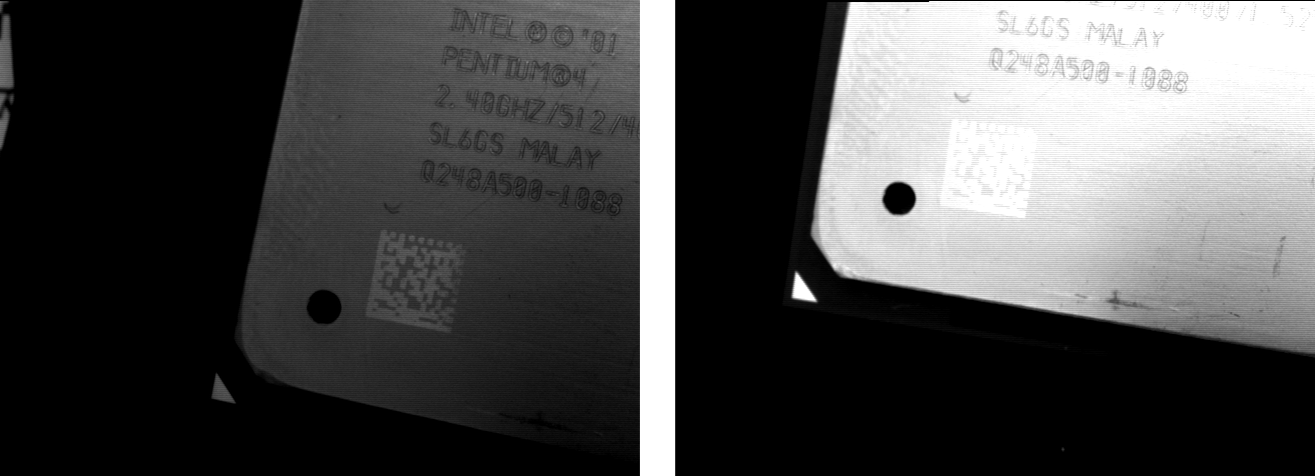
The training leads to a new 2D data code model, which is now used to find, read, and decode the symbols in the
remaining images. To do this, the operator find_data_code_2d is applied again, this time without
the parameter 'train'.
for Index := 7 to 16 by 1
    read_image (Image, ImageFiles + Index$'.2d')
    find_data_code_2d (Image, SymbolXLDs, DataCodeHandle, [], [], ResultHandles, DecodedDataStrings)
endfor
Specific parameter settings🔗
The HDevelop program %HALCONEXAMPLES%\hdevelop\Applications\Data-Codes\ecc200_optimized_settings.hdev
shows how to modify parameters and introduces several operators that
provide a deeper insight into a specific 2D data code model. The modification of a model can be done either
within the operator create_data_code_2d_model or by the operator set_data_code_2d_param.
The latter operator can be called several times and therefore is used if several tuples of
parameters that cannot be combined in the same operator call have to be modified. Instead of setting all parameters
at once by specifying a global parameter set,
we now modify the individual parameters separately.
See the symbol-specific parameters for
- Aztec Code models
- Data Matrix ECC 200 models
- DotCode models
- Micro QR Code models
- PDF417 models
- QR Code models
Enhance run time🔗
You can speed up the run time of the operator find_data_code_2d in two ways. One way is to restrict
the search space, the other way is to restrict the value ranges of the parameters used by the 2D data code model.
In the following, both approaches are described in more detail.
Region of interest🔗
The standard HALCON approach to speed up the processing is to restrict the search space. For this, you define a
region of interest (ROI) where the symbol is searched in. If, for example, all of your images have the symbol placed in the
upper left corner, you define a region that covers the upper left corner in a way that it contains the symbols in all
images. An ROI can be created, for example, by generating a rectangle with the operator gen_rectangle1. After reading
an image, you reduce the image domain to this specific rectangular region using the operator reduce_domain.
Instead of the original image you then use the reduced one in the operator find_data_code_2d.
Restricted model🔗
Another way to speed up find_data_code_2d is to restrict all
global parameters to
the minimum range of values needed for your specific symbol representations. To understand the importance of
restricting the ranges of values for specific parameters, we have a closer look at the functionality of the symbol
search.
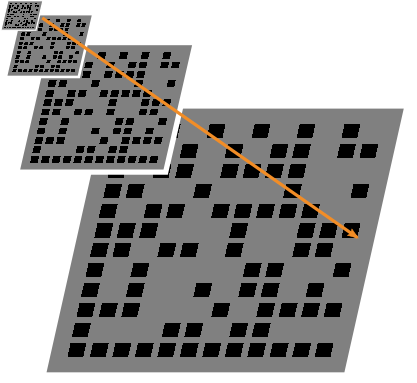
The search takes place in several passes, starting at the highest pyramid level, i.e., the level where symbols with
the maximum module size are still visible. The minimum module size determines the lowest pyramid level to
investigate (see Figure 3). Reducing the range of values for the module size, we reduce the
number of passes needed for the symbol search and thus enhance the run time.
In each pyramid level specific parameters are checked. If, for example, the 'polarity' is set to 'any', in a first pass
'dark_on_light' symbols are searched for. If none are found, a second pass searches for 'light_on_dark'
symbols. Therefore, restricting the polarity significantly increases the speed.
Each pass consists of two phases, the search phase and the evaluation phase. The search phase is used to look for
finder patterns and generate symbol candidates for every detected finder pattern. The evaluation phase is used to investigate
the candidates in a lower pyramid level and, if possible, to read them. The operator find_data_code_2d
terminates when the required number of symbols was successfully decoded, or when the last pass was performed.
This explains why the symbol search is rather fast when the right parameter values are checked first and takes
much longer when a wide range of parameter values has to be checked, but the requested number of symbols is not
found.
Note that for the Aztec Code you can even add more pyramid levels in order to increase the robustness. This setting
does however increase runtime, too.
In summary, if run time matters to your application, you should pay special attention to the model parameters for
the following attributes:
- polarity,
- minimum module size,
- number of symbol rows (for PDF417, especially for strongly cluttered or textured images),
- module gaps (for matrix codes with very small modules),
- the minimum number of position detection patterns (for QR codes), and
- the use of additional pyramid levels (
'additional_levels') as well as the setting of the tolerance while looking for the finder pattern ('finder_pattern_tolerance'(for Aztec Codes)).
If these parameters are not set correctly or with a range that is unnecessarily wide, the search process slows down,
especially when the requested number of symbols cannot be found. The actual values of the found symbols can be
queried with the operator get_data_code_2d_results.
Store the 2D data code model🔗
After changing the parameter setting by an automatic training or by a manual parameter setting, the new model
can be stored in a file using the operator write_data_code_2d_model. The HDevelop program
%HALCONEXAMPLES%\hdevelop\Identification\Data-Code\ecc200_training.hdev shows the main steps for storing
a trained 2D data code model. First, like in the previous example programs, a 2D data code handle
for symbols of the type 'Data Matrix ECC 200' is created. Then, the model is trained by applying the
operator find_data_code_2d to selected images using the parameter ’train’. This step changes the 2D
data code model, which then is stored into the default file 2d_data_code_model.dcm using the operator
write_data_code_2d_model.
create_data_code_2d_model ('Data Matrix ECC 200', [], [], DataCodeHandle)
find_data_code_2d (Image, SymbolXLDs, DataCodeHandle, 'train', 'all', ResultHandles, DecodedDataStrings)
write_data_code_2d_model (DataCodeHandle, '2d_data_code_model.dcm')
Using the saved file, you can restore the saved model in a later session. Then instead of calling the operator
create_data_code_2d_model at the beginning of the program, the operator
read_data_code_2d_model is used to create a 2D data code handle, which loads the parameter
settings described in the file 2d_data_code_model.dcm.
read_data_code_2d_model ('2d_data_code_model.dcm', DataCodeHandle)
for Index := 7 to 16 by 1
read_image (Image, ImageFiles + Index$'.2d')
find_data_code_2d (Image, SymbolXLDs, DataCodeHandle, [], [], ResultHandles, DecodedDataStrings)
endfor