DotCode parameters🔗
Symbol shape and size🔗
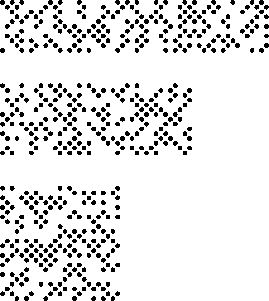
Parameters related to the symbol size set the minimum and maximum number of rows and columns allowed for a searched symbol. For matrix codes like DotCodes, rows and columns correspond to modules. For DotCode symbols the number of rows and columns may differ. Note that one of the two dimensions needs to be even while the other one needs to be odd.
Restrict the symbol search by reducing the possible range of shape and size, like in the example program
%HALCONEXAMPLES%\hdevelop\Applications\Data-Codes\dotcode_optimized_settings.hdev.
set_data_code_2d_param (DataCodeHandle, ['symbol_rows_min', 'symbol_rows_max'], [14, 84])
set_data_code_2d_param (DataCodeHandle, ['symbol_cols_min', 'symbol_cols_max'], [17, 83])
Module appearance🔗
Polarity🔗
The parameter 'polarity' determines if the foreground modules are darker or brighter than the background
or if both polarities are checked. By default, the value 'dark_on_light' is set. If it is set to 'any',
both polarities are checked. In the program we change it to 'light_on_dark' to adapt it to our specific symbols.
set_data_code_2d_param (DataCodeHandle, 'polarity', 'light_on_dark')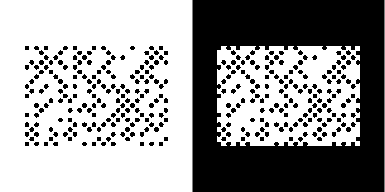
Mirrored🔗
Especially when reading symbols on transparent surfaces, it may occur that the symbol’s representation is mirrored.
By default, the parameter 'mirrored' is set to 'any', i.e., mirrored and non-mirrored symbols
are searched for. If you have only mirrored symbols you can restrict the search by setting the parameter to 'yes'.
Here, all of our symbols are not mirrored, so we restrict the search by setting the parameter to 'no'.
set_data_code_2d_param (DataCodeHandle, 'mirrored', 'no')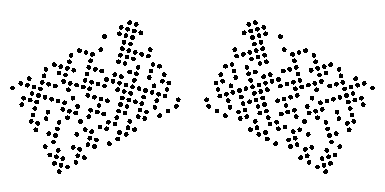
Module size🔗
Parameters related to the module size restrict the size of a module in pixels to speed up the search process. This is useful if the modules of all symbols are of similar size. The size is described by the width and height of a module.
Module gap🔗
The modules of a matrix code are not necessarily connected. If a gap between the
modules exists, you can specify the range of its size for both x- and y-direction, 'small' (≤ 10% of the module
size) or 'big' (≤ 50% of the module size; not available for DotCode). In standard mode no or only a small gap
is allowed. In the example program, we have no gaps in all directions of our symbols, so we restrict the parameter
'module_gap' to 'no'. See the figure below for exemplary module gaps.
set_data_code_2d_param (DataCodeHandle, 'module_gap', 'no')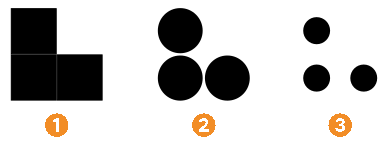
Strict quiet zone🔗
All code standards (except Aztec Code) require a quiet zone (i.e. a region with undisturbed background) around
the code symbol. Nevertheless, HALCON is able to read codes, even if the quiet zone shows defects. The reading
of such codes can be suppressed by setting the parameter 'strict_quiet_zone' to 'yes'.
Model control parameter🔗
Besides the size and appearance of the symbol, you can also specify the general behavior of a 2D data code model.
Persistence🔗
The parameter 'persistence' determines how intermediate results, obtained while searching for symbols by the
operator find_data_code_2d, are stored in the 2D data code model. By default, they are stored only temporarily
('persistence' set to 0) in order to reduce the allocated memory. Setting the parameter 'persistence' to '1',
the results are stored persistently. Due to the high memory requirements, we recommend to do this only if some of
the intermediate results are to be visualized or used for debugging purposes, e.g., when a symbol can not be read.
Further information about debugging is given here.
If only the decoded 2D data code and no further information is needed, 'persistence' can also be set to '-1'.
Then, only the data that is necessary for retrieving the decoded data is stored in the model and the allocated
memory is reduced to a minimum.
Strictness🔗
Sometimes, symbols can be read but nevertheless do not fit the model restrictions on the size of the symbols. The
parameter 'strict_model' controls if the operator find_data_code_2d rejects such symbols or returns them
as a result independent of their size and the size specified in the model. For the first case the
parameter is set to 'yes'. This is reasonable if only symbols of a certain size are to be found and other symbols,
which may be contained in the image as well, should be ignored. If you set the parameter 'strict_model' to
'no', it may occur that also symbols that do not strictly fulfill the restrictions are found.
Timeout🔗
It may be necessary to interrupt find_data_code_2d after a defined period, for example, when a maximum
cycle time has to be ensured. This period can be defined with the parameter 'timeout' in milliseconds. All
results gained until the interrupt can be accessed by get_data_code_2d_results. Passing values less or equal
to zero implies a deactivation of the timeout, which is the default. The temporal accuracy is about 10 ms. It
depends on several factors including the speed of your computer and the 'timer_mode' set via set_system.
find_data_code_2d does not raise an exception if a timeout occurs. To check whether find_data_code_2d
has been interrupted, check the parameter 'timeout_occurred' in get_data_code_2d_results. Note that
the timeout is ignored if find_data_code_2d runs in training mode.