Problem handling🔗
Data access for debugging🔗
During the search process of the operator find_data_code_2d, various results besides the decoded data string
and the XLD contour of the successfully decoded symbol are available. These results provide hints how the search
process can be enhanced with respect to run time, or why a symbol is not found or decoded. The HDevelop program
%HALCONEXAMPLES%\hdevelop\Identification\Data-Code\2d_data_codes_data_access.hdev shows
how to access results for various reasons. The following sections describe the single steps of the program in
detail. In particular, they introduce you to
- data access in general, as well as a selection of results useful for all debugging purposes,
- a selection of results that are useful when facing symbols that are decoded successfully but slowly (see here),
- a selection of results that may give you a hint why a symbol is not decoded (see here). The program concentrates on symbols of type Data Matrix ECC 200. Some characteristics of PDF417, QR Codes, Micro QR Codes, Aztec Codes, and DotCode that deviate from the presented results are introduced here as well.
General information about data access🔗
The results obtained from the operator find_data_code_2d are divided into iconic and alphanumeric results.
Iconic results, i.e., objects like images or regions, can be queried with the operator get_data_code_2d_objects.
The input parameters for the operator are the DataCodeHandle, a CandidateHandle, and the ObjectName.
Alphanumeric results are obtained by the operator get_data_code_2d_results. Here, the input parameters
are the DataCodeHandle, the CandidateHandle, and the ResultNames. The candidate handle needed for both
iconic as well as for alphanumeric results specifies either an individual candidate for a symbol or a group of
several candidates, for which the results or objects are queried. In a single operator call, you can combine a group
of candidates with an individual result or an individual candidate with a tuple of results. A list of all predefined
groups of candidates as well as all available object and result names for each SymbolType can be found in the
reference documentation of the individual operators.
In the HDevelop program %HALCONEXAMPLES%\hdevelop\Identification\Data-Code\2d_data_codes_data_access.hdev,
we first specify the general settings, i.e., we create a 2D data code
model for symbols of type 'Data Matrix ECC 200' and set the default parameters to the enhanced mode so
that all undamaged symbols can be decoded. By default, some of the results are stored only temporarily in the 2D
data code model. Therefore, we set the model parameter 'persistence' to 1 to keep all intermediate results in
memory (see here).
create_data_code_2d_model ('Data Matrix ECC 200', 'default_parameters', 'enhanced_recognition', DataCodeHandle)
set_data_code_2d_param (DataCodeHandle, 'persistence', 1)
The lists of the available alphanumeric result names and iconic object names are obtained by the operator
query_data_code_2d_params with the parameters 'get_result_param' and 'get_result_objects'.
query_data_code_2d_params (DataCodeHandle, 'get_result_params', GenParamName)
query_data_code_2d_params (DataCodeHandle, 'get_result_objects', GenObjectNames)find_data_code_2d, which now stores all of its intermediate
results, so that we can investigate them further.
For the group of alphanumeric results, we differentiate between general results and results associated with a specific
symbol candidate or a group of candidates. General results are used, for example, to get information about the number
of candidates related to each individual group of candidates. In the program, we set the CandidateHandle to
'general' and pass a tuple containing all available general ResultNames. In detail, we want to access the lowest
and highest pyramid level that is searched for symbols ('min_search_level' and 'max_search_level'),
the number of passes that were completed ('pass_num'), the number of all successfully decoded symbols
('result_num'), the number of all investigated candidates ('candidate_num'), the number of candidates that
were identified as symbols but could not be read ('undecoded_num'), and the number of candidates that could not
be identified as valid candidates ('aborted_num'). The first three values provide us with information about the
performance of the search process. All result values that are stored in the variable GenResult are are visualized
for a better inspection (see Figure 1)
GenResultNames := ['min_search_level', 'max_search_level', 'pass_num', 'result_num', 'candidate_num', 'undecoded_num', 'aborted_num']
GenResultValues := []
get_data_code_2d_results (DataCodeHandle, 'general', GenResultNames, GenResultValues)
GenResult := (GenResultNames + ': ')$'-20' + GenResultValues$'2'
CandidateNum := GenResultValues[4]
UndecodedNum := GenResultValues[5]
AbortedNum := GenResultValues[6]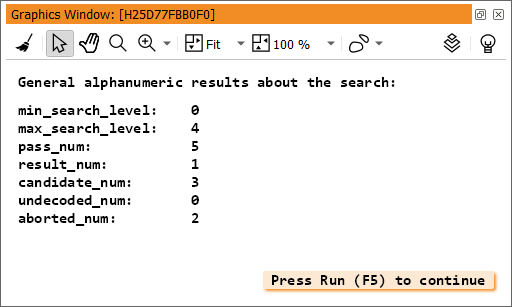
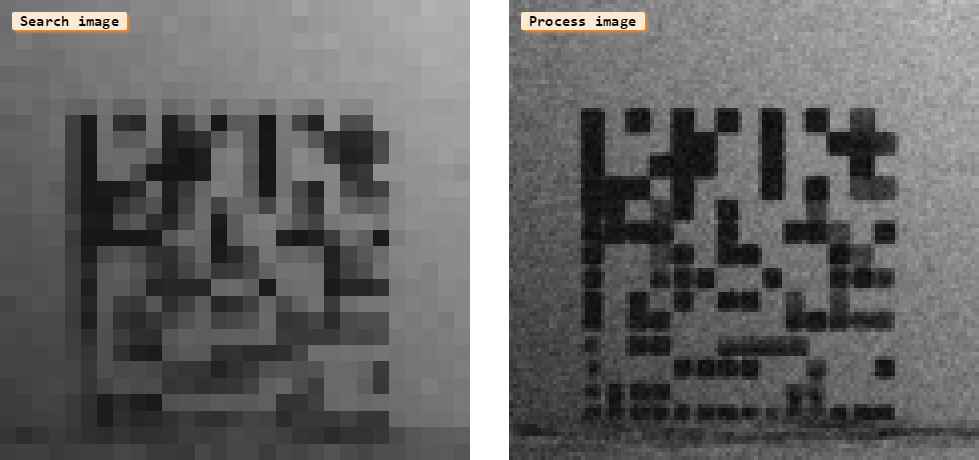
If candidates are found the program queries and displays two iconic results of the search process, the search image, and the process image. The search image is the pyramid image in which a candidate is found, whereas the process image is the pyramid image in which it is investigated more closely. A visual inspection of search image and process image often leads to ideas why a symbol is not found or decoded, or why the decoding process takes too much time.
get_data_code_2d_objects (SearchImage, DataCodeHandle, 0, 'search_image')
dev_display (SearchImage)
get_data_code_2d_objects (ProcessImage, DataCodeHandle, 0, 'process_image')
dev_display (ProcessImage)
Figure 2 shows the search image and the process image of the noisy image that was preprocessed here. The reason why the noisy streak in the quiet zone cannot be distinguished from the symbol becomes more obvious in the low-resolution search image than in the high-resolution original image.
Using the information on the number of candidates in each candidate group, we now discuss two different sit- uations. On the one hand, we investigate successfully decoded symbols to get information about their current parameter values so we can enhance the run time. On the other hand, we investigate symbols which are not decoded to find out why they are not decoded and if specific preprocessing steps are suitable.
Parameters to access for successfully decoded symbols🔗
The main reason for the debugging of successfully decoded symbols is to enhance the run time of the search
process, i.e., to reduce the number of passes needed. For that, you have to restrict the ranges for the parameter
values of the 2D data code model to a minimum.
To determine a reasonable range for a specific application, it is helpful to query the current parameter values of the
symbols using the operator get_data_code_2d_results. The success of the model adaptation can be controlled
by comparing the number of completed passes
queried before and after the adaptation.
In the HDevelop program %HALCONEXAMPLES%\hdevelop\Identification\Data-Code\2d_data_codes_data_access.hdev,
we query a tuple of results which provide us with information about the symbol’s appearance and additional information concerning
the successful search process (see Figure 3).
The latter comprises the actual pass in which the symbol was generated and processed ('pass'), a status
message ('status'), and the decoded data string ('decoded_string'). Status messages provide you with the
information whether a symbol was decoded successfully or why and at which point of the evaluation process the
search was aborted for a specific candidate. Here, we query the results for successfully decoded symbols, so the
status message in the tuple VariousResults is always 'successfully decoded'.
ResultVariousNames := ['polarity', 'module_gap', 'pass', 'status', 'mirrored', 'module_height', 'module_width', 'slant', 'contrast', 'decoded_string']
ResultVariousValues := []
get_data_code_2d_results (DataCodeHandle, ResultHandles[J], ResultVariousNames, ResultVariousValues)
VariousResults := (ResultVariousNames + ':')$'-18' + ResultVariousValues
disp_message (ResultWindow, 'Alphanumeric results about the symbol:', 'window', 12, 12, 'black', 'false')
disp_message (ResultWindow, VariousResults, 'window', 30, 12, 'black', 'false')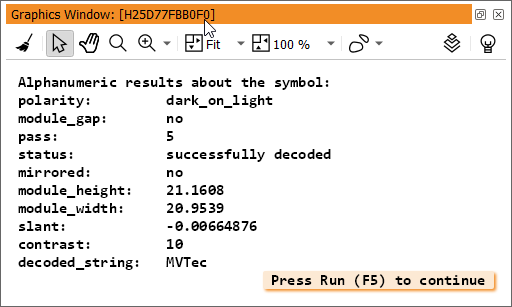
To control the classification of the modules that are determined in the search process the program queries two
different arrays of regions, in particular the iconic representations of the foreground and background mod-
ules ('module_1_rois' and 'module_0_rois'). The returned tuples of regions (Foreground and Background)
are displayed in Figure 4.
get_data_code_2d_objects (Foreground, DataCodeHandle, ResultHandles[J], 'module_1_rois')
dev_set_color ('blue')
dev_display (Foreground)
get_data_code_2d_objects (Background, DataCodeHandle, ResultHandles[J], 'module_0_rois')
dev_set_color ('yellow')
dev_display (Background)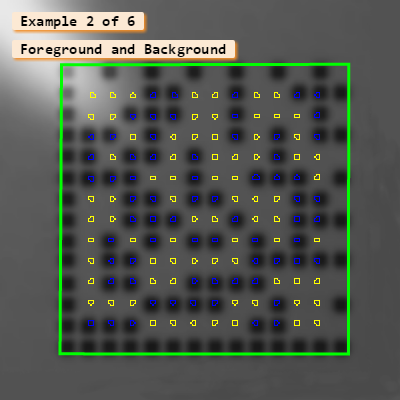
When working with rather large codes, you can query an unrestricted tuple containing all individual numbers
and characters of the decoded data as ASCII code by passing the result name 'decoded_data' to the operator
get_data_code_2d_results. In the program, the resulting tuple ResultASCIICode is displayed in formatted
form in a graphics window for a better view (see Figure 5).
get_data_code_2d_results (DataCodeHandle, ResultHandles[J], 'decoded_data', ResultASCIICode)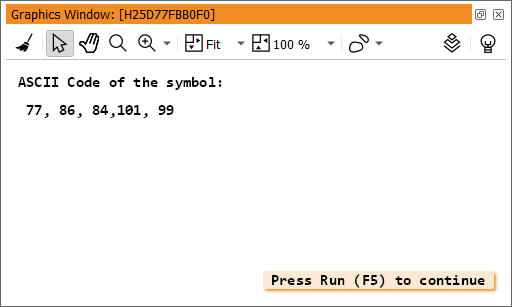
Parameters to access for symbols that are not decoded🔗
For symbols that are not decoded, we differentiate further between symbols that are found but not decoded and symbols for which no candidate is classified as a valid symbol. If the minimum size of the modules is not set the modules themselves are often determined as candidates. To reduce the number of candidates and thus make the investigations more concise, we adapt the model to the minimum module size before applying the 2D data code reader to the problematic images.
if (Index == 3)
  set_data_code_2d_param (DataCodeHandle, 'module_size_min', 24)
endif
if (Index == 4)
  set_data_code_2d_param (DataCodeHandle, 'module_size_min', 10)
endif
Another method to reduce the number of the candidates, especially if the image contains other objects with right angles, is to reduce the domain of the image to an ROI containing the complete symbol (including its quiet zone).
To access all individual symbol candidates that are found but not decoded, we create the handle HandlesUndecoded
by passing the candidate handle 'all_undecoded' and the result name 'handle' to the operator
get_data_code_2d_results.
get_data_code_2d_results (DataCodeHandle, 'all_undecoded', 'handle', HandlesUndecoded)Then, we query the XLD contour and the corresponding status message for the undecoded symbol candidates.
These provide important information about the reason why a candidate was not found or decoded. For successfully
decoded symbols we received the XLD contour explicitly by the operator find_data_code_2d. For symbols that
are not decoded, we have to query the XLD contours using the operator get_data_code_2d_objects with the
result name 'candidate_xld'.
for J := 0 to |HandlesUndecoded| - 1 by 1
  dev_display (Image)
  get_data_code_2d_results (DataCodeHandle, HandlesUndecoded[J], 'status', StatusValue)
  disp_message (ResultWindow, 'Alphanumeric results about the symbol:', 'window', 12, 12, 'black', 'false')
  disp_message (ResultWindow, 'Status: ' + StatusValue, 'window', 40, 12, 'black', 'false')
  get_data_code_2d_objects (DataCodeObject, DataCodeHandle, HandlesUndecoded[J], 'candidate_xld')
  dev_display (DataCodeObject)
Additionally, we visualize the regions of the modules, this time to check, for example, if a great amount of modules is
missing or if the modules deviate from the regular grid. Perhaps the modules are too small or the quiet zone is
distorted by streaks. In these cases, the obtained grid may be translated relative to the symbol. The problem with
small modules can be solved by adjusting the parameter 'small_modules_robustness' (except for DotCode
symbols). Other problems often can be solved by preprocessing the image.
  get_data_code_2d_objects (Foreground, DataCodeHandle, HandlesUndecoded[J], 'module_1_rois')
  dev_set_color ('blue')
  dev_display (Foreground)
  get_data_code_2d_objects (Background, DataCodeHandle, HandlesUndecoded[J], 'module_0_rois')
  dev_set_color ('yellow')
  dev_display (Background)
Besides the iconic results, alphanumeric information about the modules can be obtained. During the search process,
the modules are read row by row. The value 0 defines a certain background module and the value 100 defines
a certain foreground module. Often, modules have a value somewhere in between. An automatically chosen
threshold divides the foreground from the background modules. By inspecting the values, or more precisely their
deviations from 0 or 100, you can evaluate the quality of the module classification.
  get_data_code_2d_results (DataCodeHandle, HandlesUndecoded[J], 'bin_module_data', ResultBinModules)
endfor
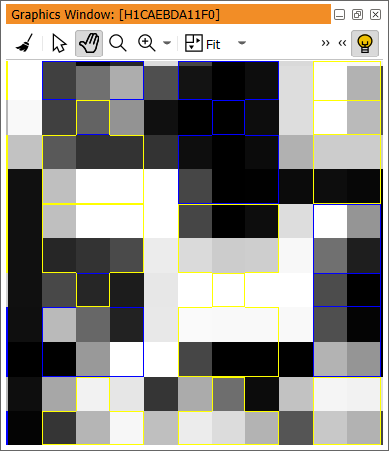
Figure 6 shows a part of a symbol with very small modules. Because the modules are smaller than the specified minimum module size the computed grid cannot be fitted correctly to the symbol and each computed region contains parts of several modules, i.e., the individual regions contain dark and light parts at the same time.
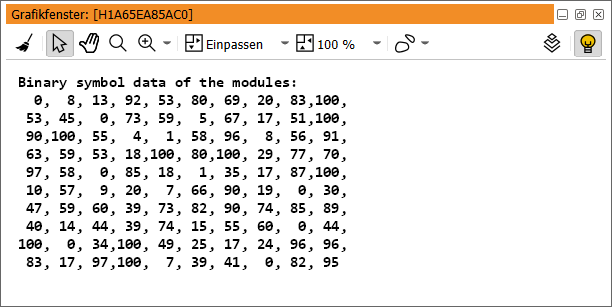
The binary values of all regions that are stored in the tuple ResultBinModules (see Figure 7) confirm the visual
impression, since for most of the regions the values strongly deviate from 0 or 100. Hence, the decision whether
a region belongs to foreground or background is not reliable. As noted before, the problems caused by a small
module size can be solved by adapting the parameter 'small_modules_robustness'.
For candidates that are not detected as valid symbols, no module regions can be obtained. Therefore, after creating
a handle for 'all_aborted' candidates called HandlesAborted, the debug information is reduced to the
status message and the XLD contour for each candidate.
get_data_code_2d_results (DataCodeHandle, 'all_aborted', 'handle', HandlesAborted)
for J := 0 to |HandlesAborted| - 1 by 1
  dev_display (Image)
  get_data_code_2d_objects (DataCodeObject, DataCodeHandle, HandlesAborted[J], 'candidate_xld')
  dev_set_color ('yellow')
  dev_display (DataCodeObject)
  get_data_code_2d_results (DataCodeHandle, HandlesAborted[J], 'status', StatusValue)
  Substrings := regexp_replace(StatusValue,'(: )',':\n')
  disp_message (ResultWindow, 'Alphanumeric results about the symbol:', 'window', 12, 12, 'black', 'false')
  disp_message (ResultWindow, 'status:\n\'' + Substrings + '\'', 'window', 40, 12, 'black', 'false')
endfor
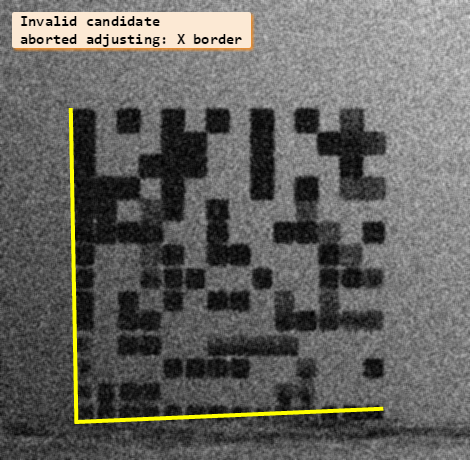
For example, the status message tells us that the X-border of the finder element cannot be adjusted. A didactic illustration for such a candidate is shown in Figure 8. By looking at the corresponding XLD contour, it becomes obvious that it cannot be adjusted because of the disturbing streak in the quiet zone near the X-bord. To differentiate clearly between streak and symbol, we have to remove the noise.
Sometimes no candidate can be found at all. If this happens check visually if a preprocessing step could be reasonable. Sometimes the symbols are damaged and cannot be read at all.
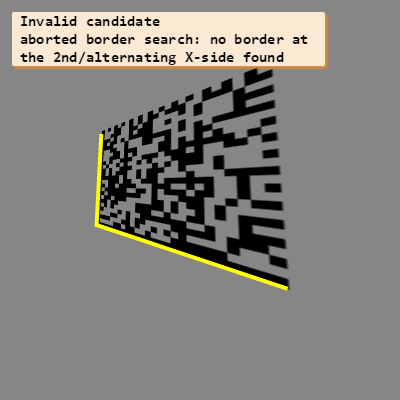
In the program, we concentrated on a selection of important results common for Data Matrix ECC 200. If you work with PDF417, QR Codes, Micro QR Codes, or Aztec Codes, some results will differ. An example for rather different debugging results concerns slanted symbols. For the Data Matrix ECC 200 symbol the 2D data code reader searches for a rectangular finder pattern. Because the symbol is slanted the right angles are lost and the status messages state problems related to the border of the symbol or the finder pattern. A didactic example to visualize such a case is shown in Figure 9. Since no valid finder pattern is identified all symbol candidates are aborted.
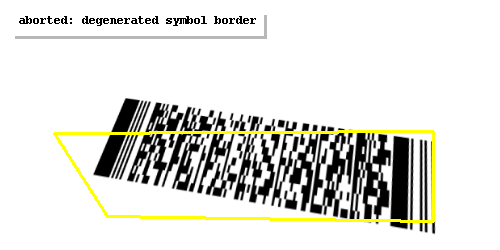
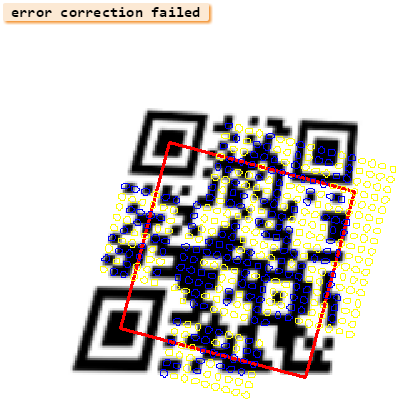
For the PDF417 code in Figure 10 no rectangular finder pattern is searched for. Therefore, several symbol candidates are found and adjusted in relation to the start or stop pattern of the symbol. Because these are degenerated and do not correspond to the outline of the actual symbol no data modules are found and the symbol is not decoded. For QR Codes, similar difficulties may occur. A didactic example to visualize such a case is shown in Figure 11. Again, several symbol candidates are found, because the finder pattern, i.e., at least two of the three position detection patterns, are found. However, as the candidates are adjusted in relation to those two position detection patterns, the candidate does not fit the slanted symbol. Here, at least some of the modules are detected and visualize the square of the incorrect symbol candidate. Since inside the candidate the modules are in the wrong place the error correction fails.
Additionally, further results are available, for example, the actual error correction level for PDF417 and QR Codes, queried
by get_data_code_2d_results with the parameter 'error_correction_level'. For PDF417, a value be-
tween 0 and 8 can be obtained. 0 means that errors are only detected but not corrected. The values 1 to 8 describe
an increasing error correction capacity. For QR Codes and Micro QR Codes, the increasing levels 'L', 'M' and
'Q' are available. The level 'H' is available for QR Codes but not for Micro QR Codes. As mentioned before, the
complete list of results specific for each SymbolType can be found in the Reference Manual at the description of
the operators get_data_code_2d_results and get_data_code_2d_objects. To learn more about the error
correction levels, also refer to the corresponding standard ISO/IEC CD 18004, Information technology - Automatic
identification and data capture techniques - QR Code 2005 bar code symbology specification.
Selected problems and how to avoid them🔗
Geometric distortions🔗
The modules of an ideal symbol are placed on a regular grid. For matrix codes the grid must be regular along
the whole symbol, whereas for PDF417 a regular grid is necessary only within the individual columns. While
searching for a symbol, the operator find_data_code_2d searches for the finder pattern (or start and stop pattern
for PDF417) of the specified symbol. If found, it approximates a grid for the modules, which is adjusted in relation
to the finder pattern. Some errors, i.e., small deviations of the modules from the grid (up to a displacement of half a
modules size, for Data Matrix ECC 200 up to a whole modules size when 'module_grid' is set to 'variable'),
can be coped with. For stronger deviations the 2D data code reading fails. The HDevelop program
%HALCONEXAMPLES%\hdevelop\Identification\Data-Code\2d_data_codes_arbitrary_distortions.hdev reads
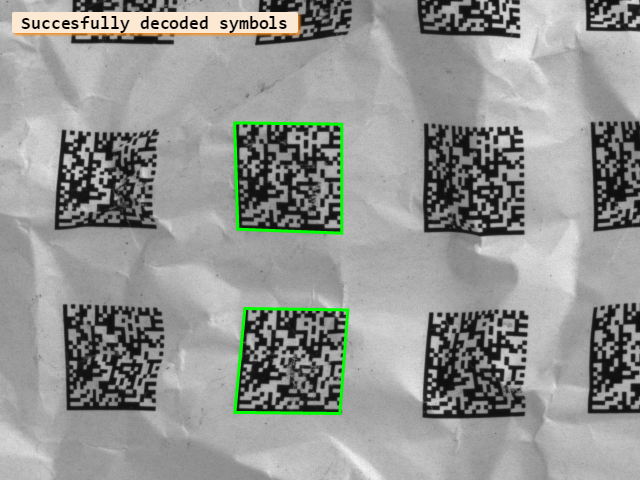
symbols with various distortions. In Figure 12,
for example, six symbols are printed on paper. The paper is crumpled, so that arbitrary distortions occur to the symbols and
for four of them the modules deviate so much from the regular grid, that they cannot be decoded.
In contrast to the regular distortion, which can be removed by a rectification, here the distortions are arbitrary and irregular. Therefore, no preprocessing step can be proposed. You have to prevent such a situation already when acquiring the images by attending that the symbols are as flat as possible. If your symbols are printed on a flexible surface like paper, you can, for example, flatten them with a glass plate. But then, you have to be very careful and consider the right lighting conditions. Otherwise you may get problems because of reflections as described in the next section.
Radiometric distortions🔗
Besides the right geometry of the symbol’s grid, the contrast and a uniform appearance of the
symbol’s modules, especially with regard to their polarity, are essential for the decoding of 2D
data codes. The HDevelop program %HALCONEXAMPLES%\hdevelop\Identification\Data-Code\2d_data_codes_arbitrary_distortions.hdev
searches for the symbols of two more images. These contain symbols printed on a reflecting surface.
Figure 13 shows an image where the
reflections are so strong that for some parts of the symbols the contrast approaches 0, i.e., the information about the modules of
these parts is not available anymore. Thus, the symbols cannot be reconstructed by preprocessing and the 2D data code reading
fails.
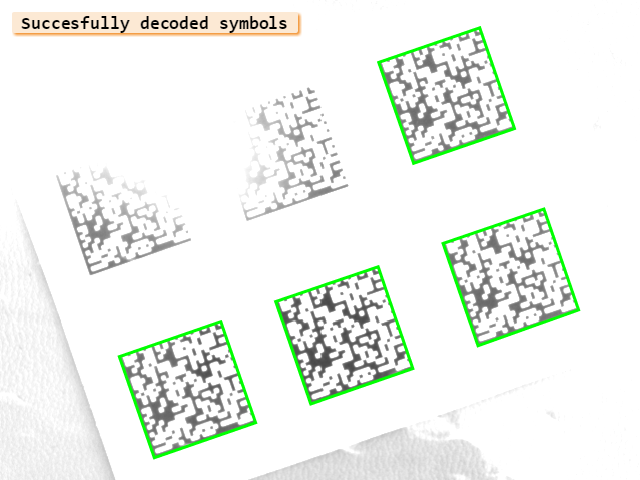
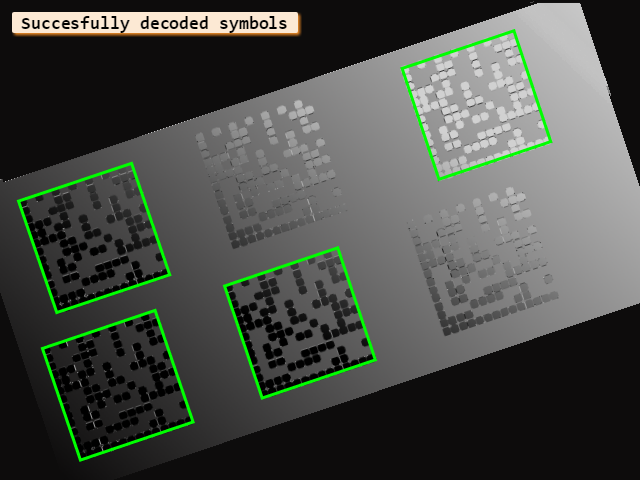
Figure 14 illustrates another problem that occurs because of bad lighting conditions. Here, because of reflections the polarity changes within two of the symbols. This leads to problems, since in most cases a change of the appearance of the modules inside a symbol cannot be coped with.
For both cases, no preprocessing is reasonable to improve the image in a way that makes the symbols readable again. Therefore, it is especially important to avoid strong reflections by using diffuse light at the image acquisition.
Requirements and limitations🔗
Main rules to follow🔗
All symbol types:
- The symbol (including the quiet zone if it is required) must be contained completely in the image.
- The modules must fit a regular grid and therefore should have approximately the same size. For matrix
codes, the grid has to be regular along the whole symbol, whereas for PDF417 codes it has to be regular only
within the individual columns. Some errors up to a displacement of half a modules size (for Data Matrix
ECC 200 up to a whole modules size when
'module_grid'is set to'variable') can be coped with, whereas errors at the finder pattern are worse than errors at the data modules. - The appearance of the modules of a symbol should be uniform. Especially the polarity must not change within a symbol.
- Although a minimum contrast of
1is allowed, for a stable result the symbols should have a minimum contrast of10between foreground and background.
- For a stable result, the minimum width of the modules should not fall below 3 pixels.
- At the border of the symbol, there should be a quiet zone of at least 2 modules width in each direction.
- Gaps between the modules are not allowed.
- For a stable result, the minimum size of the modules should not fall below 4 pixels.
- At the border of the symbol, there should be a quiet zone of at least 1 module’s width in each direction.
- Gaps between the modules are allowed, but should not exceed 50% of the module’s size.
- Although theoretically allowed, a slant angle of maximum 0.5235 (30 degrees) should not be exceeded.
- For a stable result, the minimum size of the modules should not fall below 4 pixels.
- At the border of the symbol, there should be a quiet zone of at least 4 module’s width in each direction.
- Gaps between the modules are allowed, but should not exceed 50% of the module’s size.
- At least two of three position detection patterns have to be visible.
- For a stable result, the minimum size of the modules should not fall below 4 pixels.
- At the border of the symbol, there should be a quiet zone of at least 2 module’s width in each direction.
- Gaps between the modules are allowed, but should not exceed 50% of the module’s size.
- The position detection pattern has to be visible.
- For a stable result, the minimum size of the modules should not fall below 4 pixels.
- No quiet zone is required at the border of the symbol.
- Gaps between the modules are allowed, but should not exceed 50% of the module’s size.
- For a stable result, the minimum size of the modules should not fall below 4 pixels.
- At the border of the symbol, there should be a quiet zone of at least 3 module’s width in each direction.
- Gaps between the modules are allowed, but should not exceed 10% of the module’s size.
Valid parameter ranges🔗
The following list concisely summarizes the value ranges valid for the parameter groups related to the size and
appearance of the individual symbol types. A complete list of parameter names that belong to each group can be
found atin the description of the operator set_data_code_2d_param.
| Parameter | Value range |
|---|---|
| Symbol size (columns) | 1-30 codewords |
| Symbol size (rows) | 3-90 modules |
| Polarity | 'dark_on_light', 'light_on_dark', 'any' |
| Mirrored | 'yes', 'no','any' |
| Minimum contrast | 1-100 |
| Module aspect ratio | 0.5 - 20 |
| Module gaps | no gaps |
| Small module robustness | 'low', 'high' |
| Parameter | Value range |
|---|---|
| Symbol size (columns) | 10-144 modules (even) |
| Symbol size (rows) | 8-144 modules (even) |
| Symbol shape (rows) | 'rectangle', 'square', 'any' |
| Polarity | 'dark_on_light', 'light_on_dark', 'any' |
| Mirrored | 'yes', 'no','any' |
| Module size | 1-100 |
| Module gaps | 'no', 'small', 'big' |
| Module grid | 'fixed', 'variable', 'any' |
| Maximum slant | 0- 0,7 |
| Small module robustness | 'low', 'high' |
| Finder pattern tolerance | 'low', 'high', 'any' |
| Alternating pattern tolerance | 'low', 'medium', 'high' |
| Contrast tolerance | 'low', 'high','any' |
| Candidate selection | 'default', 'extensive' |
| Parameter | Value range |
|---|---|
| Symbol size (rows) | 21-177 modules |
| Symbol size (columns) | 21-177 modules |
| Model type | 1, 2, 'any' |
| Version | 1-40 |
| Polarity | 'dark_on_light', 'light_on_dark', 'any' |
| Mirrored | 'yes', 'no','any' |
| Minimum contrast | 1-100 |
| Module size | 1-100 |
| Module gaps | 'no', 'small', 'big' |
| Minimum position patterns | 2, 3 |
| Small module robustness | 'low', 'high' |
| Deformation tolerance | 'low', 'curved' |
| Candidate selection | 'default', 'extensive', 'all' |
| Parameter | Value range |
|---|---|
| Symbol size (rows) | 11-17 modules |
| Symbol size (columns) | 11-17 modules |
| Version | 1-4 |
| Polarity | 'dark_on_light', 'light_on_dark', 'any' |
| Mirrored | 'yes', 'no','any' |
| Minimum contrast | 1-100 |
| Module size | 1-100 |
| Module gaps | 'no', 'small', 'big' |
| Small module robustness | 'low', 'high' |
| Candidate selection | 'default', 'extensive', 'all' |
| Parameter | Value range |
|---|---|
| Symbol size (rows) | 21-151 modules |
| Symbol size (columns) | 21-151 modules |
| Format | compact, full_range, 'rune' |
| Polarity | 'dark_on_light', 'light_on_dark', 'any' |
| Mirrored | 'yes', 'no','any' |
| Minimum contrast | 1-100 |
| Module size | 1-100 |
| Module gaps | 'no', 'small', 'big' |
| Small module robustness | 'low', 'high' |
| Finder pattern tolerance | 'low', 'high' |
| Additional levels | 0-2 |
| Parameter | Value range |
|---|---|
| Symbol size (rows) | 5-999 modules |
| Symbol size (columns) | 5-999 modules |
| Polarity | 'dark_on_light', 'light_on_dark', 'any' |
| Mirrored | 'yes', 'no','any' |
| Module size | 1-100 |
| Module gaps | 'no', 'small' |
| Candidate selection | 'default', 'extensive', 'all' |
Note that in enhanced mode the 2D data
code reader checks the whole range of values for some but not all parameters. See create_data_code_2d_model
for the exact behaviour standard, enhanced, and maximum recognition mode.