Workflow🔗
With 2D metrology, you can measure the dimensions of objects that can be represented by specific geometric primitives.
The geometric shapes that can be measured comprise circles, ellipses, rectangles, and lines.
You need approximate values for the positions, orientations, and dimensions of the objects to measure.
Then, the real edge positions of the objects in the image are located near the boundaries of the approximate objects.
With these edge positions, the parameters of the geometric shapes are optimized to better fit to the image data and are returned as measurement result.
The approximate values for the shape parameters of an object as well as some parameters that control the measurement are stored in a data structure that is called
Parameters that adjust the dimension and distribution of the measure regions are specified together with the approximate shape parameters for each metrology object.
When the measurement is applied, the edge positions inside all measure regions are determined and fitted to geometric shapes using a
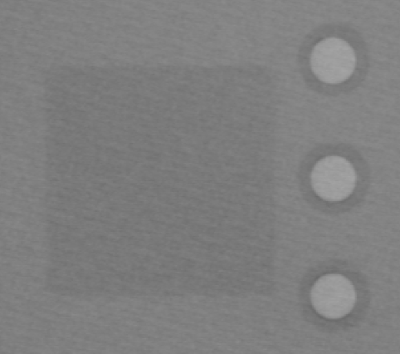 |
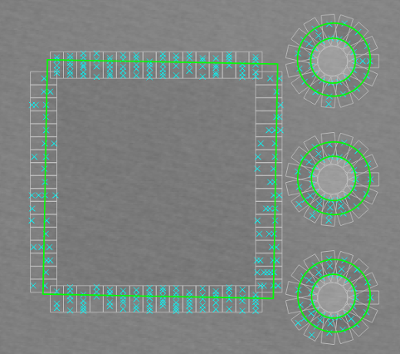 |
Figure 1. The geometric shapes in
are measured using 2D metrology.
: A metrology model with 4 metrology objects (blue contours) is created.
Using the edge positions (cyan crosses) located within the measure regions (gray rectangles) for each metrology object, the geometric shapes (green contours) are fitted and their parameters can be queried.
As shown for the circles, more than one instance per object can be found.
This image is from the example program apply_metrology_model.hdev.
Performing a 2D measuring🔗
In the following, the steps that are required to use 2D metrology are described briefly.
-
Create the metrology model and specify the image size:
Create a metrology model using
The metrology model is used as a container for one or more metrology objects. For an efficient measurement, after creating the metrology model, specify the image size of the image in which the measurements will be performed using
-
Provide approximate values:
Add the metrology objects to the metrology model. Each metrology object consists of the approximate shape parameters for the corresponding object in the image and of the parameters that control the measurement. The parameters that control the measurement comprise, for example, parameters that specify the dimension and distribution of the measure regions. Furthermore, several generic parameters can be adjusted for each metrology object.
The metrology objects are specified with-
add_metrology_object_circle_measurefor circles, -
add_metrology_object_ellipse_measurefor ellipses, -
add_metrology_object_rectangle2_measurefor rectangles, -
add_metrology_object_line_measurefor lines. -
add_metrology_object_genericallows you to create metrology objects of different shapes (for example, ellipse, circle, etc.) using one operator.
To visually inspect the defined metrology objects, you can access their XLD contours with the operator
get_metrology_object_model_contour. To visually inspect the created measure regions, you can access their XLD contours with the operatorget_metrology_object_measures. -
-
Modify the model parameters:
If a camera calibration has been performed, the camera parameters and the pose of the measurement plane can be set with
Then, the result of the measurements returned by
get_metrology_object_resultwill be in world coordinates. The reference coordinate system in which the metrology objects are defined can also be changed withset_metrology_model_param. -
Modify object parameters:
Many parameters can be set when adding the metrology objects to the metrology model. Some of them can also be modified afterwards using the operator
-
Align the metrology model:
To translate and rotate the metrology model before the next measurement is performed, you can use the operator
An alignment is temporary and is replaced by the next alignment. The metrology model itself is not changed.
Note
Typically, the alignment parameters are obtained using shape-based matching.
-
Apply the measurement:
Perfomr the actual measurement in the image with
The operator locates the edges within the measure regions and fits the specified geometric shape to the edge positions using a
measure_posorfuzzy_measure_pos(see also 1D measuring). The latter uses fuzzy methods and is used only if at least one fuzzy function was set viaset_metrology_object_fuzzy_parambefore applying the measurement.
If more than one instance of the returned object shape is needed (compare the figure above), the generic parameter'num_instances'must be set to the number of instances to be returned. The parameter can be set when adding the individual metrology objects or afterwards with the operatorset_metrology_object_param. -
Access the results:
After the measurement, you can access the results. The parameters of the adapted geometric shapes of the objects are queried with the operator
Querying only the edges used for the returned result and their amplitudes is also done using
get_metrology_object_result.The row and column coordinates of all located edges can be accessed with
To visualize the adapted geometric shapes, you can access their XLD contours with
Further operators🔗
In addition to the operators mentioned above, you can copy the metrology handle with copy_metrology_model, write the metrology model to file with write_metrology_model, read a model from file again using read_metrology_model, and serialize or deserialize a metrology model using serialize_metrology_model or deserialize_metrology_model.
Furthermore, you can query various information from the metrology model.
For example, you can query the indices of the metrology objects with get_metrology_object_indices, query parameters that are valid for the entire metrology model with get_metrology_model_param, query a fuzzy parameter of a metrology model with get_metrology_object_fuzzy_param, query the number of instances of the metrology objects of a metrology model
with get_metrology_object_num_instances, and query the current configuration of the metrology model with get_metrology_object_param.
Additionally, you can reset all parameters of a metrology model using reset_metrology_object_param or reset only all fuzzy parameters and fuzzy functions of a metrology model using reset_metrology_object_fuzzy_param.