Correlation-based matching🔗
General concept🔗
Correlation-based matching is based on gray values. This approach uses a normalized cross correlation to evaluate the correspondence between a model and a search image. It is quite fast and can compensate both additive as well as multiplicative variations in illumination.
In contrast to the matching methods that rely on object edges, also objects with slightly changing shapes, lots of texture, or objects in blurred images (contours vanish in blurred images, for example, because of defocus) can be found.
A first example🔗
To follow the example actively, start the HDevelop program %HALCONEXAMPLES%\hdevelop\Matching\Correlation-Based\ncc_matching_workflow.hdev.
Step 1: Select the object in the reference image
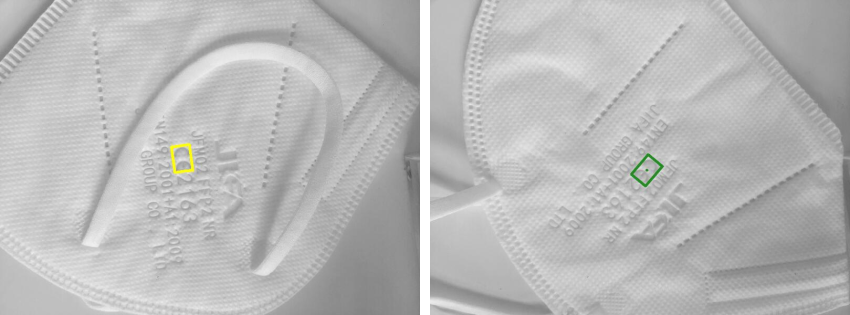
First, inside the training image a region containing the object is created using gen_rectangle2.
read_image (Image, 'face_masks/face_mask_01')
gen_rectangle2 (ROI, 616.5, 708.5, rad(-82.4054), 50, 35)
reduce_domain (Image, ROI, ImageReduced)
Step 2: Create the model
The reduced image is used to create the NCC model with create_ncc_model.
As a result, the operator returns a handle for the newly created model (ModelID), which can then be used to specify the model, for example, in calls to the operators find_ncc_model or find_ncc_models.
Step 3: Find the object again
Now, the search images are read in a loop and for each search image the NCC model is searched.
The found matches can conveniently be displayed using the procedure dev_display_ncc_matching_results.
To visualize the match, latter one is overlaid by the region of the model using an affine transformation.
Figure 1 shows the reference image and one of the found model instances.