Perspective deformable matching🔗
General concept🔗
Like shape-based matching, perspective deformable matching extracts contours and matches their shapes against the shapes of previously created models. But in contrast to shape-based matching, also perspectively deformed contours can be found.
For the perspective deformable matching, an uncalibrated as well as a calibrated version is provided.
A first example🔗
In this section we give a quick overview of the matching process with perspective deformable matching.
To follow the example actively, start the example program %HALCONEXAMPLES%\hdevelop\Applications\Traffic-Monitoring\detect_road_signs.hdev, which locates road signs independently from their direction.
Actually, the program searches an attention sign and a dead end road sign. In the following, we show the proceeding exemplarily for the attention sign.
Step 1: Select the object in the reference image
First, the colored reference image is read and a channel that clearly shows the attention sign (see
) is accessed with access_channel.
As the attention sign in the search images is expected to be much smaller than in the reference image, the reference image is scaled with zoom_image_factor to better fit the expected size (see
).
The creation of perspective deformable models is based on XLD contours, which is similar to shape-based matching.
Thus, inspect_shape_model can be used to get suitable values for the parameters NumLevels and Contrast, which are needed for the creation of shape models as well as for the creation of perspective deformable models.
The returned representation of a shape model with multiple pyramid levels can be used to visually check a potential model (see
).
 |
 |
 |
|---|---|---|
| Specific channel of colore image in original resolution | Image scaled by \(\frac{1}{10}\) | Inspection of the shape model |
read_image (ImageAttentionSign, 'road_signs/attention_road_sign')
access_channel (ImageAttentionSign, Image, Channel[0])
zoom_image_factor (Image, ImageZoomed, 0.1, 0.1, 'weighted')
inspect_shape_model (ImageZoomed, ModelImages, ModelRegions, 3, 20)
Step 2: Create the model
How to obtain a proper template image from a reference image.
In this case, a further reduction to a more restricted ROI is not needed.
The model is obtained from the template image with create_planar_uncalib_deformable_model.
create_planar_uncalib_deformable_model (ImageZoomed, 3, [], [], 0.1, ScaleRMin[0], [], 0.05, ScaleCMin[0], [], 0.5, 'none', 'use_polarity', 'auto', 'auto', [], [], ModelID)
Step 3: Find the object again
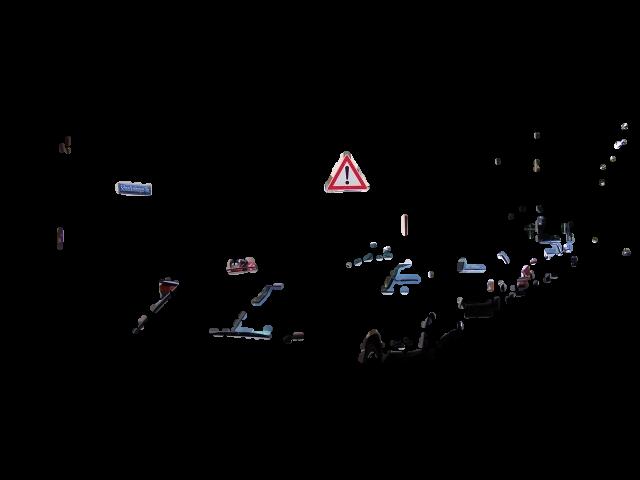
To speed up the matching, the search space is restricted first to a rectangular region and then, within this region, to an ROI consisting of a set of blobs (see
).
This set of blobs is obtained by the procedure determine_area_of_interest, which exploits the available color information and applies a blob analysis.
gen_rectangle1 (Rectangle1, 28, 71, 69, 97)
for Index := 1 to 16 by 1
    read_image (Image, 'road_signs/street_' + Index$'.02')
    determine_area_of_interest (Image, Rectangle, AreaOfInterest)
    reduce_domain (Image, AreaOfInterest, ImageReduced)
 |
 |
|---|---|
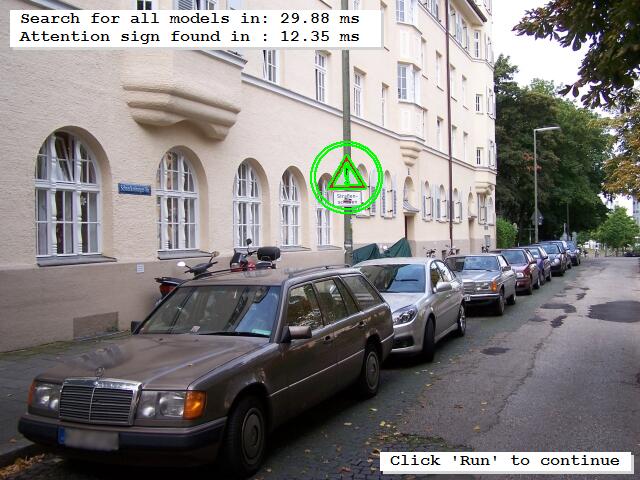
| ROI derived from the color image | Found match for the model of the attention sign |
Within the resulting ROI, the actual matching is applied using the operator find_planar_uncalib_deformable_model. Note that the search is applied in the same image channel that was already used for the model creation.
for Index2 := 0 to |Models| - 1 by 1
    access_channel (ImageReduced, ImageChannel, Channel[Index2])
    find_planar_uncalib_deformable_model (ImageChannel, Models[Index2], 0, 0, ScaleRMin[Index2], ScaleRMax[Index2], ScaleCMin[Index2], ScaleCMax[Index2], 0.85, 1, 0, 2, 0.4, [], [], HomMat2D, Score)
The result of the matching for each found model instance is a 2D projective transformation matrix (homography) and a score that represents the quality of the matching. Using the homographies, the result is visualized for the successful matches. In particular, the contours of the model are queried and projected into the search image ( ).
        if (|HomMat2D|)
            get_deformable_model_contours (ModelContours, Models[Index2], 1)
            projective_trans_contour_xld (ModelContours, ContoursProjTrans, HomMat2D)
        endif
    endfor
endfor
The following sections go deeper into the details of the individual steps of a perspective deformable matching and the parameters that have to be adjusted.