Optimization🔗
The actual matching is applied by one of the following operators:
-
find_planar_uncalib_deformable_modelsearches for the best matches of an uncalibrated perspective deformable model. It returns a 2D projective transformation matrix (homography) and the score describing the quality of the match. -
find_planar_calib_deformable_modelsearches for the best matches of a calibrated perspective deformable model. It returns the 3D pose of the object, the six mean square deviations, respectively the 36 covariances of the pose parameters, and the score describing the quality of the match.
Restrict the search to a region of interest🔗
The obvious way to restrict the search space and thus speed up the matching is to apply the operator find_planar_uncalib_deformable_model or find_planar_calib_deformable_model not to the whole image but only to an ROI.
The corresponding procedure is explained in more detail for shape-based matching.
For perspective deformable matching you simply have to use find_planar_uncalib_deformable_model or find_planar_calib_deformable_model, respectively.
Restrict the range of orientation and scale🔗
Affected parameters
AngelExtent, AngleStart, ScaleCMax, ScaleCMin, ScaleRMax, ScaleRMin
When calling find_planar_uncalib_deformable_model or find_planar_calib_deformable_model, you can limit the orientation and scale ranges with the parameters AngleStart, AngleExtent, ScaleMin, and ScaleMax.
This is useful if you can restrict these ranges by other information, which can, for example, be obtained by suitable image processing operations.
Specify the visibility of the object🔗
Affected parameters
MinScore
With the parameter MinScore you can specify how much of the model must be visible.
A typical use of this mechanism is to allow a certain degree of occlusion.
The parameter is similar to the corresponding parameter for shape-based matching.
Trade thoroughness vs. speed🔗
Affected parameters
Greediness
With the parameter Greediness you can influence the search algorithm itself and thereby trade thoroughness against speed.
Search for multiple instances of the Object🔗
Affected parameters
NumMatches, MaxOverlap
All you have to do to search for more than one instance of the object is to set the parameter NumMatches to the maximum number of instances you want to find.
If you select the value '0', all matches are returned.
Locating more than one instance, the operators find_planar_uncalib_deformable_model and find_planar_calib_deformable_model return the results for the individual model instances concatenated in the output tuples.
That is, the Score, which is a single value for a single model instance, is now returned as a tuple for which the number of elements corresponds to the number of found model instances.
For the results that are already returned as tuples for a single model instance, the number of elements multiplies by the number of found instances.
These results comprise the projective transformation matrix (HomMat2D) for the uncalibrated matching or the 3D pose (Pose) and the standard deviations or covariances (CovPose) for the calibrated matching.
Note that a search for multiple objects is only slightly slower than a search for a single object.
A second parameter, MaxOverlap, lets you specify how much two matches may overlap (as a fraction).
This parameter is similar to the corresponding parameter of shape-based matching
Restrict the number of pyramid levels🔗
Affected parameters
NumLevels
The parameter NumLevels, which you already specified when creating the model, allows you to use a different (in most cases a more restrictive) value in the search process.
By using the value 0 for NumLevels, the value specified when creating the model is used.
Optionally, NumLevels can contain a second value, so that you can specify not only the highest but also the lowest pyramid level used for the search.
If the search is aborted on a pyramid level that is higher than the first pyramid level, which corresponds to the original, full-sized image, the search becomes faster.
On the other hand, the search is then also less robust and less accurate.
If objects should be found also in images of poor quality, for example, if the object is defocused or noisy, you can activate the increased tolerance mode by specifying the second value negatively. Then, the matches on the lowest pyramid level that still provides matches are returned.
Adjust generic parameters🔗
Affected parameters
GenParamName, GenParamValue
Besides the parameters that correspond more or less to those used for shape-based matching, perspective deformable matching allows to adjust some generic parameters that are set via GenParamName and GenParamValue.
Typically, there is no need to adjust them.
But if, for example, a low accuracy of the matching is sufficient, you can speed up the matching by a reduction or deactivation of the subpixel precision or by changing the discretization steps for the orientation or scale that were set during the creation of the model.
To avoid false positive matches, you can also restrict the distortions of the angles and scales.
For further information, please refer to the description of find_planar_uncalib_deformable_model.
Use the specific results of local deformable matching🔗
The perspective deformable matching returns for the uncalibrated case a 2D projective transformation matrix (HomMat2D), for the calibrated case a 3D pose (Pose) and either the standard deviations or the covariances (CovPose), and for both cases a score (Score) that evaluates the quality of the returned object location.
The 2D projective transformation matrix and the 3D pose can be used, for example, to transform a structure of the reference image into the search image.
Similar to the shape-based matching, perspective deformable matching can return multiple instances of a model.
Deal with multiple matches🔗
If multiple instances of the object are searched and found, the results are concatenated in tuples.
In particular, Score, which is a single value for a single model instance, is now a tuple for which the number of elements corresponds to the number of found model instances.
The access of the value for a specific instance is similar to the proceeding described for correlation-based matching.
The parameters HomMat2D, Pose, and CovPose are already returned as tuples for a single model instance.
For multiple instances, the values are simply concatenated.
To access them for a specific match, you must know the number of elements returned for a single model instance, which is nine for a single projective transformation matrix, seven for a single 3D pose, and either six ('default') or 36 elements (generic parameter 'cov_pose_mode' set to 'covariances') for the single instance’s standard deviations or covariances, respectively.
Then, for example, in the tuple containing the 3D poses that are returned by a calibrated matching, the first seven values belong to the first instance, the next seven values belong to the second instance, etc.
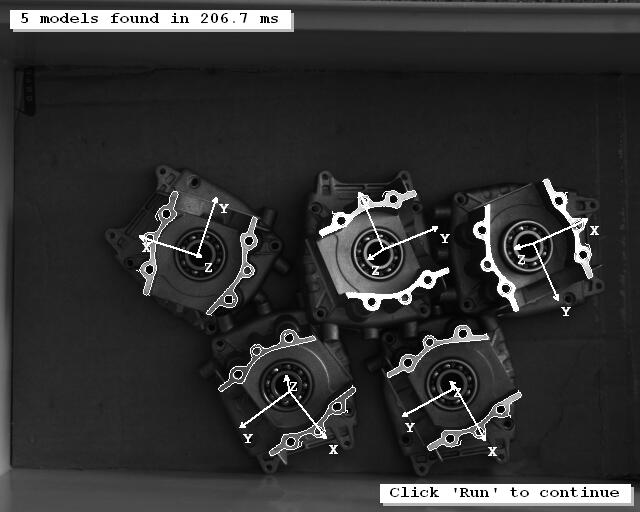
An example for the access of the values for each instance is the example program %HALCONEXAMPLES%\hdevelop\Applications\Position-Recognition-3D\locate_engine_parts.hdev, which locates the engine parts shown in Figure 1.
In the example, the 3D poses of the individual model instances are accessed by selecting specific subsets of the tuples using tuple_select_range.
find_planar_calib_deformable_model (Image, ModelID, rad(0), rad(360), 1, 1, 1, 1, 0.65, 0, 0, 3, 0.75, [], [], Pose, CovPose, Score)
for Index1 := 0 to |Score| - 1 by 1
    tuple_select_range (Pose, Index1 * 7, ((Index1 + 1) * 7) - 1, PoseSelected)
    pose_to_hom_mat3d (PoseSelected, HomMat3D)
endfor