2D transformations🔗
2D affine transformations🔗
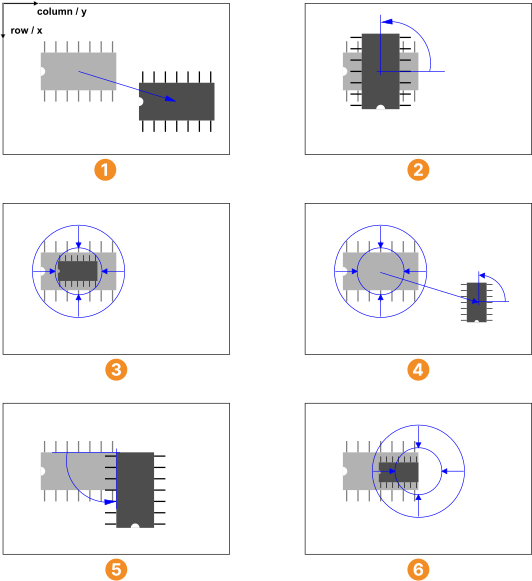
“Affine transformation” is a technical term in mathematics describing a certain group of transformations. Figure 1 shows the types that occur, for example, in the context of the shape-based matching: An object can be translated (moved) along the two axes, rotated, and scaled. In , all three transformations were applied in a sequence.
translation along two axes
rotation around the IC center
scaling around the IC center
translation, rotation and scaling with regard to the IC center
rotation around the upper right corner
scaling around the right IC center
Note that for the rotation and the scaling the transformation is performed around the point of reference.
In , for example, the IC is rotated around its center, in around its upper right corner. The point is called fixed point because it remains unchanged by the transformation.
The transformation can be thought of as a mathematical instruction that defines how to calculate the coordinates of object points after the transformation.
HALCON allows you to transform pixels, regions, images, and XLD contours by providing the operators affine_trans_pixel, affine_trans_region, affine_trans_image, and affine_trans_contour_xld.
The transformation in
corresponds to this code line:
affine_trans_region (IC, TransformedIC, ScalingRotationTranslation, 'nearest_neighbor')The parameter ScalingRotationTranslation is a so-called homogeneous transformation matrix that describes the desired transformation.
To create this matrix, add simple transformations step by step:
-
Create an identity matrix with
hom_mat2d_identity.hom_mat2d_identity (EmptyTransformation) -
Add the scaling around the center of the IC with
hom_mat2d_scale.hom_mat2d_scale (EmptyTransformation, 0.5, 0.5, RowCenterIC, ColumnCenterIC, Scaling) -
Add the rotation and the translation with
hom_mat2d_rotateandhom_mat2d_translate.hom_mat2d_rotate (Scaling, rad(90), RowCenterIC, ColumnCenterIC, ScalingRotation) hom_mat2d_translate (ScalingRotation, 100, 200, ScalingRotationTranslation)
Note
In these operators, the coordinate axes are labeled with x and y instead of Row and Column.
clarifies the relation.
Transformation matrices can also be constructed by a sort of “reverse engineering”.
In other words, if the result of the transformation is known for some points of the object, you can determine the corresponding transformation matrix.
If, for example, the position of the IC center and its orientation after the transformation is known, you can get the corresponding matrix via the operator vector_angle_to_rigid and then use this matrix to compute the transformed region.
vector_angle_to_rigid (RowCenterIC, ColumnCenterIC, 0, TransformedRowCenterIC, TransformedColumnCenterIC, rad(90), RotationTranslation)
affine_trans_region (IC, TransformedIC, RotationTranslation, 'nearest_neighbor')
If a pixel, image, or contour should be transformed, the proceeding is similar, but instead of affine_trans_region, you apply the operator affine_trans_pixel, affine_trans_image, or affine_trans_contour_xld, respectively.
2D projective transformations🔗
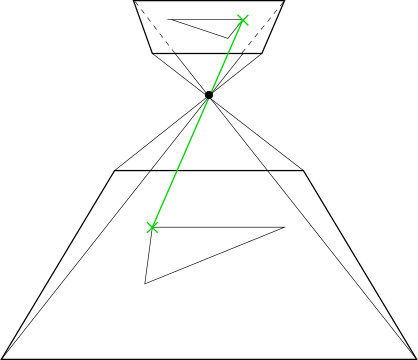
A 2D projective transformation matrix describes a perspective projection as illustrated in Figure 2. It consists of 3×3 values.
Note
If the last row contains the values [0,0,1], it corresponds to a homogeneous transformation matrix, that is, it describes a 2D affine transformation, which is a special case of the 2D projective transformation.
HALCON provides several operators to apply projective transformations.
Similar to the affine transformation, with a projective transformation you can transform different HALCON structures like pixels (projective_trans_pixel), regions (projective_trans_region), images (projective_trans_image), and XLD contours (projective_trans_contour_xld).
In contrast, perspective deformations are also accounted for by the transformation.
Tip
In the context of matching, projective transformation matrices are even easier to handle than affine transformations, as you do not need to create a transformation matrix from corresponding points or by adding several transformation steps. Instead, the projective transformation matrix is directly returned by one of the operators that are used for the uncalibrated matching of perspectively distorted objects, and can be directly used to apply one of the above stated transformations.