Blob analysis🔗
The idea of blob analysis is quite easy: In an image the pixels of the relevant objects (also called foreground) can be identified by their gray value. For example, Figure 1 shows tissue particles in a liquid. These particles are bright and the liquid (background) is dark. By selecting bright pixels (thresholding) the particles can be detected easily. In many applications this simple condition of dark and bright pixels no longer holds, but the same results can be achieved with extra pre-processing or alternative methods for pixel selection / grouping.
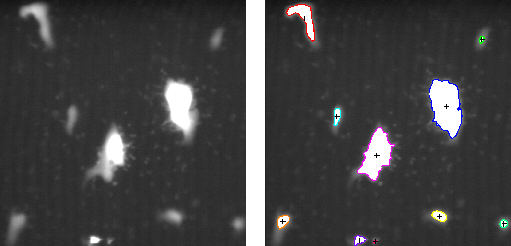
The advantage of blob analysis is the extreme flexibility that comes from the huge number of operators that HALCON offers in this context. Furthermore, these methods typically have a very high performance. Methods known from blob analysis can also be combined with many other vision tasks, e.g., as a pre-processing step for a flexible generation of regions of interest.
Segmenting images🔗
For the segmentation various methods can be used.
The most simple method is threshold, where one or more gray value ranges that belong to the foreground objects are specified.
Another very common method is dyn_threshold.
Here, a second image is passed as a reference.
With this approach, a local threshold instead of a global threshold is used.
These local threshold values are stored in the reference image.
The reference image can either be static by taking a picture of the empty background or can be determined dynamically with smoothing filters like mean_image.
Processing regions and extracting features🔗
Once blob regions are segmented, it is often necessary to modify them, e.g., by suppressing small areas, regions of a given orientation, or regions that are close to other regions.
In this context, the morphological operators opening_circle and opening_rectangle1 are often used to suppress noise and closing_circle and closing_rectangle1 to fill gaps.
Blobs with a specific feature can be selected with select_shape, select_shape_std, and select_shape_proto.
To finalize the image processing, features of the blobs are extracted. The type of features needed depends on the application.
Blob analysis examples🔗
For programming examples see, among others,:
- Extracting crystal structures
%HALCONEXAMPLES%/solution_guide/basics/crystal.hdev - Inspecting atom structures
%HALCONEXAMPLES%/solution_guide/basics/atoms.hdev - Analyzing particles
%HALCONEXAMPLES%/hdevelop/Applications/Measuring-2D/particle.hdev - Extracting forest features in color infrared images
%HALCONEXAMPLES%/hdevelop/Applications/Object-Recognition-2D/forest.hdev - Checking a boundary for fins
%HALCONEXAMPLES%/hdevelop/Applications/Measuring-2D/fin.hdev - Measuring bonding balls
%HALCONEXAMPLES%/hdevelop/Applications/Completeness-Check/ball.hdev - Detecting surface scratches
%HALCONEXAMPLES%/solution_guide/basics/surface_scratch.hdev
Tips and tricks🔗
- By default, most HALCON segmentation operators like
thresholdreturn one region even if you see multiple not connected areas on the screen. To transform this region into separated objects (i.e., connected components in the HALCON nomenclature) one has to callconnection. -
Regions of interest are the standard method to increase the speed by processing only those areas where objects need to be inspected. This can be done using pre-defined regions but also by an online generation of the regions of interest that depend on other objects found in the image.
-
If an object has a specific minimum size, the operator
fast_thresholdis a fast alternative tothreshold. This kind of fast operator can also directly be generated by using operators likegen_grid_regionandreduce_domainbefore calling the thresholding operator. -
By default, HALCON performs some data consistency checks. These can be switched off using
set_check. -
By default, HALCON initializes new images. Using
set_systemwith the parameter'init_new_image', this behavior can be changed.
Connected components
Speed up