fuse_object_model_3d🔗
Short description🔗
fuse_object_model_3d — Fuse 3D object models into a surface.
Signature🔗
fuse_object_model_3d( object_model_3d ObjectModel3D, number BoundingBox, number Resolution, number SurfaceTolerance, number MinThickness, number Smoothing, string NormalDirection, attribute.name GenParamName, attribute.value GenParamValue, out object_model_3d ObjectModel3DFusion )
Description🔗
fuse_object_model_3d fuses multiple point clouds representing an
object surface into a watertight surface ObjectModel3DFusion.
The operator can be used to simplify the postprocessing step of point clouds
that are already registered in the same coordinate system.
In particular, unification, suppression of outliers, trade-off between
smoothing and preservation of edges, equidistant
sub-sampling, hole filling, and meshing of the output surface can often
be handled nicely and in high quality.
On the other hand, these advantages come at the price of a high runtime.
If you want to fuse 3D point clouds acquired by stereo reconstruction,
you should use reconstruct_surface_stereo instead of
fuse_object_model_3d.
Workflow🔗
-
Acquire point clouds and transform them into a common coordinate system, for example using
register_object_model_3d_pairandregister_object_model_3d_global. -
If not already available, compute triangles or point normals for the point clouds using
triangulate_object_model_3dorsurface_normals_object_model_3d. A triangulation is more suitable if you have surfaces with many outliers or holes that should be closed. Otherwise, for clean surfaces, you can work with normals. -
Inspect the normals of the input models using
visualize_object_model_3dwithGenParamName'disp_normals' ordev_inspect_ctrl. The point or triangle normals have to be oriented consistently towards the inside or outside of the object. SetNormalDirectionaccordingly to 'inwards' or 'outwards'. -
Specify the volume of interest in
BoundingBox. To obtain a first guess forBoundingBox, useget_object_model_3d_paramswithGenParamNameset to 'bounding_box1'. -
Specify an initial set of parameters: a rough
Resolution(e.g., 1/100 of the diameter of theBoundingBox),SurfaceToleranceat least a bit larger (e.g., 5*Resolution),MinThicknessas the minimum thickness of the object (if the input point clouds represent the object only from one side, set it very high, so that the object is cut off at theBoundingBox),Smoothingset to 1.0. -
Apply
fuse_object_model_3dand readjust the parameters to improve the results with respect to quality and runtime, see below. Use aResolutionjust fine enough to make out the details of your object while tuning the other parameters, in order to avoid long runtimes. Also consider using the additional parameters inGenParamName.
Parameter Description🔗
See the HDevelop example fuse_object_model_3d_workflow for an
explanation how to fine-tune the parameters for your application.
The input point clouds ObjectModel3D have to lie in a common
coordinate system and add up to the initial surface.
Furthermore, they must contain triangles or point normals.
If both attributes are present, normals are used
as a default due to speed advantages.
If triangles should be used, use copy_object_model_3d to obtain only
point and triangle information.
Surfaces with many outliers or holes to be closed should be used with a
triangulation, clean surfaces with normals.
The point or triangle normals have to be oriented consistently towards the
inside or outside of the object.
NormalDirection is used to specify whether the point or triangle
normals point 'inwards' or 'outwards'. If only one value
is specified, it is applied to all input models. Otherwise, the number of
values has to equal the number of input models.
BoundingBox specifies the volume of interest to be taken into
account for input and output.
Note that points outside the bounding box are discarded. Triangles of the
input point cloud with a point outside the BoundingBox are
discarded, not clipped. The BoundingBox is specified as
a tuple [x1,y1,z1,x2,y2,z2] assigning two opposite corner points
P1=[x1,y1,z1] and P2=[x2,y2,z2] of the rectangular cuboid
(with edges parallel to the coordinate axes).
For a valid bounding box, P1 must be the point on the front
lower left corner and P2 on the back upper right corner of the
bounding box, i.e., x1<x2, y1<y2 and z1<z2.
Note that the operator will try to produce a closed surface.
If the input point clouds represent the object from only one point of view,
one wants the bounding box usually to cut off the unknown part,
wherefore MinThickness should be set
e.g., to a value larger than or equal to the length of the diagonal of the
bounding box (which can be obtained by using
get_object_model_3d_params with the parameter
'diameter_axis_aligned_bounding_box'). An object cut off
by a surface of the bounding box has no points at this specific surface,
thus has a hole. Note also that you may have to rotate the input point
clouds in order make the bounding box cut off the unknown part in the right
place, since the edges of the bounding box are always parallel to the
coordinate axes. This can be achieved e.g., using
affine_trans_object_model_3d or rigid_trans_object_model_3d.
Resolution specifies the
distance of neighboring grid points in each coordinate direction in
the discretization of the BoundingBox. Resolution is set
in the same unit as used in ObjectModel3D. Too small values will
unnecessarily increase the runtime, so it is recommended to begin with a
coarse resolution.
Too large values will lead to a reconstruction with high loss of details.
Smoothing may need to be adapted when Resolution
is changed.
Resolution should always be a bit smaller than
SurfaceTolerance in order to avoid discretization artifacts.
SurfaceTolerance
specifies how much noise in the input point cloud should be combined
to the surface from its inside and outside.
Sole exemption when SurfaceTolerance is larger than
'distance_in_front', in that case 'distance_in_front'
determines the surface thickness to the front of the object.
SurfaceTolerance is set in the same unit as used in
ObjectModel3D.
Points in the interior of the object as specified by
NormalDirection (and also
GenParamName='angle_threshold') are considered surely
inside the object if their distance to the initial surface exceeds
SurfaceTolerance but is smaller than MinThickness.
SurfaceTolerance always has to be smaller
than MinThickness.
SurfaceTolerance should always be a bit larger than
Resolution in order to avoid discretization artifacts.
MinThickness specifies the thickness of the object in normal
direction of the initial surfaces. MinThickness is set
in the same unit as used in ObjectModel3D.
Points which are specified by NormalDirection (and also
GenParamName='angle_threshold') to be in the interior of
the object are only considered as being inside if their distance to the
initial surface does not exceed MinThickness. Note that this can
lead to a hollow part of the object.
MinThickness always has to be larger than
SurfaceTolerance.
For point clouds representing the object from different sides,
MinThickness is best set as the thickness
of the objects narrowest part.
Note that the operator will try to produce a closed surface.
If the input point clouds represent the object only from one side, this
parameter should be set very large, so that the object is cut off at the
bounding box.
The backside of the objects is not observed and thus its
reconstruction will probably be incorrect.
If you observe several distinct objects from only one side, you may want
to reduce the parameter MinThickness to restrict the
depth of reconstructed objects and thus keep them from being smudged into
one surface.
Too small values can result in holes or double walls in the fused point
cloud. Too large values can result in a distorted point cloud or
blow up the surface towards the outside of the object (if the surface is
blown up beyond the bounding box, no points will be returned).
 |
 |
| (1) | (2) |
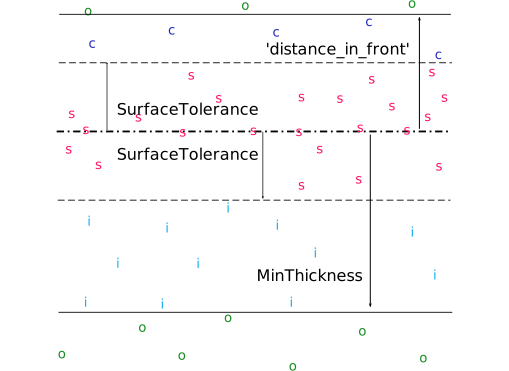
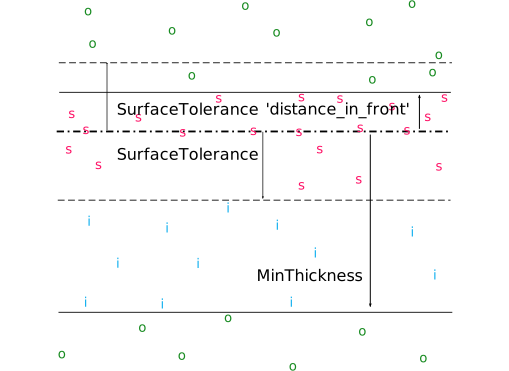
Schematic view of the parameters SurfaceTolerance,
MinThickness and the value 'distance_in_front'
with the aid of an example surface (_.):
o are points taken as outside,
s are points of the surface,
i are points surely inside the object,
c are points also considered for the evaluation of the surface.
(1): 'distance_in_front' smaller than SurfaceTolerance
(2): 'distance_in_front' larger than SurfaceTolerance.
Smoothing
determines how important a small total
variation of the distance function is compared to data fidelity. Thus,
Smoothing regulates the ‘jumpiness’ of the resulting surface.
Note that the actual value of Smoothing for a given data to
result in an appropriate and visually pleasing surface has to be found by
trial and error.
Too small values lead to integrating many outliers into the surface even
if the surface then exhibits many jumps. Too large values lead to lost
fidelity towards the input point clouds (how the
algorithm views distances to the input point clouds depends heavily on
SurfaceTolerance and MinThickness).
Smoothing may need to be adapted when Resolution
is changed.
By setting GenParamName to the following values, the additional
parameters can be set with GenParamValue:
-
'distance_in_front' Points in the exterior of the object as specified by
NormalDirection(and alsoGenParamName='angle_threshold') are only considered as part of the object if their distance to the initial surface does not exceed 'distance_in_front'. This is the outside analogous toMinThicknessof the interior, except that 'distance_in_front' does not have to be larger thanSurfaceTolerance. In case 'distance_in_front' is smaller thanSurfaceToleranceit determines the surface thickness to the front. This parameter is useful if holes in the surface should be closed along a jump in the surface (for example along the viewing direction of the sensor). In this case, 'distance_in_front' can be set to a small value in order to avoid a wrong initialization of the distance field. 'distance_in_front' is set in the same unit as used inObjectModel3D. 'distance_in_front' should always be a bit larger thanResolutionin order to avoid discretization artifacts. Per default, 'distance_in_front' is set to a value larger than the bounding box diameter, therewith all points outside of the object in the bounding box are considered.Suggested values: 0.001, 0.1, 1, 10.
Default: Larger than the bounding box diameter.
Restriction: 'distance_in_front' > 0
-
'angle_threshold' specifies the angle of a cone around a surface normal. 'angle_threshold' is set in [rad]. When determining the distance information for data fidelity, only points are considered lying in such a cone starting at their closest surface point. For example, if distances to triangles are considered, 'angle_threshold' can be set to 0.0, so that only the volume directly above the triangle is considered (thus a right prism). If point normals are used and thus distances to normals are considered, 'angle_threshold' has to be set to a higher value. When outliers disrupt the result, decreasing 'angle_threshold' may help. If holes in the surface should be closed along a jump in the surface (for example along the viewing direction of the sensor), enlarging 'angle_threshold' may help.
Suggested values: 'rad(0.0)', 'rad(10.0)', 'rad(30.0)'.
Default: 'rad(10.0)'.
Restriction: 'angle_threshold' >= 0
-
'point_meshing' determines whether the output points should be triangulated with the algorithm ‘marching tetrahedra’, which can be activated by setting 'point_meshing' to 'isosurface'. Note that there are more points in
ObjectModel3DFusionif meshing of the isosurface is enabled even if the usedResolutionis the same.List of values: 'none', 'isosurface'.
Default: 'isosurface'.
Fusion algorithm🔗
The algorithm will produce a watertight, closed surface (which is maybe
cut off at the BoundingBox). The goal is to obtain
a preferably smooth surface while keeping form fidelity. To this end,
the bounding box is sampled and each sample point is assigned an initial
distance to a so-called isosurface (consisting of points with distance 0).
The final distance values (and thus the isosurface) are obtained by
minimizing an error function based on fidelity to the initial point clouds
on the one hand and total variation (‘jumpiness’) of the distance function
on the other hand. This leads to a fusion of the input point clouds
(see paper in References below).
The calculation of the isosurface can be influenced with
the parameters of the operator.
The distance between sample points in the bounding box (in each
coordinate direction) can be set with the parameter Resolution.
Fidelity to the initial point clouds is grasped as the signed distances of
sample points, lying on the grid, in the bounding box to their nearest
neighbors (points or triangles) on the input point clouds.
Whether a sample point in the bounding box is considered to lie outside
or inside the object (the sign of the distance) is determined by the
normal of its nearest neighbor on the initial surface and the set
NormalDirection.
To determine if a sample point is surely inside or
outside the object with respect to an input point cloud, the
distance to its nearest neighbor on the initial surface is determined.
A point on the inside is considered surely inside if the distance
exceeds SurfaceTolerance but not MinThickness, while
a point on the outside counts as exteriorly if the distance exceeds
'distance_in_front'.
Fidelity to the initial point clouds is only considered for those sample
points lying within MinThickness inside or within
GenParamName 'distance_in_front' outside the initial
surface.
Furthermore, fidelity is not maintained for a given sample point lying
outside a cone around GenParamName 'angle_threshold'.
Thus it is not maintained if the line from
the sample point to its nearest neighbor on the initial surface differs
from the surface normal of the nearest neighbor by an angle more than
GenParamName 'angle_threshold'.
Note that the distances to nearest neighboring triangles will
often yield more satisfying results while distances to nearest points can
be calculated much faster.
The subsequent optimization of the distance values is the same as
the one used in reconstruct_surface_stereo with
Method='surface_fusion'.
The parameter Smoothing regulates the ‘jumpiness’ of the
distance function by weighing the two terms in the error function:
Fidelity to the initial point clouds
on the one hand, total variation of the distance function on the other
hand. Note that the actual value of Smoothing for a given data
set to be visually pleasing has to be found by trial and error.
Each 3D point of the object model returned in ObjectModel3DFusion
is extracted from the isosurface where the distance function equals zero.
Its normal vector is calculated from the gradient of the distance
function. The so-obtained point cloud can also be meshed using the
algorithm ‘marching tetrahedra’ by setting the GenParamName
'point_meshing' to the GenParamValue
'isosurface'.
Troubleshooting🔗
Please follow the workflow above. If the results are not satisfactory, please consult the following hints and ideas:
-
Quality of the input point clouds The input point clouds should represent the entire object surface. If point normals are used, the points should be dense on the entire surface, not only along edges of the object. In particular, for CAD-data typically triangulation has to be used.
-
Used attribute Using triangles instead of point normals will typically yield results of higher quality. If both attributes are present, point normals are used per default. If triangles should be used, use
copy_object_model_3dto obtain only point and triangle information. -
Outliers If outliers of the input models disturb the output surface even for high values of
Smoothing, try to decreaseGenParamName'angle_threshold'. If wanted, outliers of the input models can also be removed, for example usingconnection_object_model_3d. With reduced influence also modifyingGenParamName'distance_in_front' may help to reduce certain outliers. -
Closing of holes If holes in the surface are not closed even for high values of
Smoothing(for example a jump in the surface along the viewing direction of the sensor), try to decreaseGenParamName'distance_in_front'. EnlargingGenParamName'angle_threshold' may help the algorithm to close the gap. Note thattriangulate_object_model_3dcan close gaps when triangulating sensor data which contains a 2D mapping. -
Empty output If the output contains no point, try to decrease
Smoothing. If there is no output even for very low values ofSmoothing, you may want to check ifMinThicknessis set too large and if the setNormalDirectionis correct.
Runtime🔗
In order to improve the runtime, consider the following hints:
-
Extent of the bounding box The bounding box should be tight around the volume of interest. Else, the runtime will increase drastically but without any benefit.
-
Resolution Enlarging the parameter
Resolutionwill speed up the execution considerably. -
Used attribute Using point normals instead of triangles will speed up the execution. If both, normals and triangles, are present in the input models, normals are used per default.
-
Density of input point clouds The input point clouds can be thinned out using
sample_object_model_3d(if normals are used) orsimplify_object_model_3dwithGenParamName'avoid_triangle_flips' set to 'true' (if triangles are used). -
Distances to surface Make sure that
MinThicknessandGenParamName'distance_in_front' are not set unnecessarily large, since this can slow down the preparation and distance computation.
Execution information🔗
Execution information
-
Multithreading type: reentrant (runs in parallel with non-exclusive operators).
-
Multithreading scope: global (may be called from any thread).
-
Automatically parallelized on internal data level.
Parameters🔗
ObjectModel3D (input_control) object_model_3d(-array) → (handle)
Handles of the 3D object models.
BoundingBox (input_control) number-array → (real / integer)
The two opposite bound box corners.
Resolution (input_control) number → (real / integer)
Used resolution within the bounding box.
Default: 1.0
Suggested values: 1.0, 1.1, 1.5, 10.0, 100.0
SurfaceTolerance (input_control) number → (real / integer)
Distance of expected noise to surface.
Default: 1.0
Suggested values: 1.0, 1.1, 1.5, 10.0, 100.0
MinThickness (input_control) number → (real / integer)
Minimum thickness of the object in direction of the surface normal.
Default: 1.0
Suggested values: 1.0, 1.1, 1.5, 10.0, 100.0
Smoothing (input_control) number → (real / integer)
Weight factor for data fidelity.
Default: 1.0
Suggested values: 1.0, 1.1, 1.5, 10.0, 100.0
NormalDirection (input_control) string(-array) → (string)
Direction of normals of the input models.
Default: 'inwards'
List of values: 'inwards', 'outwards'
GenParamName (input_control) attribute.name-array → (string)
Name of the generic parameter.
Default: []
List of values: 'angle_threshold', 'distance_in_front', 'point_meshing'
GenParamValue (input_control) attribute.value-array → (string / real / integer)
Value of the generic parameter.
Default: []
Suggested values: 'isosurface', 'none', 0.0, 0.1, 0.175, 0.524
ObjectModel3DFusion (output_control) object_model_3d → (handle)
Handle of the fused 3D object model.
Result🔗
fuse_object_model_3d returns 2 (H_MSG_TRUE) if all parameters
are correct. If necessary, an exception is raised.
Combinations with other operators🔗
Combinations
Possible predecessors
read_object_model_3d, register_object_model_3d_pair, register_object_model_3d_global, surface_normals_object_model_3d, triangulate_object_model_3d, simplify_object_model_3d, get_object_model_3d_params
Possible successors
write_object_model_3d, create_surface_model
See also
References🔗
C. Zach, T. Pock, and H. Bischof: ``A globally optimal algorithm for robust TV-L1 range image integration.’’ Proceedings of IEEE International Conference on Computer Vision (ICCV 2007).
Module🔗
3D Metrology