Regions and regions of interest🔗
More Info
Learn about regions of interest and many other topics in interactive online courses at our MVTec Academy.
The concept of regions of interest (ROIs) is essential for machine vision in general and for HALCON in particular. The aim is to focus the processing on a specific part of the image. This approach combines region information with the image matrix: Only the image part corresponding to the region remains relevant, which reduces the number of pixels to be processed.
The advantages of using ROIs are manifold. First of all, it is a very good method to speed up a process because fewer pixels need to be processed. Furthermore, it focuses processing, for example, a gray value feature is usually calculated only for a part of the image. Finally, ROIs are used to define templates, for example, for matching. HALCON allows to make full use of the concept of ROIs because it enables using arbitrary shapes for the regions. This means that you are not limited to standard shapes like rectangles or polygons, but can really use any form – the best one to solve a given problem.
Basic concept🔗
Creating a region🔗
HALCON provides many ways to create regions, which can then be used as ROIs. The traditional way is to generate standard shapes like circles, ellipses, rectangles, or polygons. In addition, regions can be derived by converting them from other data types like XLD, by segmenting an image, or by user interaction.
Creating an ROI🔗
By combining a region with an image, the region assumes the role of an ROI, that is, it defines which part of the image must be processed.
In HALCON, the ROI is also called the domain of the image.
This term comes from mathematics where an image can be treated as a function that maps coordinates to gray values.
An ROI reduces the domain of this function from the complete image to the relevant part.
Therefore, the operator to combine regions and images is called reduce_domain.
This simple operator fulfills the desired task in almost all applications.
Example🔗
As an example for the basic concept, the following program shows all important steps to make use of an ROI.
The image is acquired from file.
Inside the image, only a circular part around the center should be processed.
To achieve this, a circular region is generated with gen_circle.
This region is combined with the image using reduce_domain.
This has the effect that only the pixels of the ROI are processed when calling an operator.
If, e.g., the operator edges_sub_pix is applied to this image, the subpixel accurate contours are extracted only inside the circle.
To make this visible, some visualization operators are added to the end of the example program.
read_image (Image, 'mreut')
gen_circle (ROI, 256, 256, 200)
reduce_domain (Image, ROI, ImageReduced)
edges_sub_pix (ImageReduced, Edges, 'lanser2', 0.5, 20, 40)
dev_display (Image)
dev_display (ROI)
dev_display (Edges)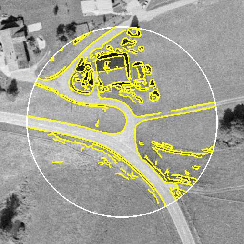
Extended concept🔗
Segmenting images🔗
Very typical for HALCON is the creation of ROIs by a segmentation step. Instead of having a predefined ROI, the parts of the image that are relevant for further processing are extracted from the image using image processing methods. This approach is possible because ROIs are nothing else but normal HALCON regions, and therefore share all their advantages like efficient processing and arbitrary shapes. The segmentation of regions used for ROIs follows the same approach as standard blob analysis. Automatically selecting relevant regions can be done based on their specific region properties.
Drawing regions🔗
The standard way to specify ROIs is to draw the shape interactively using the mouse.
To make this easy, HALCON provides special operators for standard shapes and free-form shapes.
All operators for this kind of action start with the prefix draw_.
The drawing is performed by making use of the left mouse button (drawing, picking, and dragging) and finished by clicking the right mouse button.
Creating regions🔗
The standard way is to generate regions based on the coordinates and dimensions returned by a user interaction or by coordinate values stored in a file.
In this case, operators like gen_circle, gen_rectangle2, or gen_region_polygon_filled are used.
More advanced are special shapes used to guide a preprocessing step to save execution time.
Typical examples for this are grids of lines or dots or checker boards.
With these shapes, the images can be covered in a systematic way and checked for specific object occurrences.
If you want to segment, for example, blobs of a given minimum size it is sufficient to use in a first step a search grid that is finer than the minimum object size to locate fragments.
In a second step these fragments are dilated (dilation_rectangle1) and the segmentation method is called once again, now within this enlarged area.
If the objects cover only a relatively small area of the image this approach can speed up the process significantly.
Processing regions🔗
Sometimes the shape of a given ROI, either generated from the program or defined by the user, does not fulfill the requirements.
Here, HALCON provides many operators to modify the shape to adapt it accordingly.
Often used operators are, e.g., fill_up to fill holes inside the region, shape_trans to apply a general transformation like the convex hull or the smallest rectangle, or morphological operators like erosion_circle to make the region smaller or closing_circle to fill gaps.
Aligning ROIs or images🔗
Sometimes the coordinates of an ROI depend on the position of another object in the image. If the object moves, the ROI must be moved (aligned) accordingly. This is achieved by first locating the object using template matching. Based on the determined position and the orientation, the coordinates of the ROIs are then transformed.
Creating ROIs🔗
This step combines the region and the image to make use of the region as the domain of the image.
The standard method that is recommended to be used is reduce_domain.
It has the advantage of being safe and having a simple semantics.
rectangle1_domain is a shortcut for generating rectangular ROIs (instead of calling gen_rectangle1 and reduce_domain in sequence).
For advanced applications change_domain can be used as a slightly faster version than reduce_domain.
This operator does not perform an intersection with the existing domain and does not check if the region is outside the image - which will cause a system crash when applying an operator to the data afterwards if the region lies partly outside the image.
If the programmer ensures that the input region is well defined, this is a way to save (a little) execution time.
Visualizing results🔗
Finally, you might want to display the ROIs or the reduced images.
With the operator get_domain, the region currently used by the image can be accessed and displayed (and processed) like any other region.
When displaying an image, e.g., with disp_image, only the defined pixels are displayed.
Pixels in the graphics window outside the domain of the image will not be modified.
Examples🔗
See these programming examples for the use of ROIs in HALCON:
- Processing inside a user-defined area:
%HALCONEXAMPLES%/solution_guide/basics/critical_points.hdev - Interactive partial filtering of an image:
%HALCONEXAMPLES%/solution_guide/basics/median_interactive.hdev - Inspecting the contours of a tool:
%HALCONEXAMPLES%/hdevelop/Applications/Measuring-2D/circles.hdev
Tips & tricks🔗
Reuse of ROIs🔗
If an ROI is used multiple times it is useful to save the region to file and load it at the beginning of the application.
Storing to file is done using write_region, loading with read_region.
Effect of ROI shape on speed-up🔗
ROIs are a perfect way to save execution time:
The smaller the ROI, the faster the application.
This can be used as a general rule.
If we consider this in more detail, we also need to think about the shape of ROIs.
Because ROIs are based on the HALCON regions they use runlength encoding.
This type of encoding is perfect if the runs are long.
Therefore, a horizontal line can be both stored and processed more efficiently than a vertical line.
This holds as well for the processing time of ROIs.
Obviously this type of overhead is very small and can only be of importance with very fast operators like threshold.
ROIs from binary images🔗
In some applications, it might be necessary to use ROIs that are available as binary images.
To convert these to HALCON regions, you must use gen_image1 to convert them into a HALCON image, followed by threshold to generate the region.
The conversion back can easily be achieved using region_to_bin followed by get_image_pointer1.
It is also possible to import binary image files using read_region.