Contours🔗
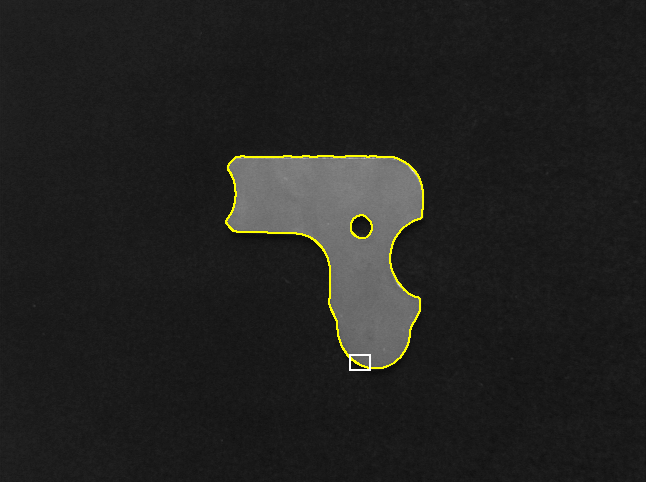
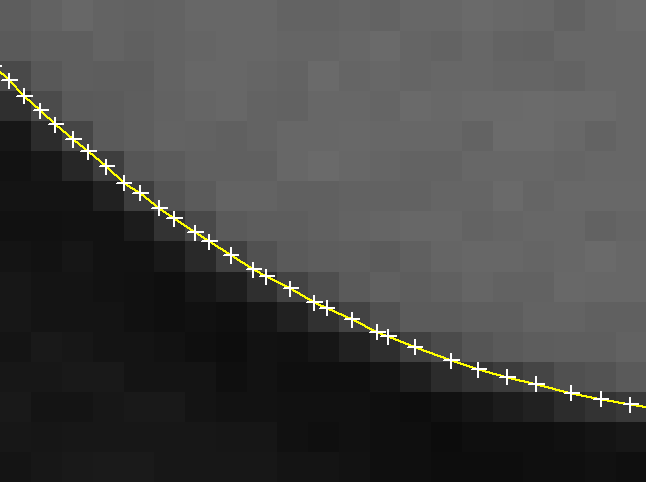
One of HALCON’s powerful tool sets are the subpixel-accurate contours. Contours belong to the data type XLD. These contours are typically the result of some kind of image processing and represent, e.g., the borders of objects. shows such edges overlaid on the original image; zooms into the rectangular area marked in and furthermore highlights the so-called control points of the contours with crosses. Here, you can clearly see the highly accurate positioning of the control points.
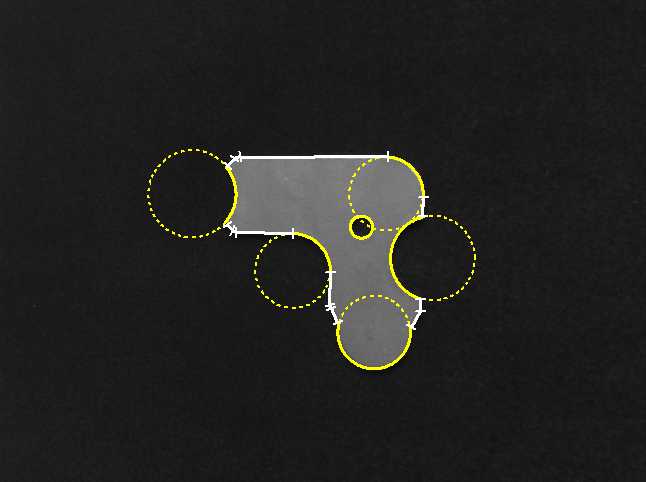
HALCON provides operators to perform advanced types of measurements with these contours. For example, the contours can be segmented into lines and circular or elliptic arcs (see ). The parameters of these segments, e.g., their angle, center, or radius, can then be determined and used, e.g., in the context of a measuring task.
| Edge contours | Zoom into rectangular area | Segmented lines and elliptic arcs |
|---|---|---|
 |
 |
 |
The advantage of contour processing is twofold: First, its high accuracy enables reliable measurements. Secondly, the extensive and flexible set of operators provided for this data type enables you to solve problems that cannot be solved with classical methods like 1D measuring.
Creating contours🔗
The standard method to create contours is to call a contour extraction operator.
Contour extraction for edges is performed with edges_sub_pix, edges_color_sub_pix, or zero_crossing_sub_pix.
Lines are extracted using lines_gauss, lines_facet, or lines_color.
For subpixel blob analysis, the operator threshold_sub_pix can be used.
If pixel-accuracy is sufficient, you can use an edge filter (like sobel_amp or edges_image) or a line filter (like bandpass_image) followed by thresholding and thinning.
The resulting elongated regions are then converted into XLD contours with the operator gen_contours_skeleton_xld.
Contours can also be synthesized from different sources, e.g., CAD data, user interaction, or measuring.
Having obtained the coordinates of the control points from such a source, the operators gen_contour_polygon_xld and gen_contour_polygon_rounded_xld convert them to XLD contours.
You can also draw XLD contours interactively with the operators draw_xld and draw_xld_mod.
Finally, the border of regions can be converted into XLD contours.
The corresponding operator is called gen_contour_region_xld.
Processing contours🔗
The first method to segment contours is to call segment_contours_xld.
This operator offers various modes:
Splitting into line segments, linear and circular segments, or linear and elliptic segments.
The individual contour segments can then be selected with select_obj and passed to one of the fitting operators described with the step refSpecials{step}{xld.fit}{Perform Fitting}.
Whether a contour segment represents a line, a circular, or an elliptic arc can be queried via the global contour attribute 'cont_approx' using the operator get_contour_global_attrib_xld.
If only line segments are needed, you can use the combination of gen_polygons_xld followed by split_contours_xld.
The behavior is similar to using segment_contours_xld.
The main difference is the possible postprocessing:
When applying gen_polygons_xld, a so-called XLD polygon is generated.
This is a different data type, which represents the initial step for grouping of segments to parallel lines.
An important step during contour processing is the suppression of irrelevant contours.
This can be accomplished with the operator select_shape_xld, which provides almost 30 different shape features.
By specifying the desired minimum and maximum value and possibly combining multiple features, contours can be selected very flexibly.
As an alternative, you can use the operator select_contours_xld, which offers typical features of linear structures.
Finally, the operator select_xld_point can be used in combination with mouse functions to interactively select contours.
If there are gaps within a contour, the pieces are treated as separate objects, which makes further processing and feature extraction difficult.
You can merge linear segments with the operators union_collinear_contours_xld or union_straight_contours_xld.
Additionally, you can also merge adjacent contours (union_adjacent_contours_xld), contours that lie on the same circle (union_cocircular_contours_xld), or contours that are cotangential (union_cotangential_contours_xld).
To handle contours with a complex shape you can first segment them into linear, circular, or elliptic segments (see above).
HALCON also provides an operator for general shape modifications:
shape_trans_xld.
With this operator you can, e.g., transform the contour into its surrounding circle, convex hull, or surrounding rectangle.
Further, for closed contours or polygons, set theoretical operations can be applied to combine contours.
For example, with intersection_closed_contours_xld you can intersect the regions that are enclosed by the closed contours, with difference_closed_contours_xld you can calculate the difference between the enclosed regions, or with union2_closed_contours_xld you can merge the enclosed regions.
Fitting contours🔗
With the operator fit_line_contour_xld you can determine the parameters of a line segment.
The operator provides different optimization methods, most of which are suppressing outliers.
It returns the coordinates of the start and the end point of the fitted line segment and the normal form of the line.
To visualize the results, you can use the operator gen_contour_polygon_xld.
To fit a rectangle into a contour, the operator fit_rectangle2_contour_xld can be used.
It provides various optimization methods as well.
The returned parameters comprise mainly the center position, the extent, and the orientation of the rectangle.
To generate the obtained rectangle for a visualization, you can use the operator gen_rectangle2_contour_xld.
For the fitting of circular and elliptic segments the operators fit_circle_contour_xld and fit_ellipse_contour_xld are available.
They also provide various optimization methods.
For a circular segment the center and the radius are returned together with the angle range of the visible part.
In addition, a second radius and the orientation of the main axis are returned for elliptic segments.
To visualize the results of both operators, you can use either the operator gen_ellipse_contour_xld or the operator gen_circle_contour_xld.
Extracting features🔗
HALCON offers various operators to access the feature values.
Commonly used shape features are calculated by area_center_xld, compactness_xld, convexity_xld, eccentricity_xld, diameter_xld, and orientation_xld.
The hulls of the contours can be determined with smallest_circle_xld or smallest_rectangle2_xld.
Features based on geometric moments are calculated, e.g., by moments_xld.
Converting and accessing contours🔗
It might be necessary to access the raw data of the contours or to convert contours into another data type, e.g., into a region.
You can access the coordinates of the control points with the operator get_contour_xld.
It returns the row and column coordinates of all control points of a contour in two tuples of floating-point values.
In case of a contour array (tuple), you must loop over all the contours and select each one using select_obj.
To convert contours to regions, simply call the operator gen_region_contour_xld.
The operator paint_xld paints the contour with anti-aliasing into an image.
The operators for edge and line extraction not only return the XLD contours but also so-called attributes.
Attributes are numerical values; they are associated either with each control point (called contour attribute) or with each contour as a whole (global contour attribute).
The operators get_contour_attrib_xld and get_contour_global_attrib_xld enable you to access these values by specifying the attribute name.
Programming examples🔗
Some example applications are shown in the following programs:
-
Measuring lines and arcs:
%HALCONEXAMPLES%/solution_guide/basics/measure_metal_part.hdev -
Close gaps in a contour:
%HALCONEXAMPLES%/solution_guide/basics/close_contour_gaps.hdev -
Calculate pointwise distances between contours:
%HALCONEXAMPLES%/hdevelop/Applications/Measuring-2D/inspect_frame_width.hdev -
Extract roads from aerial images:
%HALCONEXAMPLES%/hdevelop/Applications/Object-Recognition-2D/roads.hdev