create_scene_3d🔗
Short description🔗
create_scene_3d — Create the data structure that is needed to visualize collections of
3D objects.
Signature🔗
create_scene_3d( out scene_3d Scene3D )
Description🔗
create_scene_3d creates a new 3D scene and returns it in
Scene3D.
A 3D scene is a collection of instances of 3D object models, cameras, and
light sources. Use the operators add_scene_3d_instance,
add_scene_3d_camera, and add_scene_3d_light to add these
objects to Scene3D. Use display_scene_3d to display a
3D scene in a window.
A pose is associated (with add_scene_3d_instance or
set_scene_3d_instance_pose) to each instance in the Scene, which
represents the instance’s position within the scene coordinate system SCS.
The pose of the scene in the world coordinate system WCS can be set with
set_scene_3d_to_world_pose. The pose of the camera in the
world coordinate system can be set with set_scene_3d_camera_pose and
defines the camera coordinate system CCS.
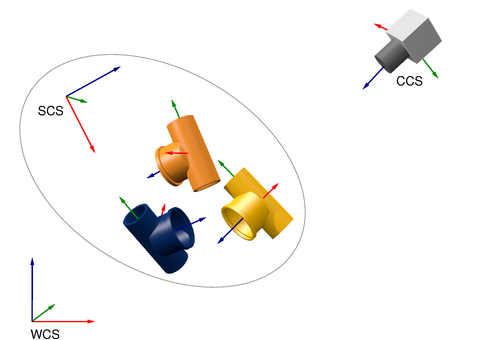
The coordinate systems in a 3D scene
Parameters influencing the whole scene such as the quality of the
rendering can be set with set_scene_3d_param.
Execution information🔗
Execution information
-
Multithreading type: reentrant (runs in parallel with non-exclusive operators).
-
Multithreading scope: global (may be called from any thread).
-
Processed without parallelization.
This operator returns a handle. Note that the state of an instance of this handle type may be changed by specific operators even though the handle is used as an input parameter by those operators.
Parameters🔗
Scene3D (output_control) scene_3d → (handle)
Handle of the 3D scene.
Example🔗
(HDevelop)
  * Create a new scene
  create_scene_3d (Scene)
  * A scene needs at least one camera. The default pose
  * of a camera is located at the origin. The pose can be
  * changed with set_scene_3d_camera_pose.
  add_scene_3d_camera (Scene, CameraParam, CameraIndex)
  * Further a scene needs at least one light.
  add_scene_3d_light (Scene, [42.0, 42.0, 42.0], 'point_light', LightIndex)
  *
  * To add an object, add_scene_3d_instance is called with a
  * 3d object model and a pose. add_scene_3d returns an InstanceIndex
  * which must be used to reference this instance in subsequent calls.
  add_scene_3d_instance (Scene, ObjectModel3D, Pose, InstanceIndex)
  * Set its color.
  set_scene_3d_instance_param (Scene, InstanceIndex, 'color', 'green')
  * Display the scene.
  display_scene_3d (WindowHandle, Scene, CameraIndex)
  clear_scene_3d (Scene)
Result🔗
create_scene_3d returns 2 (H_MSG_TRUE) if the scene could be created
successfully. If necessary, an exception is raised.
Combinations with other operators🔗
Combinations
Possible successors
add_scene_3d_instance, add_scene_3d_light, add_scene_3d_camera, set_scene_3d_param
See also
Module🔗
3D Metrology