Concept – Multi-View🔗
This chapter describes how to calibrate different multi-view camera setups.
In order to achieve high accuracy for your measuring tasks you need to calibrate your camera setup. In comparison to a single-camera setup, some additional requirements apply to the calibration of a multi-view camera setup. The following paragraphs provide explanations regarding the calibration of multi-view camera setups. For general information on camera calibration please refer to the chapter Calibration.
Preparing the Calibration Input Data for Multi-View Camera Setups🔗
Before the actual calibration can be performed, a calibration data model must be prepared (as described in Calibration). For setups with multiple cameras, these additional aspects should be considered:
-
The number of cameras in the setup and the number of used calibration objects can be set when calling
create_calib_data. -
When specifying the camera type with
set_calib_data_cam_param, note that only cameras of the same type (i.e., area scan or line scan) can be calibrated in a single setup. -
Configure the calibration process, e.g., specify the reference camera, using
set_calib_data. You can also specify parameters for the complete setup or just configure parameters of individual cameras as well as calibration object poses in the setup.
Performing the Actual Camera Calibration🔗
The calibration performed by calibrate_cameras depends on the
camera types that are involved in the calibration setup. While different
camera setups require specific conditions when acquiring images, the basic
steps of the calibration procedure for setups including projective and/or
telecentric cameras are similar:
-
Building a chain of observation poses: In the first step, the operator
calibrate_camerastries to build a valid chain of observation poses, that connects all cameras and calibration object poses to the reference camera. Depending on the setup, the conditions for a valid chain of poses differ. For specific information see the respective paragraphs below.If there is a camera that cannot be reached (i.e., it is not observing any calibration object pose that can be connected in the chain), the calibration process is terminated with an error. Otherwise, the algorithm initializes all calibration items’ poses by going down this chain.
-
First optimization: In this step,
calibrate_camerasperforms the actual optimization for all optimization parameters that were not explicitly excluded from the calibration. -
Second optimization: Based on the so-far calibrated cameras, the algorithm corrects all observations that contain mark contour information (see
find_calib_object). Then, the calibration setup is optimized anew for the corrections to take effect. If no contour information was available, this step is skipped. -
Compute quality of parameter estimation: In the last step,
calibrate_camerascomputes the standard deviations and the covariances of the calibrated internal camera parameters.
The following paragraphs give further information about the conditions specific to the camera setups.
-
Projective area scan cameras For a setup with projective area scan cameras, the calibration is performed in the four steps listed above. The algorithm tries to build a chain of observation poses that connects all cameras and calibration object poses to the reference camera like in the diagram below.
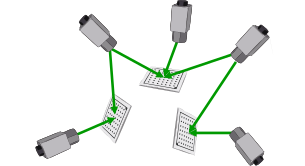
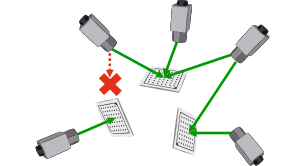
(1) (2) (1) All cameras can be connected by a chain of observation poses. (2) The leftmost camera is isolated, because the left calibration plate cannot be seen by any other camera.
Possible projective area scan cameras are:
-
'area_scan_division'
-
'area_scan_polynomial'
-
'area_scan_tilt_division'
-
'area_scan_tilt_polynomial'
-
'area_scan_tilt_image_side_telecentric_division'
-
'area_scan_tilt_image_side_telecentric_polynomial'
-
'area_scan_hypercentric_division'
-
'area_scan_hypercentric_polynomial'
-
-
Telecentric area scan cameras For a setup with telecentric area scan cameras, similar to projective area scan cameras, the same four steps that are listed above are executed. In the first step (building a chain of observation poses that connects all cameras and calibration objects), additional conditions must hold. Since the pose of an object can only be determined up to a translation along the optical axis, each calibration object must be observed by at least two cameras to determine its relative location. Otherwise, its pose is excluded from the calibration. Also, since a planar calibration object appears the same from two different observation angles, the relative pose of the cameras among each other cannot be determined unambiguously. Therefore, there are always two valid alternative relative poses. Both alternatives result in a consistent camera setup which can be used for measuring. Since the ambiguity cannot be resolved, the first of the alternatives is returned. Note that, if the returned pose is not the real pose but the alternative one, then this will result in a mirrored reconstruction.
Possible telecentric area scan cameras are:
-
'area_scan_telecentric_division'
-
'area_scan_telecentric_polynomial'
-
'area_scan_tilt_bilateral_telecentric_division'
-
'area_scan_tilt_bilateral_telecentric_polynomial'
-
'area_scan_tilt_object_side_telecentric_division'
-
'area_scan_tilt_object_side_telecentric_polynomial'
-
-
Projective and telecentric area scan cameras For a mixed setup with projective and telecentric area scan cameras, the algorithm performs the same four steps as enumerated above. Possible ambiguities during the first step (building a chain of observation poses that connects all cameras and calibration objects), as described above for the setup with telecentric cameras, can be resolved as long as there exists a chain of observation poses consisting of all perspective cameras and a sufficient number of calibration objects. Here, sufficient number means that each telecentric camera observes at least two calibration objects of this chain.
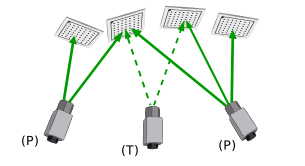
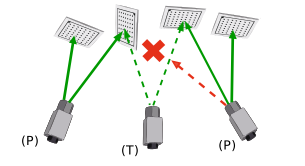
(1) (2) Mixed calibration setup with perspective (P) and telecentric (T) area scan cameras. (1) All perspective cameras are connected by a chain of observation poses that only contains perspective cameras. (2) The second calibration plate (from the left) is not observed by the rightmost perspective camera. Therefore, the relative pose between both perspective cameras cannot be determined uniquely.
-
Line scan cameras Setups with telecentric line scan cameras ('line_scan_telecentric') behave identically to setups with telecentric area scan cameras and the same restrictions and ambiguities that are described above apply. For this type of setup, two possible configurations can be distinguished. In the first configuration, all cameras are mounted rigidly and stationary and the object is moved linearly in front of the cameras. Alternatively, all cameras are mounted rigidly with respect to each other and are moved across the object by the same linear actuator. In both cases, all cameras share a common motion vector, which is modeled in the camera coordinate system of the reference camera and is transformed to the camera coordinate systems of all other cameras by the rotation part of the respective camera’s pose. This configuration is assumed by default. In the second configuration, the cameras are moved by independent linear actuators in different directions. In this case, each camera has its own independent motion vector. The type of configuration can be selected with
set_calib_data.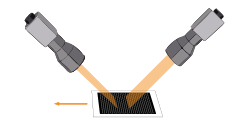
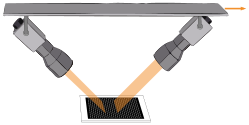
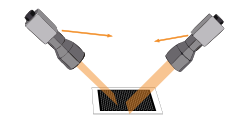
(1) (2) (3) Different configurations of telecentric line scan camera setups can be distinguished: (1) Only one motion vector needs to be computed if the cameras are mounted stationary while the object is moved linearly, (2) or if the cameras are moved across the object while mounted rigidly to each other. (3) Alternatively, if the cameras are moved independently from each other, a motion vector is determined for each camera.
Note that two different stereo setups are common for telecentric line scan cameras. For both setups, a linear, constant motion is assumed for the observed object or the camera system respectively.
-
For along-track setups one camera is placed in front, looking in backwards direction, while the second camera is mounted behind, looking forwards, both at an suitable angle in respect to the motion vector.
-
The cameras in an across-track setup are all directed perpendicular to the motion vector, while the viewing planes are approximately coplanar. Therefore, the depth of field is rather limited. Precise measurements are only possible in areas where the depth of field of the individual cameras overlap.
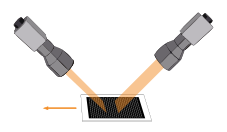
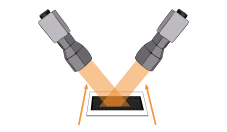
(1) (2) Stereo setups for telecentric line scan cameras: (1) Along-track setup and (2) Across-track setup.
For setups with projective line scan cameras ('line_scan'), the following restriction exists: only one camera can be calibrated and only one calibration object per setup can be used.
-
Finally, for calibration plates with rectangularly arranged marks (see
gen_caltab) all observations must contain the projection
coordinates of all calibration marks of the calibration object. For
calibration plates with hexagonally arranged marks (see
create_caltab) this restriction is not applied. You can find
further information about calibration plates and the acquisition of
calibration images in the section ``Additional information about the
calibration process’’ within the chapter Calibration.
Checking the Success of the Calibration🔗
If more than one camera is calibrated simultaneously, the value
of Error is more difficult to judge.
As a rule of thumb, Error should be as small as
possible and at least smaller than 1.0, thus indicating that a
subpixel precise evaluation of the data is possible with the
calibrated parameters. This value might be difficult to reach in
particular configurations. For further analysis of the quality of
the calibration, refer to the standard deviations and covariances of
the estimated parameters.
Getting the Calibration Results🔗
The results of the calibration, i.e., internal camera parameters,
camera poses (external camera parameters), calibration objects poses
etc., can be queried with get_calib_data.
Note that the poses of telecentric cameras can only be determined up to a displacement along the z-axis of the coordinate system of the respective camera (perpendicular to the image plane). Therefore, all camera poses are moved along this axis until they all lie on a common sphere. The center of the sphere is defined by the pose of the first calibration object. The radius of the sphere depends on the calibration setup. If projective and telecentric area scan cameras are calibrated, the radius is the maximum over all distances from the perspective cameras to the first calibration object. Otherwise, if only telecentric area scan cameras are considered, the radius is equal to 1 m.
Further Information🔗
Learn about the calibration of multi-camera setups and many other topics in interactive online courses at our MVTec Academy.