Concept – 2D Transformations🔗
To specify a location in an image, we need a convention how to do so. Such a convention is set via a coordinate system. There are different coordinate systems used in HALCON. Here, we explain the ones used in 2D.
Pixels are discrete and to address them, we have a coordinate system using only integer values, the pixel coordinate system. For a higher accuracy that goes beyond the pixel grid, we need floating point coordinates, like e.g., \((3.6,4.1)\). This leads to subpixel accurate coordinate systems. In HALCON, we have three different implementations of subpixel coordinate systems:
-
Pixel Centered Coordinates, the HALCON Standard Subpixel Coordinate System
-
Edge Centered Coordinates
-
Polar Coordinates
Thereof the first two vary only in the coordinate origin,
as visible in the figures below.
Calibration makes it possible to map the image coordinates distances to
real-world distances. For more information about these Calibrated
Coordinates we refer to the “Solution Guide III-C - 3D Vision”.
HALCON Standard Coordinate System🔗
-
Pixel Accurate Coordinate System The pixel coordinate system treats the image as a grid of discrete elements, the pixels. In HALCON, we put the origin \((0,0)\) in the middle of the upper left pixel. Now, we assign the pixel coordinates specifying its row and column like in a matrix.
Note that this implies for an image of size height \(\times\) width = \(m \times n\) pixels that the row coordinate values run from \(0\) to \(m-1\) and the column coordinate values from \(0\) to \(n-1\), as visualized in the figure below.
-
Subpixel Accurate Coordinate System: Pixel Centered
The origin of this coordinate system is in the center of the upper left image pixel, the axes are in row (r) and column (c) direction, respectively. Therewith this convention embeds the pixel coordinate system. The upper left image corner has the coordinates \((-0.5,-0.5)\) and for an image of size height \(\times\) width = \(m \times n\) pixels the bottom right corner has the coordinates \((m-0.5,n-0.5)\) (=\((m-1+0.5,n-1+0.5)\), remember the coordinate values start at 0). It also implies that a pixel (k,l) covers the area of the rectangle \((k-0.5,l-0.5)\), \((k+0.5,l-0.5)\), \((k-0.5,l+0.5)\), \((k+0.5,l+0.5)\). This convention is called the standard coordinate system, or also Image Coordinate System.
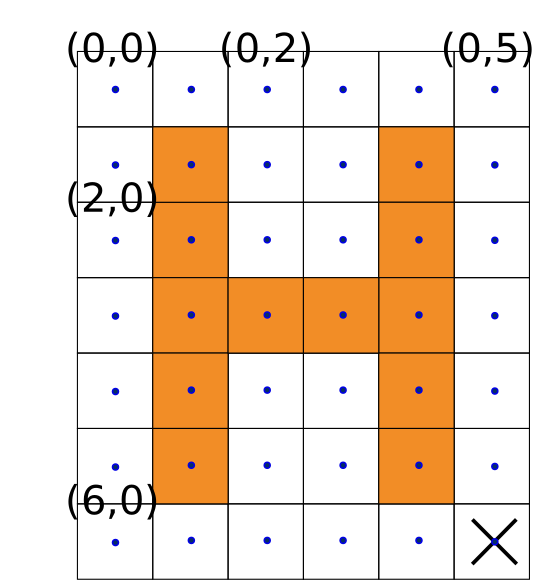
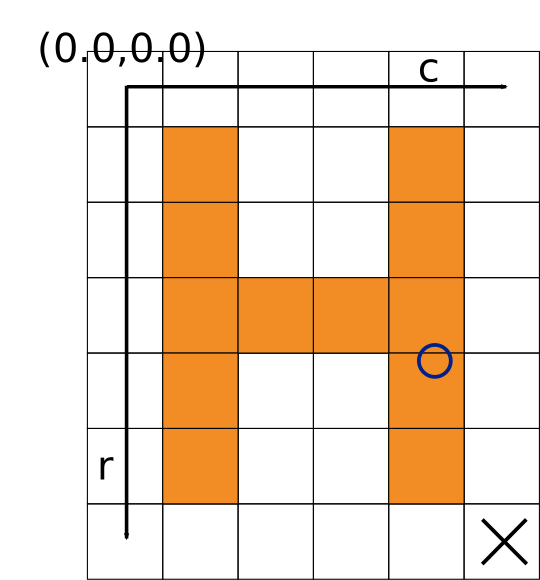
(1) (2) Visualization of the HALCON standard pixel and subpixel Cartesian coordinate systems. The cross indicates the pixel in the bottom right image corner. Its center has the coordinates \((6,5)\) (in pixel coordinates (1)), \((6.0,5.0)\) (in standard subpixel coordinates (2)). The circle center has the coordinates \((3.6,4.1)\).
HALCON Non-Standard Cartesian Coordinate System🔗
If we rotate an image around its origin by \(\pi/2\) (=90 degrees), we want the two images with touching edges but not overlapping with each other. Also, scaling the image is not expected to result in negative image coordinates. For this, the origin \((0.0,0.0)\) has to be set in an image corner. This motivates the following coordinate system.
-
Subpixel Accurate Coordinate System: Edge Centered For this coordinate system we set the origin \((0.0,0.0)\) in the upper left image corner. Thus the center of the upper left pixel has the coordinates \((0.5,0.5)\) and for an image of size height \(\times\) width = \(m \times n\) pixels the bottom right corner has the coordinates \((m,n)\). A pixel \((k,l)\) covers the area of the rectangle \((k,l)\), \((k,l+1)\), \((k+1,l)\), \((k+1,l+1)\).
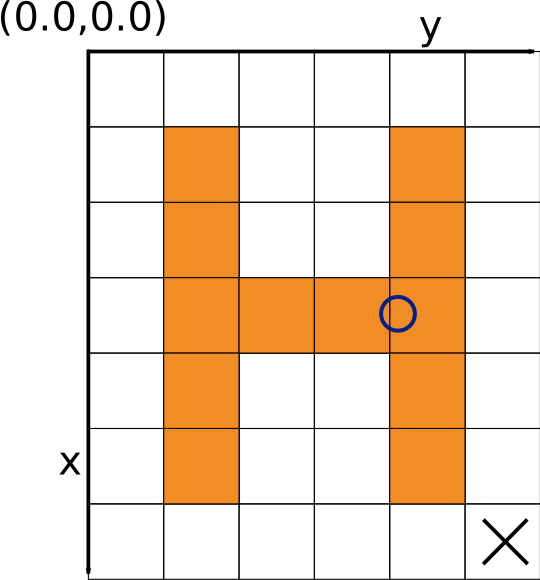
Visualization of the HALCON non-standard subpixel Cartesian coordinate system. The cross indicates the pixel in the bottom right image corner. Its center has the coordinates \((6.5,5.5)\). The circle center has the coordinates \((3.6,4.1)\).
For this coordinate system rotations are defined in the mathematically positive direction and thus counterclockwise. A rotation of \(\pi/2\) (=90 degrees) maps the first axis (= x-axis) onto the second axis (= y-axis). Accordingly, the axes have the assignment row: x coordinate, column: y coordinate.
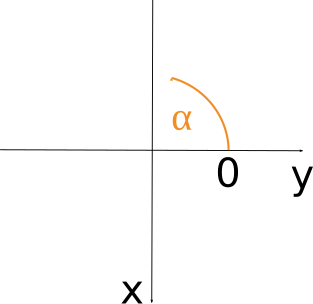
Visualization of a rotation (\(\alpha\)) using the edge centered coordinate system.
Operators Expecting Parameters in any Cartesian Coordinate🔗
System
The operator affine_trans_point_2d applies the transformation
given by HomMat2D to the point coordinates.
This means, affine_trans_point_2d works
in both Cartesian Coordinate systems, as long you make sure that the point
and the transformation are given in the same coordinate system.
The operators angle_ll and angle_lx may take the input
points in pixel centered coordinates, but the returned angle is in the
convention of rotations in a mathematically positive direction, thus
counterclockwise, and with the horizontal axis as 0, like in the
edge centered coordinate system.
Operators Expecting Parameters in Different Coordinate Systems🔗
In HALCON there is also the case that an operator expects its input in
different coordinate systems.
On the one hand, the object is expected in its usual coordinates, the
standard coordinates.
On the other hand, for the transformation matrix HomMat2D, the
operator expects edge centered coordinates with their advantages regarding
transformations described above.
The operator converts the coordinates of the object from HALCON’s
standard coordinate system (with the origin in the center of the
upper left pixel) to the edge centered coordinate system
(with the origin in the upper left corner of the upper left pixel).
After the transformation with HomMat2D, the result is
converted back to the standard coordinate system.
These operators are
A matrix representing a transformation in pixel centered coordinates can be converted to represent the same transformation (e.g., a rotation around the same point) written in edge centered coordinates, e.g., through
hom_mat2d_translate(HomMat2D, 0.5, 0.5, HomMat2DTmp) |
hom_mat2d_translate_local(HomMat2DTmp, -0.5, -0.5, HomMat2DAdapted) |
Note, the operators beginning with projective_ mentioned above
use a projective transformation matrix. These transformation matrices can,
e.g., be obtained from a 3D camera pose. Doing so, the matrix used is
written in a projection of the xy-plane within the 3D coordinate system.
Accordingly, the axes have the assignment row: y coordinate, column:
x coordinate and therewith the coordinates need to be converted.
Shape-based Matching and Correlation-based Matching🔗
Results from shape-based matching, like e.g.,
find_generic_shape_model, are given in edge centered coordinates.
The returned matches are already transformed. The respective homographic
transformation matrices can be retrieved using
get_generic_shape_model_result.
Results from correlation-based matching, like e.g.,
find_ncc_model and find_ncc_models,
are computed in edge centered coordinates as well, however the parameters
for the transformation are returned separately.
With these results one can create a transformation
HomMat2D directly applicable for,
e.g., affine_trans_contour_xld
and the other operators listed in the paragraph above, entitled
Operators Expecting Parameters in Different Coordinate Systems.
To display the results found by correlation-based matching, we highly
recommend the usage of the procedure
dev_display_ncc_matching_results.
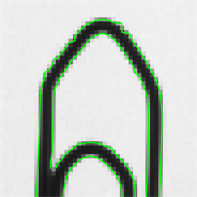
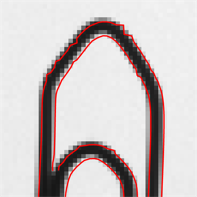
In the following images we give an example how a displayed
match may look when using the transformation matrix in the correct and
the erroneous coordinate system, respectively.
For the latter one, shown in image (3), the transition matrix is given in
pixel centered coordinates as well and therefore the match shown by
affine_trans_contour_xld is off by 0.5 pixels.
Note, this effect is only visible when a rotation is involved.
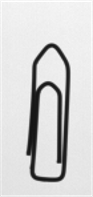 |
 |
 |
| (1) | (2) | (3) |
The original image of the paperclip (1), a part of the match where the inputs are given in the correct coordinates (2), and a match with inputs given in wrong coordinates.
Non-Cartesian Coordinate Systems🔗
-
Subpixel Accurate Coordinate System: Polar Coordinates In polar coordinates, points are defined through a distance and an angle. The distance is called the radial coordinate and is given in relation to the fix point, the pole. The angular coordinate is given with respect to a defined axis, the polar axis. In HALCON, the pole is specified by \((\textrm{Row},\textrm{Column})\) and the polar axis is the horizontal axis. The angular coordinate is given in radians.
After a transformation with
polar_trans_image_ext, the upper left pixel in the output image always corresponds to the point in the input image that is specified byRadiusStartandAngleStart. Analogously, the lower right pixel in the output image corresponds to the point in the input image that is specified byRadiusEndandAngleEnd. In the usual mode (AngleStart\(<\)AngleEndandRadiusStart\(<\)RadiusEnd), the polar transformation is performed in the mathematically positive orientation (counterclockwise). Furthermore, points with smaller radius lie in the upper part of the output image. By suitably exchanging the values of these parameters (e.g.,AngleStart\(>\)AngleEndorRadiusStart\(>\)RadiusEnd), any desired orientation of the output image can be achieved.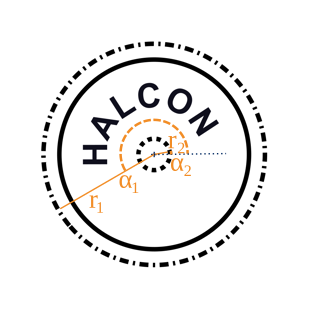
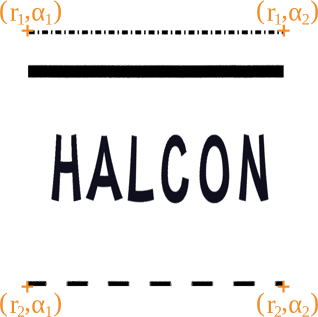
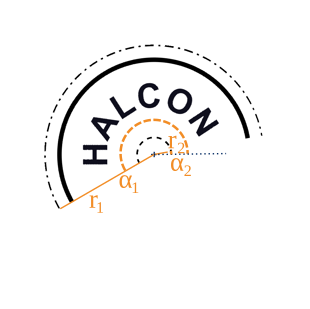
(1) (2) (3) As an example, we show an annular arc defined by its pole (
Row,Column) (+), the polar axis (…), two angular coordinatesAngleStart(\(\alpha1\)),AngleEnd(\(\alpha2\)) and two radial coordinatesRadiusStart(\(r1\)),RadiusEnd(\(r2\)). (1) The original image and the parameters defining the annular arc. (2) The annular arc, shown in a figure where the polar coordinates form an equidistant grid obtained bypolar_trans_image_ext. (3) The annular arc in the representation of the original image. The Cartesian coordinates have been obtained throughpolar_trans_image_invon image (2). The origin is in the center of the pixel in the upper left corner.Polar coordinates are used by the following operators:
Images with a reduced domain, regions, and models🔗
In the part before we spoke about coordinates of images. When it comes to the location of the origin of the coordinate system used, images with reduced domains, regions, and models are treated differently than images.
-
Images with a reduced domain and regions Both images with a reduced domain and regions keep the coordinate system of the image from which they were created. This means, they inherit the origin and the points keep the coordinate values they had in the original image.
-
Models Models, on the other side, can have a local coordinate system. E.g., models obtained over
create_generic_shape_modelhave their origin in the center of gravity of the ROI they are created from. For further information see the“Solution Guide II-B - Matching”.
Calibrated Coordinates🔗
While working with pixel units, we can not extract any information about
real-world distances directly.
When a camera is calibrated, it is possible to rectify the images.
In this case one can assign world coordinates to the image.
For further information we refer to the
“Solution Guide III-C - 3D Vision”.