Deep 3D Matching🔗
Deep 3D Matching is used to accurately detect objects in a scene and compute their 3D pose. This approach is particularly effective for complex scenarios where traditional 3D matching techniques (like shape-based 3D matching) may struggle due to variations in object appearance, occlusions, or noisy data. Compared to surface-based matching, Deep 3D Matching works with a calibrated multi-view setup and does not require data from a 3D sensor.

Figure 1. A possible example for a Deep 3D Matching application: Images from different angles are used to detect an object. As a result, the 3D pose of the object is computed.
The Deep 3D Matching model consists of two components, which are dedicated to two distinct tasks: detection, which localizes objects, and estimation of object poses. For a Deep 3D Matching application, both components need to be trained on the 3D CAD model of the object to be found in the application scenes.
Note
HALCON provides the functionalities to train both components of a Deep 3D Matching model. However, if you need assistance for training the networks, you can contact your HALCON sales partner for further information.
Once trained, the deep learning model can be used to infer the pose of the object in new application scenes. During the inference process, images from different angles are used as input.
About data🔗
This section gives information on the camera setup and data that needs to be provided for the model inference or training of a Deep 3D Matching model. For more information about the data handling, see Deep learning > HALCON DL model.
- Multi-view camera setup
-
To use Deep 3D Matching with high accuracy, you need a calibrated stereo or multi-view camera setup. In comparison to stereo reconstruction, Deep 3D Matching can deal with more strongly varying camera constellations and distances. Further, there is no need to use 3D sensors in the setup.
For more information about how to calibrate the used setup, see Camera calibration > Multi-view calibration.The objects to be detected must be captured from two or more different perspectives to calculate the 3D poses.
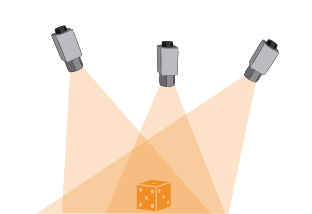
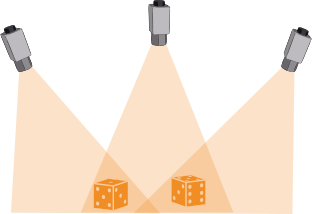
Figure 2. Example setups for Deep 3D Matching: Scenes are recorded by several cameras, the objects to be detected do not have to be seen by every single camera (but by at least two cameras).
- Data for training
-
The training data is used to train and validate the two components of a Deep 3D Matching model specifically for your application.
The required training data is generated using CAD models. Synthetic images of the object are created from various angles, lighting conditions, and backgrounds. Note that there are no real images required, the required data is generated based on the CAD model.
The data needed for this is a CAD model and corresponding information on material, surface finish, and color. Information about possible axial and radial symmetries can significantly improve the generated training data.
Requirements for DLDataset
For training the Deep 3D Matching model, the dataset needs to provide images with objects labeled using axis-aligned bounding boxes. The information is created during the creation of the synthetic data. In particular:
-
'class_ids': class IDs -
'class_names': class names -
'image_dir': base path to the images -
'orig_3d_model': 3D CAD object model -
'samples': tuple of dictionaries, one for each sample-
'image_id': ID of the image -
'image_file_name': relative path and file name of the image -
'bbox_row1': Row coordinate of the upper left corner of the bounding box -
'bbox_col1': Column coordinate of the top left corner of the bounding box -
'bbox_row2': Row coordinate of the bottom right corner of the bounding box -
'bbox_col2': Column coordinate of the bottom right corner of the bounding box -
'bbox_label_id': class ids of bounding boxes -
'camera_parameter': camera parameter for the image -
'mask': masks of the object instances -
'pose': poses of the objects in each bounding box (tuple of HALCON poses) -
'visibility': fractional visibility of bounding boxes
-
-
- Images
- The model imposes requirements on images, such as dimensions, gray value range, and type.
Refer to
create_deep_matching_3dfor specific values for the trainable components of the Deep 3D Matching model. For a read model, these can be queried withget_dl_model_param. To meet these requirements, you may need to preprocess your images. The standard preprocessing for the entire sample and therefore also for the image is carried out using the procedurepreprocess_dl_samples. - Model output of the training
- The operator will return a dictionary
DLTrainResultwith the current value of total loss and values for all other losses included in your model.