Troubleshooting🔗
If matching results are not as expected, potential sources of problems can be identified by visualizing and debugging with the procedure debug_find_surface_model.
For the standard surface-based matching, major problems are:
-
Model normals and surface normals do not both point either inwards or outwards from the model surface.
-
Scaling issues appear.
-
The shape of the object does not have enough 3D information.
For the edge-supported surface-based matching, in addition to the aforementioned issues, users may encounter problems related to the presence of duplicate points.
Normals🔗
The direction and orientation (inwards or outwards) of the normals of the model and scene must be consistent for the matching process:
For both standard and edge-supported surface-based matching, model normals and scene normals should point approximately in the same direction.
This can be checked visually using the procedure debug_find_surface_model (see Figure 1).
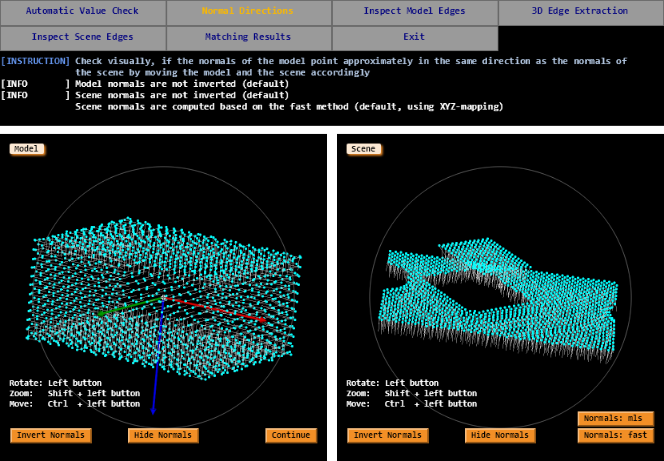
debug_find_surface_model for checking surface-based matching, given a scene and a model to be found. In this example, normal consistency is checked. For the standard surface-based matching, the normals’ orientation can be adjusted by setting the parameter 'model_invert_normals' to be 'true' when creating it with create_surface_model.
For edge-supported surface-based matching the normals need to point inwards.
This should be the case for the scene normals anyway, as they are calculated from the 2D-mappings.
Shape of the model🔗
Only for shapes containing enough 3D information, that is, shapes consisting of tilted or curved surfaces facing many directions, standard surface-based matching returns robust results.
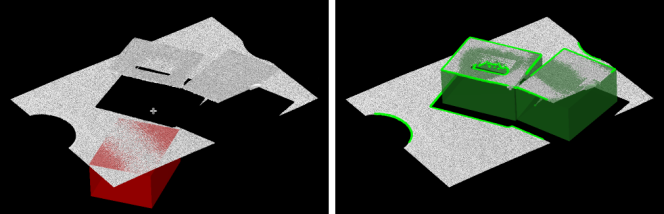
Some models have parts that could very well fit in several locations of the scene, for instance, planar objects present in a planar scene (for example, a box viewed from above). In those cases, it is difficult to fix all dimensions of the pose, since the matching score hardly varies under largely different translation or rotation values.
This ill-posed behavior can be avoided by using edge-supported surface-based matching (see Figure 2).
Duplicate points🔗
The presence of duplicate points, that is, points with identical coordinates, often depends on the sensor’s handling of data during the 3D acquisition process.
In some cases, parts of the sensor do not register any information, for example, caused by shading or the reflective features of a surface, which leads to invalid data points.
Some 3D sensors remove invalid points, some code them as NaN, and others code them with value 0.
If those values are assigned with 0, all the invalid data points will be reconstructed as the (0, 0, 0) coordinate point.
To check if duplicate points are available, you can use the “Automatic Value Check” of the procedure debug_find_surface_model or the gray-value histogram of the Z-mapping (see Figure 3).
If duplicate points are present, the matching process will slow down and the 3D-edge extraction will fail.
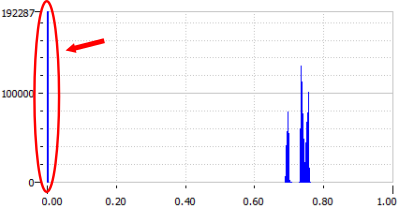
Duplicate points can be removed by an appropriate threshold on the Z-mapping or by applying the operator select_points_object_model_3d.
In the example of Figure 3 the following two approaches will solve the problem.
object_model_3d_to_xyz (XMapping, YMapping, ZMapping, Scene, 'from_xyz_map', [], [])
threshold (ZMapping, Region, 0.000001, 1)
reduce_object_model_3d_by_view (Region, Scene, CamParam, Pose, SceneReduced)
select_points_object_model_3d (Scene, 'num_neighbors_fast 0.000001', 0, 1, SceneReduced)Checklist🔗
When encountering problems while implementing or running your application, you can use this checklist to identify the issue.
- Normal directions
- Shape of the model
- Duplicate points
- Scaling:
Useread_object_model_3dwith correct scaling - Sampling of the model:
Check the sampling of the model with the following code:
Make sure the essential parts of the object are still represented in the surface model.get_surface_model_param (SurfaceModelID, 'sampled_model', SampledModel) visualize_object_model_3d(WindowHandle, SampledModel, [], [], [], [], [], [], [], PoseOut) - Sampling of the scene:
Check the sampling of the scene with the following code:
The object should be covered by at least 150 scene points. In case that fine details of the model should be considered, the sampling distance needs to be lowered. When long and thin objects need to be matched, the sampling distance must be adapted such that enough information is available in the shortest object extension.get_surface_matching_result (SurfaceMatchingResultID, 'sampled_scene', 0, SampledScene) visualize_object_model_3d(WindowHandle, SampledScene, [], [], [], [], [], [], [], PoseOut) - Score:
If only low scores are returned check the following potential causes:- If the model contains structures on the inside that cannot be seen, those invisible structures should be removed.
- If the model normals do not point approximately in the same direction as the scene normals, they should be adapted.
- The model needs to fit the objects in the scene.
- The model is sampled a second time for the refinement. This sampling can be controlled by the parameter value
'pose_ref_rel_sampling_distance'. To obtain more accurate results, this parameter can be set to a lower value. Its default value is0.01. - If only few of the object instance is visible for the camera, use the view-based score, which considers only that part of an object, that can actually be seen from the camera viewpoint.
Edge-supported surface-based matching only:
- Model normals:
If model normals do not point inwards, invert the model normals by setting the parameter'model_invert_normals'ofcreate_surface_modelto'true'. As the scene normals are calculated from the 2D-mappings the scene normals should point inwards anyway. - Score:
If only low scores are returned check the following potential causes:
- Check if 3D edges are computed in a suitable way. 3D edges can be accessed by
get_surface_matching_resultwith the parameter'sampled_3d_edges'. If 3D edges can not be computed adequately due to the underlying noise, they can also be determined withedges_object_model_3dand filtered by a suitable method. Then, the 3D edges can be set as a generic parameter infind_surface_model, that is, with 3d_edges as generic parameter and the filtered edges as its value. - Retrieve the results of the matching using
get_surface_matching_resultand check the values for'score_surface','score_3d_edges'and'score_2d_edges'.- If the
'score_3d_edges'is very low, increase the value of the parameter'pose_ref_scoring_dist_rel'/'pose_ref_scoring_dist_abs'when callingfind_surface_model. This can be due to the fact that 3D edges of the objects in the scene are slightly deformed or the point cloud is slightly noisy close to 3D edges. - If the
'score_2d_edges'is very low, check if the set camera parameters and camera pose are correct. To do so, project the model into the 2D intensity image. In case the objects in the scene are slightly deformed, increase the value of the parameter'max_deformation'offind_surface_model_image.
- If the
- Check if 3D edges are computed in a suitable way. 3D edges can be accessed by