Workflow🔗
The code fragments used for the following descriptions belong to the HDevelop example program %HALCONEXAMPLES%\hdevelop\Calibration\Multi-View\calibrate_cameras_multiple_camera_setup.hdev.
Creating and configuring the calibration data model🔗
The first step of preparing for a calibration is to create the calibration data model with the operator create_calib_data.
In the example, four cameras are used with one calibration object.
NumCameras := 4
NumCalibObjects := 1
create_calib_data ('calibration_object', NumCameras, NumCalibObjects, CalibDataID)
Then, the initial camera parameters are set with the operator set_calib_data_cam_param (see also refsec{monocam:calib:initial.values}).
The parameter CameraIdx is set to 'all', so that the values are set for all cameras.
gen_cam_par_area_scan_polynomial (0.0085, 0.0, 0.0, 0.0, 0.0, 0.0, 6e-6, 6e-6, Width * .5, Height * .5, Width, Height, StartCamPar)
set_calib_data_cam_param (CalibDataID, 'all', [], StartCamPar)
Finally, the calibration object is described with the operator set_calib_data_calib_object.
CaltabDescr := 'caltab_100mm.descr'
set_calib_data_calib_object (CalibDataID, 0, CaltabDescr)
Acquiring calibration images🔗
For the calibration of the stereo camera system, each camera acquires multiple images of one or more calibration objects in different poses.
Note that it is not necessary that the calibration object is always visible in all poses for each camera.
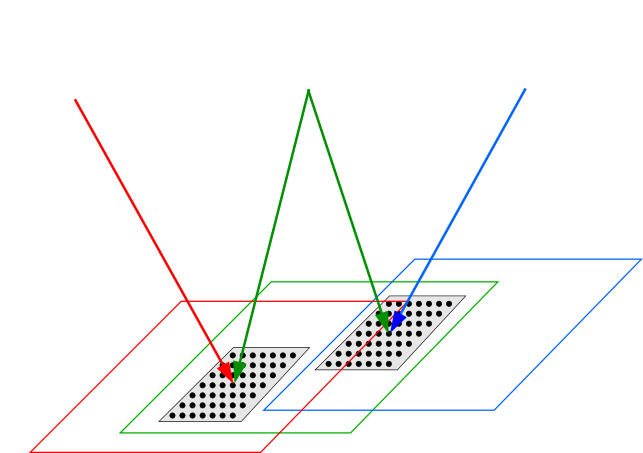
The only requirement is that the cameras can be “connected” in a chain by the calibration object poses, e.g., that camera 0 and 1 observe the pose 0 of the calibration object, camera 1 and 2 observe pose 3, and camera 2 and 3 observe pose 8 (see Figure 1).
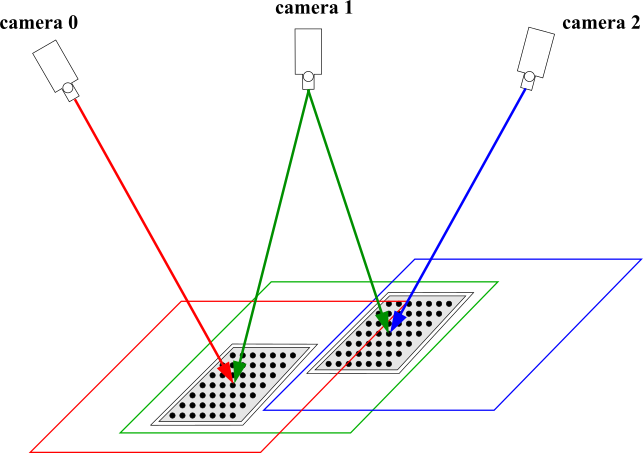
Note that when taking the images for the calibration, the recommendations for taking the calibration images for the single camera calibration apply accordingly.
More information on the calibration of multi-view camera setups, especially with mixed (telecentric and perspective) camera setups can be found here.
Note that you must not change the camera setup between the acquisition of the calibration images and the acquisition of the stereo images of the object to be investigated.
Observing the calibration object🔗
As in the case of the single camera calibration, the main input data for the camera calibration are the observed points of the calibration objects in the camera images.
Generally, you extract the observations and then add them to the calibration data model with the operator set_calib_data_observ_points.
If you use a standard HALCON calibration plate as calibration object, you can extract and store the observations in a single step using find_calib_object.
In the example, this operator is called within a double loop over all poses and all cameras.
The code raises a warning if the calibration plate could not be found in an image.
for PoseIndex := 0 to NumPoses - 1 by 1
    for CameraIndex := 0 to NumCameras - 1 by 1
        read_image (Image, FileName)
        Message := ['Camera ' + CameraIndex,'Pose # ' + PoseIndex]
        try
            find_calib_object (Image, CalibDataID, CameraIndex, 0, PoseIndex, [], [])
        catch (Exception)
            if (Exception[0] == 8402)
                Message := [Message,'No calibration tab found!']
            elseif (Exception[0] == 8404)
                Message := [Message,'Marks were not identified!']
            else
                Message := [Message,'Unknown Exception!.']
            endif
            Message := [Message,'This image will be ignored.']
        endtry
        disp_message (WindowHandles[CameraIndex], Message, 'window', 12, 12, Color, 'true')
    endfor
endfor
Calibrating the cameras🔗
The actual calibration of the stereo camera system is carried out with the operator calibrate_cameras.
calibrate_cameras (CalibDataID, Error)The calibration stores its results in the calibration data model.