Calibrated mosaicking🔗
Some objects are too large to be covered by one single image. Multiple images that cover different parts of the object must be taken in such cases. You can measure precisely across the different images if the cameras are calibrated and their external parameters are known with respect to one common world coordinate system.
It is even possible to merge the individual images into one larger image that covers the whole object. This is done by rectifying the individual images with respect to the same measurement plane. In the resulting image, you can measure directly in world coordinates.
Note that the 3D coordinates of objects are derived based on the same principle as described for the transformation from image to world coordinates, i.e., a measurement plane that coincides with the object surface must be defined. Although two or more cameras are used, this is no stereo approach.
If the resulting image is not intended to serve for high-precision measurements in world coordinates, you can generate it using the uncalibrated mosaicking approach.
A setup for generating a high-precision mosaic image from two cameras is shown in Figure 1. The cameras are mounted such that the resulting pair of images has a small overlap. The cameras are first calibrated and then the images are merged together into one larger image. All further explanations within this section refer to such a two-camera setup.
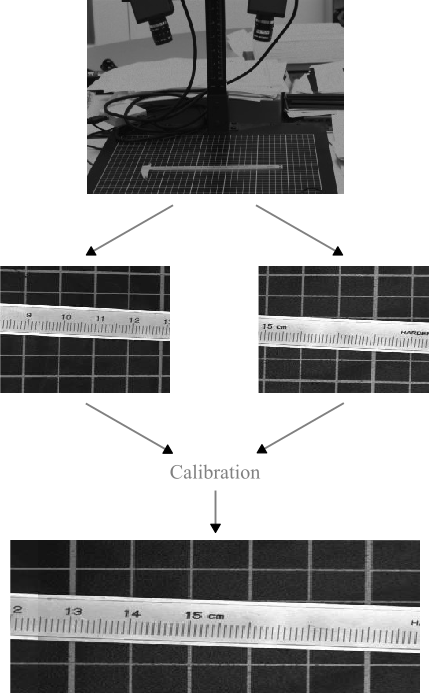
Typically, the following two steps must be carried out:
- Determination of the internal and external camera parameters, using one calibration object, to facilitate that the relation between the cameras can be determined.
- Merge the images into one larger image that covers the whole object.
In this chapter, two approaches, both using a two-camera setup, are described:
The first approach demonstrates, how highly accurate mosaicking can be easily performed after calibrating your cameras simultaneously with a single standard HALCON calibration plate with hexagonally arranged marks.
Thereby, in the calibration step, each camera has to be able to obtain adequate images of the calibration plate at the same time.
You can also refer to the example program %HALCONEXAMPLES%\hdevelop\Tools\Mosaicking\two_camera_calibrated_mosaicking.hdev.
The second approach, which is used in the HDevelop example program %HALCONEXAMPLES%\solution_guide\3d_vision\two_camera_calibration.hdev, shows a calibration setup for cases, where one calibration plate is not sufficient.
Thus, a calibration object consisting of multiple calibration plates, whose relative positions are exactly known, is needed.
Setup🔗
Two or more cameras must be mounted on a stable platform such that each image covers a part of the whole scene. The cameras can have an arbitrary orientation, i.e., it is not necessary that they are looking parallel or perpendicular onto the object surface.
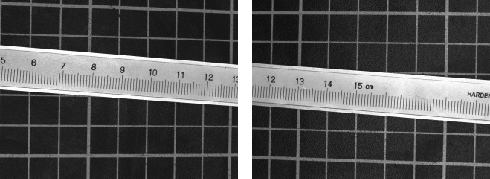
To setup focus, illumination, and overlap appropriately, use a big reference object that covers all fields of view. To permit that the images are merged into one larger image, they must have some overlap (see Figure 2 for an example). The overlapping area can be even smaller than depicted in Figure 2, since the overlap is only necessary to ensure that there are no gaps in the resulting combined image.